
4.3 Manual Synchronization
It is assumed that the instance is well configured, already connected to the synchronization server and registered.
| Click on menu Synchronization , Synchronization, Manual The next synchronization wizard will open. | 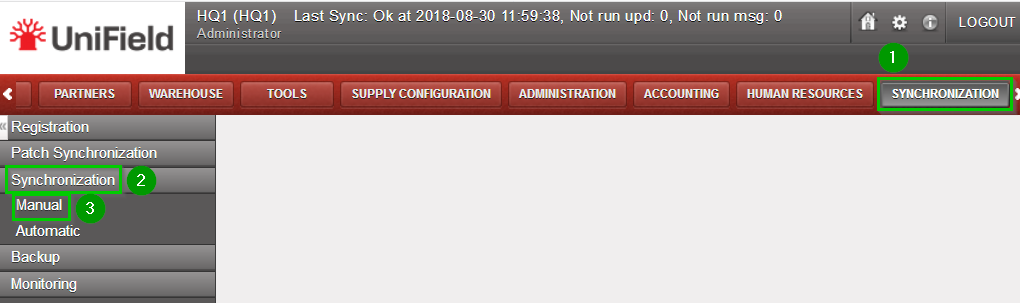 |
| Click on Start All Synchronization In Background. This launches the synchronization process in background. It is recommended to back up the data after a successful synchronization. Please refer to the “Procedure for backing up and restoring local instances”. To know when the synchronization is over, refer to the monitoring documentation. Instead of starting the synchronization, you may be advised that there is an upgrade to apply. Refer to the upgrade chapter. | 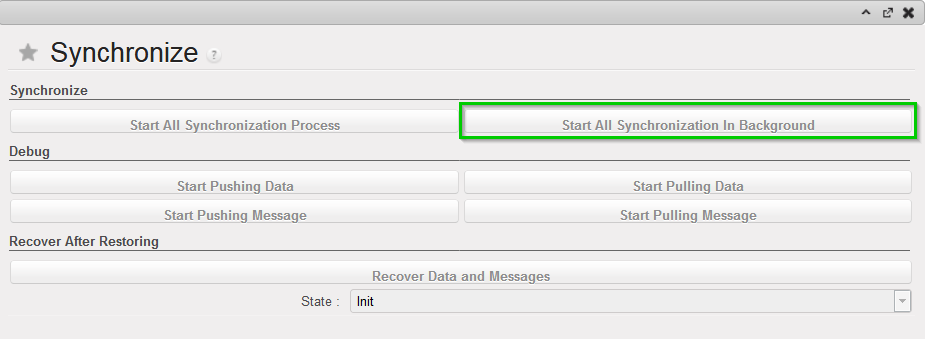 |
