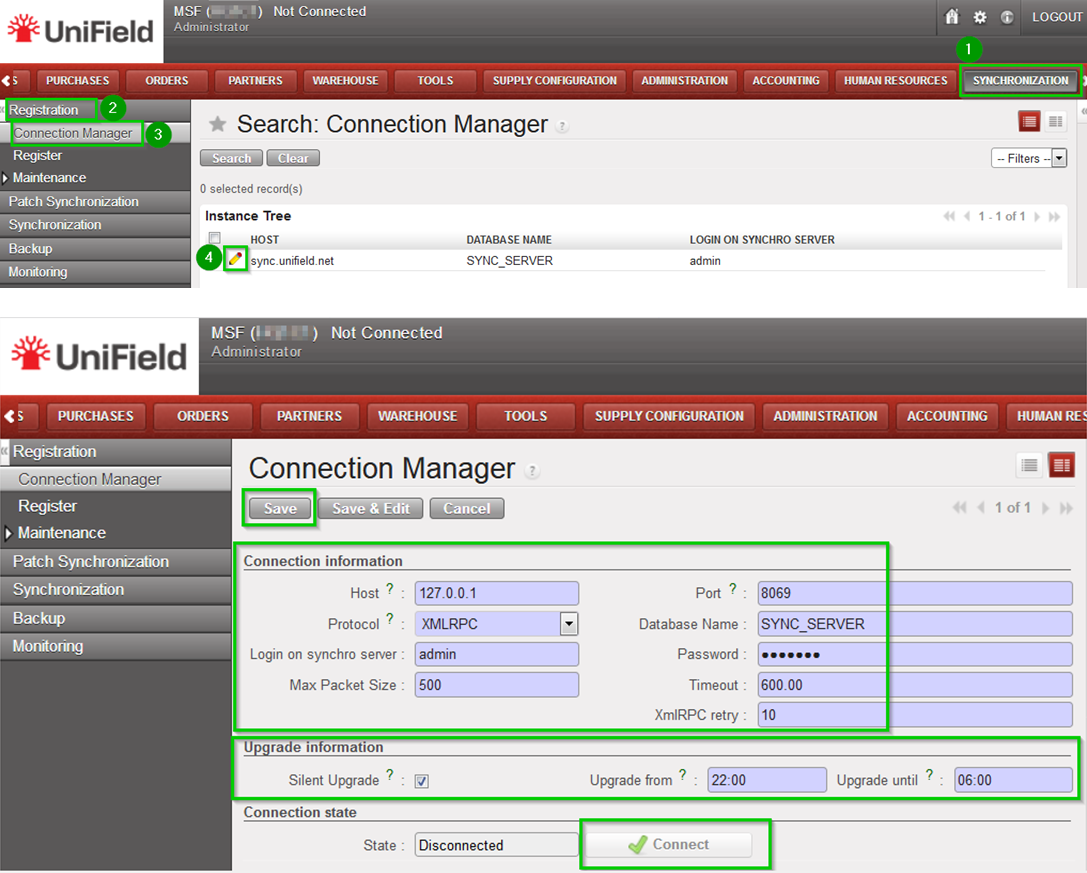
The final step is to connect every instances in your sandbox to your_SYNC_SERVER.
Click on Menu Synchronization 1, Registration 2, Connection Manager 3 Click on the edit icon4 and to edit the Current Connection:
Host: Address of the machine where your_SYNC_SERVER is installed – code>localhost if installed on the same machine
Port: Default (8069) or as per your Sandbox configuration
Protocol: XMLRPC
Database Name: your_SYNC_SERVER_name
Login on synchro server your_SYNC_SERVER_login
Password: your_SYNC_SERVER_password
Max Packet Size: 500
Timeout: 600 – The number of seconds the instance will wait during a sync before raising a timeout error
XmlRPC retry: 10 – The number of retry during a sync when the instance don’t receive the acknowledge from the SYNC_SERVER with the XmlRPC protocol.
Silent upgrade: The instance will patch automatically during the time slot defined if an automatic synchronisation is performed. Only useful if testing patches.
Click on Connect the State switches to connected Click on Save
We use cookies to ensure that we give you the best experience on our website. If you continue to use this site we will assume that you are happy with it.