
4.2 Connection to the Synchronization Server
As a security, the synchronization password is not saved in the database or a file. It means this step must be done every time OpenERP starts. For example when:
- the computer was off and is now on
- the instance has been upgraded with a patch received from the synchronization server.
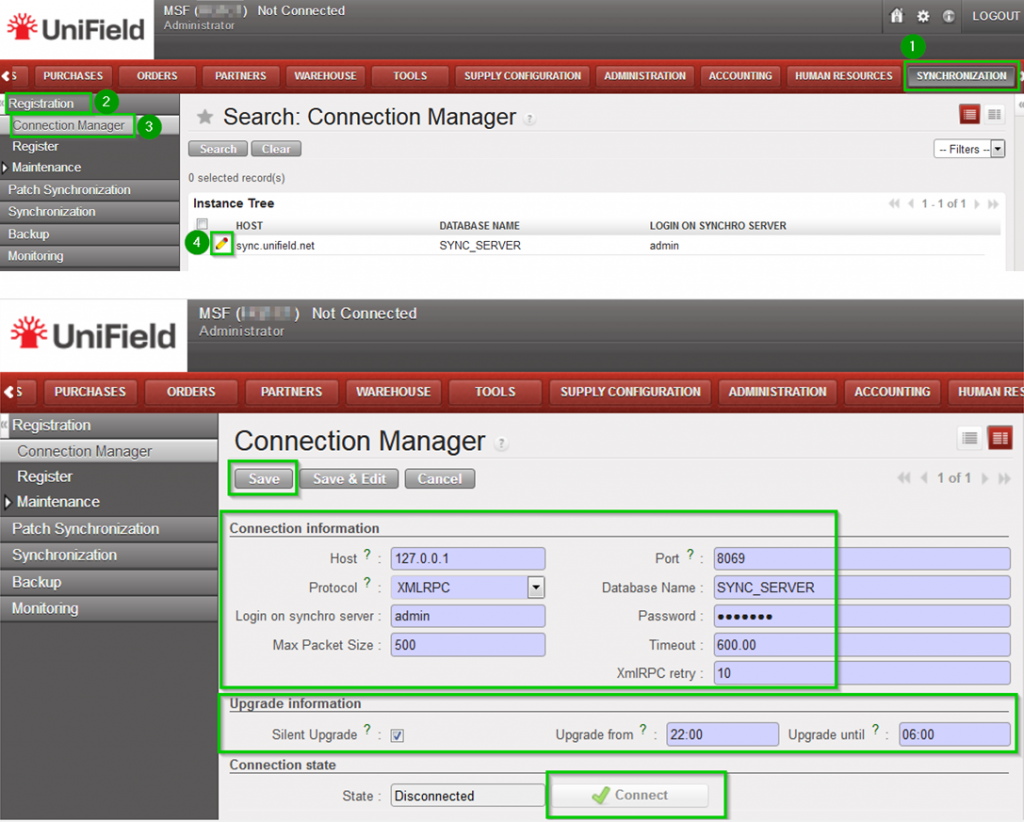
Click on Menu Synchronization 1, Registration 2, Connection Manager 3
Click on the edit icon (4) and to edit the Current Connection
Host:
* Production instance: sync.unifield.net
*Sandbox: Address of the machine where your Sync Server is installed (localhost if installed on the same machine)
Port:
*Production: 443
*Default or Sandbox: 8069
Protocol:
*XMLRPC
*secured compressed XMLRPC
Database Name:
*Production: SYNC_SERVER
*Sandbox: Your_sync_server_name
Login on synchro server:
*Production: provided by the Support Team
*Sandbox: Your_sync_server_login
Password:
*Production: provided by the Support Team
*Sandbox: Your_sync_server_password
Max Packet Size: 500
Timeout:600 – The number of seconds the instance will wait during a sync before raising a timeout error
XmlRPC retry: 10 – The number of retry during a sync when the instance don’t receive the acknowledge from the sync server with the XmlRPC protocol.
Silent upgrade: The instance will patch automatically during the time slot defined if an automatic synchronisation is performed. It is strongly
recommended to activate it
Click on Connect 5 the State switches to connected
Click on Save
