
Supply User Manual ENG -> 5. Warehouse -> 5.15 LU-SU4301:Traceability -> A. HOW TO CREATE A BATCH MASTER DATA MANUALLY
A. HOW TO CREATE A BATCH MASTER DATA MANUALLY
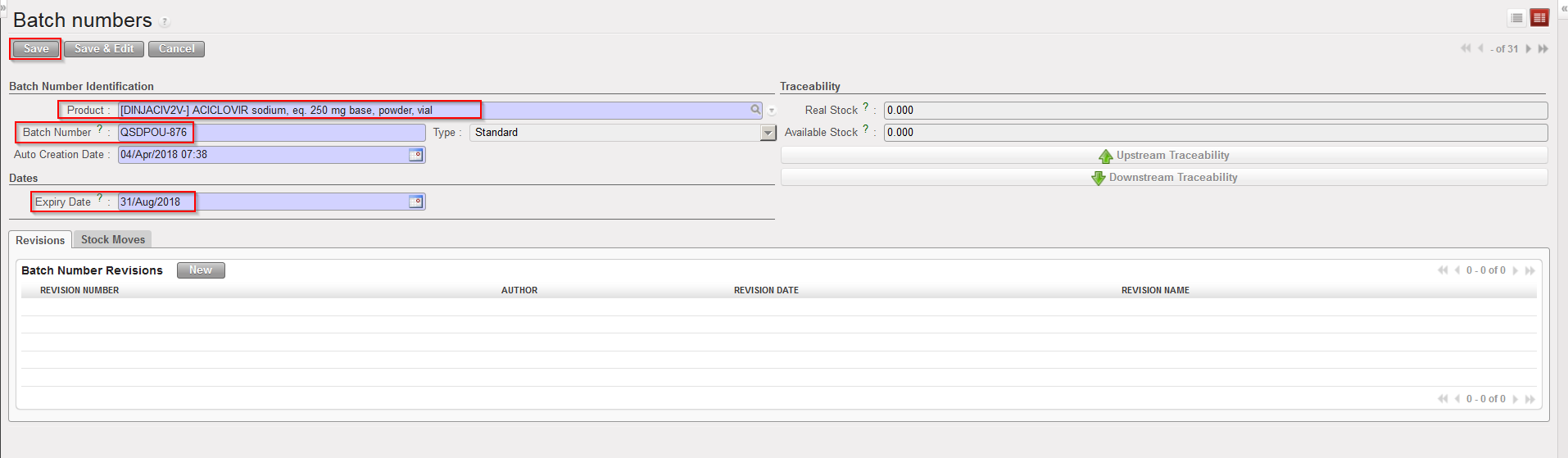
Although batch master data will most of the time be created during reception (IN) or when an Initial Stock Inventory (ISI) will be performed, batches can also be created manually. Note that only “Standard” batches can be created manually, meaning batches for products managed by BN and ED but not for products which are managed by ED only.
Go to: Warehouse / Traceability / Batch numbers
- Click on the “New” button.
- Select a product.
- Enter batch number and expiry date.
- Click on the “Save” button.
|
|
|
Creating a batch master data |
Note that the combination product code/BN/ED must always be unique (i.e. you cannot have 2 batch master data with same product code, same BN and same ED).
