Supply User Manual ENG -> 5. Warehouse -> 5.16 LU-SU4302: Stock Inventory Reports -> J. EXPORT STOCK & PIPE REPORT (HQ ONLY)
J. EXPORT STOCK & PIPE REPORT (HQ ONLY)
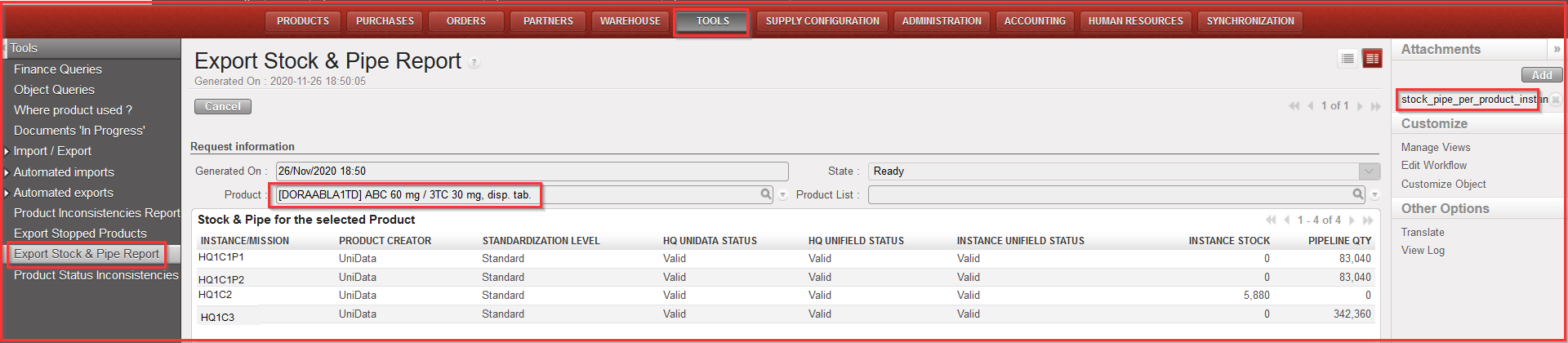
This report aims at displaying in which instance/s an individual product or a list of products is/are in Stock or in Pipe throughout the whole OC (it can be generated for example before proceeding to a BN/ED mass update). Therefore, the report can only be generated at HQ level.
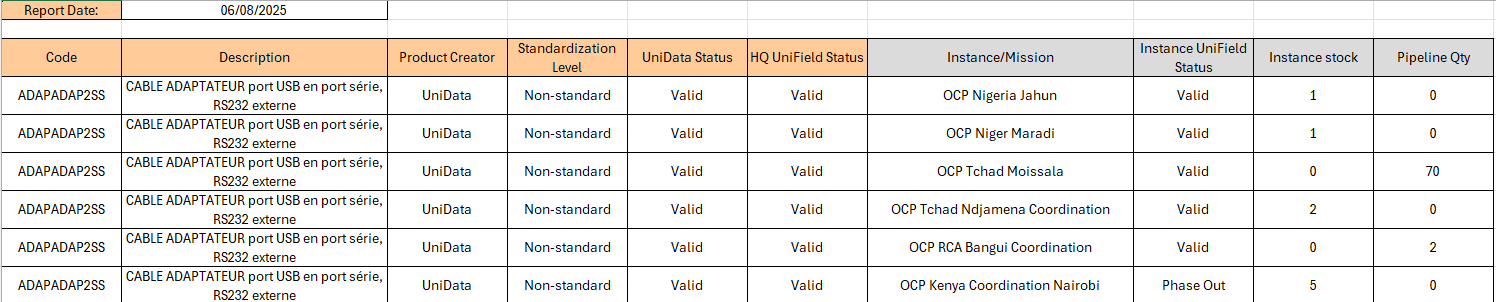
The results give visibility of: Product Code, Description, Product Creator, Standardization level, UD status, UF status, Instances (name), Instance stock (qty) and Pipeline quantity (reminder: pipeline is calculated starting from a Validated PO line).
Report can be generated on screen or on Excel ( only on Excel for Product list).
Go to: Tools / Tools / Export Stock & Pipe Report
- Click on the “Export Stock & Pipe Report” sub-menu.
- Click on “New”
- Select a “Product” or a “Product List”
- Click on “Generate report” – the on-screen report will be displayed automatically (for individual product report) and additionally the Excel one can be accessed by clicking on “stock_pipe_per_product_instance” on the right action menu
|
|
|
Export Stock & Pipe Report – on screen report (for 1 product) |
|
|
|
Export Stock & Pipe Report – excel export |