
Supply User Manual ENG -> 5. Warehouse -> 5.17 LU-SU4303: Management of Expiry Dates -> F. HOW TO PRODUCE THE "Expired/Damaged Products" REPORT
F. HOW TO PRODUCE THE “Expired/Damaged Products” REPORT
UniField offers the possibility to generate a report that will display all the INT that are sent to “Quarantine (analyze/ before scrap)” or “Destruction” locations. This will help user to better track the expired and damaged products.
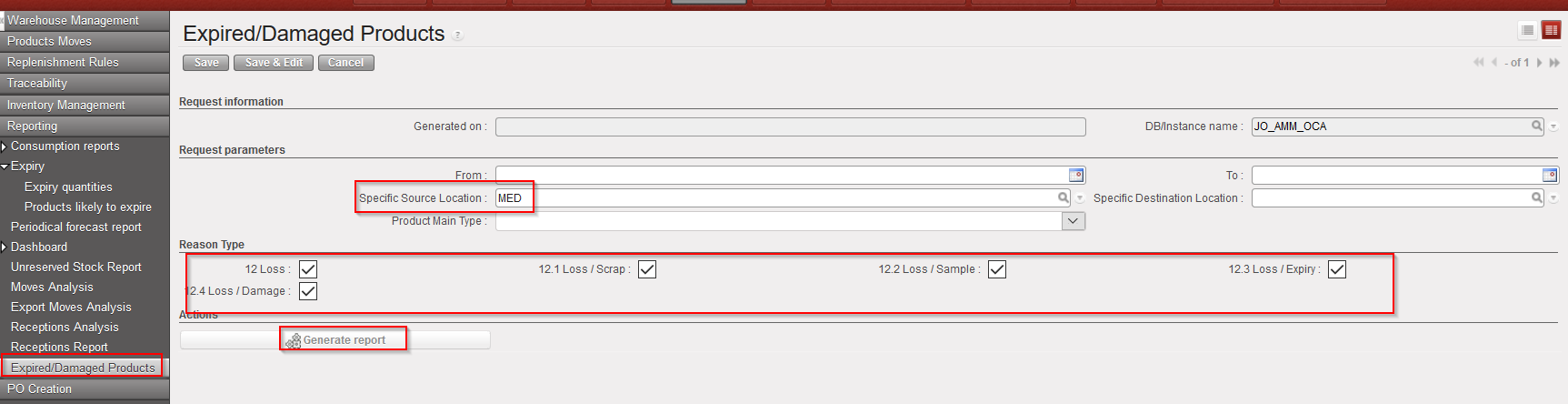
Go to: Warehouse / Reporting / Expired/Damaged Products
- Click on “New”
- Before generating the report user have the option to select several filters such as : “From” and “To” date; “Specific Source Location”, “Specific Destination Location”; “Product Main Type” and finally different “Reason Type” (please note that if user needs All the reason type, user will have to “untick” all the default reason type – as the list in the pop up is not exhaustive). The Reason type filter is meant at line level.
- Click on “Generate report”
|
|
|
Expired/Damaged Products |
|
|
|
Expired/Damaged Products – Excel export |

The excel report display all the INT reference which are Closed and with the selected “Source” and “Destination” location as well as the selected “Reason type”( product line level).
