
Supply User Manual ENG -> 5. Warehouse -> 5.18 LU-SU4304: Movements Reports -> E. HOW TO GENERATE THE "Receptions Report"
E. HOW TO GENERATE THE “Receptions Report”
This feature is one of the latest development that enables to get the receptions information more easily thanks to the different filters and direct information.
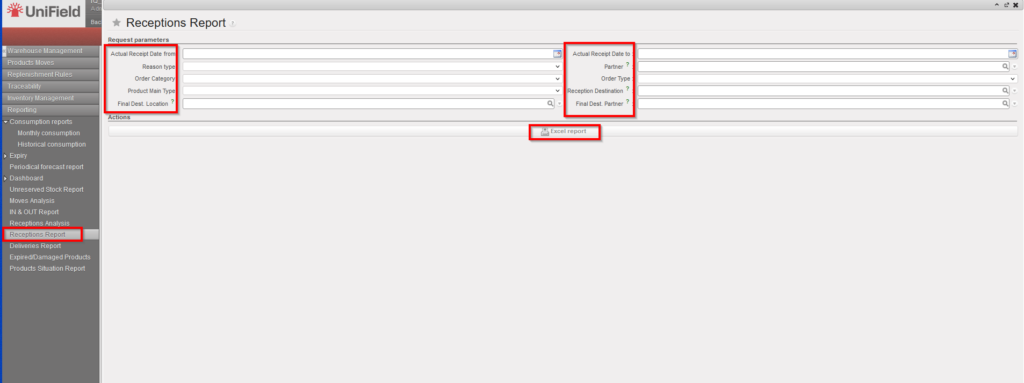
Go to: Warehouse / Reporting / Receptions Report
- Select any filter you need among the following: Actual Receipt Date from; Actual Receipt Date to; Reason type; Partner; Order Category; Order Type; Product Main Type, , Final Dest. Location, Final Dest. Partner.
- Click on the “Excel report” button.
 |
|
Receptions Report |
 |
|
Receptions Report – Excel Export |
In case the user change the Destination location to “Ext CU” in the “IN” from the original location in the “IR”, this report will not reflect the new destination location.
IR > PO > IN > Ext CU which is changed is not reflected.
In case the user change the Destination location ” INT CU ” in the “IN” from the original location in the “IR”, this report will reflect the new destination location.
IR > PO > In > INT CU which is changed is reflected.
In case the user change the Destination location TO “Stock” in the “IN” from the original location in the “IR”, this report will reflect the new destination location
FO > PO > IN where destination of IN changed to Stock is reflected.
