
Release Details
Release version: UF 25.0
Date of production synchronization server patch: 15-June-2022 / 18:00 Geneva time
Latest user rights files updated: UF24.1 can be found here
Note that no user rights need to be loaded at each HQ. This will be done at the Sync Server by the Core team and will update the user rights via Sync for all HQs and missions.
JIRA filter for all integrated tickets: https://jira.unifield.org/issues/?filter=12420
Supply
(US-9766) IR aligned to PO in warnings / IR, PO & FO blocks on high qtys
This ticket aligned the warning messages in the IR to the ones in the PO/FO, and also added some extra checks to avoid excessive digits for Qty / amounts which previously had caused issues. Now for IRs, FOs and POs, adding a line with Qty more than 10 digits is not allowed and warning message is displayed. For IRs, line-level check is made on result of the Quantity x Unit Price that it does not exceed 10 digits, and also for IRs at document level there is a check if total amount/value has more than 15 characters. Warning messages are displayed for all of these cases.
(US-9727) Export inventory level: Do not include batches with qty <> 0 with product list as filter
This ticket raised by OCA, for the inventory level export, when a location and a specific product list have been chosen, and in case there is a product with many batches and zero stocks, reports will exclude the batches with 0 stocks and include one line for the product with zero qty.
(US-9656) Phase Out product should be possible in FO
This ticket raised by OCA to assure that FO with external and internal customer could have “Phase out” products added/validated, and the check for sourcing external or internal will be in OST.
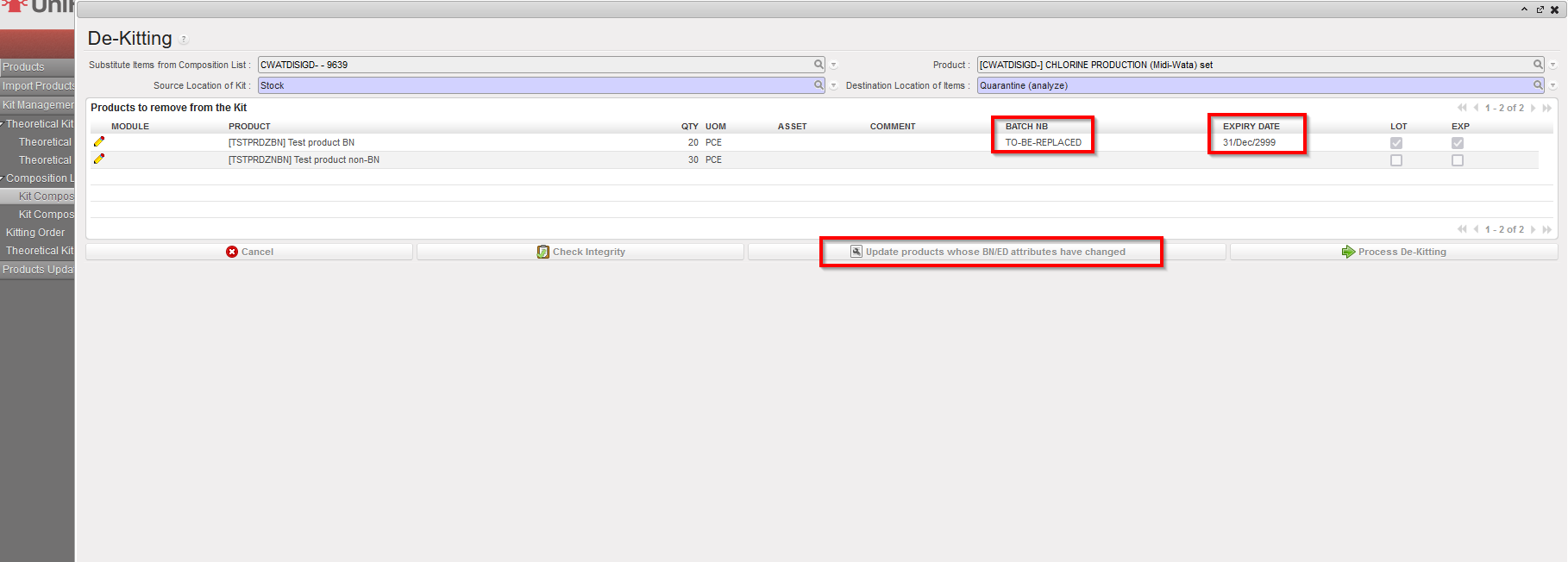
(US-9639) Kit: Substitution / Dekitting when component prod values changed BN/ED attributes
This improvement requested by OCG, will enable the processing of KCL De-kitting or Substitution for products with BN/ED attributes which have changed. Now there is an extra button “Update products whose BN/ED attributes have changed” which appears in KCL processing window. When button is used, any affected products will have their BN/ED info removed, or have default BN/ED info added (as per original ticket ). Action only updates products in this KCL window.
(US-9604) Performance improvement: PO / FO Validation / Confirmation
This ticket raised by OCB, to improve the system performance and decrease the time needed in PO validation/confirmation, and for applying the CDD on all lines, especially for the POs which consists of many lines.
(US-9467) RR: export empty template in the Replenishment Segment
This request raised by OCB, is to enable users to export improved template from an empty RR Replenishment Segment. Now if user exports excel (via Action menu) from an empty Replenishment Segment, the export template has 5 empty lines. These can be filled in the normal way to import lines onto the Segment.
Menu: Warehouse > Replenishment Rules > Configuration > Replenishment Segment
(US-9466) RR: Round up Projected view figures
This improvement raised by OCB, to decrease the digits of the months of supply and projected months in the Replenishment Rules Inventory Review excel export:
The values in the following columns are now rounded to 2 decimal places:
- months of supply (RR-AMC)
- months of supply (RR-FMC)
- Projected MX (month)
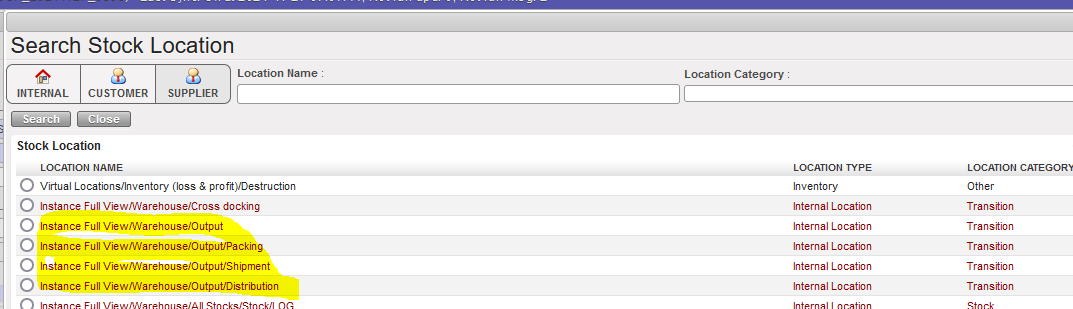
(US-9373) Do not allow Output locations as Destination
OCA requested this improvement to remove the output locations (Output, Packing, Shipment, Distribution) from the destination location in the INT from scratch, to avoid any inconsistent data in these locations, and to be consistent with the IR’s destination locations as well as including Quarantine and Destruction.
(US-9190) Backorder filename tab issue after the e-PL importation Vertical integration
This improvement requested by OCB, means that in the Incoming shipment from ESC, which is updated through the e-PL importation, in the Notes tab, any “filename” relates only to files imported on the specific IN which was updated by import. Back order INs without direct VI import should have this field blank.
(US-9173) Inconsistencies in location name MSF Customer
This ticket raised by support team after noticing that some instances in different sections contain created / configured locations with the same name “MSF Customer” as the default location. With this ticket, all those manually configured locations which have the same name or some variation of name of MSF Customer location have their location(s) changed to “Other_MSF_Customer”, and then users can de-activate the locations which are not in use.
(US-9070) IN line at project cancelled due to Coordo split & partial cancel
This important ticket was raised by OCA, and had previously led to many issues with incomplete/incorrect flows as the splitting of a line and then cancellation of one part of a split line led to all of the line in other document or instance being cancelled. This has now been resolved for all of the Test cases outlined in ticket.
(US-8451) RR: Allowing same product in multiple segments
This ticket, raised by OCA introduces more flexibility into Replenishment Rules Replenishment Segments, and means that one product may be present across several segments belonging to the same Location Configuration as long as the product does not have an active value (FMC/Min Max or Auto Supply) in overlapping periods. When a product is active in one period of an RS, any other RS in which it is present must have the value “0” for this period. A product can be present in up to 3 active Replenishment Segments belonging to the same Location Config, and these Segments can have different types of RR applied. Having the same product in multiple RSs implies that all of the RSs involved must have the “Specific Periods only” checkbox ticked if the RR types are either Auto Supply or Min/Max, as was developed in US-8449 and implemented in release UF24.0
N.B. Please see Finance section of Release Notes to see further details of US-6475 ticket of addition of VAT corner to POs. and US-8567 also treatment of intermission partners.
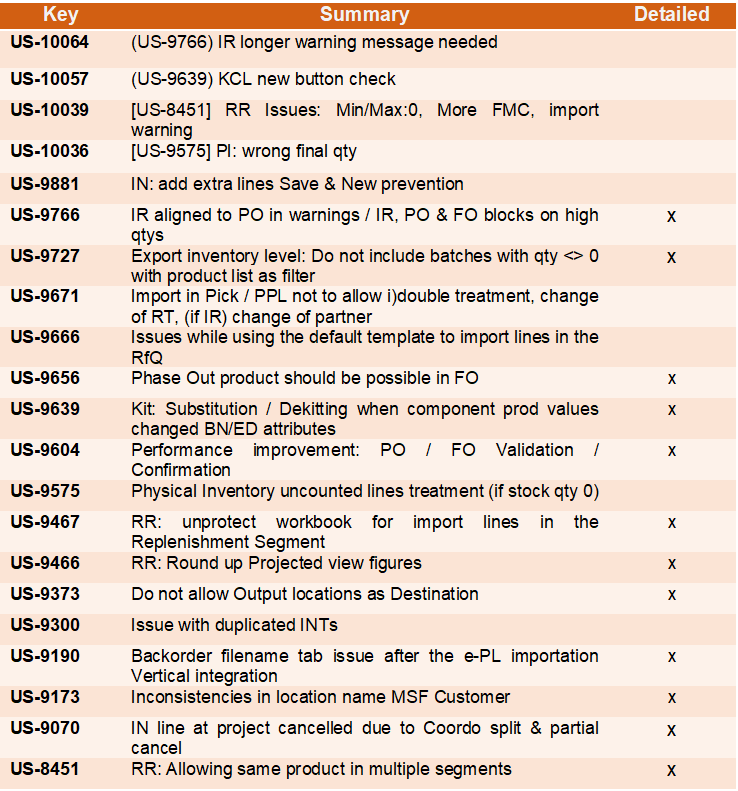
All Supply tickets integrated in UF25.0
Finance
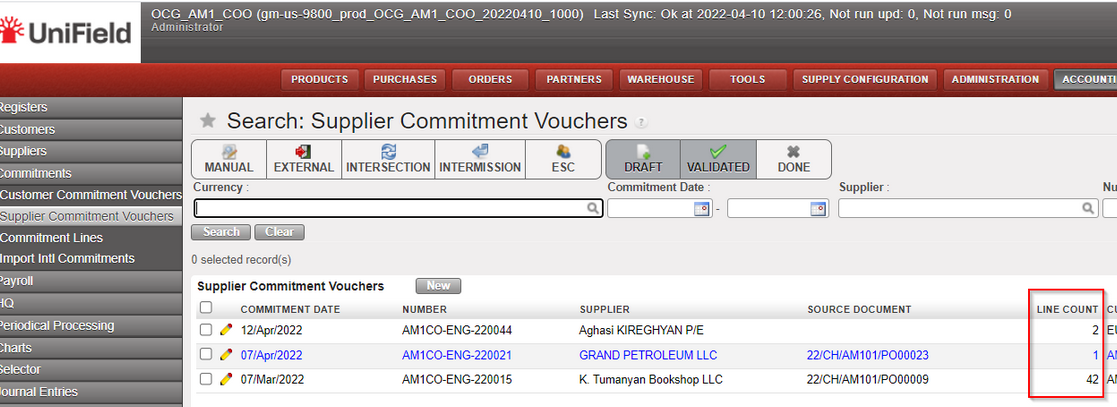
(US-9800) To add an additional count LINE column on the supplier and customer Commitment Voucher screens.
In the Supplier Commitment Voucher screen and in the Customer Commitment Voucher screen, we added the “Line count” column between “source document” and “currency”.
Go to Accounting >Commitments > Customer Commitment Vouchers /Supplier Commitment Vouchers
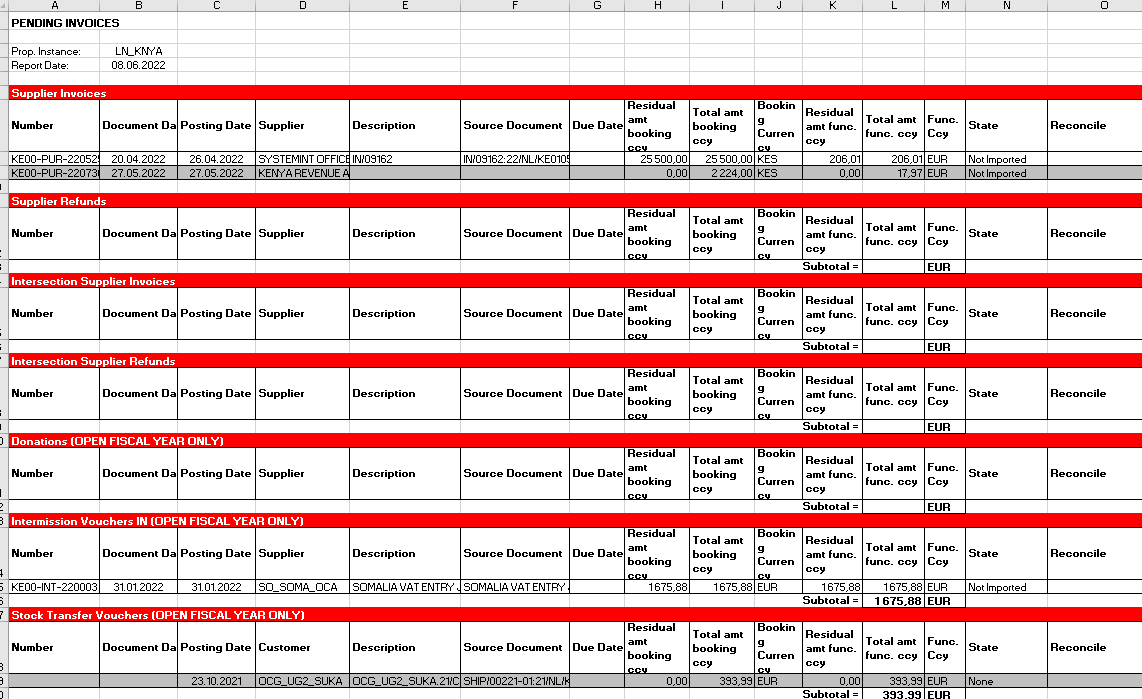
(US-9355) Changes in the “Open Invoices” Report (suppliers right action menu) – to add draft invoices and other
In the accounting/Suppliers/and submenus Supplier Invoices, Supplier Direct Invoices, Supplier Refunds, Intersection Supplier Invoices, Intersection Supplier Refunds, Donation, Intermission Voucher In), we have amended the content of the report named “Open Invoices”. The main issue is the addition of the drafts.
The new name is “Pending Invoices “. In French; “Rapport de factures en attente”.
It is placed in the right menu of the screen, with the other reports.
- For the Supplier invoices: we will have the open invoices before and the draft invoices after (drafts in light grey in order to distinguish Draft from Open).
- For the Donations: we will have the open and draft donations of the Open fiscal year + the donations in draft.
- For the Intermission Vouchers IN: we will have the Intermission Vouchers IN of the Open fiscal year + the IVI in draft.
- For the Stock Transfer Vouchers: we will have the Stock Transfer Vouchers of the Open fiscal year + the STV in draft.
Example:
(US-9213) Intermission/intersection: remove the step “missing information” IVI/ISI/ISR
When validating an IVI, ISI or ISR (Intermission Voucher IN, Intersection Supplier Invoices or an Intersection Supplier Refund), the user was asked to retype the total amount of the invoice. In the case it was not done, there was an error message, and the process was blocked.
This step did not have any added value and create an unnecessary step in a long and lasting process flow, so this step has been removed.
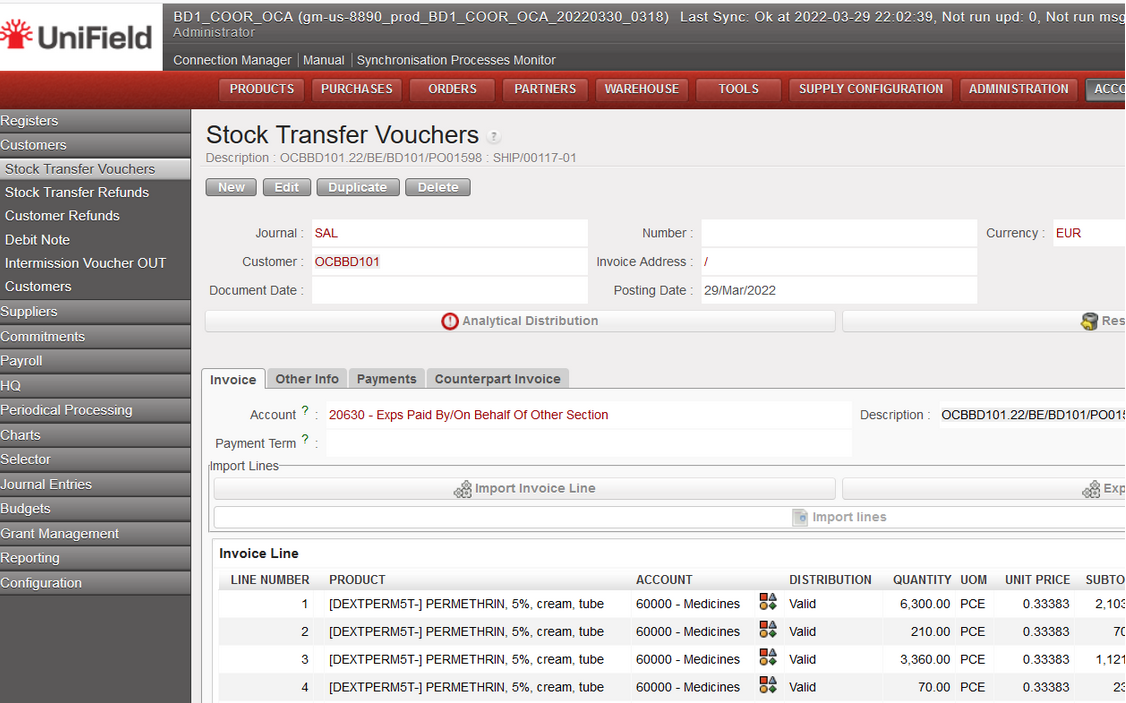
(US-8890) Intermission / Intersection: black color of the STV lines instead of blue
In order to align the behavior of STV invoice lines to the IVO or SI lines, we decided to put the lines in black (and not in blue).
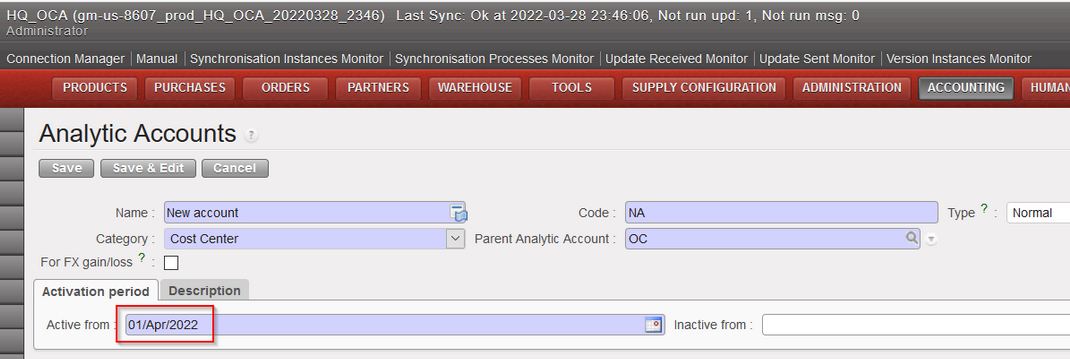
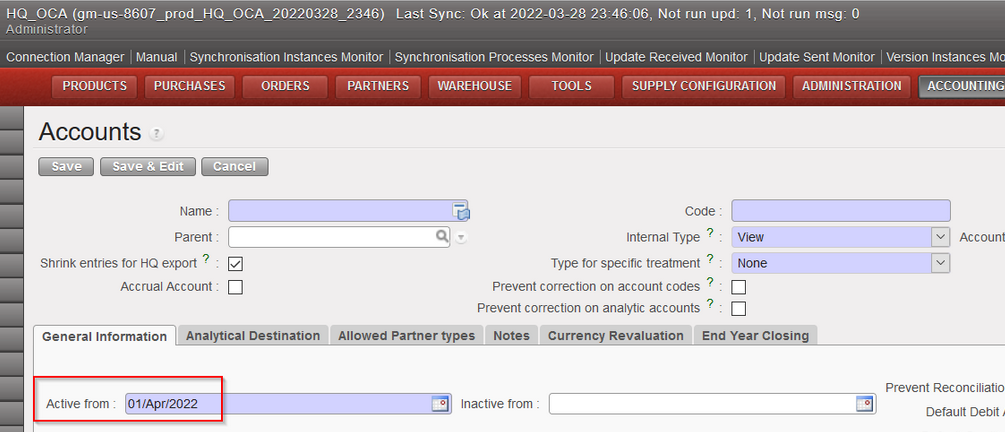
(US-8607) Set the first day of the current month at [active from field] when creating a new analytic account or a new GL/account
Now, when you create a new GL Account or a new Analytic Accounts the field “Active from” will have by default the first day of the current month.
(US-8567) Do not allow to activate the intermission partner when an internal partner already exists with the same name
When activating a partner type intermission, the system will check if the same name exists in the internal partners; if yes, the system will not allow to activate the partner (regardless of the status of the internal partner and whatever the letter case) and we will have an error message as follows:

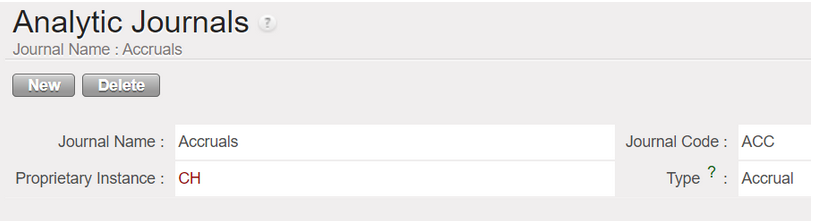
(US-8023) In the analytic journal items please add the journal ACC (accruals) in the “Journal type” filter
In Accounting/configuration/analytic accounting/analytic journals : the accrual journal was tagged to the journal type named “GENERAL”. Now the journal type “GENERAL” has been renamed to journal type “ACCRUAL”.
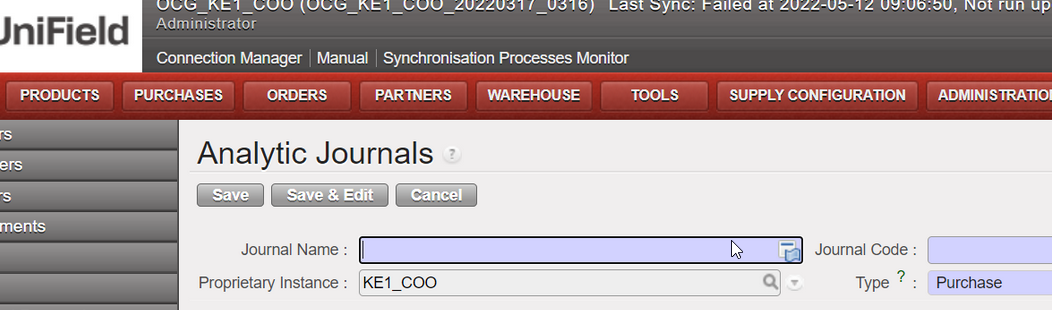
When opening a new Analytic Journals form, the type selected by default was “General”. Now it will be “Purchase”:
(US-7961) To allow to settle one advance in cash or bank register, even it has been originally booked in a cheque register.
Before, if an operational advance was created through a cheque register, it was not possible to close it through a cash nor bank register and we received a warning message “The register journal is not compatible with an advance return.”
Now after this improvement, it is possible to settle an advance created in a cheque register through a cash or a bank register.
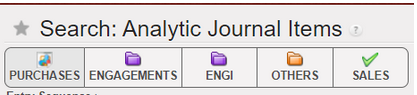
(US-7857) Button filters on AJI: Engagements and ENGI journals
Some improvements have been done in the filter buttons naming and in the searching options regarding AJI.
We go to Accounting/Journal Entries/Search: Analytic Journal Items:
- If we toggle on search button “ENGAGEMENTS”, the result of the search will be the journal code column with “ENG” only.
- If we toggle on search button “ENGI”, the result of the search will be the journal code column with “ENGI” only
- If we toggle on both search buttons “ENGAGEMENTS” and “ENGI”, the result of the search will be the journal code column with both “ENG” and “ENGI”
We have also changed the order of the filters and the name of one filter:
- BEFORE

- AFTER: The filter ORDERS has been renamed to SALES and replaced at the end of the filters
(US-7791) To update the HR information needed by UF to run payroll and third party: to remove values:
This improvement was done in order to assess the GDPR compliance of UF, given the facts below: we synchronized databases between continents in and out of EU and everyone having the Fin_HR group could access to the info.
In this improvement:
- we deleted from the database the “not used” personal information from the staff list.
- and we changed the import of the permois by not taking a list of fields anymore. This is the list of the fields that will not be retrieve anymore from the permois to Unifield:
Field | Name | Homere file | Column in Homere file |
|---|---|---|---|
|
birthday |
Date of Birth |
staff.csv |
datenaissance |
|
gender |
Gender |
staff.csv |
sexe |
|
marital |
Marital Status |
staff.csv |
Statut familial |
|
mobile_phone |
Mobile |
staff.csv |
portable |
|
notes |
Notes |
staff.csv |
commentaire |
|
private_phone |
Private Phone |
staff.csv |
tel_prive |
|
work_email |
Work E-mail |
staff.csv |
|
|
work_phone |
Work Phone |
staff.csv |
tel_bureau |
|
country_id |
Nationality |
staff.csv |
nation |
|
ssnid |
SSN No |
staff.csv |
num_soc |
3.12 (US-6475) VAT corner for the PO – like VAT corner for SI
In this improvement we created a tax part in the PO (the same part as we have already in the Supplier invoice).
Go to PURCHASES > Purchase Management > Purchase Orders:
- Click Edit “yellow pen” any PO
- Click on tab “invoices”
- The new part has been added at the bottom, after the Down Payments and it is named “Taxes”:
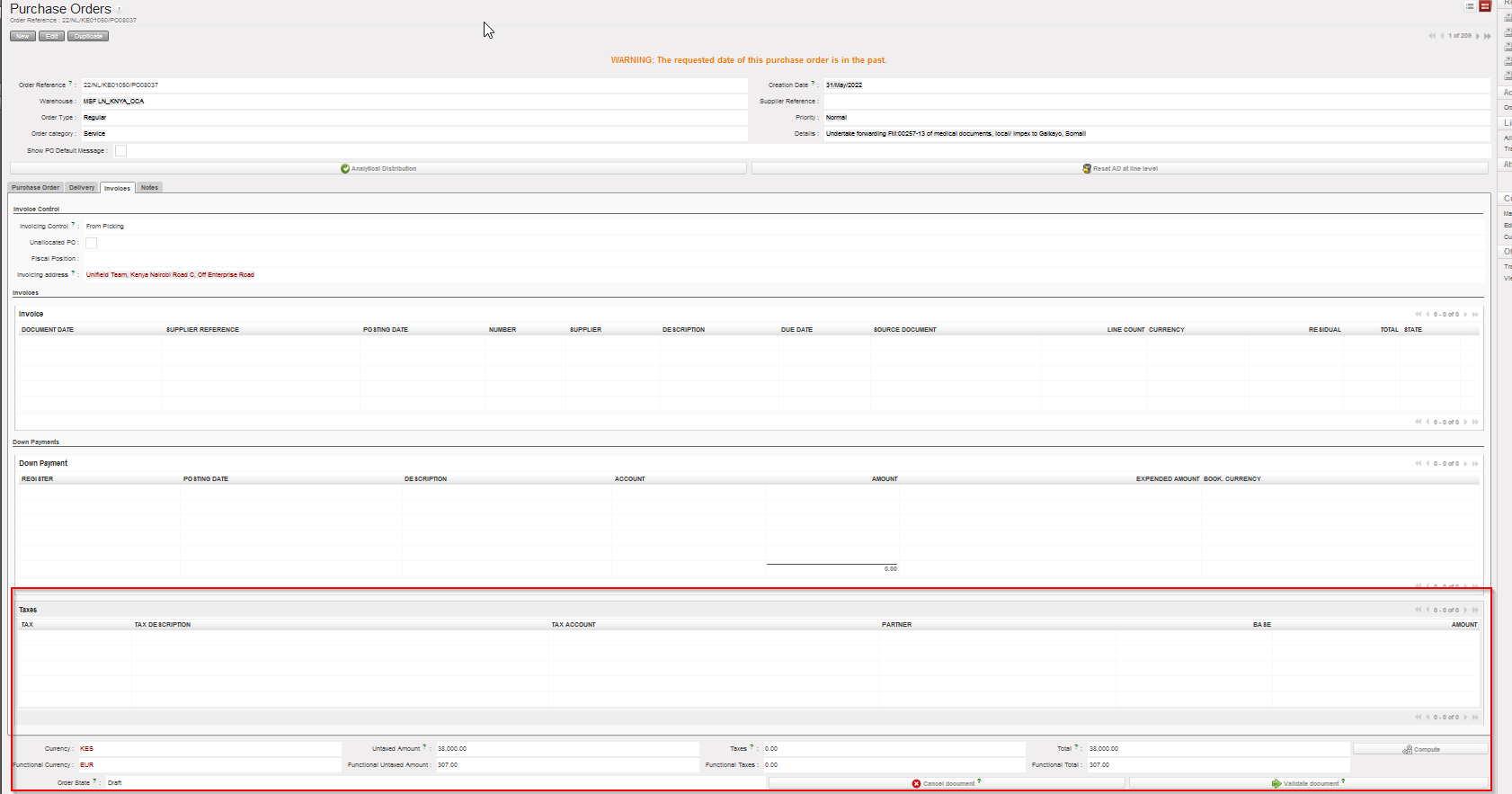
To consider below points:
- The new box “Taxes” is available for External PO only.
- If relevant, there is a new button on PO footer to remove the taxes at line level.
- Adding a tax line or removing it, will affect in the total amount of PO.
- SI Tax corner is populated from the PO Tax box.
(US-5722) Accruals Management improvements release
We have done new improvements in the accrual functionality in terms of display and we have also added a new option: we can use more than one expense account in the accrual lines.
These changes have made the functionality user friendly.
Here you can visually see some of the improvements:
Go to Accounting > Periodical Processing > Accruals management > It will display “Search: Accruals Management”
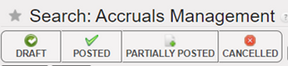
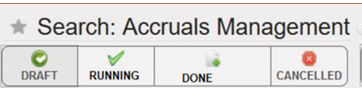
We renamed the status from: draft, posted, partially posted and cancelled
to: Draft, running, done and cancelled.
The new search options: 2 new buttons have been created “ONE TIME ACCRUALS” and “REVERSING ACCRUALS” as below, to search by toggle on/ toggle off:

We can also search by filters as below:

Here we have the new display of the screen “Search: Accruals Management” linked with the columns related.
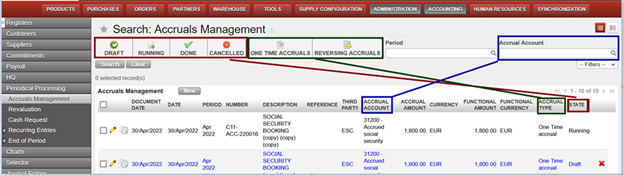
Note that name of the column “Status” changed to “State”.
The display of the Accruals Management screen has also changed as follows:
Go to Accounting > Periodical Processing > Accruals management > Click on “New”
- Screen for the Accrual type One Time Accrual

- Screen for the Accrual type Reversing Accrual

- Example with data:
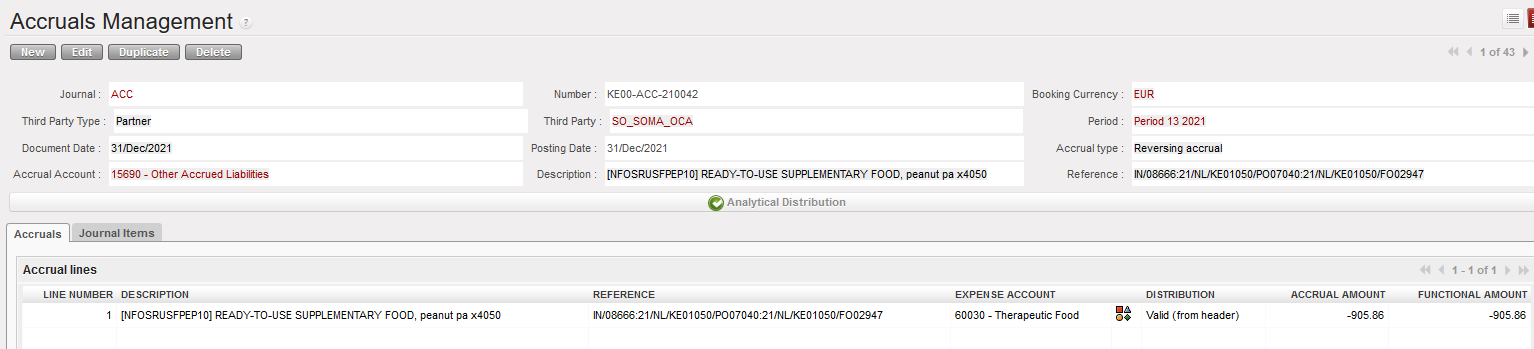
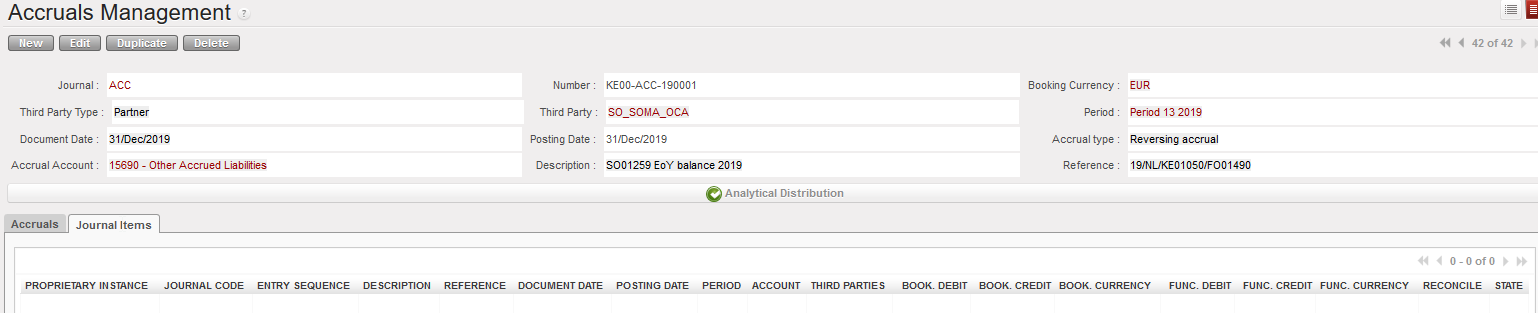
We have now two tabs (instead of one before): Accruals and Journal Items:
- Tab named Accruals: which include the below columns:
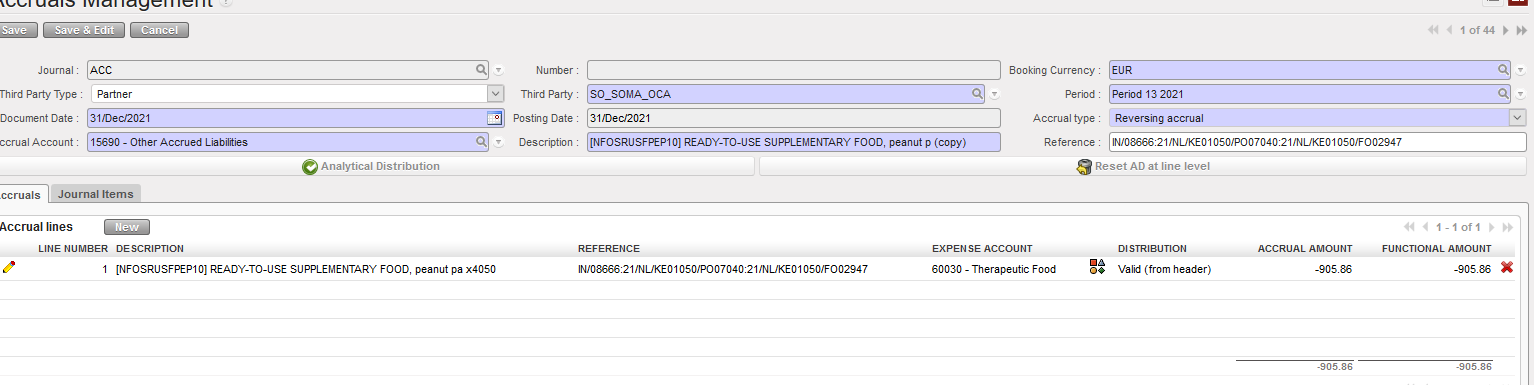
- The pencil (to edit only at draft status).
- Line number.
- Description of the line: it will be reported in the AJI and JE
- Reference
- Expense account.
- Analytic distribution at line level.
- Accrual amount.
- Functional amount
- And the X button to delete in draft status
- The state (draft, running, done or cancelled)
- Tab named Journal Items: Including all accruals lines of the transaction (Expenses, Payables and receivables) as below:
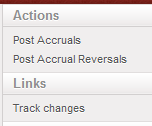
In the right action menu, we have renamed the actions to “Post Accruals” and “Post Accrual Reversals” and we have also added the track changes:
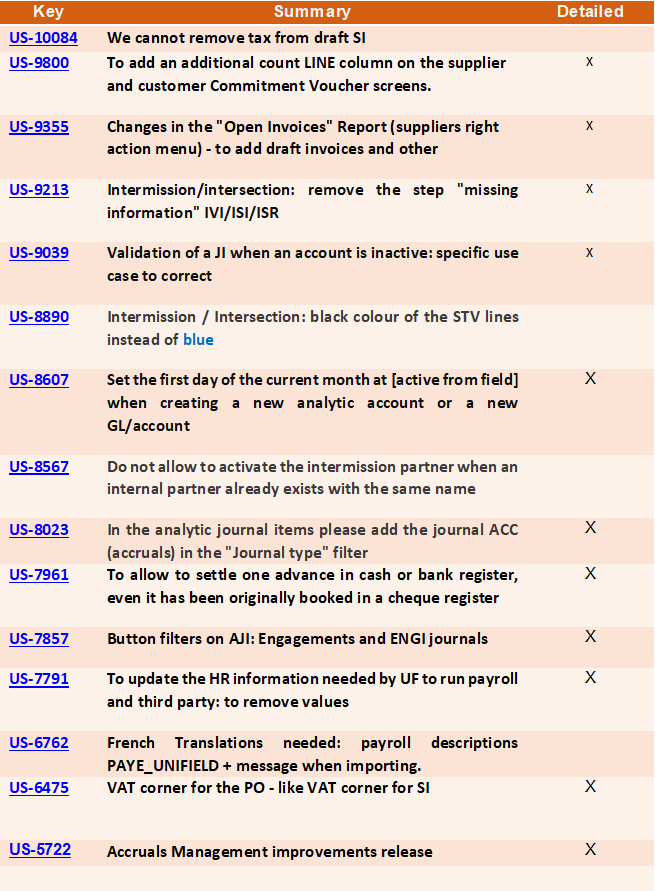
All Finance tickets integrated in UF25.0
Non- functional
(US-9815) Create a link button to the User Manual Online.
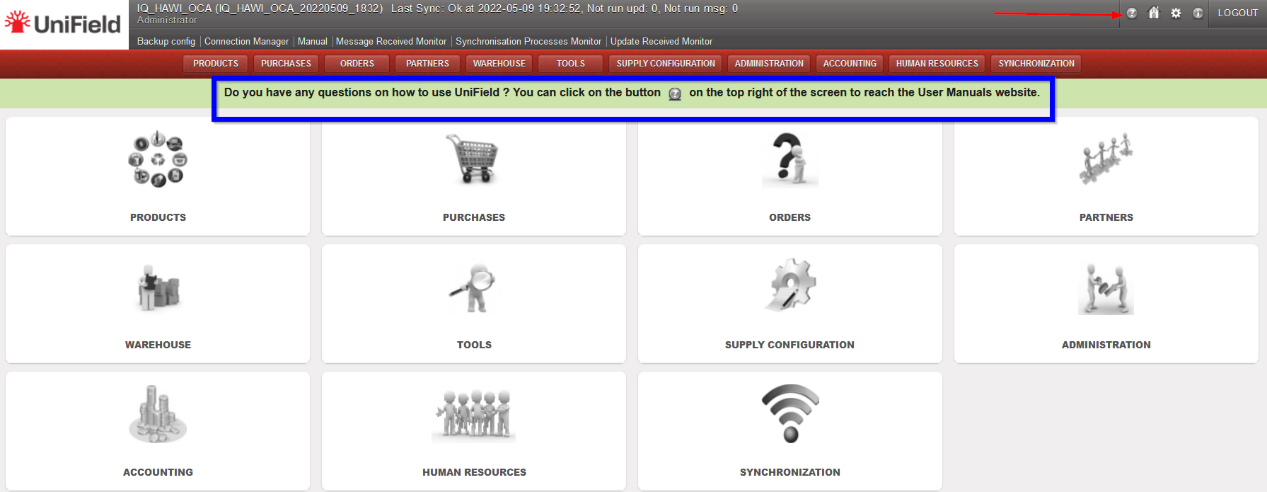
Following the release of UniField documentation online, we have created a link inside UniField to the user manual. The icon  has been added to the top right corner next to the Home button. Clicking on this icon will open the documentation site https://doc.unifield.org/, in a new tab.
A banner has been added to alert the users of this new feature. The banner will disappear once the user clicks on any menu.
(US-9736) Users Filter: Show not Synchronized
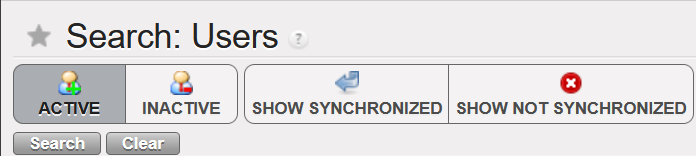
A new filter [SHOW NOT SYNCHRONIZED] has been added to the Users search menu to allow one to search for only non-synchronized users. Previously, it was only the Active, Inactive and Show synchronized filters.
All Non-functional tickets integrated in UF25.0

