
Supply User Manual ENG -> Products -> 3.2 LU-SU2101: General Product Management -> E. How to activate the expiry date
E. How to activate the expiry date
The expiry date of any product that expires must be entered in the system database. Update of this attribute can only be done at HQ for non-local products and only at Coordination for local products (providing some specific user rights) and will be synchronized down to children instances.
To activate this option, follow these steps:
Go to: Products/ Products
- Use the search tools to filter values to find the product you want to edit
- Click on the pencil icon
 next to the product line to open it in edit mode
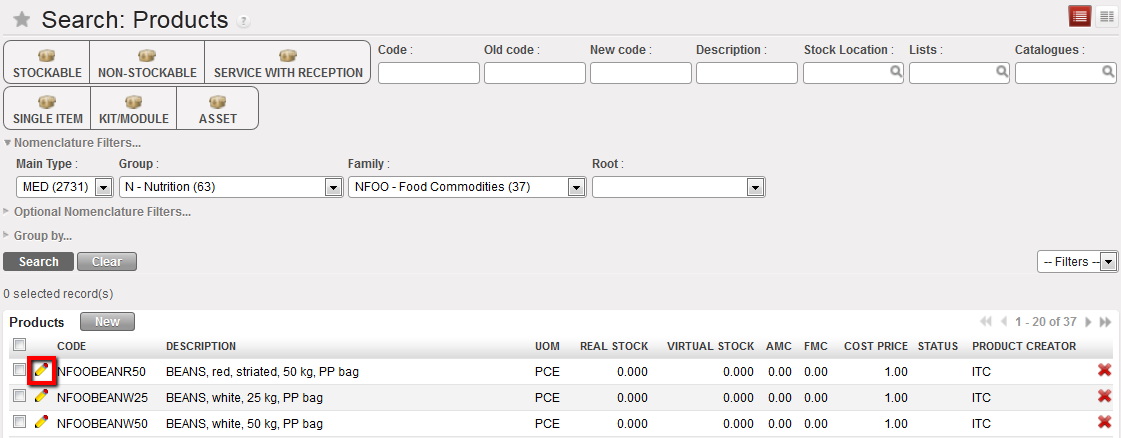
Expiry date activation 1
3. In the “Information” tab, click on the “Make mandatory” button aside the “Expiry Date Mandatory” checkbox to enable it.

Expiry dates management 2
4. Click on “Save” to save your changes
5. The system will now request that the specific expiry date of this product be recorded in the system during the product reception.
 Please note: This attribute needs to be changed cautiously especially if product is in Stock or is in a document in progress.
If product with ED is changed to product without ED, then the ED will be erased from the system and for existing product in the documents/ Stock. Also, products quantity will be aggregated in Stock (in case you had several ED for the same product).
If product without ED is changed to product with ED a “False” ED (31/12/2999) will be automatically added to the existing product in Stock/document. This “false” ED will have to be updated by the user later.
