
Supply User Manual ENG -> 4. Procurement -> 4.3 LU-SU3102: Orders Sourcing Tool (OST) -> D. How to source individually an IR/FO line to a Tender/Request for Quotation
D. How to source individually an IR/FO line to a Tender/Request for Quotation
In some cases, the requirements (products) listed in Internal Requests or Field Orders are items which are not available in stock and for which there is no known supplier and/or price. In this case they may need to be sourced to a Tender or a Request for Quotation (RFQ).
It might also be the case for large Purchase Orders, where according to the supply procedure in place on your mission, a Call for Tender (CFT) should be carried out. The system will allow the creation of the Tender/RFQ within the supply process, linking it to the other supply documents, while maintaining the chain of the supply steps.
Generally, the Tender is used when you do not know yet from which supplier you want to get information while the RFQ will be used if you want to ask for products availability and price to a specific supplier.
Go to: Orders / Orders / Orders Sourcing Tool
- Use the Filter options to filter the lines to be sourced with the appropriate reference.
- Click on the pencil
 on the left side of the screen to edit the sourcing of the appropriate lines.
|
|
|
Sourcing to a Tender |
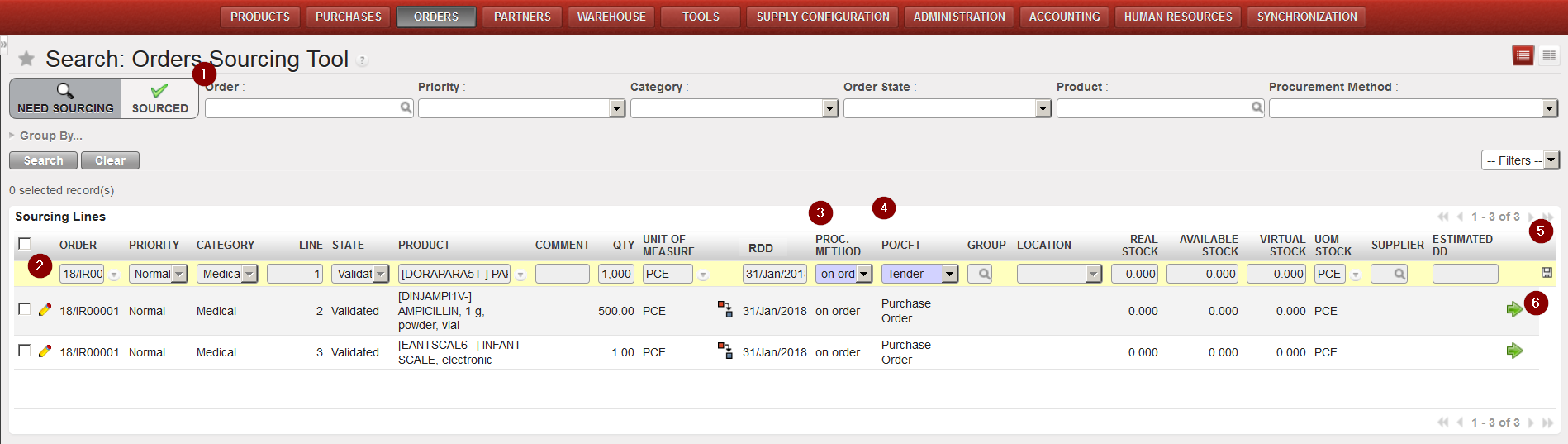
3. In the “Procurement Method” column, select “on order“.
4. In the “PO/CFT” column, select “Tender” or “Request for Quotation“. Note that if you select RFQ you will have to enter a supplier as well.
5. Click on the floppy disk  at the right side of the screen to save the changes.
6. Click on the green arrow  at the right side of the screen to source the line.
7. The Tender or RFQ document is created by the system.
