
Supply User Manual ENG -> 4. Procurement -> 4.5 LU-SU3104: Field Orders (FOs) - Specifics -> B. How to create a "Donation before expiry" FO
B. How to create a “Donation to prevent losses” FO
This option is to be used to donate goods that are going to expire quite soon to another partner and are unlikely to be used in time by their current owner. To learn more about expiry dates and how to determine products likely to expire please see LU-SU4303 Management of Expiry Dates.
Go to: Orders / Orders / Field Orders
- Create a Field Order manually (see “How to create a Field Order manually” in LU-SU3103 FO GENERAL). The process is exactly the same, besides the order type.
- For the field “Order Type“, choose the option “Donation to prevent losses” instead of “Regular“.
- Enter the partner (internal, external, inter-mission or inter-section) to who you wish to donate the goods.
- Add the products that are going to be donated.
- Validate the FO created. Note that at this stage, the system sets (if needed) the procurement method to “from stock“.
- Source the FO in the Orders Sourcing Tool.
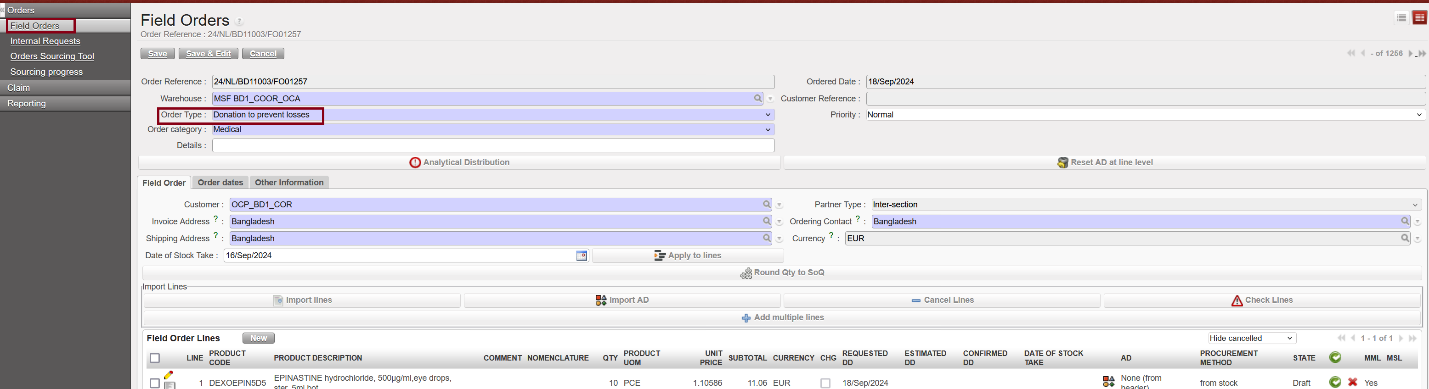
Donation to prevent losses
Note that the validation of a “Donation to prevent losses” FO does not require an Analytical Distribution.
Note that if the customer is another instance (i.e. an internal, inter-mission or inter-section partner), the validation of the FO will (after synchronization of the 2 instances) trigger the creation of a “Donation to prevent losses” PO on the instance where the goods will be received.
In the above example, the donation process is initiated by the “giver“. If the “receiver” is another instance, the donation process could also be initiated by the “receiver” through the manual creation of a “Donation to prevent losses” PO on its instance. However in most cases, the donation process is initiated by the “giver“.
