
Supply User Manual ENG -> 5. Warehouse -> 5.17 LU-SU4303: Management of Expiry Dates -> A. EXPIRY QUANTITIES
A. Expiry Quantities
This report allows to see batches/quantities already expired and batches/quantities which will expire within XX weeks. It is actually a simple “picture” of batches in your instance.
In addition, the system also calculates the quantities which are probably going to expire before use using the Real Average Consumption (RAC) in the calculation.
Go to: Warehouse / Reporting / Expiry / Expiry Quantities
- As “Location“, select the location in which you want to investigate on expiry. If you leave the field empty, all internal locations will be investigated. If you tick the “Exclude Input and Output locations” checkbox, batches located in these 2 locations won’t be looked at.
- In the “Period of calculation (Today till XX weeks)” field, enter the number of weeks to look at. The system will only look at the batches already expired and at the ones which will expire within XX weeks.
- Click on the “Process” button to launch the analysis. The “Print report PDF” and “Print report Excel” will produce the report directly in PDF/Excel.
|
|
|
Expiry quantities – selection screen |
|
|
|
Expiry quantities – report |

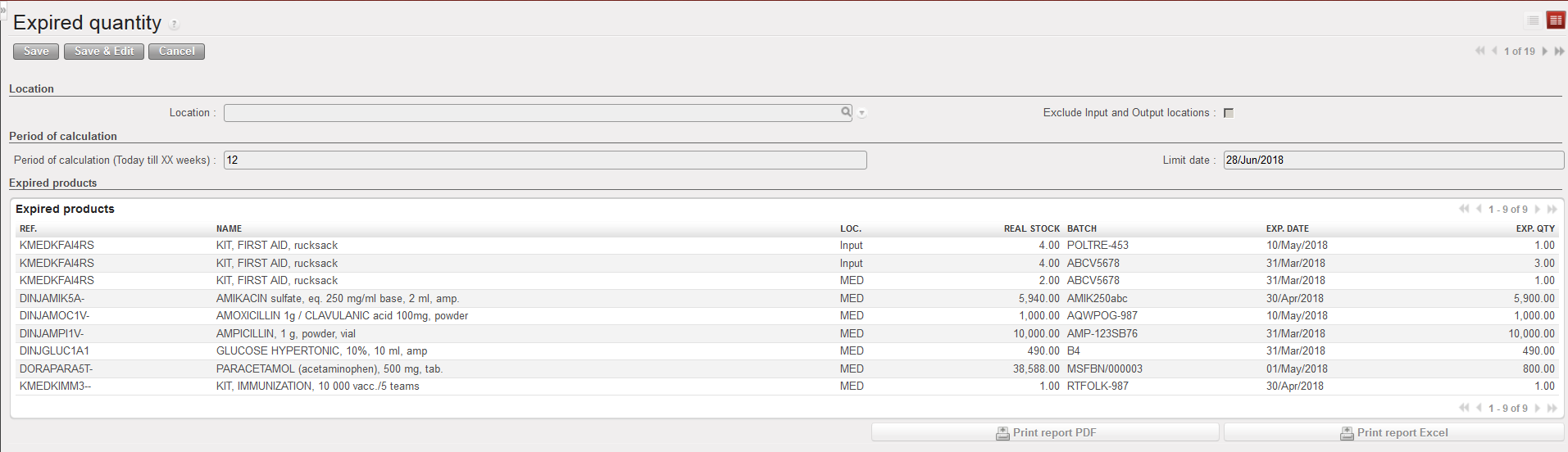
An on-screen report is produced. Expired batches and batches which will expire within XX weeks are showed. The current real stock per product and location (not per batch) is also showed.
The “Exp. Qty” column shows, for each batch, the quantity which is probably going to expire before use in the involved location. This quantity is calculated using as information: stock in hands, expiry dates and the RAC.
The “Print report PDF” and “Print report Excel” allow to export the report in PDF/Excel.
