UniField v.37.0 Release Notes

1       Release Details

Release version: UF 37.0

Date of production synchronization server patch: 11th June 2025 / 18:00 Geneva time

Latest user rights files updated: UF37.0 can be found here

Note that no user rights need to be loaded at each HQ. This will be done at the Sync Server by the Core team and will update the user rights via Sync for all HQs and missions.

JIRA filter for all integrated tickets: https://jira.unifield.org/issues/?filter=12539

2       Supply

2.1        (US-14373, US-13955) To define empty Location OST if procurement method from stock

To reduce the potential for data encoding errors that can lead to incorrect picking locations when users are using the Order Sourcing Tool (OST), we are implementing a change regarding the “Stock” warehouse location. This update involves removing the “Stock” location as the default preselection when sourcing items “from stock.” The goal is to decrease the likelihood of mistakenly sourcing goods from the “Stock” warehouse location.

The default location will now be set to empty, rather than defaulting to “Stock.”

Note: Location is a mandatory field. If no location is selected, a blocking message will appear, similar to the behaviour when the procurement method “On order” is chosen. The “Stock” location will remain available in the dropdown list for selection.

2.2        (US-13952, US-13741) Supplier rankings information displayed in PMD / OST

To improve visibility and utilize the new ranking feature for sourcing management at the user level, a new column called “Ranking” has been added to the Order Sourcing Tool. This column displays the line ranking from the selected supplier catalogue (sourced from the product card). If two supplier catalogues exist for the same code/ranking, the supplier with the lowest price is selected.

Previously, suppliers were chosen in alphabetical order when all other conditions were equal.

2.3        (US-14253) Adding a new line in Confirmed catalogue updating a Catalogue

A bug fix allows to update a catalogue in a confirmed status when a new line is added

2.4        (US-14268, US-14216) Adjustment of FO follow-up and IR follow-up generation behaviour

A bug fix addresses the export behaviour of the FO follow-up report and adjusts the column positions. The issue was identified in the previous UF version.

2.5        (US-14084) Loan Return does not allow change of Partner

As the Loan Return PO is created automatically via the Loan flow, and not from scratch. With this correction a change of a partner in a loan return document is not possible anymore.

2.6        (US-13597, US-13263) Layout improvement for big numbers in PDF report Allocation report and Purchase Order

This improvement ensures no overlapping of big numbers in PDF report Allocation report and Purchase order

2.7        (US-14069) Duplication of Direct Purchase order creates a Regular PO

Previously, duplicating a DPO was blocked with an error message. This update enables the duplication of a DPO as a standard Purchase Order.

2.8        (US-11801) Modification of Product Inconsistency report and Product Status inconsistency report

The improvement renames the report from Product Inconsistencies Report to BN/ED Inconsistencies Report. The location of the report moves the report from “Tools” to Warehouse >Traceability (under “Batch Location”). Abbreviation of the report is adjusted to make it easy to read.

A new Standardization level column is introduced in Product Status Inconsistency report. The values pull information from the product card (Standard/ Non-Standard/Non- standard Local).

The report moves from Tools to Product> Reporting (new submenu is introduced under “Product update”)

2.9         (US-11802) Change columns in the report ” Product likely to expire”

Naming of columns is changed to improve readability of the report.

N.B. Columns “Total Quantity Likely to Expire” and “Total Value of Likely to Expire Quantity” excludes qty and value of already expired products.

2.10     (US-13923) Multiple lines AD missing on PO/FO: change of warning message

This improvement enhances the visibility of lines missing Analytical Distribution in PO/FO. A new dynamic pop-up warning message on PO/FO notifies users about lines missing Analytical Distribution:  “Analytical distribution is missing for lines A, B, C. It must be added manually.” 

The warning message dynamically lists only the lines missing Analytical Distribution. If the Analytical Distribution for a line is corrected, that line is automatically removed from the error message.

2.11     (US-13995) Aligning the sequence of signatures in IN PDF

A new column, “Approved by” has been added to the Incoming Shipment PDF. It is positioned after “Received by” and “Controlled by” The French translation has been aligned with standard supply terminology.

2.12     (US-13508) Merge of Local and UniData code changes behaviour for blocking message.

This improvement standardizes the behaviour of warning messages for blocking and non-blocking attributes related to the Local Code/UD Merge functionality. 

When merging Local and UniData codes, if the Main Type differs between the Local Code and UniData codes, users receive an immediate blocking message.

“There is an inconsistency between the selected products: Main Type need to be the same.  Please update your local product Product Type and then proceed with the merge. Products XXXX and XXXX”

2.13     (US-13308) IR: Change name of “Request Date” Field

With this improvement in IR form page “Requested Date” is renamed to “Requested Delivery Date” to align with FO and PO.

2.14     (US-13190) Historical Consumption Report – Include Customer Type Partners in RR-AMC

As part of the Programmatic Donation development, this improvement introduces a new field, “External Partner,” in the Historical Consumption Report when using the RR-AMC function. The goal is to enable AMC extraction for a specific customer or multiple customers. Additionally, “Source” and “Destination” have been renamed to “Source Locations” and “Destination Locations.” 

The RR-AMC will continue to be calculated as usual but will only consider outgoing moves involving the selected partner(s).

The following rules apply to the new field: 

– If an External Partner (Type: Customer) is selected as the destination location, the source location must be either Internal Locations or Cross-Docking. 

– The source location can also be left empty, in which case only movements from Internal Locations and Cross-Docking will be included in the RR-AMC calculation. 

– An External Partner can be combined with an External Consumption Unit as the destination location. 

– If “Other Customer” is selected as the destination and you attempt to select one or more External Customers, a warning message will block this action. 

– Similarly, if “External Customer” is selected as the destination and you attempt to select “Other Customer” a warning message will also block this action.

2.15     (US-13377, US-13353, US-13346) Improvement linked to the E-Validation

This release improves landing pages for Sign-only Users, makes UniField easier to navigate. The role/function titles aligned between the PDF (Incoming Shipment, Internal move, and Delivery Order).

2.16     (US-12270) Introduction of E-validation in Internal Move

The improvement introduces E-validation functionality in Warehouse->Warehouse management-> Internal moves.

2.17     (US-13064) Introduction of E-validation in Physical Inventory

With new improvement E-validation is available in Physical inventory in “Validated”, “Confirmed” Statuses. The signature order in the PDF follows this sequence: Warehouse Responsible, Supply Responsible, and Stock Owner (with the Stock Owner’s signature being optional). If the signature is accepted on validation and the Physical Inventory is set to         Re-count or Regenerate Discrepancy, all E-signatures are removed.
To confirm inventory, the PI must be signed. If no signatures are provided during the confirmation process, a blocking message will appear:

“The Warehouse Responsible role must be a signer in order to confirm inventory. 

If the signature is provided physically, please select ‘Sign Off-line’.”

2.18     All Supply tickets integrated in UF37.0

KeySummaryDetailed
   
US-14373(US-13955) To define empty Location OST if procurement method from stockx
US-14341(US-11801) Issues with Inconsistencies reportx
US-14268Export FO follow-up excel report failing – OCBSL101x
US-14253Adding a new line in Confirmed catalogue not updating a Cataloguex
US-14216Excel IR Follow Up Formatting Issuex
US-14146OCA RR: The Automatic Supply doesn’t work and displays error messages when checking with “specific period only”x
US-14143OCA: RR, The “Set Paired Product” functionality is not working in the Segmentx
US-14112Misalignment of the “Manufacturer” field in the Product Information Interfacex
US-14084Loan Return Allows change of Partnerx
US-14069Issue while trying to duplicate a DPO in specific casesx
US-13998Error after Import Packing – French versionx
US-13995to aligne the sequence of signatures in IN PDFx
US-13989Possible to select internal locations as Source and Destination for RR-AMC calculationx
US-13978Import / Export: Products – template not imported due to Nomenclature issuex
US-13955PMD / OST removing “stock” from the default source location automatically preassigned by the systemx
US-13952Supplier rankings information displayed in PMD / OSTx
US-13923Multiple lines AD missing on PO/FO: change of warning mesagex
US-13741Supplier rankings in PMD / OST ignores validity datesx
US-13597Big numbers on POx
US-13508Merge product functionality: Warning Message behavior Blocking V Non-Blockingx
US-13377E-Validation: Change to Signee Landing Pagex
US-13353E-Validation: Role / Function Title Improvementsx
US-13346E-Validation: User Rights Pop Up When Signee Clicks Save/Edit/Duplicate Buttonsx
US-13308IR: Change name of “Request Date” Fieldx
US-13263Big numbers on PO allocation report – beyond US-12787x
US-13190Historical Consumption Report – Include Customer Type Partners in RR-AMCx
US-13064Physical Inventory : Document status to be linked to signature: E-validationx
US-12270E-Validation for INT Internal Movex
US-11802Change columns in the report ” Product likely to expired”x
US-11801Change the name of: Inconsistencies Reportsx

3       Finance

3.1        (US-13520) “Fixed Asset Register”: creation of a new report for audit purposes (in the asset form menu)

A new register for all fixed assets has been created in the screen Asset form, in the right action menu.

The report can be issued in PDF and Excel formats.

3.2        (US-13582) Fixed Asset: to allow to delete generated UNposted depreciation entries in the asset form (same functionality as in the recurring entries)

We can delete the Unposted entries via the button Delete Unposted entries

After this deletion, we can generate the entries again

3.3        (US-13662) Fixed Asset: to add restrictions when we create an asset form from scratch from a JI

We have done a fix in order to avoid errors. We have prevented that the initial line creation when the JI will be on a depreciation Account.

3.4        (US-13716) Fixed Asset: Account code restriction for manual creation at Journal Item level (in the Asset Forms screen) + renaming

The list of Journal Items (JI) available for selection on the manual asset form was restricted to those linked to account codes where “Prevent Fixed Asset on HQ entries” had not been ticked.

This meant that when an account had been tagged as “Prevent Fixed Asset on HQ entries”, the system did not display journal items from that account in the “Journal Item” field of the asset form used for manual creation.

If the checkbox had not been ticked, journal items were displayed for manual asset creation and HQ entries capitalization was allowed.

If the checkbox had been ticked, journal items were not displayed, and the account could not be used for HQ entries capitalization.

It should be noted that asset capitalization accounts were not meant to be ticked, and therefore were displayed in the list of journal items for manual asset creation — serving as a workaround for capitalization of multiple items from HQ entries.

In the “Search: Accounts” screen, the checkbox on the “Chart of Accounts” (COA) section and its corresponding filter were renamed as follows:

  • : Prevent capitalization of entries
  • : Empêcher la capitalisation des écritures

3.5        (US-14168) Fixed Asset: Colour in blue draft + grey disposed asset form on list view

The draft asset forms are in blue and the fully disposed are in grey.

3.6        (US-13624) Combined Journal report: Bad selection results “exclude journal” ENG

In the combined journal report: we are now able to exclude from the selection the analytic journal ENG. This was not possible before, so it has been fixed with this ticket.

3.7        (US-13801) Internal transfers: to add a new constraint to prevent to change the account code on a counterpart line

There was already a constraint to prevent to change the 3rd party on a counterpart line with a transfer account (US-12678). Here we have added a new constraint to prevent to change the account on a counterpart line.

3.8        (US-13963) Not to be able to select an inactive staff when booking an entry in the cash registers

For register lines:

For Journal Items:

Error messages:

3.9        All Finance tickets integrated in UF37.0

US-14379Period states not synced up on new instance creation 
US-14362(US-13520) Fixed Asset Register crashes when there is an asset without a related booking currency
US-14332OCP_HQ workday mapping table to export the Finance VI file for expat users 
US-14264OCBLB101 : error “Let me fix it “screen while consulting List of advance in Bank register 
US-14168Fixed Asset: Colour in blue draft + grey disposed asset form on list viewX
US-14039OCBSD207: impossible to access to the cash registers 
US-13963Not to be able to select an inactive staff when booking an entry in the cash registersX
US-13947Import file for liquidity register is generating multiple lines because we clicked several times on the “import” button 
US-13935French translation in tools menu: importer/Exporter 
US-13906Account Periods: to set Fiscal Year and Period name as read only
US-13902In the Selector/analytic selector/combine report: to increase the number of digits of the field sequence number to 365 digits 
US-13801Internal transfers: to add a new constraint to prevent to change the account code on a counterpart lineX
US-13782OCA Code Fix : Import of expat (auto and manual) identification number 
US-13716Fixed Asset: Account code restriction for manual creation at Journal Item level (in the Asset Forms screen) + renamingX
US-13708AJI is not updating the currency update if ODM unposted (just updated when the ODM is posted) 
US-13662Fixed Asset: to add restrictions when we create an asset form from scratch from a JIX
US-13624Combined Journal report : Bad selection results “exclude journal” ENGX
US-13582Fixed Asset: to allow to delete generated UNposted depreciation entries in the asset form (same functionality as in the recurring entries) X
US-13539Import Homere: to permit the import of the permois for inactive destinations with no need to tick “allow all cost centers” 
US-13520“Fixed Asset Register”: creation of a new report for audit purposes (in the asset form menu) X
US-14429OCP VI Finance: AJI rounding issue in January 2025 (Workday export) 

4       Non- functional

4.1        (US-14040) Cleaning users_last_login.date

Since UF34.0 release, based on the ticket US-12274, users created via duplication no longer inherit the last connection date value from the original user. This ticket cleans the historical data = sets users_last_login.date to null for the users whose users_last_login.date is earlier than res_users.created date.

4.2        (US-14046) Last password change of duplicated users + cleaning historical data

Users created via duplication inherit the last password change value from the original user while users created from scratch have last password change equal to create date. This ticket ensures that all new users, including those created via duplication, will now have last_password_change set to their create_date. Moreover it cleans the historical data – sets res_users.last_password_change to res_users.create_date for the users whose res_users.last_password_change is earlier than res_users.create_date and for the users whose res_users.last_password_change is before June 16th, 2021 (when the res_users.last_password_change column was introduced).

4.3        (US-14124) Cleaning ir_property table

Entries related to property_product_pricelist_purchase, property_product_pricelist, property_account_receivable and property_account_payable were deleted from ir_property table since property_product_pricelist_purchase, property_product_pricelist, property_account_receivable and property_account_payable columns in the res_partner table have been modified in US-10652.

4.4        (US-14239) Email configuration allowing emails to be triggered

With this ticket, an adjustment has been made so that with current version of Python version used in UniField, an email can be triggered by UniField. This is a technical ticket as no rules have yet been defined to launch the emails.

4.5        (US-14105) Upgrade of version PostgreSQL: Patch from v.14.16 to v.14.18

With this ticket, the version of PostgreSQL for all instances already on v.14.16 will be updated to v.14.18. This ticket is one of several measures relating to IT security via regular upgrades. For any instances not yet on v.14.16 (e.g. those still on v.9.6) there will be no change as they would still need manual intervention.

4.6        All Non-functional tickets integrated in UF37.0

KeySummaryDetailed
US-14040Cleaning users_last_login.dateX
US-14046Last password change of duplicated users + cleaning historical dataX
US-14124Cleaning ir_property tableX
US-14239Email configuration: adapt code for python3X
US-14148Possibility to extract translation file via UI of UF 
US-14105Upgrade of version PostgreSQL: Patch from v.14.16 to v.14.18X
US-13877Patch application: unable to restart unifield-server 
   

UniField v.36.0 Release Notes

1      Release Details

Release version: UF 36.0

Date of production synchronization server patch: 12th March 2025 / 18:00 Geneva time

Latest user rights files updated: UF36.0 can be found here

Note that no user rights need to be loaded at each HQ. This will be done at the Sync Server by the Core team and will update the user rights via Sync for all HQs and missions.

JIRA filter for all integrated tickets:  https://jira.unifield.org/issues/?filter=12534

2      Supply

2.1       (US-13862, US-13476) New warning when document Category inconsistent with the product in document created from scratch ( IN/OUT/INT)

For improved visibility and order accuracy, the Order Category field is mandatory for documents created from scratch (IN/OUT/INT). The default value is empty, and the user can select one of the following options: Logistic, Medical, Service, Transport, or Other.

If a product does not correspond to the selected category, the user will receive a non-blocking warning message.

2.2       (US-13836) New function Export/Import for Delivery order (OUT)

A new Export/Import function has been developed for the Delivery Document (OUT). This function is aligned with the PICK (Export/Import) process and enables users to export and import values seamlessly. It is important to note that the export file includes only available lines and has timestamp to prevent the import of an incorrect file. This is functionality is also key for the SDE project needs.

If the OUT is created from scratch “Convert to Picking ticket” option is blocked by the system with a warning message

2.3       (US-12608) Possibility to add a source document for a newy added line in PO/FO

A bug fix allows adding a source document in PO/FO on a newly added line.

2.4       (US-13832) Phase Out cannot be sourced to PO (External supplier) when sourcing multiple lines

Previously, it was possible to source Phase-out codes to external suppliers when sourcing multiple lines. US-13832 updates the rules to ensure consistency for Phase-out codes across all order source options, whether sourcing a single line or sourcing multiple lines.

2.5       (US-13683) Physical inventory: Explicit message if the Unit of Measure (UoM) or Expiry Date is incorrect at the importation of the Counting Sheet.

When Counting sheet contains value not recognized for UoM, or for ED import is blocked and a clearer warning  message is displayed.

2.6       (US-13590, US-13591) Update of “Export IR Follow-up” and “Export FO Follow-up” reports

To improve comprehension and readability, the “Export IR Follow-up” and “Export FO Follow-up“ Excel reports have been modified. 

A new column, “Qty Received,” has been introduced for sourcing on Purchase Orders. 

The new “Qty Received” column will display: 

– 0 if nothing has been received. 

– N/A if no IN is available. 

– Quantity received if items were received via the corresponding IN. 

Additionally, column names have been adjusted as follows: 

Qty Ordered > UoM > Qty Received > Qty Delivered > UoM > Qty to Deliver 

2.7       (US-13314) Updates in PO – “Supplier Catalogue” Tab

In version UF36 supplier catalogue information visible on PO is modified as follows:

  1. is renamed to “UoM.”
    1. → “PO Unit Price.”
    1. → “PO Subtotal.”

Additionally, in the PO Action menu, the “PO Lines Mismatch” report is renamed to “PO vs. Catalogue Mismatch.”

The Catalogue Mismatch information is visible to the user only if an active catalogue with a valid date exists. Otherwise, the Supplier Catalogue tab on the PO will not appear.

2.8       (US-12816) New filter “Customer Refence” introduced in Purchase order

To enhance user-friendliness and eliminate the need to switch back and forth to the FO module for the corresponding reference, a new filter, “Customer Ref” (the project PO reference), has been introduced.

This filter has been added between “Source Document” and “Customers.”

2.9           (US-12481) New Details information column in reception/delivery/movement/ Supplier performance report

Following the addition of “Details” field to various docs a new column is added in the following reports:

  • Receptions Report: a new column IN Details (details information is pulled from IN)
  • Deliveries Report:  a new column Movement Doc Details (details information is pulled from OUT/PPL)
  • IN&OUT Report: a new column Movement Doc Details (details information is pulled from IN or OUT/PPL)
  • Supplier performance: new column PO Details (details information is pulled from PO)

2.10    (US-12721) New function of Price/ Quantity/ Comment update on Purchase order via import file

When a Purchase Order (PO) is created from an Internal Request (IR) or Field Order (FO), and there is no catalog for the selected partner, the unit price on the PO is based on the average cost price converted from the functional currency.

The UniField 36.0 release introduces a new import function for POs. A new button, “Update Line,” allows users to update the price, quantity, and comments of a line via import. The “Update Line” functionality is available in Draft (-p) status for all supplier types (Internal, External, ESC, IM, and IS). Import can also be performed in Validated (-p) status, but only if the supplier is External. Lines updated via import must correspond to respective statuses.

If a line item is Confirmed, Canceled, Closed, or Validated (for ESC, Internal, IS, and IM partners), the import will ignore that line. If any lines are ignored, UniField provides a clear message explaining which lines were not updated and why.

A user can use the “Update Line” function multiple times while the PO is in Draft (-p) status (or, in specific cases, in Validated (-p) status for external suppliers).

2.11    (US- 12430) Prevent creation of external partner when combination name + city already exists.

A ticket raised by finance preventing creation of the external partner when combination of Partner name + City already exists. Please refer to the Finance section of the release for more details

2.12    (US-12005) Order line with a Product by Nomenclature can be Re-synched between 3 Internal/ Intermission/ Intersection partners

A new improvement enables re-synchronization of the line by nomenclature across three instances. This feature is available for internal, intermission, and intersection flows.

If the order line by nomenclature is sourced to a PO in the third instance, the last instance must assign a product code for PO confirmation to the external supplier.

It is important to note that the assigned code in the last instance must exist in all instances. Otherwise, the nomenclature in the downstream flow will not be updated with the assigned code, resulting in a “Not Run” status.

2.13    (US-13097) IN synch message should not be run w/o execution if PO line not yet confirmed.

Previously, when a sending instance dispatched goods via SHIP, but the receiving instance had a PO line that was not yet confirmed due to inactive code in requesting instance, the system attempted to process synchronization. However, since there was no corresponding IN to update, the system marked the message as “Run” without execution, citing an argument that the update could not proceed because the line was already closed or cancelled. 

With this improvement after activation of the product in requesting instance the run is executed “normally” as if it had waited activation of the product.

2.14    All Supply tickets integrated in UF36.0

KeySummaryDetailed
US-13957IN/INT/OUT from scratch; to block modification of Order Category if Draft is confirmedX
US-13862Introduce a warning message Category inconsistent with the product in document from scratch ( IN/OUT/INT)X
US-13836Delivery Order / OUT: create export / import fileX
US-13832Phase Out articles can be sourced to PO (External supplier) when sourcing multiple linesX
US-13683Physical inventory: counting sheet: When there is an error at import due to unrecognised value in UoM, ED message should be clearerX
US-13611Delivery Address inconsistency PPL/SHIP (converted OUT)X
US-13591Export IR follow upX
US-13590Export FO follow-upX
US-13585IR and FO Export Follow Up Log Order Categories Not WorkingX
US-13476Enable Order Category when creating IN from scratchX
US-13314Include Supplier Catalogue info in POs – followingX
US-13097IN synch message should not be run w/o execution if PO line not yet confirmed.X
US-12816POs filters – adding “Customer Ref” as filter at header levelX
US-12721PO Line Item Update via ImportX
US-12608Strange behavior when adding new lines to PO, and adding the source documentX
US-14080Impossible to create a RfQ from scratch
US-12481Receptions and Delivery Report – add Details columnX
US-12005Resync should allow order lines with nomenclatureX

3      Finance

3.1       (US-11764) Allow inactivation of Department (complementary to US-11587)

In this release, several enhancements were made to the department management system:

These improvements aim to enhance department management and streamline the user experience.

3.2       (US-13543) COA Configuration: add the “destination code” in the “analytic distribution” tab

A new column for the “Destination Code” was added to the Analytical Distribution tab, which is located under Configuration > Financial Accounting > Accounts > Account. This update ensures that the destination code is now visible and accessible for users in the specified section.

3.3       (US-13650) Fixed Asset: In the asset form: to restrict the “asset B/S depreciation account” to an account with “asset” type

In this release, the Asset B/S Depreciation Account in the asset form was restricted to only allow selection of accounts with the type “Asset”. This ensures that only appropriate account types can be used for depreciation, improving data consistency and accuracy.

3.4       (US-13693) Fixed Asset: Make not run update when asset form is received while the fixed assets functionality is inactive

A new “Not Run” update was implemented. When the asset form is received in an instance where the Fixed Assets functionality is inactive, the update prevents the form from running, ensuring that assets are only processed when the required functionality is enabled.

3.5       (US-13894) Fixed Assets: Please filter the screen of generation of entries to “unposted” entries only

The default filter for the Search: Asset Lines screen was set to “Unposted”, ensuring that only unposted asset lines are displayed by default when users access the screen. This improves the focus on entries that still require processing.

3.6       (US-13568) Fixed asset: to add a control to prevent decommission of a prop instance if all assets are not transferred nor disposed

A control was added to prevent the decommissioning of an Instance if assets have not been transferred or disposed of. Since the Instance Decommission process occurs at the HQ level, while the asset form exists only at the Coordination and Project levels, the only way to ensure the asset is not still owned by the decommissioned instance is to generate a NotRun update at the Project or at Coordination level when attempting to change the instance status. This ensures that the decommissioning process can only proceed once all assets have been properly handled.

3.7       (US-13736) Hide the duplicate button in the lines of imported Journal entries JE

A restriction was implemented to prevent modifications to Imported Journal Entries (JE). Specifically, the duplication button was hidden on the line level, ensuring that no changes can be made to the lines in an imported JE.

To clarify, lines in an imported JE are not editable—this means you cannot modify the Credit, Debit, or Account values, nor can you delete individual lines. An imported JE can only be created if it is balanced, and the only way to remove a line from an imported JE is to delete the entire journal entry.

With this update, the system helps avoid a significant amount of data fixes, improving data integrity and reducing manual corrections.

3.8       (US-13703) Import-export IVI lines: to have an error message when the destination is not correct

In this release, when importing IVI lines, if the import fails due to a non-existent destination in Unifield, a clearer error message was added. The message now includes the specific destination causing the issue, allowing users to easily identify and correct the error.

3.9       (US-12443) Inactivation of bank journal conditioned to the inactivation of the related cheques journal

the inactivation of a Bank Journal was made conditional upon the inactivation of the related Cheque Journal. This ensures that a bank journal cannot be inactivated unless its corresponding cheque journal is also inactivated, maintaining data integrity and consistency between the two.

3.10    (US-12430) Partners creation: we can modify a partners form and we can have 2 external partners with the same name and the same city within the same instance

This ticket prevents external partners from being modified so that 2 partners can have the same name and city. If a partner is created with the same name and a different city, it cannot later be modified to have a city which is already used in another partner with the same name, preventing duplicate entries and maintaining data consistency.

3.11    (US-13776) Permois import: to display a clear error message in the case that the column “name” is empty

When performing a Permois import, if the Name field is empty, a clear error message was added. The message now includes the identification number, making it easier for users to identify and address the issue.

3.12    (US-13513) To be mandatory for partners to have at least one of the role customer/supplier ticked at create/edit action

A validation was added to ensure that each Partner has at least one of the roles Customer or Supplier selected. It is now impossible to save a supplier without one of these roles being ticked. If neither role is selected, an error message will be displayed, providing an explanation and guiding users to correct the issue before saving.

3.13    All Finance tickets integrated in UF36.0

KeySummaryDetailed 
US-11764Allow inactivation of Department (complementary to US-11587)X
US-13543COA Configuration: add the “destination code” in the “analytic distribution” tabX
US-13650Fixed Asset: In the asset form: to restrict the “asset B/S depreciation account” to an account with “asset” typeX
US-13693Fixed Asset: Make not run update when asset form is received while the fixed assets functionality is inactiveX
US-13878Fixed Asset: Search: Asset lines: to correct the format of the 2 totals (func debit and func credit) 
US-13895Fixed Asset: to remove the menu Generate Asset Entries and Import Asset Entries at project level 
US-13894Fixed Assets: Please filter the screen of generation of entries to “unposted” entries onlyX
US-13568Fixed asset: to add a control to prevent decommission of a prop instance if all assets are not transferred nor disposedX
US-13691Fixed assets: to update the wording in the activate the fixed asset configuration (following the changes of release UF35) 
US-13968Fixed assets: fix to do in the asset inactivation (reconfigure) 
US-13736Hide the duplicate button in the lines of imported Journal entries JEX
US-13703Import-export IVI lines: to have an error message when the destination is not correctX
US-12443Inactivation of bank journal conditioned to the inactivation of the related cheques journalX
US-13401Partial reconciliation at project while full reconciliation at coordo 
US-12430Partners creation: we can modify a partners form and we can have 2 external partners with the same name and the same city within the same instanceX
US-13776Permois import: to display a clear error message in the case that the column “name” is emptyX
US-13648Restrict the accounts in the Product Categories import to “donation” or “asset” accounts types depending on the column 
US-13976Product categories import file: account restriction to fix in column H (asset B/S Depreciation Account) 
US-13513To be mandatory for partners to have at least one of the role customer/supplier ticked at create/edit actionX
US-9993To fix the Journal Items Track Changes in the form view: the option is there but no results are displayed 
US-11953To improve the performance of the Journal Items search view 
US-13988OCP VI Finance: prefix zip file by reopen 
US-14004OCP Workday projects: additional requests 

4      Non- functional

4.1       (US-13755) Drop column res_users.date

Since UF34.0 release, based on the ticket US-12274, last login of the users is kept in the users_last_login table instead of the res_users table. To avoid confusion, the column date was deleted from the res_users table.

4.2       (US-13788) Consolidation of users email columns

The email column in the res_users table was not populated. Instead, the column in the table res_partner_address is used for keeping email addresses of the users. To avoid confusion the email column in the res_users table was deleted.

4.3       (US-14050) Patch to upgrade PostgreSQL version

Triggered by a security concern raised by OCA, this release contains a patch which will automatically upgrade all servers which are currently on PostgreSQL version.14.10 to version 14.16. 

N.B.:This will not change the version of any servers which are still on any version of PostgreSQL prior to v.14.10 (there is a manual process required to be performed as documented in US-14042).

4.4       All Non-functional tickets integrated in UF36.0

KeySummaryDetailed
US-13755Drop column res_users.dateX
US-13788Consolidation of users email columnsX
US-14050Patch: Upgrade instances on PostgreSQL v.14.10 > v14.16  X

UNIFIELD V.35.1 RELEASE NOTES

1      Release Details

Release version: UF 35.1

Date of production synchronization server patch: 15th January 2025 / 18:00 Geneva time

Latest user rights files updated (no change): UF35.0 can be found here

Note that no user rights need to be loaded at each HQ. This will be done at the Sync Server by the Core team and will update the user rights via Sync for all HQs and missions.

JIRA filter for all integrated tickets: https://jira.unifield.org/issues/?filter=12528

2      Supply

No tickets for supply

3      Finance

These tickets were included as they impact the Finance year closure.

3.1       (US-13766) OCG_YE1_COO: wrong filtering in the analytical selector when a second Journal Item correction is done

An issue has been identified in the Analytic Selector filter, which previously ignored the case of a second Journal Item correction. A fix has been done in this release.

3.2       (US-13830) “Let me fix” error message on Accrual functionality in Sunday Sandbox in Dec 2024

A bug was detected while using the accruals functions. It was not possible to post entries, and an error message was displayed. This issue has been fixed in this release.

3.3       All Finance tickets integrated in UF35.1

KeySummaryDetailed
US-13766OCG_YE1_COO: wrong filtering in the analytical selector when a second Journal Item correction is doneX
US-13830“Let me fix” error message on Accrual functionality in Sunday Sandbox in Dec 2024X

4      Non- functional

4.1       (US-13842) Not Run due to User Rights group

This ticket was included so as to avoid Synch Not runs being created on newly created instances. The User Rights group sign_document_creator_supply (only used when E-validation module is active) should no longer create this issue.

4.2       All Non-functional tickets integrated in UF35.1

KeySummaryDetailed
US-13842Init Sync: NR on Sign_document_creator groupX

L. Comment générer un Chronogramme

Manuel de l’Utilisateur Supply -> 5. Entrepôt -> 5.12 LU-SU4205 Règles de Réapprovisonnement - en cours -> L. Comment générer un Chronogramme

L. Comment générer un Chronogramme

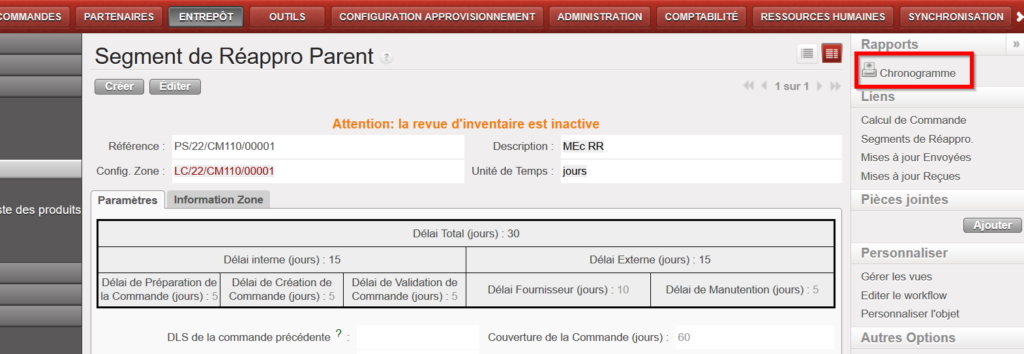
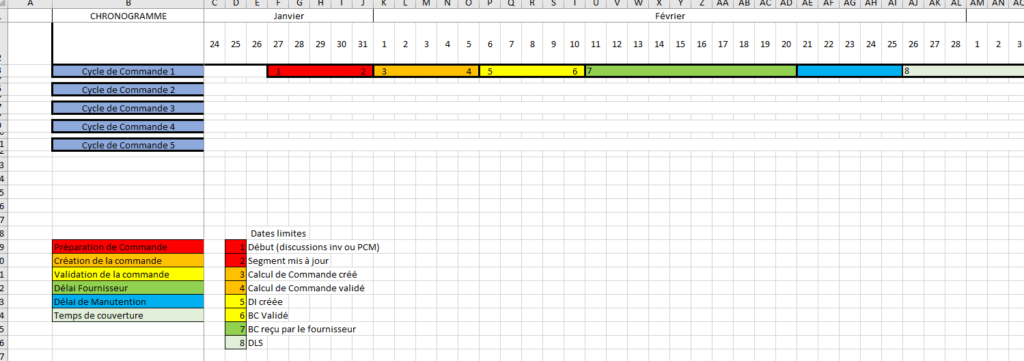
Il est possible d’exporter un schéma d’un Chronogramme sur format excel depuis le panneau de droite sur l’écran du Segment de Réappro Parent. Il donne une vue d’ensemble du horzon de 2 ans de planification, et montre jusqu’à 5 cycles de commande en fonction des dates saisies dans le Segment de Réappro Parent. Il y donne des indications des délais / dates clées pour le préparation de la commande, la création de la commande et la validation de la commande ainsi que les les délais fournisseur et de manutention et la couverture de la commande. Le Chronogramme sera généré avec l’Unité de Temps qui était sélectionné dans le Segment (jours/semaines/mois). Certaines contraintes ont été appliqué poue assurer que l’Unité de Temps sélectionnée soit pertinant aux délais saisis et il y a un message d’avertissement pour les indiquer.

Allez à: Entrepôt / Règles de Réapprovisionnement / Configuration / Segment de Réappro Parent