
This may happen if you receive/have received products on which you have doubts. In this case you will most probably create a claim (see specific LU on claims above).
Claims with type “Move to Quarantine” will move the goods to the “Quarantine (analyze)” location. Claims with type “Scrap” will move the goods to the “Expired/ Damaged /For Scrap” location. Note that if a claim is created from scratch you will be able to add an event with type “Scrap” on this claim. When this event will be processed, goods will be moved to the “Expired/ Damaged /For Scrap” location.
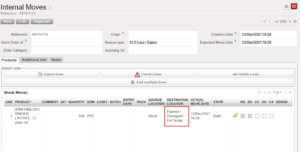
Another way to move goods to the quarantine location is via Internal Moves. This will be done when the quarantine is not related to a claim. Make sure to use the appropriate “Reason type” when you create the INT. As destination location you may choose between “Quarantine (analyze)” and “Expired/ Damaged /For Scrap)”.
|
|
|
Internal Move to isolate products in quarantine |
Note that Internal Moves will also be used to transfer goods from Quarantine back to another location if you realize that these goods can actually be used.
They will also be used to destroy the goods as explained in the next section.
