
Supply User Manual ENG -> 4. Procurement -> 4.10 LU-SU3401: Procurement Advanced Features -> B. How to launch a manual synchronization
B. How to launch a manual synchronization
As mentioned in the General chapter, the synchronization process enables to exchange automatically information between instances. For example, a validated PO at project level can be sent automatically to the coordination (and trigger the creation of an FO) via the synchronization process.
Most of the time, the synchronization will be set to an automatic parametrization and will run once or twice a day. However, there might be times when the request needs to be treated as soon as possible. In order to accelerate the process and not wait for the automatic synchronization, a manual synchronization can be launched.
The steps to perform this manual synchronization are described below and the synchronization should be done in both instances to get the full result (starting with the requesting instance and followed by the supplier instance).
Be aware that not everyone will have access to this manual synchronization. It is subject to user rights allocation.
Go to: Synchronization / Synchronization / Manual
 |
| Launch a manual synchronization |
- Click on “Start All Synchronization in Background“.
- Then, click on “Monitoring” and “Synchronization Processes Monitoring“. This allows you to watch the progress of the synchronization. Once all the lines show “OK“, the synchronization process is finished (if you need to refresh the screen, click on “Clear” – an automatic refresh is also done regularly).
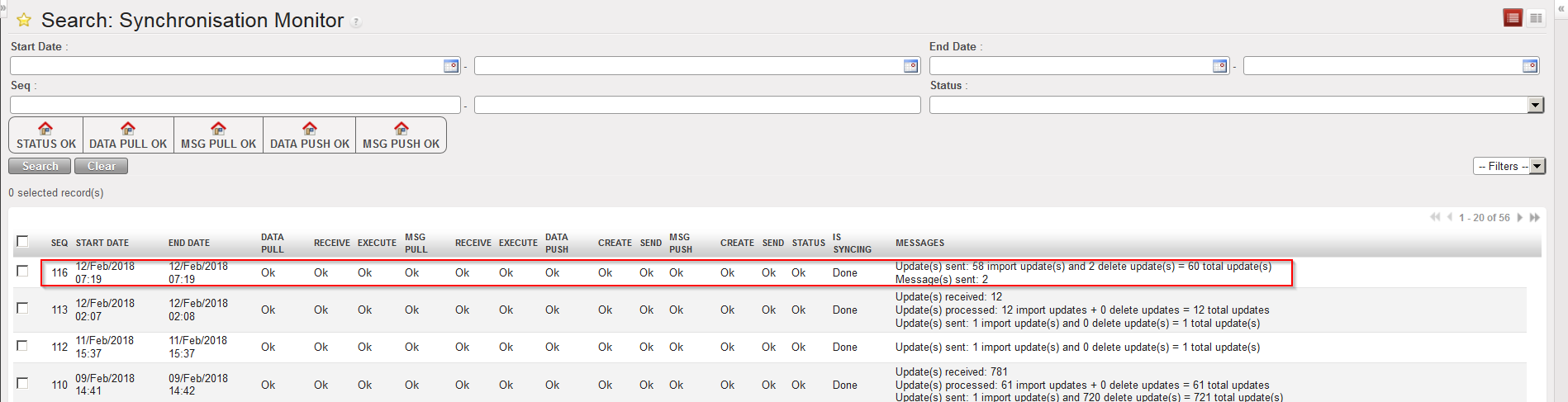 |
| Follow the synchronization process |
Note that you can still work on an instance while this instance is synchronizing. That is to say that you don’t need to wait for all the lines to be “OK” to work on the instance (the process will run in the background).
To see which documents have been created and modified due to the synchronization, you may use the “PO/FO/ Shipments Log“. Please see the configuration module for more details on this.
