
Supply User Manual ENG -> 5. Warehouse -> 5.17 LU-SU4303: Management of Expiry Dates -> C. HOW TO CHECK EXPIRATION OF KITS COMPONENTS
C. HOW TO CHECK EXPIRATION OF KITS COMPONENTS
The general tools for checking expiry dates will only take into account the overall expiry date associated with a whole kit. In some cases, a kit may contain components which will expire on different days.
By default, the kit should be associated with the earliest expiry date, but it could still be useful to check the expiration of each of the kit’s components. Please note that it will only be possible to check this for kits which have a Kit Composition List.
Go to: Products / Kit Management / Composition List / Kit Composition Item
- Filter displayed lines using the “Kit” filter and click search
|
|
|
Kit Composition Item |
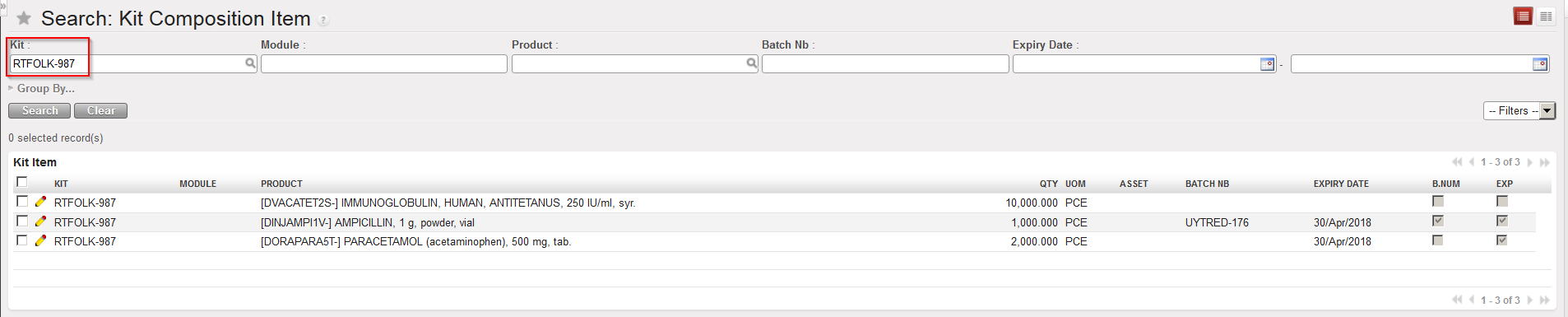
The report shows all the components of the kit with their batch number and/or expiry date if relevant.
Note that filters and the “Group by” may be used in different ways.
