
Supply User Manual ENG -> 4. Procurement -> 4.2 LU-SU3101: Internal Requests (IRs) -> C. How to create a Purchase Order with Products by Nomenclature.
C. How to create a Purchase Order with Products by Nomenclature.
As explained when IRs were introduced (see above: LU-SU3101 Internal request, C), there are situations when it is necessary to create orders containing lines with products not properly codified, called “products by nomenclature”.
These “products by nomenclature” can be present on a PO created from scratch or on a PO created via sourcing and even be synchronized if necessary. However, a PO-line cannot be confirmed with a “product by nomenclature”. The “Validated” state is the last state at which “products by nomenclature” are still allowed on a PO. After that (i.e. to confirm the PO-line), a product correctly codified will be required.
Go to: Purchases / Purchase Management / Purchase Orders
- Create a new PO or edit an existing one
- Click on the “New” button located on top of the “Lines” table (in the “Purchase order” tab) to enter a product line manually.
- On the “Purchase order Line” , fill “comment” with a product description then enter a quantity, a unit of a measure and a unit price if you know it.
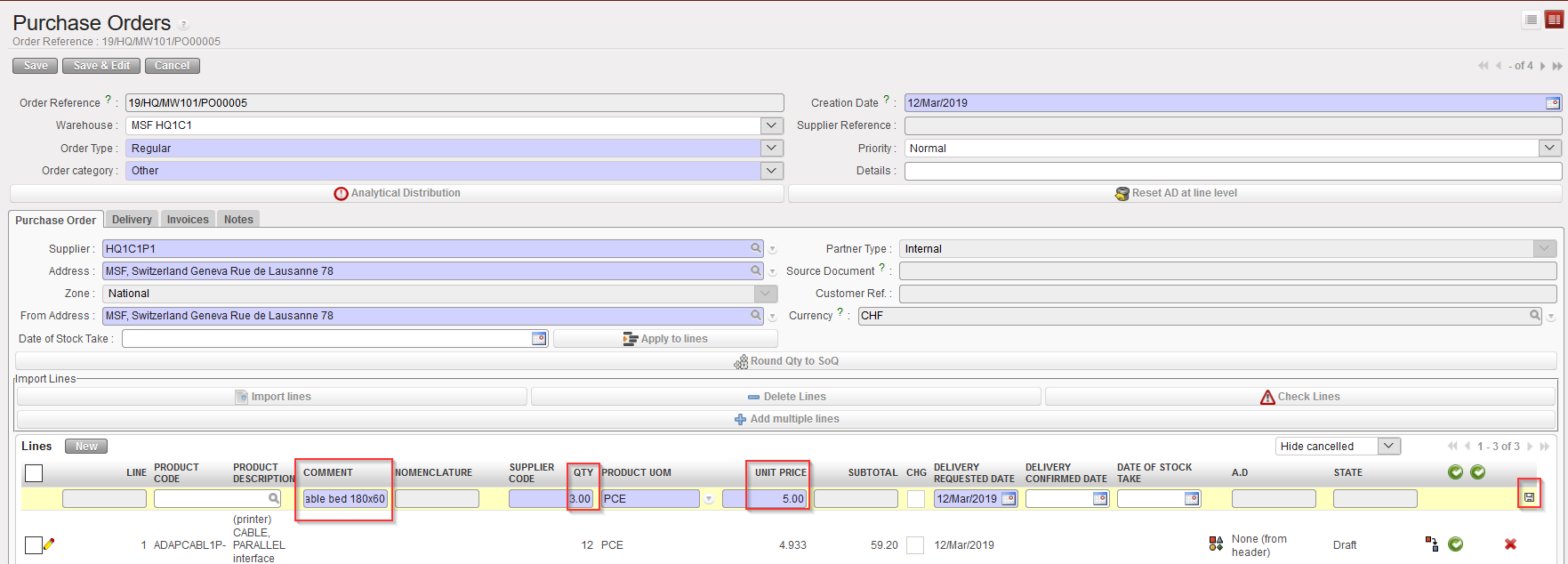 |
| Product by nomenclature on PO – Step 1 |
- Click on the floppy disk or “enter” to save the line
- Click on the “Configurator”
 |
| Product by nomenclature on PO – Step 2 |
- Select the full nomenclature in the “Main Type”, “Group”, “Family” and if possible “Root” fields.
- Click on the “Save & Close” button
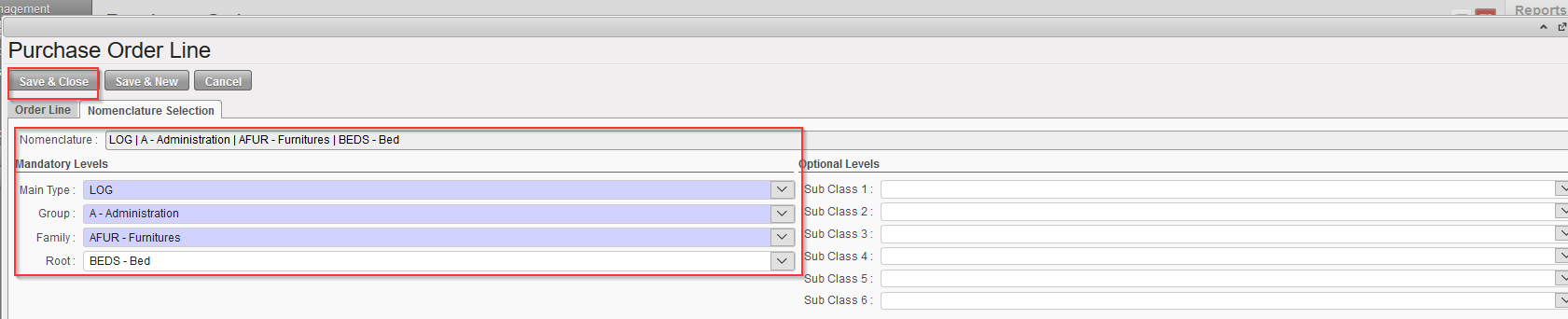 |
| Product by nomenclature on PO – Step 3 |
- On the main PO screen
- The line appears without product code and description.
- The Nomenclature levels together with the comment will help the coordination or the supplier to define the requested product.
 |
| Line with product by nomenclature on a PO |
You will be able to validate this PO-line but you won’t be able to confirm it unless you replace the product by nomenclature with a product correctly codified.
 If the PO supplier is another instance (e.g. the coordination), once the PO is validated, the synchronization will create an FO on this instance, corresponding to your PO. The correct code should replace the nomenclature on this FO before its validation. This could require the creation of a (local) product. This product will be reflected in your PO once the validated FO will be synchronised.
If the PO supplier is an ESC, the correct code should be provided by the ESC. It could require the creation of a new product in UniData which will appear in UniField thanks to the linkage between UD and UF.
