Supply User Manual ENG -> 5. Warehouse -> 5.3 LU-SU4102: Picking -> C. HOW TO PICK PRODUCTS FROM CROSS DOCKING
C. HOW TO PICK PRODUCTS FROM CROSS DOCKING
If an FO (or FO-line) is sourced on order (and to a PO), a Purchase Order is created. When this PO (or one of its lines) is confirmed, the corresponding FO (or FO-line) is also confirmed and a Picking Ticket is created in order to prepare the delivery to the customer.
The system creates a Picking Ticket as by default the system considers that the full shipment process (and not the simple out) will be used to deliver the goods to the customer. This Picking Ticket has the state “Draft”. As products are not yet available (they still have to be received in cross docking), the state of the Picking Ticket will be “Not Available“.
Note that the confirmation of the PO (or PO-line) triggers
-PO confirmation
-IN creation
-FO confirmation
-PICK creation
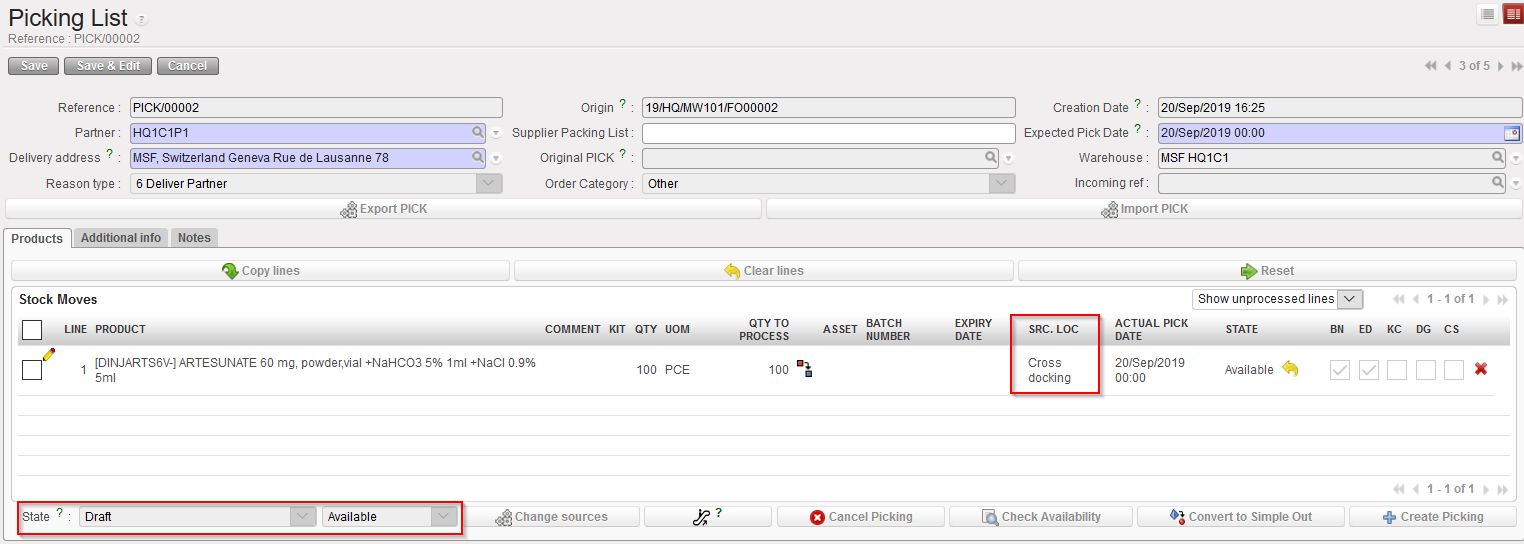
As soon as the IN is processed and goods are received in cross docking, the lines of the Picking Ticket corresponding to the received lines will become “Available“.
From this point, the process is similar to the one described in the previous section. The main PICK will be used to create sub PICK(s). The main difference is the source location of the PICK which in this case is “Cross docking”.
Go to: Warehouse / Warehouse Management / Deliveries / Picking
|
|
|
Main PICK after reception of the Incoming Shipment in Cross docking |