
Supply User Manual ENG -> Products -> 3.4 LU-SU2103: Products in Supplier Catalogues -> C. How to update a supplier product catalogue price list.
C. How to update a supplier product catalogue price list.
Go to: Partners/Suppliers
- Click on the pencil icon
 next to the Supplier whose Catalogue list you want to update to open it in edit mode
 - You can add a new line to an existing catalogue. When a new line is added directly to an existing catalogue, this new line must have its ranking assigned unless there is already a ranking at header level
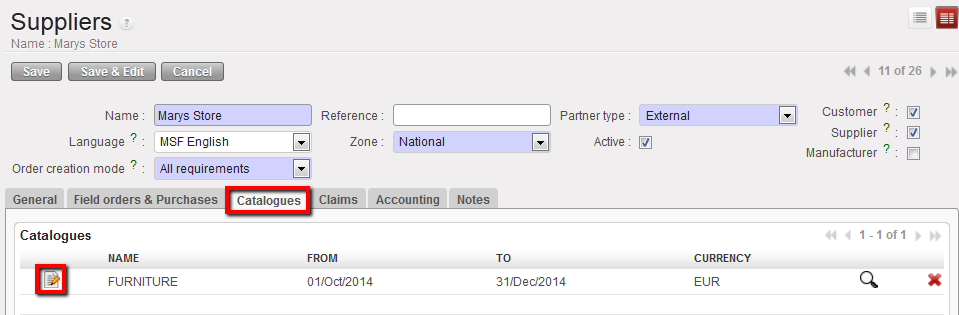
- Click on the Catalogues tab
- Click on the Edit Catalogue icon
 next to the version/name of the catalogue you wish to update, this will open the Supplier Catalogue in a new screen
Edit tab
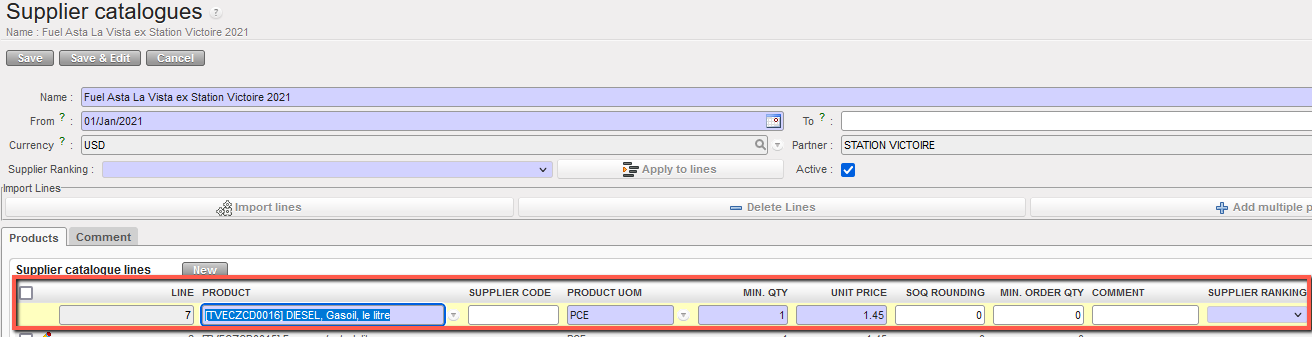
- Click on the pencil icon
 next to the product that you want to update and make the appropriate changes. (NB the system will keep a record of the original and all previous versions of this catalogue list)
 - Click on the floppy disk icon
 next to the product line to save and repeat for all products as required.
 - Click on the Save button to save all changes to this Supplier Catalogue.
Update records
The supplier catalogues are linked to the supplier and can be synchronized. The supplier in each instance must be active in order for the catalogue to be synchronized and directly activated. Any product added / changed, or any change of price can be synchronized this way.
It is possible to see Track Changes for Catalogues which are for external suppliers. This is available via the Action menu in an excel format. This includes entries for any changes to the rankings of the catalogue & its lines.
ESC’s catalogues are created by HQ and only synchronised to coordination. ESC partner must be activated as well as the catalogue by coordination. For catalogues for other external suppliers, these are synched down to project level, but the same rule applies for activating supplier and catalogue to have visibility of these.
N.B : It is not possible to add a product to a valid catalogue if the product is already included in another valid catalogue of the same supplier, otherwise you will receive a blocking warning message.
