
Supply User Manual ENG-> Supply Configurations-> 2.1 LU-SU1101: Instance set-up-> D. LU-SU1101: Configurable locations
D. LU-SU1101: Configurable locations.
UniField has been designed to be “scalable” in order to fit various contexts in the field where it is implemented (from small projects to coordination). Additional locations can be created on an instance: Intermediate Stocks (IS), Internal Consumption Units (ICU) and External Consumption Units (ECU).
The decision on whether to create and how to configure these additional locations should be taken considering the following factors:
- Resources available to maintain records (on or offline)
- Need for online visibility of stock and stock movements
- Volume and value of supplies
- Connectivity of other locations
- Consumption rate of goods
- Supply chain flow of goods following their dispatch from warehouse
- Intermediate Stocks
Intermediate Stocks are stocks which need to be managed separately from the main stock. Their management is usually done by the supply team.
Intermediate Stocks are not considered as final consumers. These stocks are “integrated” (they are part of the internal inventory and valued) and must be issued regularly.
2. Consumption Units (Internal vs External)
In UniField, a Consumption Unit is a location where goods are dispatched to be used or consumed. Consumption Units can either be internal or external locations. How the consumption units are configured depends on the situation and should be decided on a case by case basis.
Internal: If it is internal, we have full visibility on the stock level and its value in the location. Someone (probably based in that location) must update the system regularly with all stock movements when goods are consumed, and therefore the availability of resources and time to maintain the data for an Internal Consumption Unit should be a prime consideration before deciding on this option.
Internal Consumption Units are not considered as “last customers”.
External: If the destination is external, as soon as the stock has been dispatched, the stock leaves the UniField system, and other than knowing that it has been delivered to the consignee, we do not know any further details about it. Of course the location can continue to track movements using whatever system (e.g. excel or paper based), which may be a more flexible option for instances where there are time, resource or connectivity constraints.
External Consumption Units are considered as “last customers” (when goods are delivered to an ECU, they are assumed to be consumed).
The difference between an Intermediate Stock and an Internal Consumption Unit is tiny. An Intermediate Stock is used when a stock should be managed separately from the main stock (and this is usually done by the supply team). An Internal Consumption Unit is used when goods have already been sent to a unit but have not been used (consumed) yet. Their consumption can be recorded by the staff working in this unit (e.g. medical staff) if they have access to the system.
As we will see below, UniField allows creating locations for EPREP usage. Technically, there is no difference with the Intermediate Stocks. Functionally, these locations are used to keep emergency preparedness stocks.
How to set-up configurable locations
Intermediate Stock locations and Internal/External Consumptions Units can be created on an instance in order to reflect the physical stocks organization of a project/coordination office and support the physical flows which occur on the ground.
6 possible set-ups (from basic to complex) are illustrated below. These 6 set-ups focus on a consumption done from stock (i.e. not on order). Note that hybrid set-ups are also possible.
- Minimal set-up (no additional configurable locations)
Goods are received and kept in the main stock (Stock/MED/LOG).
If goods are consumed locally (on the instance) by an MSF requestor, the consumption is recorded via a Real Consumption Report with the main stock (Stock/MED/LOG) as Source Location and the generic partner location “MSF Customer” as Destination Location. If goods are consumed by a non-MSF requestor, the generic partner location “Other Customer” can be used as Destination Location. Internal Requests are not used to register local consumptions with this set-up.
If goods are dispatched to a partner (a customer, via the sourcing of an FO), the consumption is recorded via a Delivery Order (OUT) or via PICK/PACK/SHIP. The Source Location of the OUT or the PICK is the main stock (Stock/MED/LOG). The Destination Location of the OUT or the SHIP is the partner location “MSF Customer” (or “Other Customer” if the customer is an external partner).
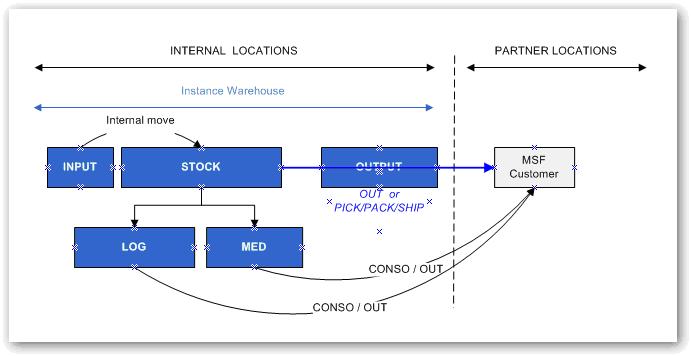
Minimal set-up
| Advantages | Disadvantages | Constraint/Effort |
| Quick and easy to manage and understand.
Minimal resources required. Stock visibility on warehouse (quantity, value, expiry dates). |
Goods delivered from the WH are considered consumed.
General follow up: no online details on intermediate stocks or consumptions/activities. |
Minimum |
2. Intermediate Stocks (IS)
When purchased, goods are:
- Either received in the main stock (Stock/MED/LOG) but transferred to an Intermediate Stock (with an Internal Move created from scratch or with an Internal Move created from IR sourcing) from where they’ll be consumed.
- Either received directly in an Intermediate Stock. This is possible if the replenishment of this IS starts with an IR which has the IS as Location Requestor.
If goods are consumed locally (on the instance) by an MSF requestor, the consumption is recorded via a Real Consumption Report with an IS as Source Location and the generic partner location “MSF Customer” as Destination Location. If goods are consumed by a non-MSF requestor, the generic partner location “Other Customer” can be used as Destination Location. Internal Requests are not used to register local consumptions with this set-up.
If goods are dispatched to a partner (a customer, via the sourcing of an FO), the consumption is recorded via a Delivery Order (OUT) or via PICK/PACK/SHIP. The Source Location of the OUT or the PICK is an IS. The Destination Location of the OUT or the SHIP is the partner location “MSF Customer” (or “Other Customer” if the customer is an external partner).
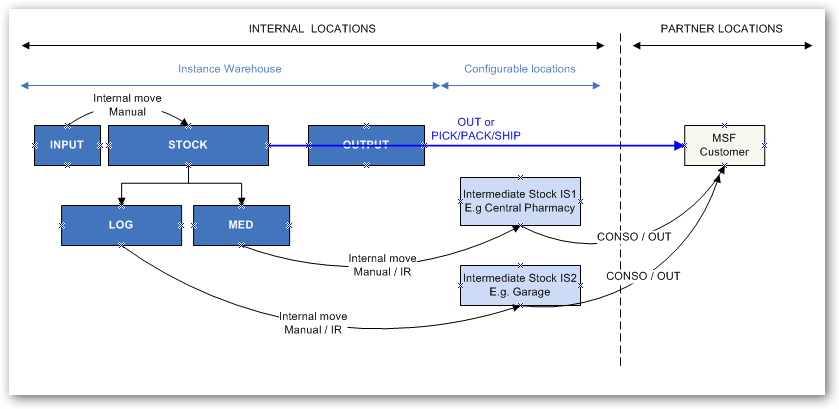
Intermediate Stocks
| Advantages | Disadvantages | Constraint/Effort |
| Fairly simple to manage.
Good visibility of stock after it has left Warehouse until it reaches intermediate stocks (quantity, value, expiry dates). |
Goods delivered from Intermediate stocks are considered consumed.
More demanding in terms of input (transactions & updates) required for system. |
Average |
3. External Consumption Units (ECU)
This configuration is similar to the minimal set-up but with further details on the destination of the goods.
Goods are received and kept in the main stock (Stock/MED/LOG).
If goods are consumed locally (on the instance) by an MSF requestor, the consumption is recorded via a Real Consumption Report with the main stock (Stock/MED/LOG) as Source Location and a specific ECU as Destination Location. Note that the partner locations “MSF Customer” and “Other customer” can also be used as Destination Location if needed.
As an alternative to the RCR, local consumption can also be recorded through Internal Requests with an ECU as Location Requestor. Their sourcing generates a Delivery Order with the ECU as Destination Location.
If goods are dispatched to a partner (a customer, via the sourcing of an FO), the consumption is recorded via a Delivery Order (OUT) or via PICK/PACK/SHIP. The Source Location of the OUT or the PICK is the main stock (Stock/MED/LOG). The Destination Location of the OUT or the SHIP is the partner location “MSF Customer” (or “Other Customer” if the customer is an external partner).
An alternative is to link a partner (customer) to an ECU (thanks to the field “Customer Location” available on the “Field orders & Purchases” tab of the partner sheet). In this case, all goods shipped to this partner have this ECU as Destination Location of the OUT or the SHIP.
Note that the stocks of the ECUs are not integrated (no visibility) as these locations are considered as “end customers”.
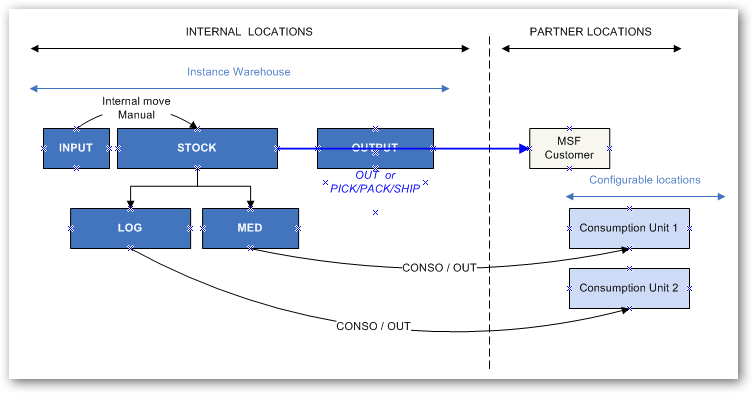
External Consumption Units
| Advantages | Disadvantages | Constraint/Effort |
| Quick and easy to manage.
Quite low volume of transactions. Minimal resources required. Stock visibility on warehouse (quantity, value, expiry dates) |
Goods delivered from the WH are considered as consumed*.
General follow up and consumption information only on destinations (consumption units = end consumers) |
Average low |
4. Intermediate Stocks (IS) and External Consumption Units (ECU)
This configuration is a mixture of set-ups 2 and 3.
When purchased, goods are:
- Either received in the main stock (Stock/MED/LOG) but transferred to an Intermediate Stock (with an Internal Move created from scratch or with an Internal Move created from IR sourcing) from where they’ll be consumed.
- Either received directly in an Intermediate Stock. This is possible if the replenishment of this IS starts with an IR which has the IS as Location Requestor.
If goods are consumed locally (on the instance) by an MSF requestor, the consumption is recorded via a Real Consumption Report with an IS as Source Location and a specific ECU as Destination Location. Note that the partner locations “MSF Customer” and “Other customer” can also be used as Destination Location if needed.
As an alternative to the RCR, local consumption can also be recorded through Internal Requests with an ECU as Location Requestor. Their sourcing generates a Delivery Order with the ECU as Destination Location.
If goods are dispatched to a partner (a customer, via the sourcing of an FO), the consumption is recorded via a Delivery Order (OUT) or via PICK/PACK/SHIP. The Source Location of the OUT or the PICK is an IS. The Destination Location of the OUT or the SHIP is the partner location “MSF Customer” (or “Other Customer” if the customer is an external partner).
An alternative is to link a partner (customer) to an ECU (thanks to the field “Customer Location” available on the “Field orders & Purchases” tab of the partner sheet). In this case, all goods shipped to this partner have this ECU as Destination Location of the OUT or the SHIP.
Note that the stocks of the ECUs are not integrated (no visibility) as these locations are considered as “end customers”.
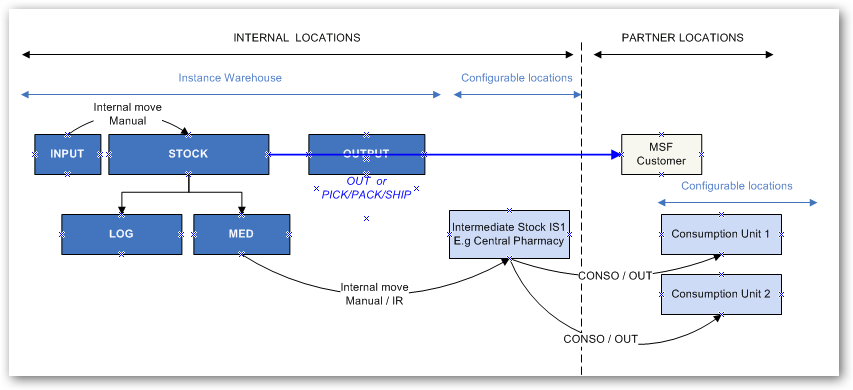
Intermediate Stocks and External Consumption Units
| Advantages | Disadvantages | Constraint/Effort |
| Good overview of stock management and general follow up for Intermediate Stocks (quantity, value, expiry dates).
Consumption information by destination/consumer. |
More complex.
Needs more input to manage: Moves from stock to intermediate stocks plus one consumption report by destination (consumer). Stock of consumption units is not integrated (no visibility). |
Average |
5. Internal Consumption Units (ICU)
This configuration is very close to set-up 2.
When purchased, goods are:
- Either received in the main stock (Stock/MED/LOG) but transferred to an Internal Consumption Unit (with an Internal Move created from scratch or with an Internal Move created from IR sourcing) from where they’ll be consumed.
- Either received directly in an Internal Consumption Unit. This is possible if the replenishment of this ICU starts with an IR which has the ICU as Location Requestor.
If goods are consumed locally (on the instance) by an MSF requestor, the consumption is recorded via a Real Consumption Report with an ICU as Source Location and the generic partner location “MSF Customer” as Destination Location. If goods are consumed by a non-MSF requestor, the generic partner location “Other Customer” can be used as Destination Location. Internal Requests are not used to register local consumptions with this set-up.
If goods are dispatched to a partner (a customer, via the sourcing of an FO), the consumption is recorded via a Delivery Order (OUT) or via PICK/PACK/SHIP. The Source Location of the OUT or the PICK is an ICU. The Destination Location of the OUT or the SHIP is the partner location “MSF Customer” (or “Other Customer” if the customer is an external partner).
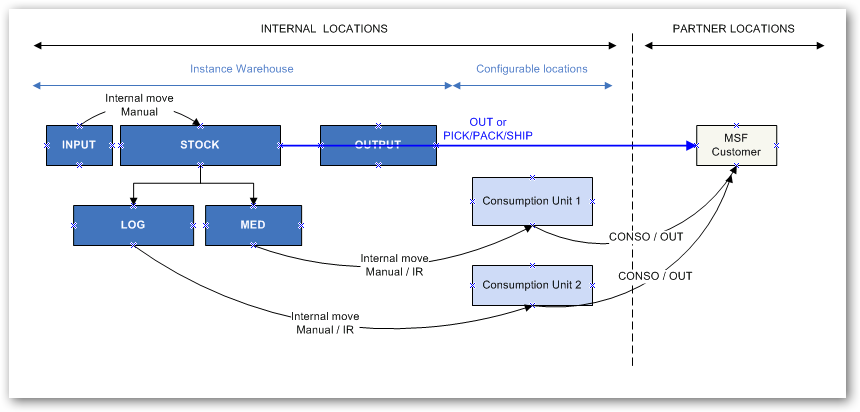
Internal Consumption Units
| Advantages | Disadvantages | Constraint/Effort |
| Fairly good overview of consumption of stocks.
Visibility of consumption units’ stock (quantity, value, expiry dates) |
Some resources needed to ensure system is up to date (frequent consumption of consumption unit). | Average |
6. Full set-up
In this configuration, Intermediate Stocks, Internal Consumption Units and External Consumption Units are used. This set-up is more complex and requires much more transactions, meaning resources, to maintain the system.
When purchased, goods are:
- Either received in the main stock Stock/MED/LOG (via the Input location and the manual/automatic processing of an INT)
- Either received in an Intermediate Stock (via the Input location and the manual/automatic processing of an INT)
- Either received in an Internal Consumption Units (via the Input location and the manual/automatic processing of an INT)
Goods can be moved between these 3 types of locations using Internal Move created from scratch or Internal Moves created from IR sourcing.
Local consumption is registered via RCR. The 3 types of locations can be used as Source Location. The Destination Location can be an ECU, “MSF Customer” or “Other Customer”.
As an alternative to the RCR, local consumption can also be recorded through Internal Requests with an ECU as Location Requestor. Their sourcing (from one of the 3 types of locations) generates a Delivery Order with the ECU as Destination Location.
If goods are dispatched to a partner (a customer, via the sourcing of an FO), the consumption is recorded via a Delivery Order (OUT) or via PICK/PACK/SHIP. The 3 types of locations can be used as Source Location on the OUT or the PICK. The Destination Location of the OUT or the SHIP is the partner location “MSF Customer” (or “Other Customer” if the customer is an external partner).
An alternative is to link a partner (customer) to an ECU (thanks to the field “Customer Location” available on the “Field orders & Purchases” tab of the partner sheet). In this case, all goods shipped to this partner have this ECU as Destination Location of the OUT or the SHIP.
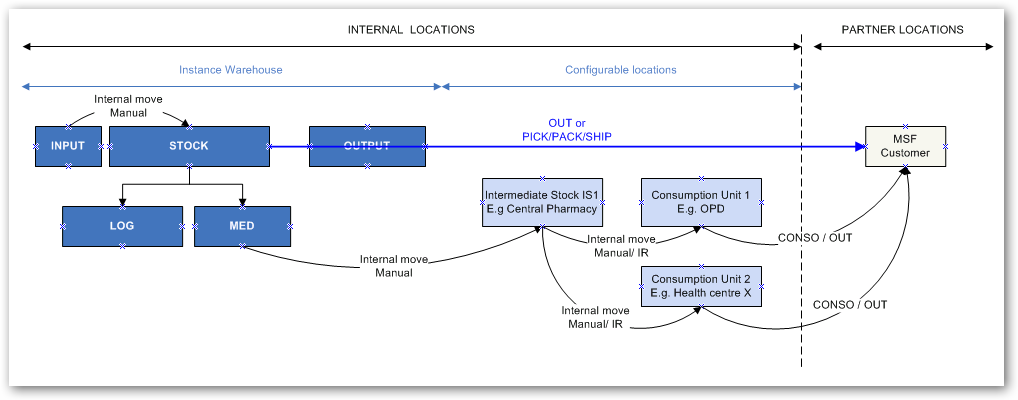
Full set-up
| Advantages | Disadvantages | Constraint/Effort |
| Very precise follow up of goods at the different stages (quantity, value, expiry dates,) of the supply chain until they’re consumed by the end consumer.
Closer to real consumption. |
Complex to understand.
Increased number of transactions (meaning also of resources needed to maintain the system). Delay in the timeframe when goods are considered “consumed”. |
Maximal |
In general, goods are considered consumed once they have left internal locations for external (partner) locations. Consumption in the system reflects either consumption reports or outgoing delivery of shipments (we exclude loans, donations, loss and discrepancies as consumption and we also deduct returns). The Warehouse Chapter details how consumptions (real by location or monthly average for the instance) are calculated.
Configurable Stock Locations can be created at Coordination and Project instance levels but the decision should be taken on case by case basis according to Mission/OC decision.
