
Supply User Manual ENG -> Products -> 3.6 LU-SU2105: Kits/Modules -> D. How to create a Theoretical Kit Mass Import
D. How to create a Theoretical Kit Mass Import
In order to be able to download easily numerous Theoretical Kits, a Theoretical Kits Mass import feature has been developed.
Starting at HQ user will be able to download a significant number of Theoretical Kits via import and once created at HQ and set to Completed, this TKL can be synchronized down to all missions as Draft.
Go to: Products/ Kit Management / Theoretical Kit Mass Import
- Click on the “New” button to start the process
- Click on “Get template” to get a template of the import file to update
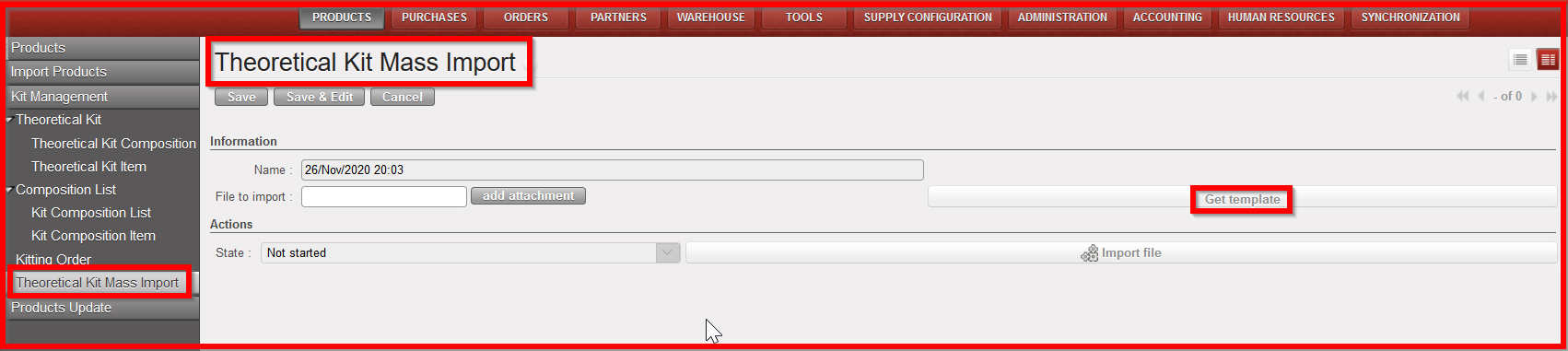
Theoretical Kit Mass import

Theoretical Kit Mass import template to be updated at HQ
3. Once template updated (do not forget to set “Active” column to “True”), click on “add attachment” and add the file to import
4. Click on “Import file”
5. A message will inform that import has been successful and the the TKL has been created
6. Go to sub- menu “Theoretical Kit Composition” and check that TKL has been created as Draft.
7. In order for the TKL to be synchronized down to all missions, the TKL will have to be set to “Completed”.
Kit composition List
Unlike the Theoretical Kit Composition list, the Kit Composition List identifies actual products composing a kit.
A kit composition list can be created during the reception process from an incoming shipment or after a kiting order. Please refer to Chapter Warehouse, LUSU-4101 Incoming Shipments How to receive and add a kit composition list.
However in some circumstances (de-kitting) or action deemed to your procedures you will need to create a Kit Composition List from scratch.
