
27. FX rates and conversions
Generic principles
All Unifield transactions are created in booking currency and systematically converted to functional currency (CHF for OCG; EUR for all other OCs) using monthly rates having a “valid from” date. The functional currency rate (1 <-> 1) must also be defined in the database though this rate does not need to be re-imported each month as it will never vary.
The calculation is computed as follows:
Amount in functional currency = Amount in booking currency * Valid rate.
The converted amount to functional currency is stored in the DB to quicken entries display and to ease the production of accounting reports. The calculation precision is displayed with 2 decimals but stored with up to 9 decimals in the DB.
The rate applied is by default the one corresponding to the entry’s posting date (even if US-5848 now allows to use document date): an entry with document date in January and posting date in March will be converted using the March rate.
This choice was enforced early in the project upon referents request and led to conversion discrepancies when exporting entries to HQ systems (vertical integration) where entries may be valued using the rate valid at the document date. This gap is individually managed by OCs either through vertical integration or by importing entries in booking currency only and then converting them to functional currency in the HQ application.
One could argue that the above choice regarding conversion rates allows manipulations by relying on the booking period rate rather than on the date stated on the physical evidence supporting the booking. Such risk was highlighted during the workshops but estimated non material by the group of referents.
In order to avoid cut-off issues it was later requested to forbid the use of document date belonging to FY (N-1) for FY (N) bookings US-192. Finally, US-5724 has introduced the possibility to allow or not to allow document dates belonging to previous Fiscal year as a setting in the reconfigure module when creating an instance. Note that this setting shall be the same in all instance from the same OC. This is part of the instance creation procedure to set this setting depending of the OC. Only OCG don’t allow the use document date from previous Fiscal Years. This setting makes that all entries from a previous fiscal year can’t be corrected in the current fiscal year when using the automatic correction wizard.
US-5848 has introduced the possibility to compute functional amount using the document date. It is now coded in the code that all instances OCB and OCG now compute functional amount using the document date and starting 1st January 2020.
FX rates are defined monthly with a “Date from” set to the first day of the month, from. All currencies and rates defined at HQ sync down to field instances but must be activated locally to be possibly used in accounting transactions. Field users can only activate / deactivate currencies. Non listed currencies (“exotic currencies”) must also be handled from HQ from a system perspective.
In case the rate for the current period did not sync (not imported at HQ, local internet connection failure…) system will keep on using the previous period rate until the new rates is synchronised in the DB. System automatically re-values all transactions booked in period (M+1) and converted using period (M) rate: the conversion to functional currency is updated. The new rate synchronisation may also trigger the creation of automated FX rates adjustments if applicable. However, it is advised to import rates at HQ as soon as they are known as retroactive calculation can impact the performance when changing the rates and after sync (i.e recalculating retroactively thousands of entries could freeze the interface access while computing. See also US-3375 and US-3528).
On a case-by-case, exceptional setting missions may require HQ to use bi-monthly or even weekly rates. Unifield can handle this behaviour without any change: an authorized user only has to import rates with the adequate “Date from”. This feature is designed to adapt to hyper-inflation contexts where MSF may operate, as was the case in Zimbabwe in the late 1990s / early 2000s. In such context MSF is likely to limit transactions in local currency if possible and to concentrate payments in a recognised international currency like USD, so the impact in terms of number of transactions to be handled in UF with this specificity should be limited.
Currencies statuses:

Exceptions
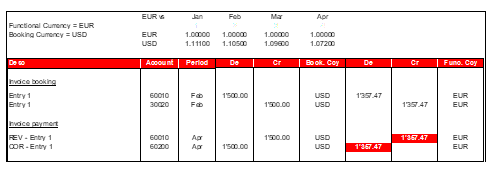
In case of accounting corrections performed through the correction wizard and triggering REV and COR entries (correction of posted entries), a different rate may apply. If the initial entry is corrected in a different period then the rate used to convert the correction is the rate at which the initial entry was converted. The principle followed is “the correction rate must systematically be converted using the original entry’s rate”.
Below is an accounting scheme illustrating this principle (G/L view).
Fig. Fin-4 – G/L Corrections accounting scheme
Specific currency tables
Specific currency tables derive from the standard FX rate table (model) and are used to produce reports. From a technical standpoint, all specific FX tables must include the 1 <-> 1 functional currency rate: if functional currency is EUR then the table must contain a line stating that the EUR <-> EUR conversion rate is equal to 1.
As an example such tables could be used to value actuals at budget rate, possibly at year-end to explain a portion of the variances between budget and actuals. Some Donors are also requiring MSF to produce grant reporting at imposed rates: specific FX tables are the right placeholder for the imposed rates to be imported or manually created.
They can be used in the following reports by adding the table’s name in an optional field located in the report’s wizard:
- Budget vs. Actual (Budget Module)
- Actuals by CC (Budget module)
- Financing Contracts Budget vs Actuals (Grant Management Module) – The currency table must be added in the “Currency Table” field located in the “Contract Information” tab of the financing contract.
- FX rates by currency (Currency configuration)
- FX rates by currency table (Currency configuration)
Such currency tables are created at HQ and must be “valid” to sync down to all field instances.
Currency tables statuses:

Output amount
Output amount is an extra hidden that is seen only when exporting AJI using “Export search result”. With this export, it is possible to select a currency table to calculate the functional amount or to select another output currency rather than the functional one. The result is display in the fields “Output amount” and “Output Currency” that can then differ from the “Functional amount” and “Functional Currency”.
28. Reconciliations
Automated FX rates adjustment
Reconciliation refers to the process of matching the credit and debit entries on a specific Balance Sheet account from a selection of records.
When reconciling B/S entries together while they are booked in different periods, the reconciliation is balanced in booking currency but not in functional currency. As statutory reporting is done in functional currency, system is creating an additional entry so as to balance the reconciliation, as shown in the illustration below:
Fig Fin-5: FX adjustments accounting scheme
General Principles of the Reconciliation Function
- Only hard-posted entries can be reconciled
- Only entries recorded on the same G/L Account can be reconciled together
- Only entries with the same Third Party can be reconciled together, unless the account has been configured with one of the following special treatments:
- If the account has been set with the specific treatment “internal transfer”, the third parties have to equal to the counterpart entry’s journal code
- If the account has been set with the specific treatment “Reconciliation – disregard 3rd party”, the check on third party is not applied
- If the account has been set as salaries default account in Company Configuration, the check on third party is not applied
- Each manual reconciliation must include at least one debit line and one credit line. There is no limit on maximum number of debit and/or credit lines.
- Each reconciliation is automatically assigned a unique alphanumeric reconciliation reference. The reconciliation reference prefix is unique to a proprietary instance and it must be set up at the time of creating a new instance in the prop instance at HQ.
- Reconciliations can be full or partial:
- Full reconciliation: Total debit entry amount matches total credit entry amount.
- Partial reconciliation: Total debit entry amount differs from total credit entry amount. This is an intermediate status; the entries included in a partial reconciliation can be reconciled further with additional entries until a full reconciliation is reached.
- However, entries originating from two or more different partial reconciliations can only be reconciled together in a full reconciliation – further partial reconciliations are not possible without unreconciling the entries first.
- Partially reconciled entries are considered as not reconciled in all reports and selections
- Reconciliations can be automatic or manual:
- Automatic reconciliations: Entries that are imported in the registers through:
- Pending Payments (e.g. Supplier Invoices and Payroll entries)
- Import Cheques wizard
- Direct Invoice wizard or
- Advance Return wizard are automatically reconciled with their source entries.
- Automatic reconciliations: Entries that are imported in the registers through:
In addition, the following entries are automatically reconciled:
-
-
- Year-End Revaluation and Accrual entries are automatically reconciled with their reversal entries.
- Supplier Refunds created through the refund wizard as well as Down Payments are automatically reconciled with the original Supplier Invoices.
- Fiscal year closing “Move to 0” entry is automatically reconciled with the entries in the accounts included in the “Move to 0” function.
- Manual reconciliations: Internal transfers between registers, direct entries in registers and manual journal entries (e.g. prepayments or correction entries) are reconciled manually.
-
- A check on currency rates is included in full reconciliations. An automatic FX adjustment entry is created to balance the reconciliation in functional currency in the following use cases:
- If the entries within a reconciliation have the same booking currency but belong to different accounting periods with different FX rates.
- If the entries within a reconciliation have a different booking currency (e.g. transfers with currency difference).
The FX adjustment entry is created in FXA (Currency Adjustment) journal. The entry has a 0.00 booking amount and a functional amount that matches to the difference in debit and credit entries within the reconciliation. The amount (credit or debit) is automatically booked to the account that is reconciled and the offsetting amount to the “Realized Loss/Gain Currency Exchange” account that is configured for the FXA journal (or in the account code settings if willingness to have a different account depending of the account to be reconciled US-5011). The FX adjustment entry is automatically posted and reconciled.
The document and posting dates of the FX adjustment entry depend on the period status. If the period of the latest entry to be reconciled is still open, the FX adjustment applies the same document and posting dates. If the period is already closed, the document and posting dates will be the first date of the first open period.
Reconciliation of entries originating from different instances
Coordination user can reconcile entries that originate from Project instances. The reconciliation synchronizes bi-directionally to the HQ and – if Project entries are included in the reconciliation – to the Project instance. If the reconciliation triggers an FX adjustment, the instance in which the FX adjustment entry is created depends on where the reconciled entries originate from:
- Coordination entries only:
- FX adjustment created at Coordination at the time of reconciliation
- Project 1 entries only:
- FX adjustment created at Project 1 when the reconciliation from Coordination has synchronized
- Coordination and Project 1 entries:
- FX adjustment created at Coordination at the time of reconciliation
- Project 1 and Project 2 entries:
- FX adjustment created at coordination at the time of reconciliation
Since it is technically possible to reconcile the same entries at Project and at Coordination at the same time, a correct reconciliation procedure has to be set up in each mission with guidelines about which instance is responsible for the reconciliations. If the same entries are reconciled in two instances at the same time, the synchronization will not work correctly and the reconciliations will remain one-legged with possible orphan FX adjustment entries.
- Example of specific reconciliation use case with FX adjustment created
Under the following use case, the FX adjustment behaviour is adapted to guarantee consistency between project and coordination data:
-
- From coordination, reconcile 2 entries belonging to projects (the reconciliation is supposed to trigger a FX rate adjustment)
- The FX rate adjustment is not created in the coordo DB
- Sync Coordo, Sync Project
- The FX adjustment is created at project level (i.e. where it initially belongs)
- Sync Coordo
- The FX adjustment is now created at Coordo level
Re-calculation of FX adjustment amounts
Normally, a posted Journal Entry is synchronized unchanged (=“as is”) from a lower instance to an upper instance. But with FX adjustments, the behaviour is different:
- The FX adjustment amounts are always re-calculated in the receiving instance.
The re-calculation means that in case any of the Journal Items within a reconciliation is not correctly synchronized and remains a not run at the receiving instance, the FX amounts are adjusted to match the difference. This can lead to differences in the FX amounts in between HQ, Coordination and Project. Therefore the not run sync updates need to be addressed in a timely manner to ensure the accounting remains correct in all instances.
Also, the functional amounts of all Journal Items are re-calculated whenever the FX rates are updated. If the currency rates are changed, also the FX adjustment entry amounts are re-calculated to keep all reconciliations balanced in functional currency.
- FX adjustments and rounding in functional currency
Depending on the data set user may come up with situations where the FX adjustment amounts to 1 or 2 cents only. In this case system is merely performing a rounding in functional currency at time of reconciliation. The generic mechanism applied consists in checking balances in functional currency for all the lines included in the reconciliation. In some cases, even if the FX adjustment does not apply (entries from the same period for e.g.) system may still create an entry described as “automated FX adjustment” but only meant to correct a misbalance in functional currency (as sum of converted line amounts may differ from the conversion of the total amount).
- Impact on synchronisation
FX adjustment lines are technically identified as “Addendum lines” in sync. It constitutes a specific boolean attribute on Journal Items that is used as a condition in sync.
Unreconciling Entries
US-1784: Only manually reconciled entries can be manually unreconciled. If the original reconciliation has triggered an FX adjustment entry, the following behaviour applies:
- The unreconciliation will trigger a reversal FX entry. The reversal FX entry is for the offsetting amounts of the original FX entry and for the same accounts, document and posting dates as the original FX entry. If the unreconciliation is done after the original reconciliation period has already been closed, the posting date of the reversal FX adjustment will be the first day of the first open period.
- Unreconciliation can only be done in the same instance in which the entries were originally reconciled, e.g. if project entries are reconciled in a coordination instance, the unreconciliation can only be done at the coordination instance.
- Unreconciliation can only be done when the original FX adjustment entry has been received through the synchronization, i.e. when all legs of the reconciliation are present and when the reconciliation is balanced in functional currency.
- The FX entry is created in the instance from which the reconciled entries originate, i.e. if coordination reconciles project entries, the FX entry is created at project level.
- The reversing FX entry is, however, created directly in the instance where the unreconciliation is performed.
- The reversing FX adjustment entry is automatically reconciled with the original FX adjustment entry.
Master Data Related to Reconciliation
In order to be able to reconcile entries, the following elements have to be configured in the set of master data:
- Each account for which reconciliations are done has to be set as “reconcilable” in the account configuration
- Specific Treatments for each account regarding reconciliation need to be applied according to the OC’s procedures (e.g. internal transfers, disregard third parties, salaries default account)
- A cost center has to be assigned for FX gain/loss in each instance
- A reconciliation prefix has to be set in each proprietary instance
- An FXA (Currency adjustment) journal and analytic journal has to be created for each instance
- The accounts for Realized Gain/Loss Currency Exchange will need to be set up in the FXA journal
- The default account for FXA entries is set in the FXA Journal (usually 67040 and or 71110) and those account codes are used for any FXA entries generated by the system.
- It is possible to choose other accounts than the one set in the FXA journal and based on the account code involved in the reconciliation. This has to be set in the account code settings. If the fields are empty, then the FXA accounts are taken to trigger the FXA entries (US-5011)
- In the chart of account, each account code “Reconcilable” have now 2 additional fields (Default Debit / Credit Account for Reconciliation) where account code for FXA can be filled. Those account codes will prevail on the default account code for FXA set in the FXA Journal.
- For instance, you can choose to have automatically the account 67050 to be used for any FXA entry related to the account 14130 (internal transfer currency exchange rate) by defining that in the configuration of this account otherwise the system will keep taking automatically the default FXA account set in the FXA Journal (67040).
- It is also possible to prevent reconciliations when entries involved have more than one currency (US-5766). Settings is in the chart of account in the field “Prevent Reconciliation with different currencies”
29. Searching Reconciled and Not Reconciled Entries
- Entries included in an individual reconciliation can be searched by entering the reconciliation reference in the “Reconcile” field in Journal Items or in the “Reconcile Reference” field in G/L Selector.
- All reconciled or not reconciled entries can be searched directly in Journal Items view or through the G/L Selector by using the “Is reconciled” filter either alone or with other filters (e.g. account, third party).
- A date can be typed in the “At” field in order to show entries that were reconciled / not reconciled at or before a selected date.
- Entries can also be filtered to show all unreconciled entries at a period end. You will need to type a period (e.g. Jul 2017) in the “Open items at” field AND a posting date “to” (e.g. 31/Jul/2017) in order to show all not reconciled entries at period end.
- All fields regarding reconciliations on JI can be found when exporting JIs and adding “reconcile number”, “reconcile date”, “unreconciled number”, unreconciled date”.
Reconciliation and Unreconciliation dates
A new function is available regarding the reconciliation (US-1838, US-1868):
- When entries are reconciled, the date of the reconciliation is stored in the data base
- It is now possible to ask an extraction (via the journals or the reports) of all the non-reconciled entries at a certain date.
- I.E :
- Entry 1 booked 25th August 2016 , Entry 2 booked in 27 August 2016
- Entry 1 and 2 are reconciled (manually or via hard posting) the 10th September
- Today, the 20th September, I ask the system all the non-reconciled entries at the date of 31st August (for the monthly closure) => Entry 1 and 2 will appear in the extraction or report because even if they are now reconciled with a reconcile number, they were not at the 31st August because they have been reconciled on the 10th September
Same apply for unreconciliations.
Reconciliations not run management
Too many datafixes were needed to fix cases where both Coordo and Projects reconciled the same entries at the same time, resulting in reconciliations discrepancies between coordo and projects, none balanced reconciliation (=unreconciliation of some legs), one leg stand-alone reconciliation entry…
We have then changed the way reconciliation are synchronized in US-6080. Before, the reconciliation number was included in the account_move_line (JI) while it is now included in the account_move_reconcile (reconciliation number) that contains all entry sequences to be reconciled. When executing the sync, it is the account_move_reconcile that trigger the sync and not the account_move_line that is even not triggered anymore when reconciling entries. If an entry including in the account_move_reconcile is already reconciled, the reconciliation will be not run with a message indicating which entriy is already reconciled. This is to guarantee that no more unbalanced reconciliation / unreconciliation will happen at coordo, project and HQ. A manual fix can then be applied (only when linked to manual reconciliation).
This section explains how to deal with not run and manual fix:
We will have not run in case Coordo and projects reconciled the same entries at the same time in between 2 synchronizations. This is to prevent overwritten of the reconciliations/missing reconciliation reference (US-6080).
The reconciliation of the Journal items related will be set as not run in both instances, so the two instances might have two different reconciliation references. The mission then can choose which reconciliation to un-reconcile so only one reconciliation shall prevail.
Several Scenarios can happen as below: –
Scenario 1: Reconciliation done at the same time between two instances in between two Sync with the project reconcile first.
- P1 create entries
- No1 D/50
- No2 C/50
- Sync P1 and C1
- P1, reconcile entry No1 and No2

- C1, reconcile entry No1 and No2

- Sync P1 and then Sync C1
- C1-4 will remain the reconciliation reference for No1 and No2 at Coordo
- C1P1-1 will remain the reconciliation for No1 and No2 at project
- Not run shall be at C1 with reconciliation from P1 and also not run at P1 with reconciliation from coordo

- At coordo, on the account.move.reconcile, in Last Execution and First Execution Messages you will see the reason as:
- No2 C1P1-DAS101-200002 already reconciled on the instance, id:40, rec_txt:C1-4
- No1 C1P1-CAS101-200003 already reconciled on the instance, id:42, rec_txt:C1-4
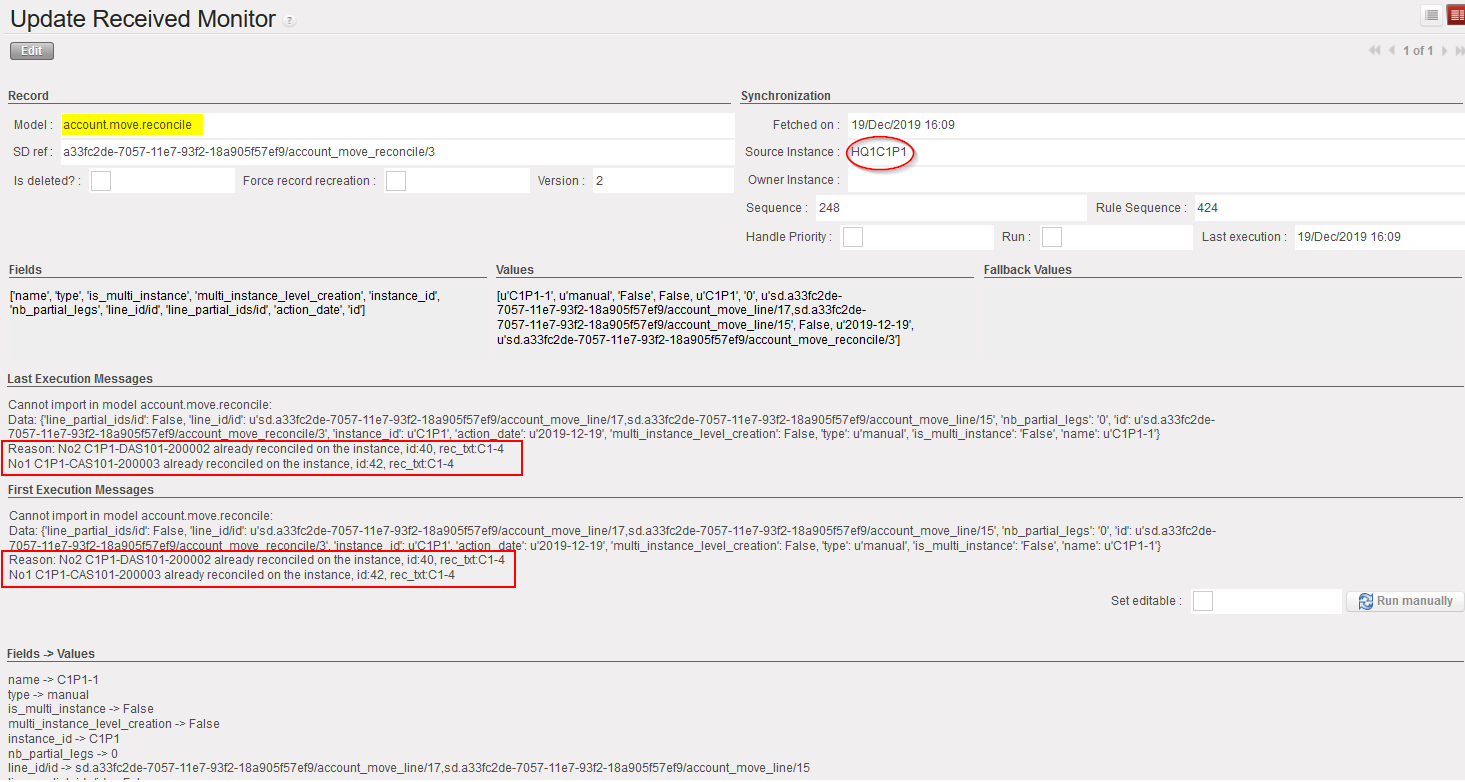
- Not run shall also be at P1 on account.move.reconcile sent from C1

- At P1, on the account.move.reconcile, in Last Execution and First Execution Messages you will see the reason as:
- No2 C1P1-DAS101-200002 already reconciled on the instance, id:17, rec_txt:C1P1-1
- No1 C1P1-CAS101-200003 already reconciled on the instance, id:15, rec_txt:C1P1-1
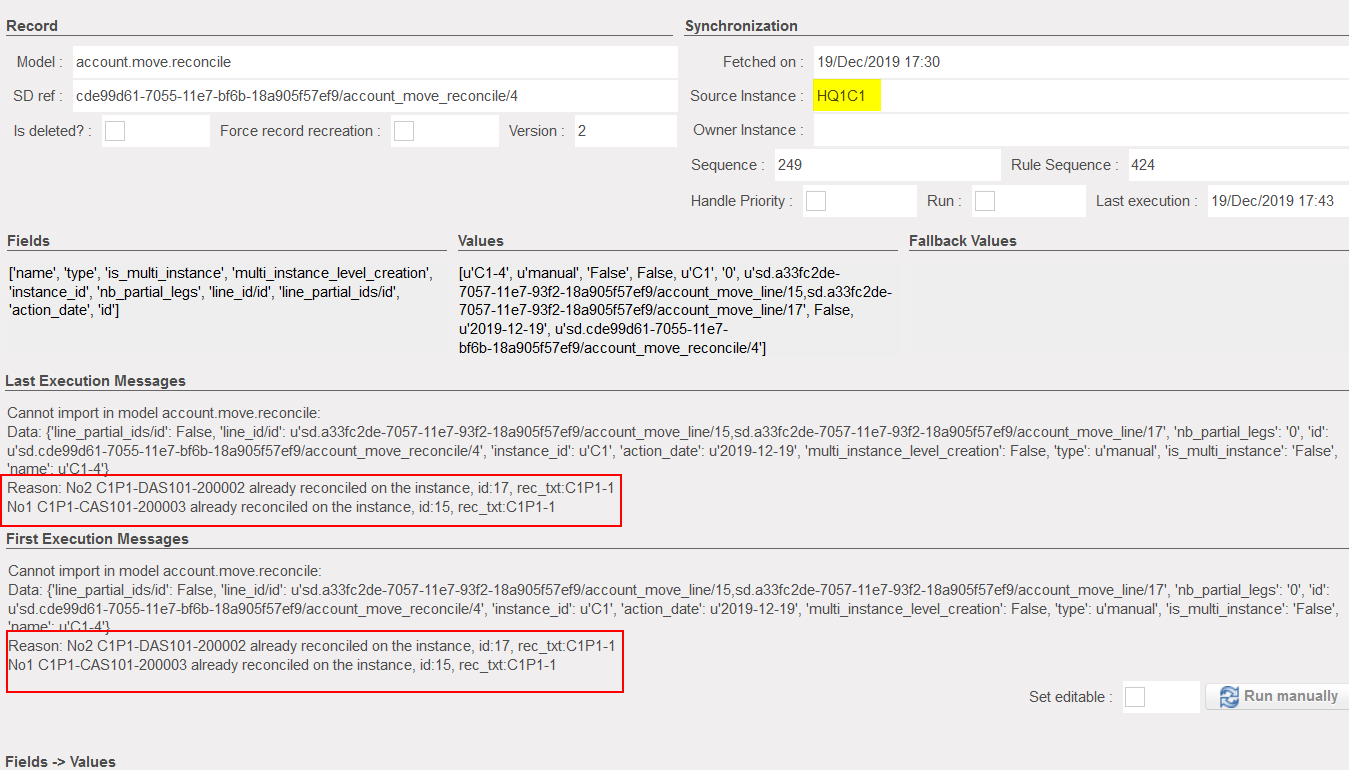
- You will have two different reconciliation references for the same entries at the same time, C1-4 at Coordo and C1P1 at the project.
- Manual Fix to be done:
- Un-reconcile the concerned entries either at Coordo or either at the project. For instance, un-reconcile C1-4 entries at Coordo C1.
- Sync Coordo C1 again, the account.move.reconcile that was not run will be executed and will create the reconciliation of the project
- The not run at the project will remain even after sync and it should be run without execution manually after performing the above.
Please note the following points:
-
- If you un-reconcile the concerned entries at Coordo, the not run will be executed automatically at Coordo only (after Sync) since the exist reconciliation (at Coordo) will be removed when you perform the un-reconciliation at Coordo
- However, the not run at the project will remain even after sync and you will have to do a run without execution manually at the project level.
- Same if you do the un-reconciliation at the project instead of Coordo, then the not run at the project will be executed automatically after sync and the one at Coordo will need to be executed manually after sync.
- Automatic reconciliation still cannot be un-reconciled manually and will still need a datafix
- Un-balanced booking and functional amount cannot be un-reconciled as well.
30. Revaluations
Following is a specification about how revaluation is handled within UniField. The revaluation is meant to adjust the value of assets and liabilities in functional currency according to a determined FX rate at month-end and/or at year-end closing.
Generic principles of the revaluation transaction
- Revaluations allow adjusting B/S positions according to a determined FX rate at month- or year- end closing, in order to provide a fair picture of these positions in functional currency at a defined point in time. OCs can choose to optionally run / not run the revaluation transaction at month- or year- end in UF. At field level, not all sections are performing a revaluation of B/S positions at month-end or even at year-end. OCA is the only OC using the revaluation feature
- Revaluations are automated and performed in dedicated “Revaluation” journals. The counterpart account used is set in the “Configuration” tab of the “Company” (Administration menu). They are necessarily performed from coordination to cover all entries booked in the mission. Entries booked against P&L accounts are allocated to default Destination of the Account set in the company”, Cost Centre “Cost Centre tagged as For FX gain/loss”, Funding Pool “Private Funds”.
- Revaluation is exclusively done in functional currency
- Revaluation only concerns B/S accounts like Payables, Receivables, Liquidity (Cash / Bank / Outstanding Cheques), Stock, Assets (the last two not being used at the time of writing this document)
- Revaluation is optional and can be done in two ways:
- Monthly liquidity accounts revaluation: calculated based on liquidity account balances at month-end
- Year-End revaluation for both, liquidity accounts and other B/S accounts: calculated based on account balances at year-end
- Revaluation entries are booked in a separate REV journal and in a period selected by the user
- Year-end revaluation can be processed in Period 15 only.
- The condition for Year-end revaluation is that FY (Y+1) is created and Period Jan (Y+1) is already opened at the time the revaluation is performed
- FX rates used for revaluation will be
- The period’s rate for monthly liquidity revaluations
- Defined in a specific currency table for the year-end revaluation
- Revaluation can only be performed at coordination level and only after the period closing has been done at project level
- Period status in all active project instances needs to be field-closed and period state has to have been synchronized to coordination
- Revaluation is irreversible and can only be performed one time in any selected period
Master data related to revaluation
In order to run the revaluation transaction properly, the following elements need to be included in the existing set of master data:
- A journal type “Revaluation”
- A G/L journal called “Revaluation” with a journal type set to “Revaluation”
- An analytic journal type “Revaluation”
- An analytic journal called “Revaluation” with a journal type set to “Revaluation”
- An attribute at G/L account level to determine if the account is to be considered in the revaluation. The attribute is managed at HQ level and is labelled “Included in revaluation?”
- If checked, the balance of this account will be considered in the revaluation process
- If unchecked, the balance of this account will not be considered in the revaluation process
- A field for Revaluation Account in company configuration
- This account determines the counterpart account for currency revaluation booking, e.g. 67050 Unrealized Loss Currency Exchange
Specific aspects
This transaction is titled “Revaluation” and is located under the “Periodical Processing” menu, below “Accruals management”.
When clicking on the revaluation, a pop-up window is opened and following options can be selected:
- Revaluation Method: “Liquidity (Month-end)” ,“Liquidity (Year-end)” and “Other B/S (Year-end)”
- Fiscal Year
- FY is by default set to the current FY
- Period (for month-end revaluation)
- Period is by default set to current period
- FY and period selection fields are mandatory but remain editable and only open FY and open periods are proposed.
- Entry Period (for year-end revaluation)
- The entry period can be chosen from extra accounting periods 13-15
- Both the liquidity and other B/S account revaluation have to be booked on the same period – it is not technically possible to run them in different periods.
- Currency table (for year-end revaluation)
- Only valid currency tables are proposed in the list of possible values at selection.
- In the wizard, the journal name (Revaluation) in which the entries will be booked as well as the entry date is displayed, but these fields remain non-editable.
- Once the user has validated the selection in the wizard, the system creates the selected revaluation entries. The entries are automatically posted and can’t be manually edited or deleted.
- In order to track entries involved in a specific revaluations, 2 new fields have been added in the Journal Items “account.move.line” and are only visible in base, not via the interface (US-4359):
- Revaluation_date : create this new field and write the date the entry have been revaluated
- Revaluation_reference: create this field and write the entry sequence of the revaluation entry that has been created in the REV journal in the period or Fiscal year to close. For the Reversal Revaluation, add also the entry sequence of the reversed entry. This will enable to match all entries included in the revaluation with the REV entry and with the reversal REV
Accounting treatment – “Liquidity (Month-end)”
At month-end we are only targeting to revalue “Liquidity” accounts to effectively consider FX variations and related risks in field accounting. OCA did not initially plan to revalue the “Outstanding cheques” account at month-end but defined it as a “Liquidity” account, which de facto includes it in month-end revaluation. Revaluation should be the last step in the closing process performed right before closing periods.
A revaluation account must be set in the “Revaluation account” field in the “Configuration” tab of the Company for the revaluation wizard to be opened. Revaluation date is automatically set to the last day of the period revalued and entries are booked in the Revaluation journal.
In the month-end revaluation system will use the rates defined for the period to close in order to revalue liquidity balances from previous months. Entries from the current period are excluded from revaluation because they are already converted at the revaluation rate. The whole booking is automated (description, dates, amounts calculation…) System will create one entry per [account, currency] used in the revaluation.
Revaluation amount = {Balance at the end of the period in functional currency}
– {Balance at the end of the period in booking currency valued at the period’s rate}
The booking performed is presented in the scheme below:
Fig. Revaluation entry booking (Entry 6 AC inverted : 10200 in De and 67040 in Cr)
- The system calculates balances for the period in functional currency for all accounts where checkbox “Included in revaluation” is ticked and which are defined as “Liquidity / Cash”. If there are entries in different currencies for this account, the system computes subtotals by currency.
- System takes into account all entries in these accounts from beginning of time, which means that initial balances booked in IB journal are excluded from the calculation to avoid duplicated amounts.
- Balances are calculated in booking currency and in functional currency. The revaluation amount is equal to the difference between:
- Balance at the end of the period in functional currency AND
- Balance at the end of the period in booking currency valued at the period’s FX rate
- The system creates one entry per account per currency. The entries will have the following attributes:
- Prop instance = corresponding to the instance where the revaluation is done (coordination)
- Journal code = REV
- Entry Sequence = generated automatically
- Description = “Revaluation – Period”
- Reference = ” Currency code – Account code – FX rate”
- Doc Date = Posting Date = last day of the booking period selected in the wizard
- Period = as per user selection
- Accounts = account revalued on one side (cash on hand, cash at bank, outstanding cheques) and account determined in company configuration (e.g. 67050 – Unrealized loss currency exchange) on the other side
- Third Party = empty
- Book. Debit = Book. Credit = 0.00 CCY
- Func. Debit or Func. Credit = amount calculated in the revaluation process in functional currency
- Once created, journal entries will be automatically posted
- Analytic Journal Items written on P&L accounts are by default allocated to the same destination and cost center that are used to book FX rate adjustments.
- The calculation is based on all entries from the mission, regardless of their proprietary instance. This means that revaluation must be processed as the very last step of month-end closing.
- A restriction has been applied to check that all projects’ have set the period as field-closed before revaluation can be run at coordination level.
- A check has been introduced at period closure to ensure revaluation has been done. If an account is set in the company for revaluation, then the system will check at coordo only is the period has been revaluated at time of field close period (US-7448). When proceeding to the period closure, if the period has not been revaluated, closure will be blocked (US-6232, US-7448).
- Revaluation can be run once and only once for each accounting period (January to December and Period 15). When the revaluation is acted, the revaluation entries are posted and the period is tagged as “revaluated”. If there is no revaluation entry to be booked, the system does not book empty entry, it tags the period as “revaluated”. Prior to revaluation, the system will check if the period has been already tagged as “revaluated”. If yes, the operation will be denied.
Accounting treatment – “Liquidity (Year-End)” & “Other B/S (Year-end)”
- Liquidity revaluation
The Year-end liquidity revaluation mechanism is similar to the month-end liquidity revaluation. Instead of using the monthly, usual FX rates table system will use a specific FX table that needs to be imported beforehand in the HQ instance and sync to field instances later on.
The system will calculate revaluation amounts against this specific FX table The FX table should be in “valid” status. Closed FX table cannot be used..
- Other B/S revaluation
At year-end user can also launch a revaluation touching non liquidity B/S accounts. The revaluation transaction will hit those accounts marked as “Included in revaluation” in the “Currency revaluation” tab of the Accounts form view; other B/S accounts will be ignored in this process.
The transaction itself works the same way as the year-end liquidity transaction: user must indicate a specific currency table in “valid” status to calculate the revaluation amount to calculate the revaluation amounts.
For the “Liquidity (Year-End)” and “Other B/S (Year-end)” revaluation:
- Accounting treatment of the revaluations is the same as in the month-end revaluation except that the revaluation rate is picked from the specific currency table selected in the wizard.
- All individual non-reconciled entries that are booked on accounts marked as “Included in revaluation” will be picked for Year-End revaluation. This means that the final open account balance of each account per currency is revaluated.
- A check on reconciliation status is made on year-end revaluation:
- If the entries are not reconciled, they are automatically included in revaluation.
- If the entries are reconciled and all legs of the reconciliation belong to a period within the same or an earlier fiscal year that is revaluated, the entries are not included in the revaluation.
- If the entries are reconciled, but one or more legs of the reconciliation belong to a period in a later fiscal year, the entries are included in the revaluation.
- Partially reconciled entries are included in the revaluation.
- A check on reconciliation status is made on year-end revaluation:
- The system creates one entry per account per currency. The entries will have the following attributes:
- Prop instance = corresponding to the instance where the revaluation is done (coordination)
- Journal code = REV
- Entry Sequence = generated automatically
- Description = “Revaluation – FY XXXX”
- Reference = ”Currency code – Account code – FX rate”
- Doc Date = Posting Date = last day of the booking period selected in the wizard
- Period = as per user selection (extra-accounting periods 13-15)
- Accounts = account revalued on one side and account determined in company configuration (e.g. 67050 – Unrealized loss currency exchange) on the other side
- Book. Debit = Book. Credit = 0.00 CCY
- Func. Debit or Func. Credit = amount calculated in the revaluation process in functional currency
- The system also creates a reversal journal entry that will offset the journal entry created in step 3. It has the same characteristics except that:
- Description = “REV – Revaluation – FY XXXX”
- Doc Date = Posting Date = first day of the period following the booking period selected in the wizard. In case period 13-15 is selected, the reversing entry is booked on 01/Jan/FY+1.
- Functional Debit and Credit amounts are inverted.
- Once created, journal entries will be automatically posted and reconciled together with the FY revaluation entries.
- Analytic Journal Items written on P&L accounts are by default allocated to the same destination and cost center that are used to book FX rate adjustments.
31. Roundings
Amounts in UF are generally recorded with a precision greater than 10 decimals. However display is limited to 2 decimals on finance-related screens. Rounding of accounting entries is managed from the currencies form view through the rounding factor attribute that shall be set to 0.01 for all currencies. It will serve several purposes
- In accounting entries, to manage conversions from booking to functional currency.
- At entries reconciliation, to determine if entries are fully reconciled i.e. if the reconciliation balance is 0.00
- When currencies are modified in objects like invoice, to manage the new amounts rounding (changing currency thanks to the “Change currency” button located on supplier invoices)
- On invoices all totals and subtotals are rounded using this attribute (residual amount, total taxes, tax free amount, total amount…)
A specific mechanism was implemented in Unifield to make sure that sum of converted amounts on JI systematically match the total amount conversion. Let’s consider a concrete illustration: a supplier invoice in USD with 3 lines. From a system perspective we are looking at 1 journal entry (“move”) and 4 journal items (“move lines”). System converts all 4 journal items individually using the valid FX rate. Amounts on the invoice could be converted (in functional currency) as:
Total amount = 151.23 EUR
Line 1 = 75.80 EUR
Line 2 = 28.95 EUR
Line 3 = 46.49 EUR
The sum of all 3 lines totals 151.24 EUR. In this case system will adjust the second biggest line in the move i.e. the biggest invoice line so that the sum matches the invoice total. User will see the following amounts in journal items:
Total move = 151.23 EUR
Line 1 = 75.79 EUR
Line 2 = 28.95 EUR
Line 3 = 46.49 EUR
System determines to which journal items the rounding adjustment should apply thanks to the following conditions:
- The second biggest line of the accounting entry considered
- In case there are several lines with the same amount (and this amount is the second biggest in the move) then a second condition applies based on journal items xml id sorting. This way we ensure the rounding adjustment applies systematically to the same journal item after sync to upper levels (it solves the issue described in Jira ticket US-411).
It is not reflected in Analytic Journal Items, creating a discrepancy between sum of JIs booked on P&L accounts in functional currency and the sum of analytic journal items. The issue was addressed in US-171 but no valid technical solution was found so it is now acknowledged in the system that sum of JI could not match sum of AJI in functional currency for the same entry.
Some interesting cases of rounding can be found in tickets US-5297 and US-5394.
