Decentralized Databases
The UF technical architecture is fully decentralised: each project location works on its own independent server (database) and exchanges information with other databases corresponding to the 3 MSF organisational levels:
- HQ
- Coordination
- Project
Each location is referred to as an “instance” in the UF vocabulary.
Fig. Fin-1: Simplified architecture illustration
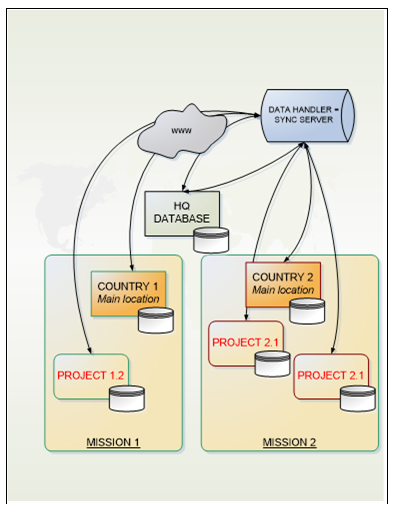
As shown on the scheme above, instances are not exchanging data directly with each other. All data flows are directed to / from a central pivot data handler referred to as the “Sync server”. The technology behind the sync engine is purely developed in python and rely on no existing technology.
In any location where UF is used the application works in a regular client-server relation without a need for the server to be permanently connected to the internet. Usually the server is a field laptop dedicated to UF, if the internet is down then users keep recording transactions offline. They will sync to the data handler when the connection is available and a “synchronisation” is performed, either manually or automatically through scheduled tasks.
Finance Master Data
Finance Master data is consisting of basic objects needed to record financial transactions in UF such as periods, currencies, accounts…
Because of the decentralised model used in UF, these elements may be managed centrally (from HQ, when the exact same elements are used across all instances.) or locally (from project or from coordination).
Each type of master data (each object, in technical language) follows specific sync rules that are presented in annex. Each object has a name displayed on the interface but also a DB ID built when the object is created, which is a unique identifier for this object. This unicity is of overwhelming importance to ensure proper data synchronisation and is totally transparent for end users.
Central master data – Managed from HQ
The reasons behind managing master data centrally are two-fold:
- The functional ownership of the master data belongs to HQ resources;
- The master data has to be strictly the same in all instances for the application to run properly.
The following elements are considered as central master data in UF:
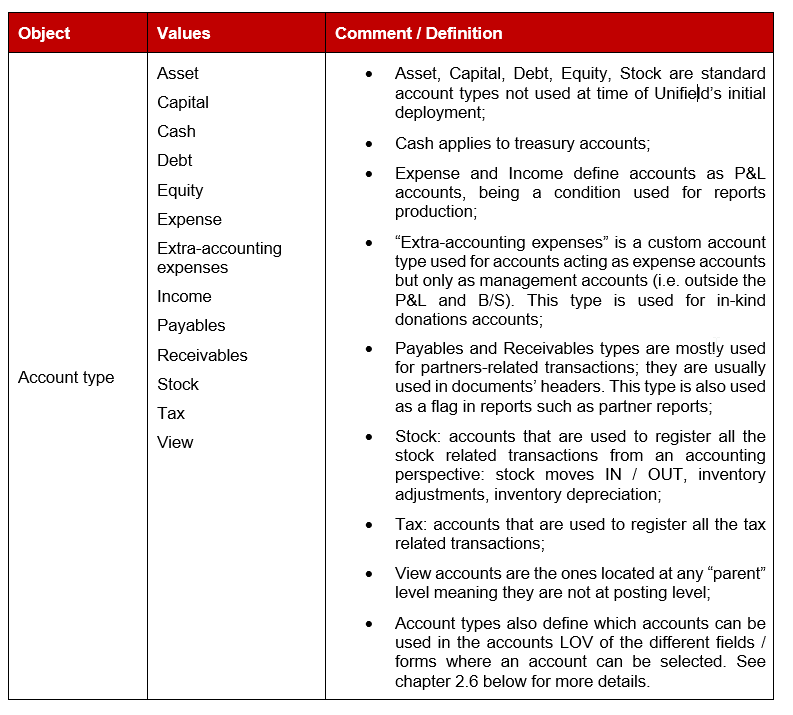
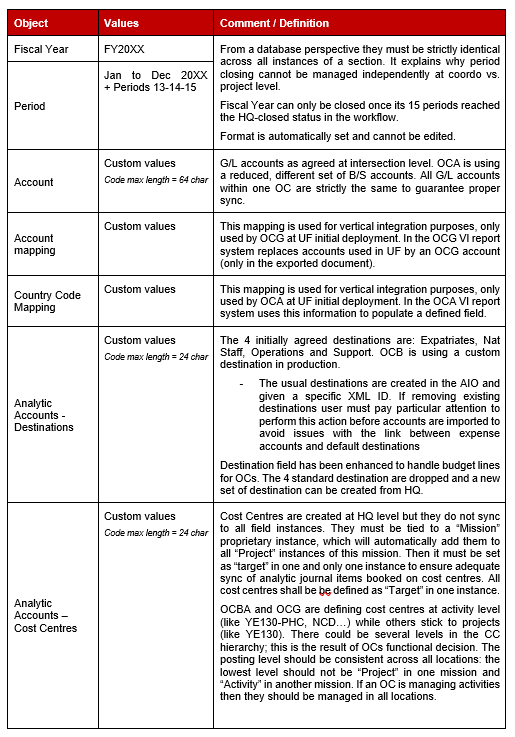
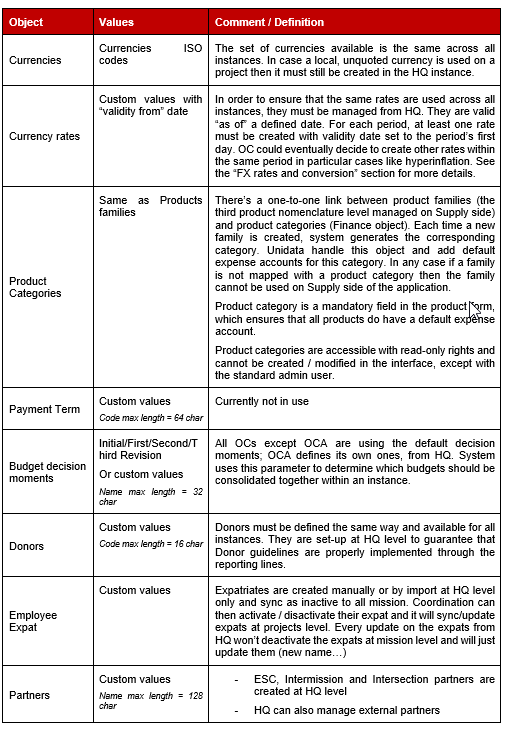
Local Master Data – Managed from Coordo
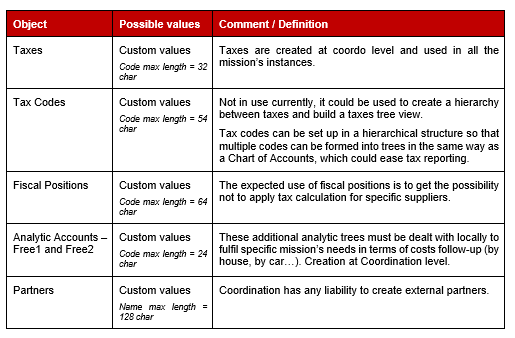
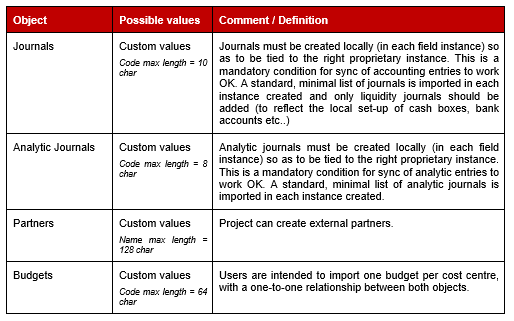
Local master data – Managed from Coordo and Project
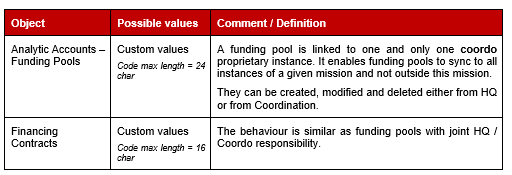
Shared master data HQ/Coordo
Inter modules Master data
In this section we are focusing on master data managed in “Non finance” areas but that are used in Finance modules.
Products
The “Products” term in Unifield designs goods and services that can be ordered on the supply side of the application or directly selected in invoice lines. They are tied to product categories which correspond to Supply families of products; by default a product selected in a finance document will be booked under its category’s default account. In case the product should be booked on a different expense account then it should be tied by default to this account; this setting is done on the product form.
Products may be:
- Unidata – Created and managed at HQ level, they are shared with all missions but not with other OCs. All products are now managed by Unidata in direct link with all HQs. Some products remain in HQ, ITC and ESC type but they are not managed by Unidata and not supposed to be used.
- Local – Created and managed at coordination level, they only exist within the mission where they have been created;
Some specific attributes are managed on the product form but functionally belong to finance:
- Income & Expense account – This field is empty for a vast majority of items; it is only filled in when the product is an exception in terms of default account to be used in finance documents for this product i.e. when its default account differs from the corresponding category’s default account;
- Account tax – Allows to link a tax with a product; it enables taxes to be computed in finance documents. In case a mission uses taxes but does not link products with taxes, users will need to select taxes in each finance document (check the “Tax” section in this document for more details);
- Donation account – This field must be filled in to be able to receive products in an incoming shipment tied to an “in-kind donation” PO. Otherwise system will deny processing the reception.
It is important to notice that all products created on the Supply side of the application can be ordered through Purchase Orders. As soon as they are received in the application, they will enter stock management and be displayed on automatic invoices generated by the system.
Partners
Several partner types have been defined in Unifield:
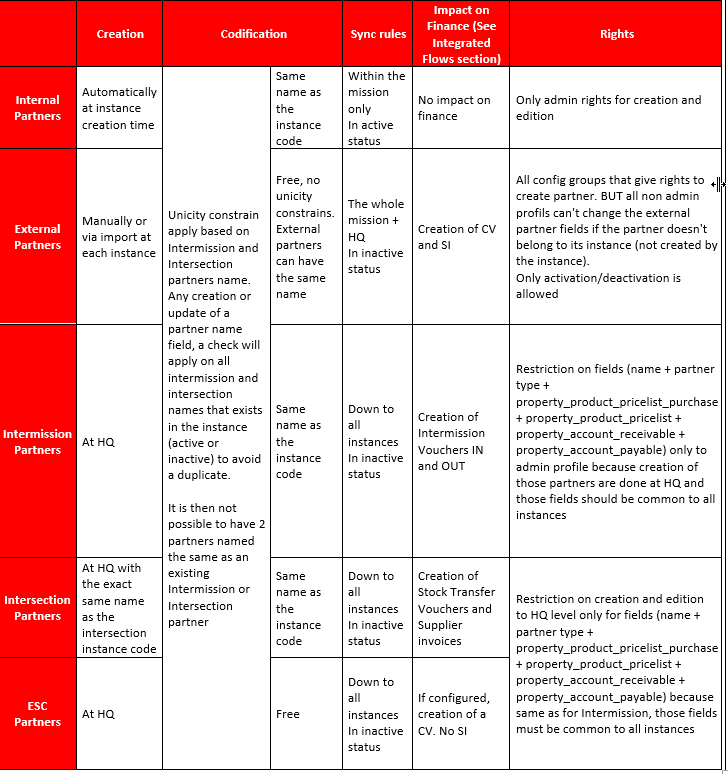
- Internal – They are automatically created and sync within a mission domain; generally speaking, flows using internal partners do not generate finance documents. When an instance is created, it generates itself as an internal partner that will sync to other instances defined in the mission;
- External – They are used for all “non MSF” partners with whom the coordination or project has regular relationships. There’s no control on partners unicity as the same suppliers may be used in different countries (Telecommunication, transport services…) and then sync to the same HQ instance; if there was a unicity check then their sync would fail and related entries would not sync properly to HQ;
- Intermission – Each coordination (project if needed) shall be created a second time with the same name as an intermission partner and at HQ level. It will then sync to all instances Coordo and project as inactive. Instances that need to interact between each other have to activate the intermission partner.
- Intersection – They are created at HQ and sync down to all instances in inactive status. Intersection partner shall be created with the exact same name as its related instance code. They can be created one by one based on the needs or all at once. I.e OCA can decide to create all OCG instances as intersection partners so thex are available in all instances as inactive. If one instance needs to do intersection transaction with another instance from another OC, it will just have to activate it.
- ESC – ESC partners are exclusively managed from HQ and sync down to all coordination and project instances in inactive status.
- Coordination that need those partners created will need to look for them in the inactive list and activate them
- It is not possible to create a partner with the same name of an existing intermission or intersection partner
The partner types described above are used to trigger different flows in Unifield and different impact on finance side.
- Impact on finance
- Internal partners don’t trigger any documents on finance side
- External partners trigger Commitment Vouchers (after PO confirmation) and Supplier Invoice (after reception)
- Intermission partners don’t trigger any Commitment Vouchers but will trigger an Intermission Voucher IN or OUT (after reception and shipment)
- Intersection partners don’t trigger any Commitment Vouchers but will trigger a Stock Transfer Voucher or Supplier Invoice (after reception and shipment)
- ESC partners can create or not CV (depending of the parametrization in the reconfigure) but don’t trigger any Supplier Invoice
- The partners themselves are bearing some finance attributes:
- AP / AR Account – The default account used on finance documents headers;
- Fiscal Position – A setting used to exempt a partner from VAT (check the “Tax” section in this document for more details);
- Donation Payable Account – A mandatory field to be able to validate an “In-kind donation” PO to an external partner;
- Default PO / FO currency – Is the default currency used in a document where the supplier is selected, not only on POs / FOs but also on finance documents. Depending on the partner type, user can change or not the default currency to any active currency on the instance he is working (valid for external and Internal partners only)
- Partner Behaviour Table
Employee
Unifield does not hold an HR management module. However, the standard OpenERP / Odoo HR module is part of the design just to be able to use employees as third parties in the application. It’s the way to build and maintain a list of local and expatriates employee.
- National staff are created in each instance through the Homere interface or by import for sections not using this interface (not possible to create manually national staff). It then sync to the whole mission + HQ
- Expatriates are created manually or by import at HQ level only and sync as inactive to all mission. Coordination can then activate / disactivate their expat and it will sync/update expats at projects level. Every update on the expats from HQ won’t deactivate the expats at mission level and will just update them (new name for example or expats file imported twice).
User has the possibility to define a default allocation for all employees from the HR module. The employee’s default allocation is used for all entries where the employee is used as a third party.
Miscellaneous
- For partners with whom missions have regular, established relationships users can import “Catalogues” that act as price lists. They can be recorded tax inclusive or exclusive, depending on local tax set-ups. The prices loaded will be used as default prices on all supplier documents (POs, invoices…)
Objects and synchronization
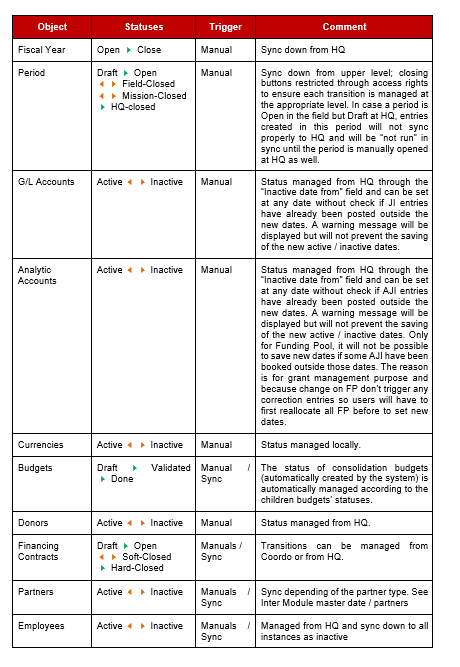
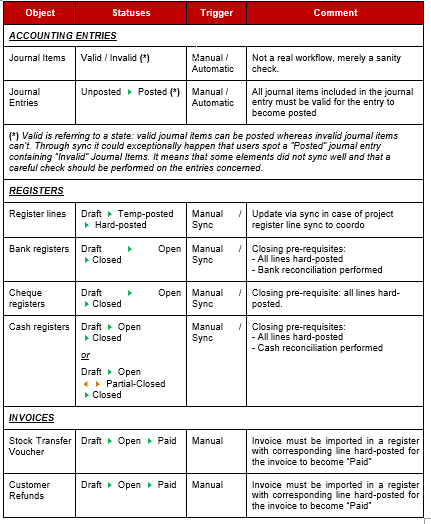
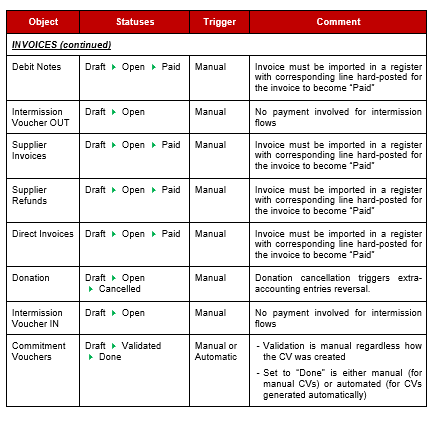
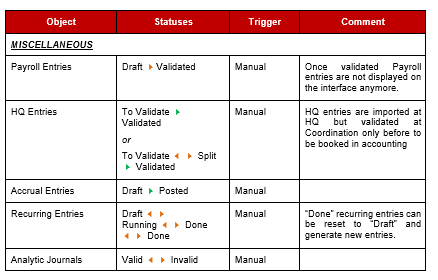
As a transactional system, Unifield manages statuses by object with transitions between statuses managed at instance level either manually or automatically (through sync). Objects listed below do have workflows and are split by object type: master data vs. transactional data. Objects not listed below are not managed through a workflow. The colour code used in the charts below is defined as follows:
Transition between 2 states is only possible one-way;
Transition between 2 states is possible two ways.
Depending on the object considered transition could take place manually or through sync in case the object’s status is included in sync.
Master data workflows
Transactional data workflows
Integrated flows
As an integrated tool offering Supply, Logistics and Finance functionalities, Unifield is sharing data between the different applicative modules.
Flows summary charts
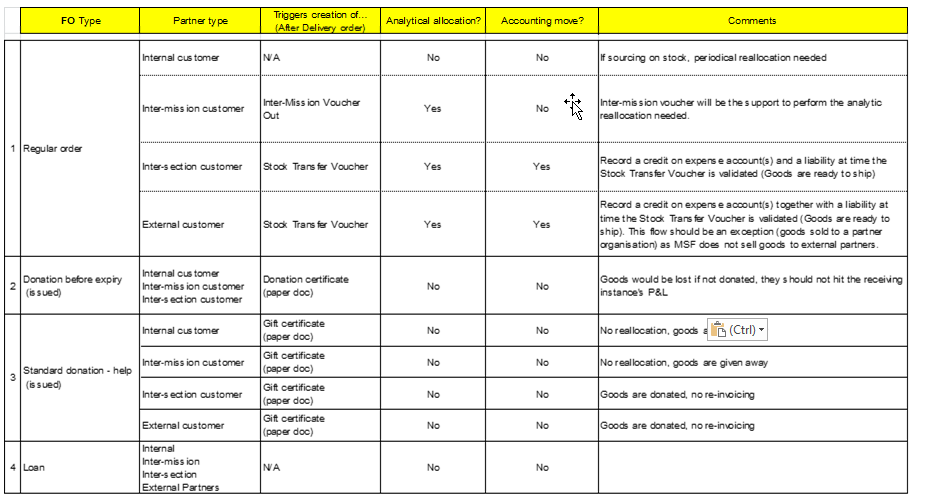
Based on combinations of PO / FO types and partner types, system triggers different documents on the finance side of the application, as detailed in the charts below.
Fig. Fin-7: Impact of OUT-PICK from scratch (Stock move OUT)
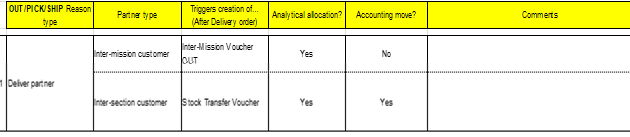
Fig. Fin-8: Flows triggered from PO
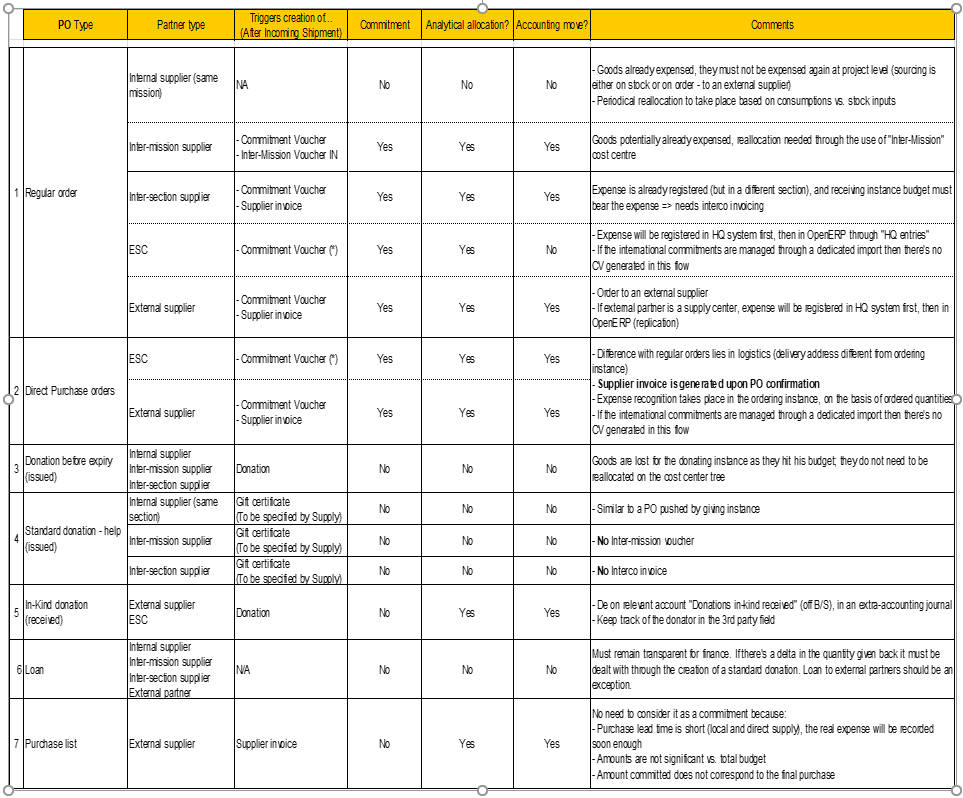
Fig. Fin-9: Flows triggered from FO