
Supply User Manual ENG -> Products -> 3.2 LU-SU2101: General Product Management -> G. Product BN/ED Mass Update.
G. Product BN/ED Mass Update.
When multiple products need to be updated for BN/ED, the BN/ED mass update function can be used. This functionality can only be used at HQ for non-local product or Coordination for local products (under specific user rights).
Go to: Products/ Products Update/ Product BN/ED Mass update
- Click on “New”
- Fill the “Update Reference”
- Select the type of update among the following “Target attributes”:
- No BN/No ED: to remove BN/ED attributes
- BN + ED: to add BN/ED attributes
- ED only: to add ED attributes
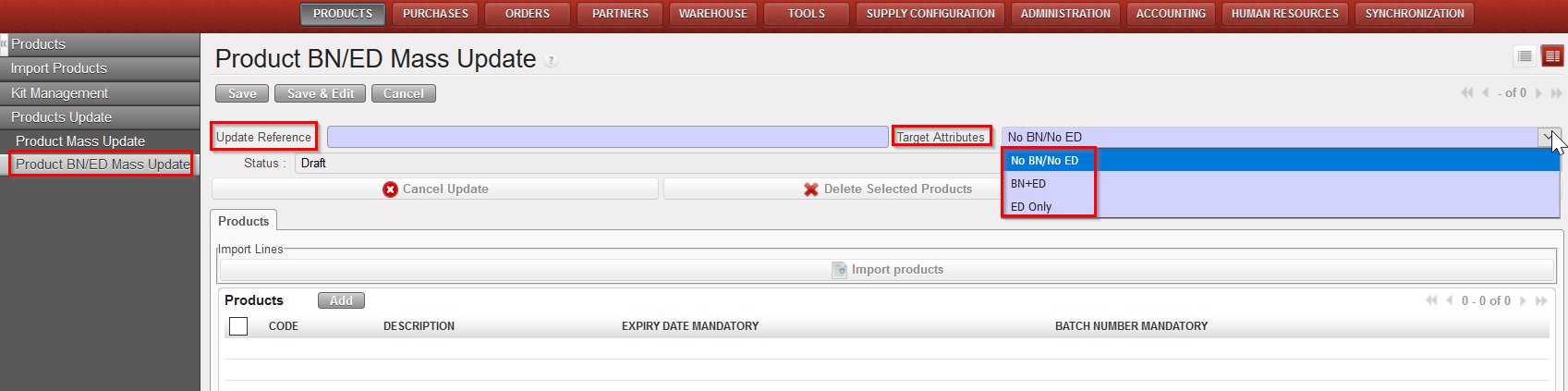
Mass update of BN/ED attributes
4. Click on “Add” to add product one by one or use the “Import products” to upload a list of product (template can be found by Clicking on “Import products” > “Save as”)
5. Click on “Apply Update” to apply to all lines once finished. (When in “Draft” update can still be Cancelled)
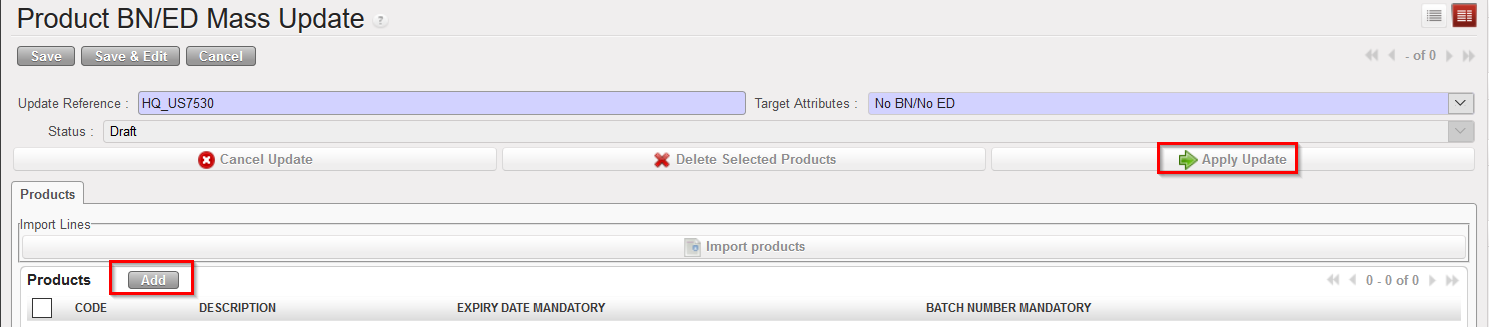
Mass update of BN/ED attributes
6. On the right-hand action menu, an Excel file can be exported to view the list of updated products with their old attribute value.

Mass update of BN/ED attributes

