
Supply User Manual ENG -> Products -> 3.2 LU-SU2101: General Product Management -> H. How to activate a product to be recognized as an asset
H. How to activate a product to be recognized as an asset
All assets must be registered in the system at their time of arrival (Reception). The setting should be set for the product so that the system recognises if it is an asset. As with batch numbers, this attribute should only be activated on a new product and not one which is already in use. To do this, follow these steps:
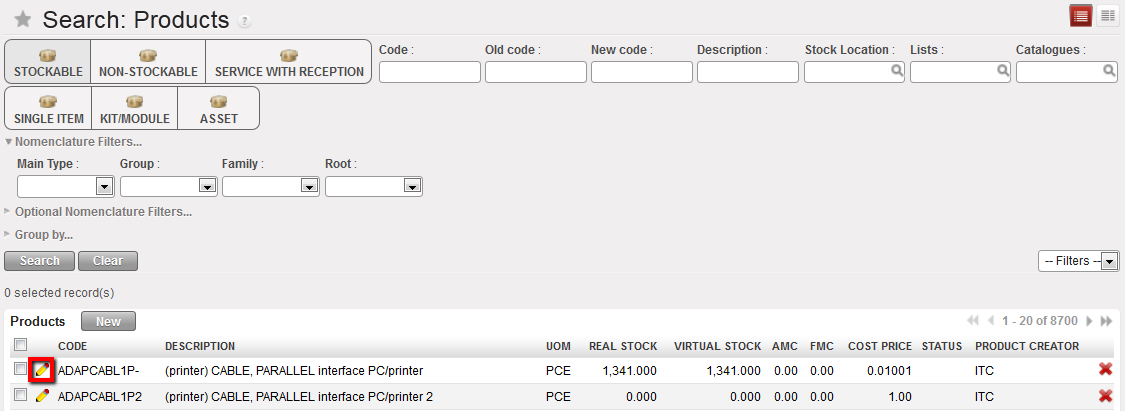
Go to: Products/Products
- Use the search tools to filter values to find the product you want to edit
- Click on the pencil icon
 next to the product line to open it in edit mode
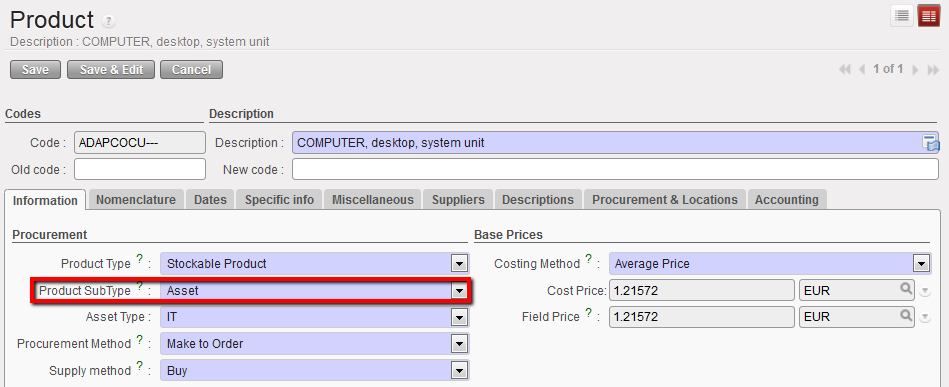
Setting a product to an asset type
3. In the “Product sub type” field, select “Asset”
4. In the “Asset Type” field, select the category from the drop-down menu
5. Click on “Save”
6. The product specificities such as brand, model, etc. will be recorded in the assets database during the asset reception.
Received product as an asset
