
Supply User Manual ENG -> Supply Configurations -> 2.1 LU-SU1101: Instance set-up -> H. LU-SU1101: How to inactivate configurable locations
H. LU-SU1101: How to inactivate configurable locations
The menu “Advanced Warehouse Management” should not be used but configurable locations which are not needed anymore can be inactivated.
Go to: Supply Configuration / Warehouse Configuration / Regular Warehouse Management / Remove a stock location
- In the field “Choose a location”, enter the name of the location you wish to inactivate.
- Click on the “Inactivate the location” button.
 |
| Inactivation of location |
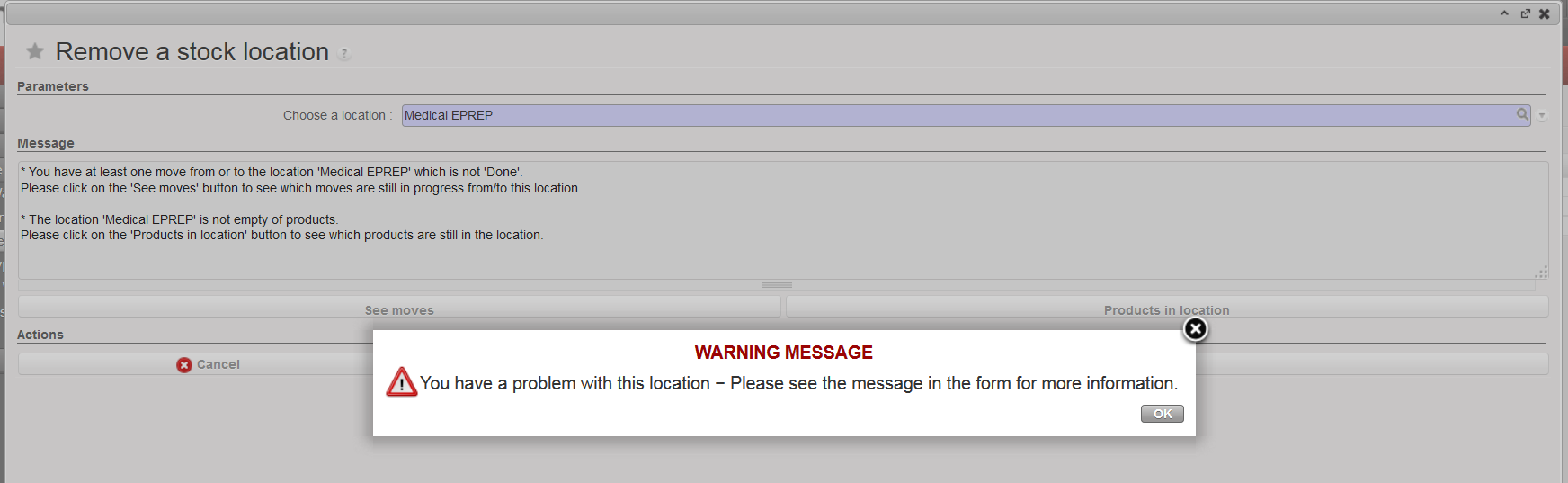
A location can only be inactivated if no stock movements related to this location are open and if no products are stored in this location. If this this not the case, when trying to inactivate a location, you will get the below message.
 |
| Inactivation of location not possible |
The button “See moves” allows to see which stock movements related to this location are open.
The button “Products in location” allows to see which products are currently stored in the location.
If you want to inactivate a location, you will need to process the open stock movements and move the products out of the location.
