
Supply User Manual ENG -> Products -> 3.2 LU-SU2101: General Product Management -> N. How to merge 2 Local products (Coordination only)
N. How to merge 2 Local products (Coordination only)
In the Coordination instance, it is possible to merge 2 Local products. This is possible for any 2 Local products, even if they are in stock or in open transactions in any country instance. The selected product is de-activated and when synched, all previous stock / closed transactions with this product are transferred so that they now show the Active (kept) product in its place.
The merge of Local products can only be performed at Coordination instance level, and both products must be “Active” at point of merging.
Once the merge action has been performed for the 2 Local products, the selected product will be de-activated in Coordination. After synch, this product will be de-activated in all lower country instances, and any quantities in stock or open or closed transactions will be updated so that the “kept” product will appear in its place. For any case where there is a conflict at a lower instance after product has been merged and synched, a Not Run message will appear in receiving instance.
The merge functionality is available on the product data sheet at Coordination level as a button that will be displayed only for Local ( Non-MED) type products. The display of this button will also be conditioned by User Rights.
To merge a Local product, go to: Products/ Products:
1- Use the search tools to filter values to find the product you want to merge/deactivate.
2- Click on the product line to open it
3- Click on the “Merge Local product” button
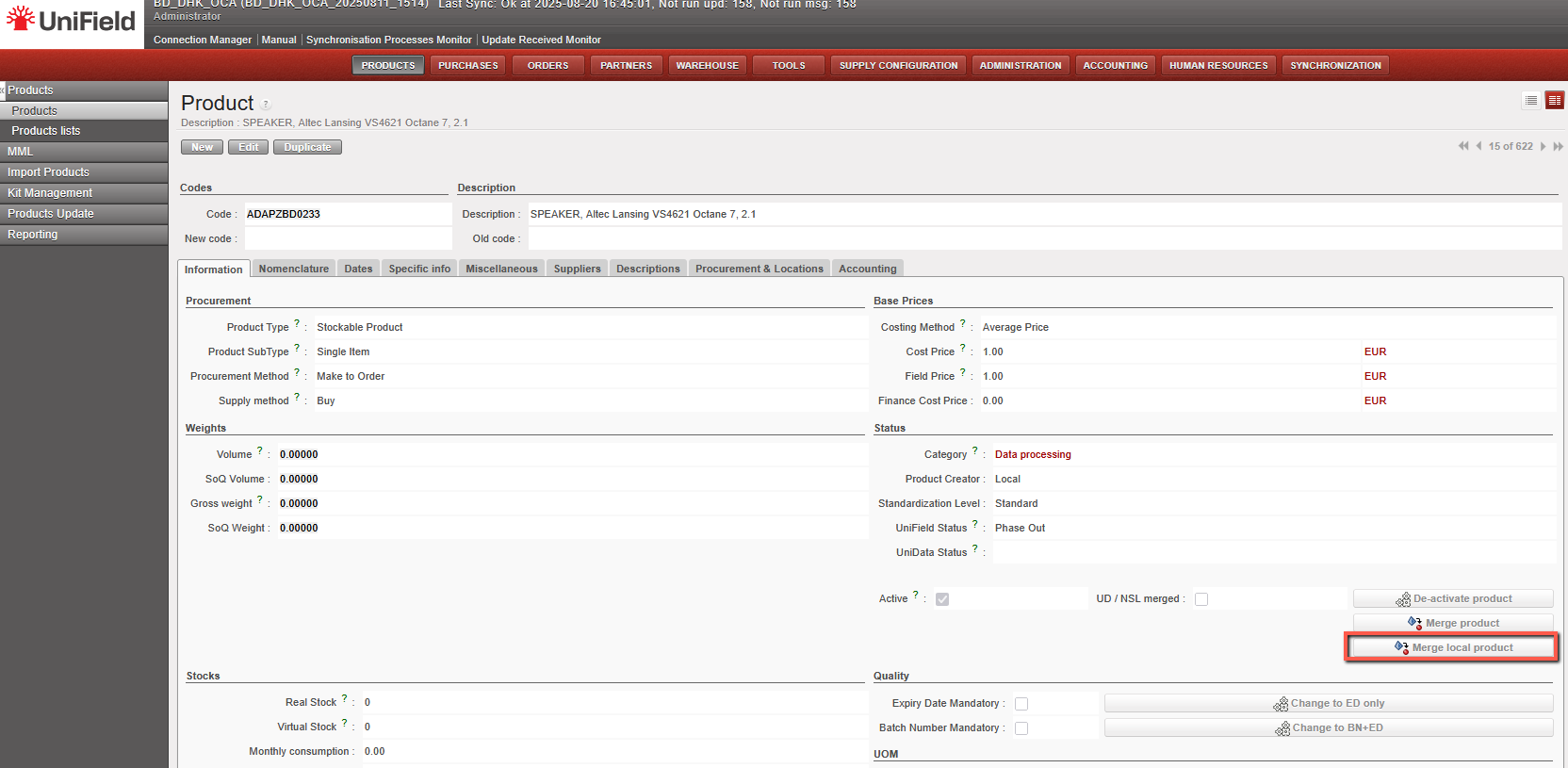
4- Select the “Kept product” (the product that will remain active) from the list of all the Active type products of the instance. When clicking on the magnifying glass, you can search using filter fields “Code”, “Description”, “Old code”, “New code”, and the 4 main nomenclature types.
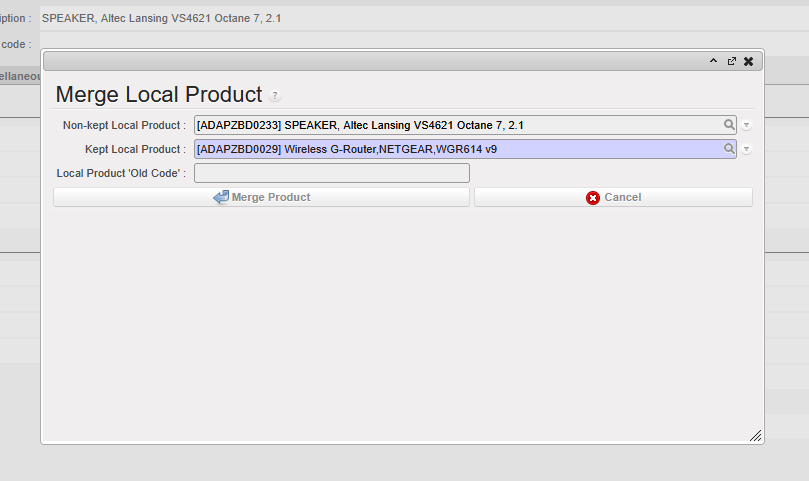
5-Click on “Merge Product” on the pop up.
The de-activated Local product will be replaced by the “kept” Local product on all open or closed documents (including Stock locations and movements) containing the product.
The “Merge local product” button will still be active on the “Kept” product after merge. This means the kept product can be merged again with another Local product.
After merge, the deactivated product cannot be reactivated and the merging cannot be undone.
When merging, there are several checks performed on compatibility of attributes of both Local products to ensure consistency after merge. In case of a discrepancy, a message (in certain cases blocking) should be displayed urging the user to align the inconsistent attributes before merging can be done.
- The warning blocking message for the above attributes should be: “Warning: There is an inconsistency between the selected products: <attributename> need to be the same. Please update (one of) your Local product’s <attributename> and then proceed with the merge.” (applied to Main Type, Product Type, Expiry Date Mandatory, Batch Number Mandatory, Default Unit of Measure,)
- The non-blocking warning message should be: “Warning: There is an inconsistency between the selected products’ <attributename> . Do you still want to proceed with the merge?” (applied to Nomenclatures: Group, Family & Root and Temperature sensitive)
In general, attributes of the “kept” product will prevail over those of the de-activated product.
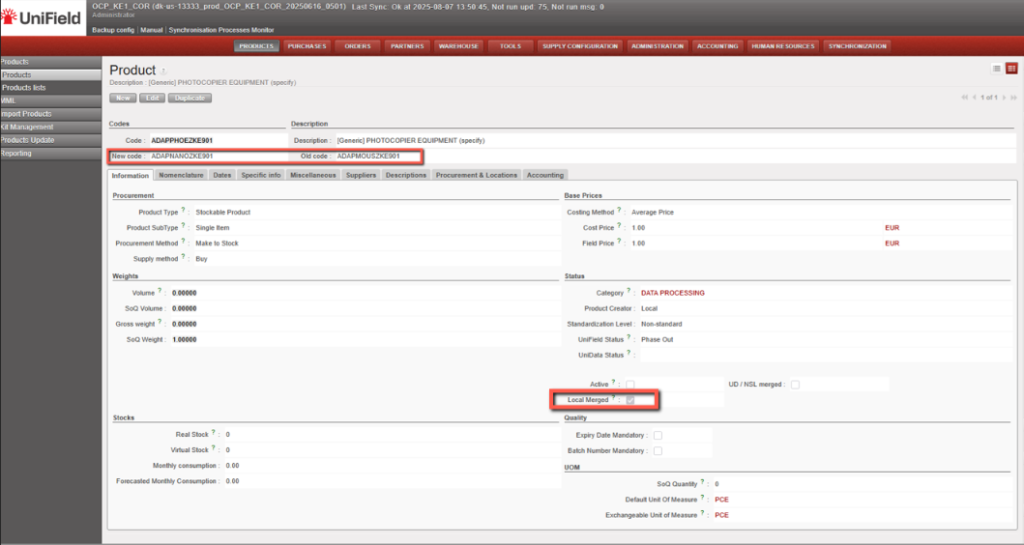
The deactivated Local products will have a checkbox named “Local merged” which will be ticked automatically once it is deactivated via merging process.
The reference of the de-activated product will be populated in the “Old code” field of the newly merged UniData product data sheet. In the non-kept product’s data sheet, the “New code” will be filled with kept product’s code.
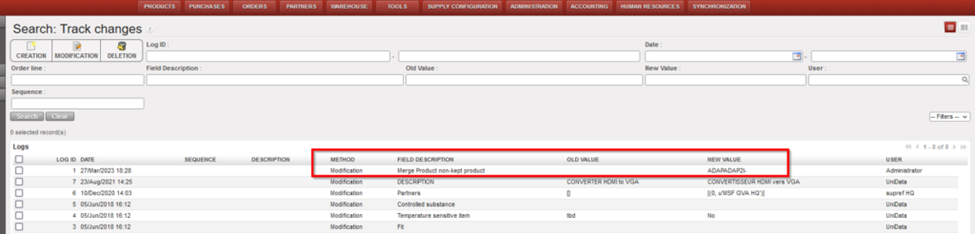
In the Track Changes of both products, there will be an indication of the other product code/product ID with which it was merged.
N.B. It is recognized that the sync rules for Non-Standard and Standard products differ from those for Non-standard Local products. The decision to merge any product should be in agreement and in line with local processes
*N.B.: The recalculation of average cost price done in the case that both kept and non-kept products stock should result in a accurate result based on current working of weight average cost price mechanism.
