
Supply User Manual ENG -> 4. Procurement -> 4.6 LU-SU3201: Purchase Orders (POs) - Generals -> I. How to Duplicate a Purchase Order
I. How to Duplicate a Purchase Order
UniField offers the possibility to duplicate a PO. This can be useful if you create similar POs on regular (e.g.monthly) basis.
The duplication creates a new PO in draft which is a copy of the duplicated PO with a new order reference. Most of the information is copied from the duplicated PO but some is not. Analytical distribution is not copied, source document reference is not copied, customer reference is not copied,… The creation date is set to today’s date.
Go to: Purchases / Purchase Management / Purchase Orders
- Click on the line of the Purchase Order to be duplicated (open the PO in display mode).
- Click on the “Duplicate” button at the top of the screen.
- A new draft PO will be created, which you can continue to process.
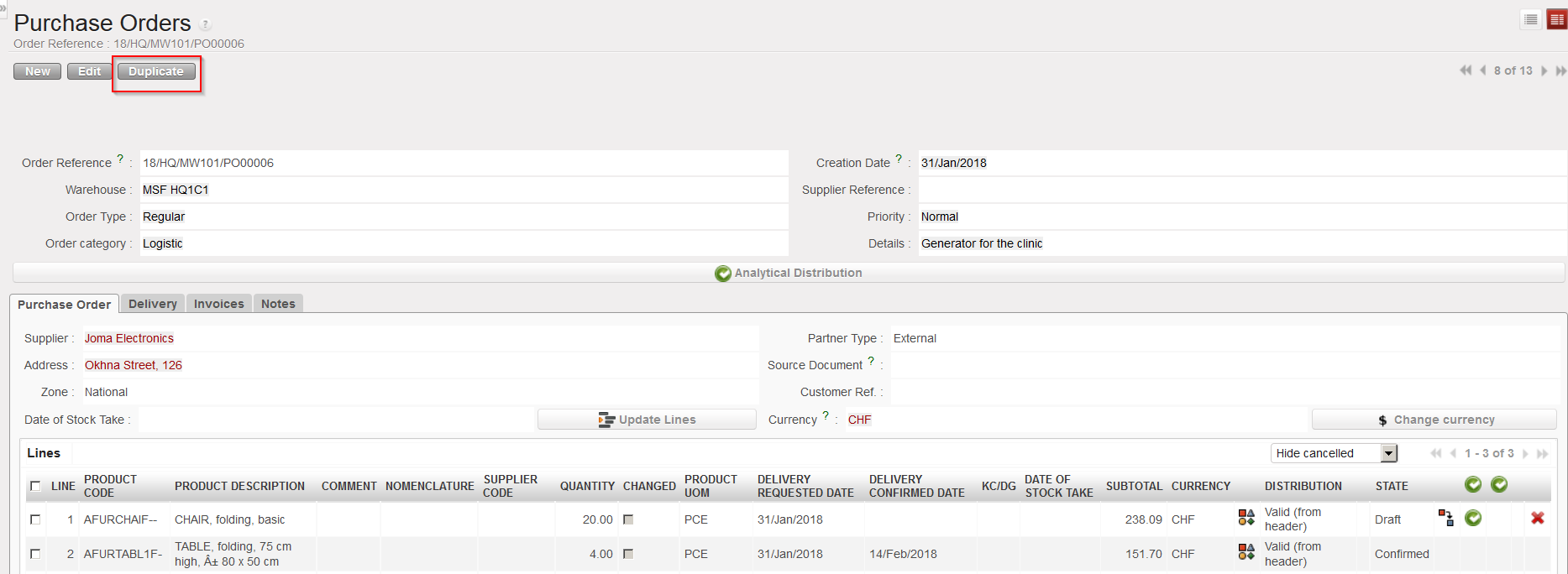 |
| Purchase order, Duplicate button |
