
10. Kits
In Unifield the Kits functionality has been developed based on the concept that a kit is a product, but which has the special attribute that it can contain components, themselves also products, and these components or “modules” can in turn contain further products, which means a kit may contain many levels. No limit to the number of levels has been applied.
Kit products are treated as single products throughout the whole supply chain (from order to reception to consumption) and in stock management. Although kit contents are not visible in the warehouse, it is possible to view/add the contents of the kit after purchase or once an incoming shipment is closed.
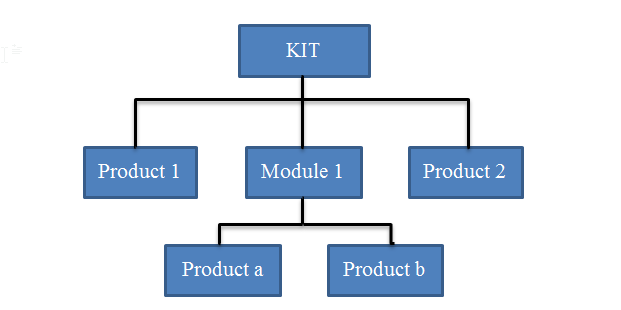
General Structure of a Kit
In order for any of the kit functionalities to be used, the kit product should exist in the database. A kit is created the same way as a product but for a product to be considered as a Kit, the product Sub-Type should be “Kit/Module” on the product datasheet. However, system-wise it is not mandatory to use any supplementary kit functionalities for a product which has the Sub-type Kit, so this is left at the discretion of the user/procedures.
The following are functionalities linked with Kit type products:
Theoretical Kit composition List – acts as a template for what a kit should contain.
Kit Composition List – a “real” list of the contents of a kit which is physically present in the instance. Can be used to substitute products and also to break apart a kit and release its components into stock.
10.1 Theoretical Kit composition List
Menu mapping: Products/ Kit Management / Theoretical Kit / Theoretical Kit Composition or
Products/ Kit Management / Theoretical Kit / Theoretical Kit Mass import functionality
The Theoretical Kit Composition List (TKCL) represents the list of items that are supposed to compose the kit. It is a type of Bill of Materials and can be created at any level of instance.
It can be manually created, for one individual KCL at a time or several KCLs can be imported via the Theoretical Kit Mass import functionality. Once created and in a Completed status it will be synched down to other instances. The idea behind these 2 functionalities (Mass import and synch) is that all validated Theoretical Kit lists can be loaded at once at HQ and then synched down, reducing the need for Missions to create each manually.
The main purpose of the Theoretical Kit Composition List is to give an overview of the theoretical contents of a Kit to be used either when it is being ordered or when an instance needs to produce Kits locally via a Kitting Order.
Preceding documents
N/A – kit type product should already exist
Successive documents
N/A although document can be used by Composition list, Kitting order, or in Purchase Order
Statuses of Theoretical Kit Composition Lists
Draft – all modifications can be made. Can also be set to inactive. If active, can be progressed to “Completed” status via “Mark as completed” button.
Completed – no modifications possible. Can be set to inactive. When Active and Completed will be synched down to instances below.
Closed – when a related Kitting Order is Closed
Lines/Products specificities
N/A
Updates from successive documents
N/A
Direct Reports / Exports
Composition Kit Excel Export
Theoretical Kit (PDF)
10.2 Kit composition List
Menu mapping: Products/ Kit Management / Composition List / Kit Composition List
Kit Composition List represents the list of actual products composing a physical kit, but it is not mandatory to make for kit products (except if kit products were added to stock via a kitting order). It is necessary to have a Kit Composition list if user wishes to “de-kit” the kit and release all the product components individually into stock or to substitute an item.
A kit composition list can be created directly or created during the reception process from an incoming shipment. A kit composition list will be automatically created after a kitting order is completed. In order to create a KCL, the template of TKC to pre-fill products or alternatively products can be added via standard methods (add individually, add multiple, import lines). The products which are kit components are visible in the “Kit Composition Item” screen together with their associated kit reference. As well as de-kitting, the kit composition list can be used to substitute some products for others (e.g. with different expiry dates).
A KCL will be unique to each kit product so de-kitting can only be performed on one KCL at a time.
Preceding documents
From scratch, Kitting Order, Theoretical Kit Composition can be used, and KCL can be initiated from Closed Incoming Shipment
Successive documents
N/A
Statuses
Draft – all modifications possible.
In production – linked to a Kitting Ordered (cannot be modified)
Completed – can be modified for de-kitting or substitution of products
Closed – cannot be modified
Cancelled
Lines/Products specificities
If Kit product is Expiry Date or Batch mandatory, this will be mandatory in the same transactions as for normal products. It is possible for a kit composition list to contain other products which are batch or expiry date mandatory, but it is not mandatory for this information for each of the component products to be added. This was left at the discretion of OCs. For where this information is added, the expiry date of the overall kit product should take the soonest expiry date of all its products. If this is changed (due to substitution etc), then the overall expiry date of the kit product should be updated to reflect the next relevant expiry date.
Updates from successive documents
Direct Reports / Exports
“Real Composition Kit Excel Export”
Kit Composition PDF
10.3 Kitting Order
Menu mapping: Products/ Kit Management / Kitting Order
This transaction is used in order to create a kit from products in stock. In order to create a kit with the double entry mechanism, the products which are kit components will be removed from Stock and moved to the virtual location. The newly created Kit product will be added to Stock (according to location selected) and will be removed from the virtual kitting location. It is possible to create multiple kit products in one kitting order. For each kit product created, there will be a kit composition list also created. It is necessary to have a Theoretical Kit Composition for the kit product in order to kit the component products into this kit.
5.2 Preceding documents
Theoretical Kit Composition
5.3 Successive documents
N/A
5.6 Statuses
Draft – all modifications possible.
In production – in progress, stil can be Cancelled, can be de-kitted and products substituted
Closed– done, cannot be edited
Cancelled
5.7 Lines/Products specificities
- Direct Reports / Exports
