
Finance User Manual ENG -> 2. Finance Configurations -> 2.7 Liquidity Journals and Their Corresponding Registers -> LUFI-20705 Register Deactivation
LUFI-20705 Register Deactivation
LU Introduction
In the [Accounting/configuration/financial accounting/journals/journals] screen, we have created a filter with [active] or [inactive] status on the header of the journal list for activation and inactivation of the GL journal.
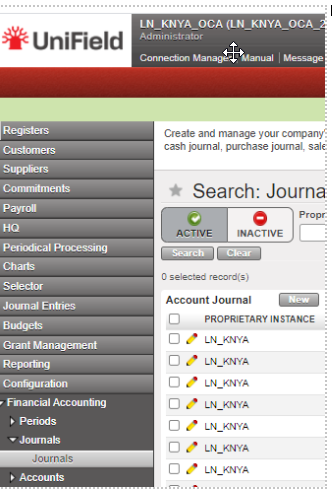
The standard display is [active]: Only active journals are displayed in the standard display screen. Registers related to inactive journals are not listed anymore on the register creation screen on [accounting/registers/register creation]. In the Journals we have the field Active:
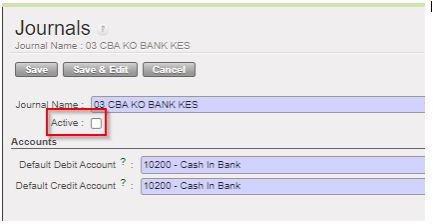
The [inactive] journals cannot be used anymore in the interface:
- as third party of an entry
- to book a manual journal entry
- We cannot import a file to the journal from manual journal entry, or into a register for register lines should check the active status of the journal code seen in the import.
Deactivation of the liquidity journal is a must if the journal is not to be used in the future, otherwise the closing period of the following month on which the journal of the register was not created will be blocked, so you will receive warning message as below:
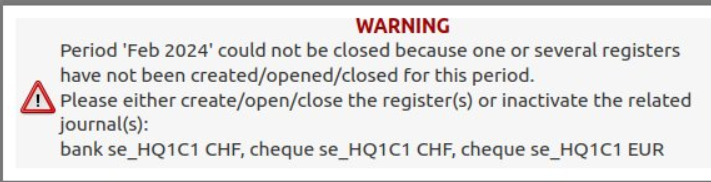
The creation of a journal with the same code as an inactive journal it is not allowed. We have added in the exportable fields the [Active] status in the export of the list of journals.
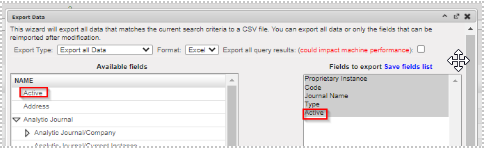
The conditions to allow the inactivation will be:
- For liquidity journals, before allowing the inactivation check:
- all registers have been closed
- all manual journal entries have been posted
- the balance of the last register is zero
We will receive error messages as the following one:

- A Cheque journal correspond to the bank register must be deactivated before bank journal ,otherwise warning message with “The bank journal BXXX cannot be inactivated because the related cheque journal CHQXXX is still active “
- For non-liquidity journals: all entries have been posted on the journals.
The activation-deactivation will synchronize to the other instances. We will prevent the deactivation if there are draft, or temp posted entries / documents. For the GL journals that have been deactivated, we will show the correction wizard in AJI and JI. We have added the field “Active” in the Journal Track Changes. We will not allow:
- The selection of inactive journals in the invoices
- The duplication of JE and invoices on inactive journals
- The re-opening of a register on an inactive journal
- The selection of inactive journals in the Recurring Models
- The inactivation of a journal if a Recurring Plan which isn’t “Done” uses it
- The selection of a Recurring Model on an inactive journal, in the Recurring Plans
- The duplication of a Recurring Model on an inactive journal / of a Recurring Plan using a Recurring Model on an inactive journal
- The selection of an inactive Bank Journal in the Cheque Journal form
- The selection of inactive journals as Refund Journal in the Refund Wizard
- The Refund Type “Modify” for the invoices booked on an inactive journal
Reporting
- We will not show the registers related to inactive liquidity journal in the [liquidity position report]
- We will show the inactive journals in the [liquidity balances] report as far as there have been movements within the period considered in the report. So, the related line won’t be displayed on the condition that the journal is inactive, and the “Starting Balance”, the “Movements”, and the “Closing Balance” are all 0.00.
- We have added a new column in the [liquidity balances] report: [Journal Status].
- In the reports “Trial Balance”, “Partner Balance”, “General Ledger”, and “Partner Ledger” the inactive journals will be displayed in red.
- In the Search views of the invoices, we have done a standard search view, with a filter hiding the inactive journals by default.
