Supply User Manual ENG -> 5. Warehouse -> 5.12 LU-SU4205 Replenishment Rules -> M. HOW TO GENERATE A PRODUCT LIST CONSISTENCY REPORT
M. HOW TO GENERATE A PRODUCT LIST CONSISTENCY REPORT
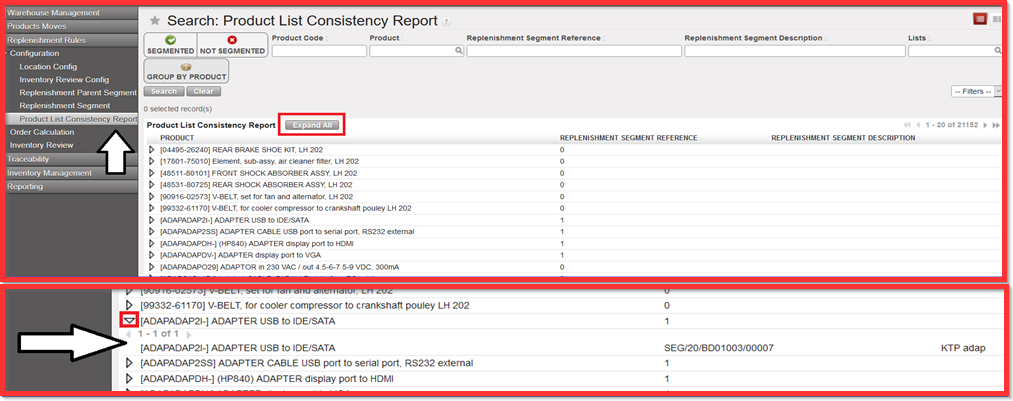
Go to: Warehouse /Replenishment Rules/ Configuration/ Product List Consistency Report
Product List Consistency Report is used for each of the products from RR. The purpose of the report is to cross check products to which segment belong to. It enables to see how many Replenishment Segments each product is in (overview) or whether it is not in any Replenishment segments. It considers only lower level of segments – Replenishment segment (child segments) where the products are added. Thus “Replenishment Parent Segment” is not part of Product List Consistency Report.
- Click on sub menu “Product List Consistency Report”
- Click on button “Expand All”. You get the detailed breakdown description of each product as depicted on picture below.
If you click on the small arrow at product line level you get the breakdown on clicked product only.