
14. Third-party Integration
14.1. UniData/MSL API Integration
Since the release of UniField v33.0, the UniData Push linkage has been replaced with Unidata pull.
Therefore, both UniData and MSL data are obtained via a pull architecture, where data is obtained by making API calls from UniField.
In the UniField tool, there are two available APIs for integration purposes. One API is specifically designed for UniData, while the other API is meant for MSL, which is a component of the UniData tool.
These API calls can be configured within the UniField interface, allowing users to customize and establish the necessary API calls for data integration. However, it is recommended to maintain the current setup unless there is a specific requirement or need to modify the existing configuration.
14.1.1. How to configure the API Sync
Menu Mapping: Tool > UniData > API Sync Config
The API Sync can be configured only on HQ level. The data are then synchronized down to coordo and project instances.
In the Scheduler section, you can activate the sync by clicking on the Active checkbox.

There are 2 Execution Sync Types:
- Based on the last modification date – the API returns only records updated within the last sync date minus 24 hours
- Full – the API returns all records
You can also start the synchronization process manually by clicking on MSL Start manually/UD Start manually.
Data in UniData returned by UniData API are real-time, so each change should be seen immediately after the synchronization process in UniField is completed.
MSL/UniData Sync report
Menu Mapping: Tool > UniData > MSL/UniData Sync report
You will see all the previous and current runs in the report. In the log file, you can see the logs of each run.
14.1.2. MML/MSL sync
MSL project mapping with UniField instances
Menu Mapping: Tool > UniData > MSL Projects with no link to UF
The mapping is done via the MSL tool. Each MSL project is mapped to max. one instance and multiple projects can be mapped to a specific instance.
14.1.3. UniData Product Sync
How to sync products individually
Apart from running the sync for all products, you can run the sync for each product individually. To do so, you need to go on the product level and click on the “Pull UD product”.
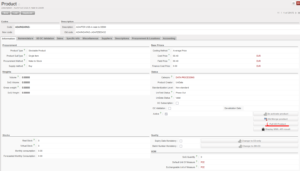
You can also run the pull for another MSFID: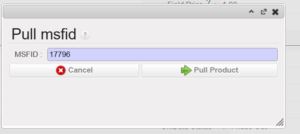
Please note that if you change the MSFID, the pull will run for another product, therefore, the product on which you run the pull won´t be impacted.
How products are matched between UniData and UniField
Products are matched on MSFID (=unique product ID generated by UniData).
However, to update/create in product in UniField, the OC subscription for a given OC must be checked in UniData OR, in case of an already existing product in UniField, the OC subscription must be checked in UniField. In case the OC subscription is checked only on the UnIField side, one last update will be performed. Products for which OC subscription is not checked in UniData nor UniField will be ignored completely.
Product codes are no longer taken into account. Therefore, the multiple truth issues should no longer occur.
UniData Linkage errors
Tools -> UniData -> UniData linkage errors
In case the data pull was not successful for a specific product, the product will be displayed in this sub-menu table. Here, you can also find the MSFID of the product and the text taken from the log explaining the cause of the error.
OC Default Values
Tools -> UniData -> OC Default Values
Some of the attributes pulled from UniData have default values set and they are not returned by the UniData API. The default values are based on Nomenclature.
Each OC can however set their OC-specific value in Unidata as well, such as Procurement Method or Expire Date Mandatory.
The table displays all OC default values received from UniData. Please note that OC default values in UniField are static. If a new OC default value is created, it will not be automatically created in UniField. This is a known limitation, that is planned to be adjusted with the next UniField releases and also once the values are available via UniData API.
UD Products incompatible with OC values
Tools -> UniData -> UD Products incompatible with OC values
The submenu lists all products for which the value of attributes differs from the OC default value.
OC default values (see above) are set in UniData and they are not directly returned by the API. Thus, if a new product is created the OC default value is taken instead and never updated afterwards. However, the OC default values can be later changed (which is rare) or created afterward but the product won´t be updated anymore.
Therefore, the table in the submenu lists all products, where there is a discrepancy between the actual value and the current OC default value.
List of values updated by Unidata Pull
The list contains only those values that can be visible on the Product Object. Technical fields are omitted.
You can find the list of Default values and OC Default Values in Unidata. You can also see the OC default values in UniField: Tools -> UniData -> OC Default Values. OC Default Values and Default Values are not updated automatically in UniField.
| UniField Field | Type of Update | Updated during creation | Updated during update |
| ABC Class | Default value | x | |
| Active | Default value | x | x |
| Batch Number Mandatory | OC Default Value | x | |
| Closed Article | UniData API | x | x |
| Justification Code | UniData API | x | x |
| Controlled substance | UniData API | x | x |
| Currency | Default value | x | |
| Dangerous goods | UniData API | x | x |
| Code | UniData API | x | x |
| Justification Code | UniData API | x | x |
| Fit | UniData API | x | x |
| Form | UniData API | x | x |
| Function | UniData API | x | x |
| Temperature sensitive item | UniData API | x | x |
| Manufacturer Ref | UniData API | x | x |
| Manufacturer | UniData API | x | x |
| MSFID | UniData API | x | x |
| Thermosensitivity | UniData API | x | x |
| Main Type | UniData API | x | x |
| Product Creator | Default value | x | x |
| Description | UniData API | x | x |
| Group | UniData API | x | x |
| Family | UniData API | x | x |
| Root | UniData API | x | x |
| OC Subscription | UniData API | x | x |
| Old code | UniData API | x | x |
| Expiry Date Mandatory | OC Default Value | x | |
| Procurement Lead Time | Default value | x | |
| Procurement Method | OC Default Value | x | |
| Product Catalog Path | UniData API | x | x |
| Short Shelf Life | UniData API | x | x |
| Single Use | UniData API | x | x |
| Standardization Level | UniData API | x | x |
| Cost Price | Default value | x | |
| UniData Status | UniData API | x | x |
| Sterile | UniData API | x | x |
| Product SubType | OC Default Value | x | |
| Supply method | Default value | x | |
| Transport Product | Default value | x | |
| Product Type | OC Default Value | x | |
| UN Code | UniData API | x | x |
| Inventory Valuation | Default value | x | |
| Volume | Default value | x | |
| Gross weight | Default value | x | |
| OC Validation | UniData API | x | x |
| Devalidation Date | UniData API | x | x |
