
How to inactivate liquidity journals and their corresponding registers ?
We can create a liquidity journal with its correspondent register and we can also deactivate the journal and its register. The purpose of the journal deactivation is to avoid opening a register by mistake in a new period and also to permit its reactivation in the future if needed.
The conditions to allow the inactivation of liquidity journals are the following:
For liquidity journals, before allowing inactivation check:
- all registers have been closed.
- all manual journal entries have been posted.
- the balance of the last register is zero.
For non-liquidity journals: all entries have been posted on the journals.
If all above requirements are not applied, you will receive the warning message “Please close the registers linked to the journal XXXXX before inactivating it”
To do deactivation you have to proceed as below:
Go to > Accounting > Configuration> Financial Accounting> Journals > Journals
There are 2 filters: “ACTIVE” and “INACTIVE”. You will have the “ACTIVE” filter by default, showing the active journals.
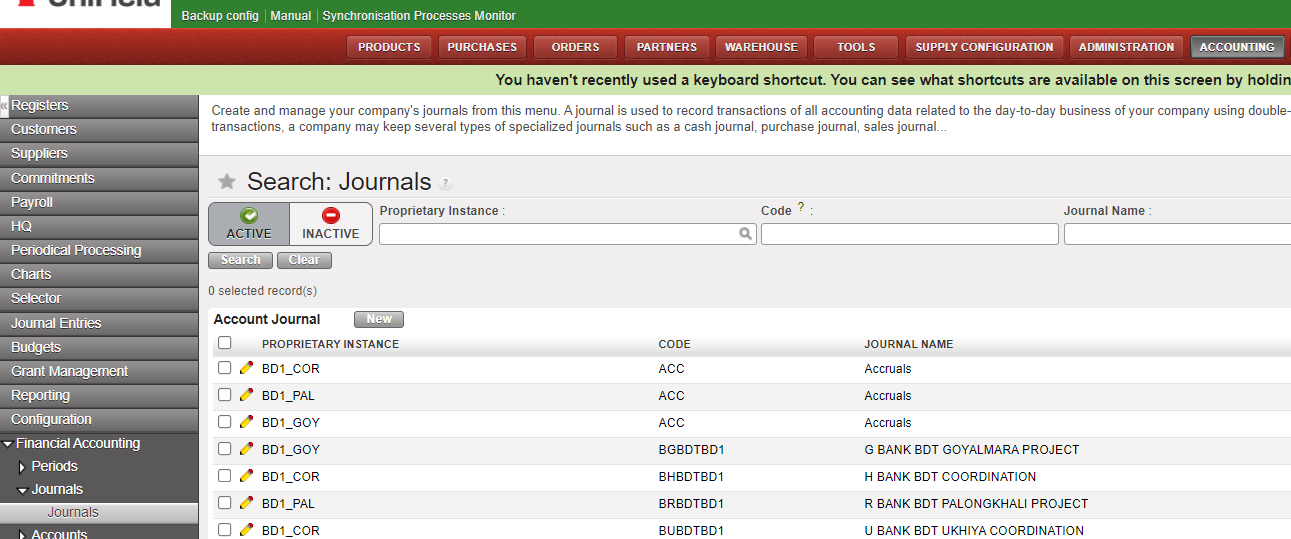
The process of deactivation:
- Select the register
- Click on Edit

- Tick off the box “Active”

- Click on “Save”
Once the journal changed to [inactive], it can not be used anymore in the interface:
- as third party of an entry.
- to book a manual journal entry.
- we can not import a file to the journal from a manual journal entry.
- the creation of a journal with the same code as an inactive journal it is not allowed.
It is not allowed :
- the selection of inactive journals in the invoices.
- the duplication of JE and invoices on inactive journals (note: we can’t create them with an empty journal as it is a mandatory field).
- the re-opening of a register on an inactive journal.
- the selection of inactive journals in the Recurring Models.
- the inactivation of a journal if a Recurring Plan which isn’t “Done” uses it.
- the selection of a Recurring Model on an inactive journal, in the Recurring Plans.
- the duplication of a Recurring Model on an inactive journal / of a Recurring Plan using a Recurring Model on an inactive journal.
- the selection of inactive journals as Refund Journal in the Refund Wizard.
- the Refund Type “Modify” for the invoices booked on an inactive journal.
