
Release Details
Release version: UF 21.0
Date of production synchronization server patch: 16-June-2021 / 18:00 Geneva time
Latest user rights files updated: UF21.0 can be found here with record of changes here
Note that no user rights need to be loaded at each HQ. This will be done at the Sync Server by the Core team and will update the user rights via Sync for all HQs and missions.
JIRA filter for all integrated tickets: https://jira.unifield.org/issues/?filter=12374
Supply
(US-7517) IR, PO, FO multi line cancellation
With this ticket comes an improvement in usability allowing users to select multiple lines directly in the IR/PO/FO or still to use the same pop-up window as before to select products for either Cancel or Cancel & Resource.
(US-7590, US-7597) Kit improvements on KCL status & comments
In these 2 tickets raised by OCB, the system now displays the status of each of the Kit components via Products>Kit Management>Kit Composition List, along with some filter buttons for each of these statuses.
In the Kit Composition list, when using the Substitute Item functionality it is now possible to see the comments linked to each KCL line, and in the substituting items, it is possible to keep the same comment as per the line removed or also to add a new comment for the replacing line.
(US-8320) Phase Out status products can be shipped out
This is a modification linked to previous alignment of UniData and UniField status of products (US-7158). UniData products with “Phase Out” status can now be consumed and sent out of the instance. This includes donations and regular outs to internal, external, intermission and intersection partners as well as Real consumption.
(US-7487, US-7003) Ship improvements – delivery address & surplus packs
Now there is a check at processing PPL and SHIPs that the partner’s delivery address exists/is active, and warning to change this if not. There is also a warning on the Partner file if user tries to delete an address which is currently used in a PPS open document.
There is an addition to the PPS flow to complement US-5859 which limits the modification/addition of packs to being done in “quick flow” in the Draft Shipment so that it is not possible to ship more parcels than exist in shipment.
(US-8194, US-7816) Sourcing/POs – Local market & Service product
Some modifications so that if “Local Market” supplier is selected in the OST, the type of PO will automatically be switched and created as Purchase List. This can be manually changed back if needed.
When an FO with a Service product is sourced to a Direct PO, it is now no longer possible to change the DPO to a regular or purchase list type PO.
(US-8372) Supply documents product price, non-acceptance of comma
When User Interface (UI) is in English, unit price fields in documents IR, PO, FO, IN, Product cost revaluation and Initial Stock Inventory will no longer accept comma “,”. Only full stop/period “ . “ will be accepted as decimal marker. No change to how French UI works or to any imports.
(US-8450, US-8453) Replenishment Rules: increased FMCs & default dates
Two improvements to the Replenishment Rules functionality, both affecting the Replenishment Segment. It is now possible to fill in up to 18 FMC values per line/product, which gives a longer planning horizon if needed. For FMC dates, when the calendar button is used to enter them, the calendar displayed will no longer show a default of “today’s” date but rather, the date of the column entered previously in order to minimise clicks for user to select future dates.
(US-7941) Vertical Integration: Auto VI multiple ESCs possible
For automated Vertical Integration, both import and export for Supply (PO, IN and Catalogue) it is now mandatory to define the specific ESC supplier for each job. This means that auto vi jobs can be active for multiple ESC Suppliers, one job for each supplier and each action.
(US-8058, US-8067, US-8492, US-8532) Reports additions
As requested by Pharma, extra columns will now be displayed in the IN&OUT and Receptions reports, and the Receptions report will now show INs created from scratch (not from PO).
Reports FO follow-up per Client and PO follow-up per supplier will also have extra columns. The Export Stopped products report is now renamed to Export Phase Out products, and will no longer display inactive products.
(US-4653, us-8162) Stock Take Date improvement & IN correction
It is now not possible to change the Stock Take Date on POs which are validated or a status after. The STDate after PO validation can only be updated by the Synch in the case of a synched flow. For products added on POs sourced to external Supplier (e.g. to ESC) then new lines will accept a STDate if date value is on/before PO creation date. Split lines will automatically take date of original line.
The issue raised where lines in Incoming Shipments (INs) could not be cancelled due to system checking Stock Take Date of POs which for historical reasons were not conforming to expected STDate. This has now been corrected.
(US-8554, US-8630) Direct Purchase Order corrections
In previous release, US-7617 meant Direct Purchase orders can now be closed/cancelled by synch when project/receiving instance process/cancel the Incoming Shipment. In a follow up ticket US-8436 on an intermediate release, the behaviour of INs was changed to allow for FOs split across multiple DPOs. However the DPOs created in this way between the 2 releases remained not being updated correctly by the synch. This ticket acts in the same way as a Data Fix would to allow the Not Run messages to be executed across all instances with this issue so the DPOs receive the correct updates.
In a second ticket, the flow where a DPO was created and then a line was split and then confirmed was corrected so that at project/requester instance, the PO split line is no longer displayed as Draft status but in Confirmed status to match its DPO counterpart.
(US-8614, US-8380) Internal moves, destruction location & expired products
Correction made to internal moves (INT) allowing only virtual location of “Destruction” to be selected as destination location. Other virtual locations were previously made inaccessible for this in US-8389.
Another issue corrected is that where an IN is processed for expired goods, the chained INT linked to it will automatically be processed in the normal way and expired goods will arrive at destination location.
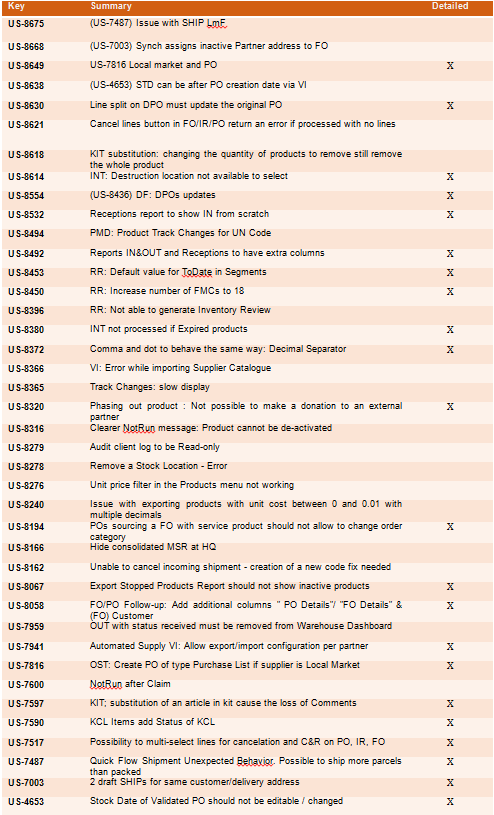
All Supply tickets integrated in UF21.0
Finance
(US-7295) Deactivation date of Destination/ Cost Center combination in UF.
- In this ticket we have added the activation and deactivation date of the combinations of destinations / cost centers.
- Additionally to the checks on the activation dates of Destination and Cost Center individually, system will also check the activation dates of their combinations.
- The display of this combination inactivation date will be in the Destination Analytic Account configuration in the Cost Center (CC) tab. It can be filled manually.
- There is the possibility to fill these dates by import via Tools.
- All parametrization is always done at HQ level.
(US-8295) Improvement in Kind Donation functionality
New functions have been added to the In Kind Donations functionality as below:
1. Do not allow to delete with the red x the IKD lines as far as the IKD is from supply.
- If IKD comes from supply (regardless of the partner types): allow to create additional lines which are editable and that can be deleted.
- Allow to delete/edit lines when IKD is manually created.
2. We did a new cancel button on IKD like on STV/IVO when we have a donation in draft. The object is not removed, just greyed. Similar to STV/IVO the object and details is visible but not useable.
3. We created the split function in IKD.
- If we try to split a line with 0 amount we will be blocked (also via de wizard).
- If we want to split an invoice that has one line amounted 0, it will be possible just if we delete this line.
4. Now we can change product, account, quantity, unit price and description from a donation coming from a supply flow. ==> we frozed the donor, the source document, the product and the quantity fields of a donation coming from a supply flow.
5. We created the import-export functionality as the one created for the supplier invoices in 2020: “Import Invoice Line / Export Invoice Line”.
The field “notes” that is in a tab of the invoice lines of a SI/IVI/IVO/STV will be also available in the excel spreadsheet.
6. There were no changes in the behavior of the ODX journal nor in the “duplication” behaviour: If the donation comes from a supply flow the source document will not be copied if we duplicate the document. If the donation is manual, the source document will be copied if we duplicate the document.
(US-7876) Track changes on currencies and currency tables
We implemented the track changes on currencies in these screens:
- Accounting/configuration/currency management/currencies.
- Accounting/configuration/currency management/currency tables.
- on the currencies we can track:
- the creation of the currency
- the editions of every field, including the changes on the rates.
- on the currency tables we can track:
- the creation of the currency table
- the editions of the code, the name, the state, the addition and deletion of currencies
- to see the changes on a currency itself: click on the button on the right of the currency line.
(US-8001) CODE FIX: Don’t generate REV and COR when correction on FP on HQ entries using the correction wizard.
We did a code fix to correct a wrong behaviour: If the AD (analytical distribution) of an HQ entry is edited using the correction wizard to change either its Funding Pool and/or its Free1/2 account, REV/COR entries were generated, whatever the period state. This is not the case anymore, no REV/COR entries are generated.
(US-8094) Track Changes in HQ Entries
Thanks to this ticket, we will trace:
- the fields used as headers in the list view of the HQ entries.
- the transition to “Validated” (the tag on which the filters To Validate and Validated depend), so that we can spot when the HQ entries have been posted.
- the split and unsplit of entries. Note: lines coming from a split will be identifiable because the “Original HQ Entry” will have a value for these lines (contrary to the “original” lines).
- the analytic reallocation
- the change of the account
(US-8208)Whenever a VI export is made, a message is stored in the logs with the filename and the database name
Whenever a VI export is made, a message is stored in the logs only (i.e. nothing is displayed in the interface) with the filename and database name. Logs are visible under Administration => Reporting => Audit => Client Logs.
This applies for these reports:
- OCP matching export
- Export to HQ system (OCP)
- OCB matching export
- OCB matching export Access Interface
- Export to HQ system (OCB)
- Export to HQ system (OCB) Access Interface
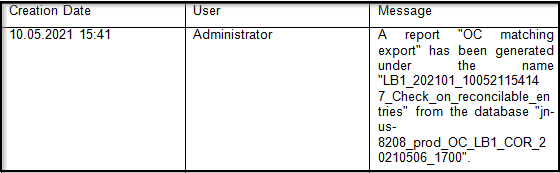
Example of log:
All Finance tickets integrated in UF21.0
Non- functional
(US-7019): Password policy best practices
Following a request to improve the UniField password policy, the following best practices have been integrated in this release as follows:
- Unifield user password has been enhanced with the following requirements -> 8 Characters : 1 capital letter, 1 number, 1 special character.
- Expiration of passwords: Users will be forced by the system to change their passwords every 6 months after their last password update. This rule will not apply for:
- production sync users, generic sandboxes, and testing environments (runbots and VMs for core team and dev)
- Administrator user
- UniData users
NB: After the release, all users in production (including admin) will be prompted to change their passwords at login.
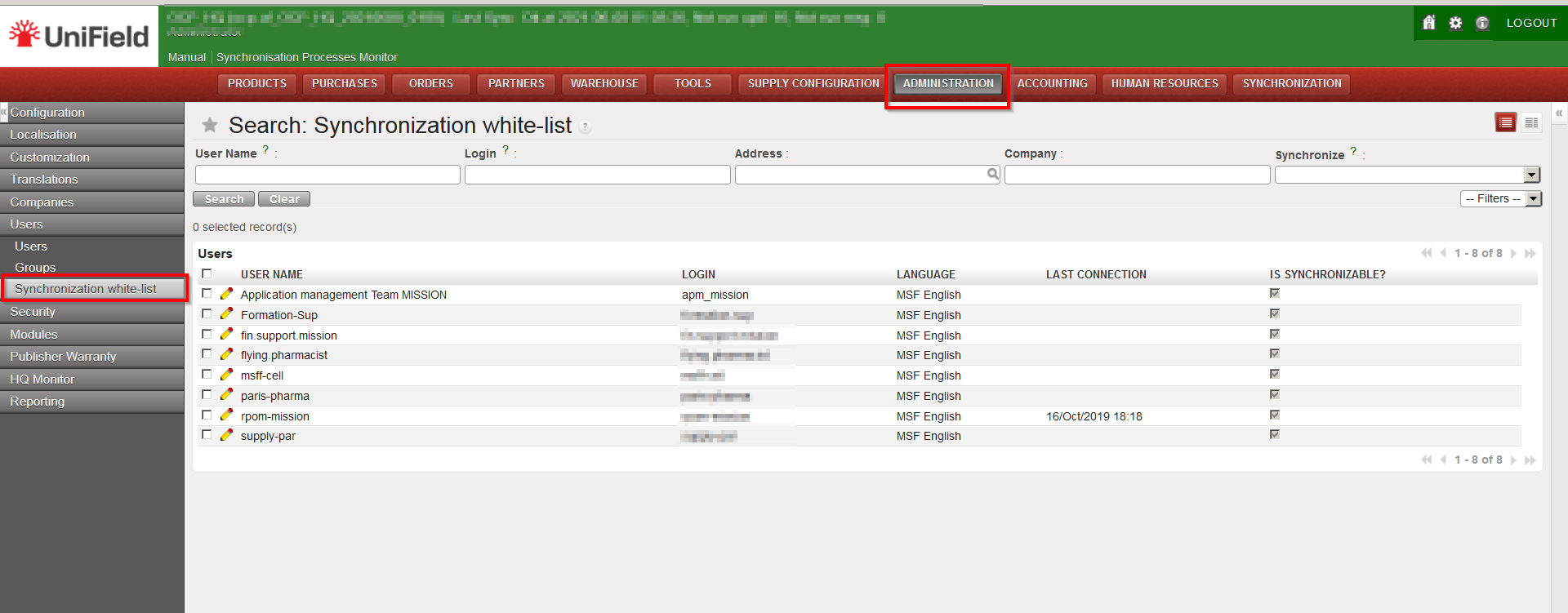
Each OC IT referent will be responsible for changing passwords for the synchronised users (synchronization white list) at HQ except for the apm user which will be updated by core team. Below is a screenshot guide on where to find the synchronisation white list in UF.
(US-8172): Most secure/efficient ways for auto clean-up of UF DB backups
The current 20.1 and older versions of UF allowed for failed backup files to be valid and kept which consumes disk space. This issue is fixed in this version 21.0. UF will no longer keep failed backup files (all dumps that complete with a non-zero exit code will be considered as a failure by the system). The failure generates a report of an empty KO file in the “Get Backup Files” view
(US-8403): UF All-In-One setup may corrupt pre-existing PostgreSQL configuration files if not ending with new-line
The postgres configuration file was being corrupted causing postgres service to stop. This was due to an erroneous appendage of lines in the postgres.conf file. UF21.0 fixes the issue by adding a new line break before the parameters added by UF in the config file.
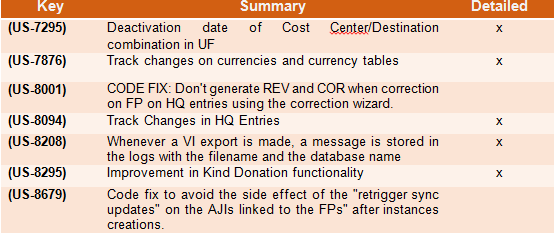
All Non-functional tickets integrated in UF21.0

