Release Details
Release version: UF 24.0
Date of production synchronization server patch: 16th March 2022 / 18:00 Geneva time
Latest user rights files updated: UF24.0 can be found here
Note that no user rights need to be loaded at each HQ. This will be done at the Sync Server by the Core team and will update the user rights via Sync for all HQs and missions.
JIRA filter for all integrated tickets: https://jira.unifield.org/issues/?filter=12407
Supply
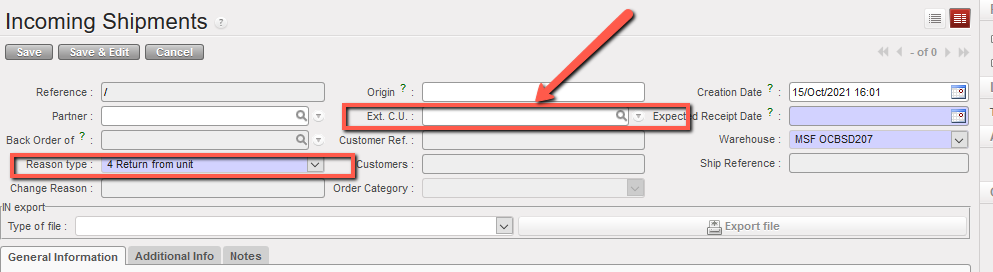
(US-9219) IN from scratch, field Ext. Unit mandatory if RT is Return from unit
An improvement implemented for the IN from scratch: when user wants to choose “Return from Unit” as a Reason type, Ext. C.U becomes mandatory to be filled, this is to be consistent with check already done if products are added via import.
(US- 9361) Historical Consumption report – AMC per location, Adjusted AMC
As raised by Pharma, the following changes to the Historical Consumption report have been developed:
It’s possible now to select a new Consumption Type “RR-AMC”. This will be the 3rd option and the other 2 options remain. When this 3rd option is selected, it is possible to select one or multiple Source Locations and one / multiple Destination locations. This means it will be possible to see consumption for a specific location or group of locations or see consumption to a specific destination location or set of destinations. Source location(s) must be internal but destination location(s) can be internal or external.
When 3rd option (RR-AMC) is selected, there is a checkbox named “Display Adjusted RR-AMC”. When selected, the report will take into account and show the adjusted AMC based on any stock outs / substitution for products recorded via a recorded “Stock Out” with selected period. When the 3rd option RR-AMC is selected, it is still possible to see and use the “Remove negative AMCs” as before meaning no negative AMC figures (due to returns) will be displayed. 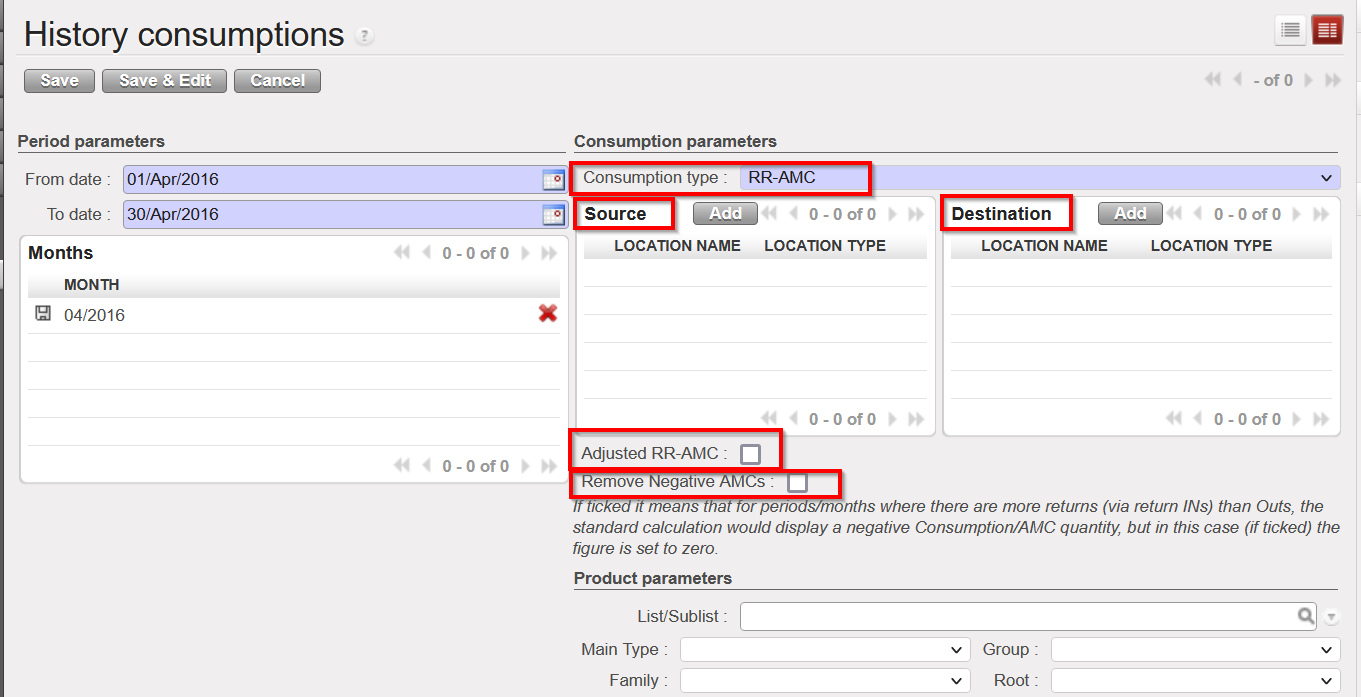
(US-9359) Physical Inventory new export
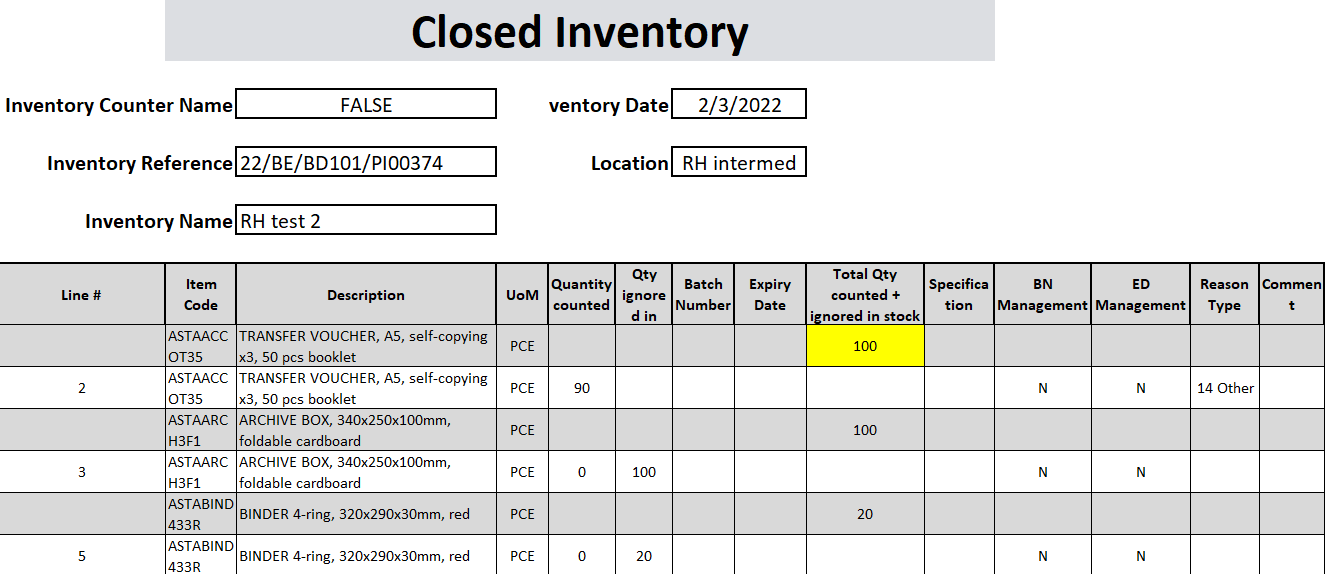
As per request from Pharma, a new excel export named “Closed Inventory” is available from Physical Inventory when in Closed Status via the Action menu.
- Similar to the Discrepancy report but with additional information: any counted qty which does not result in a discrepancy will also appear in this report.
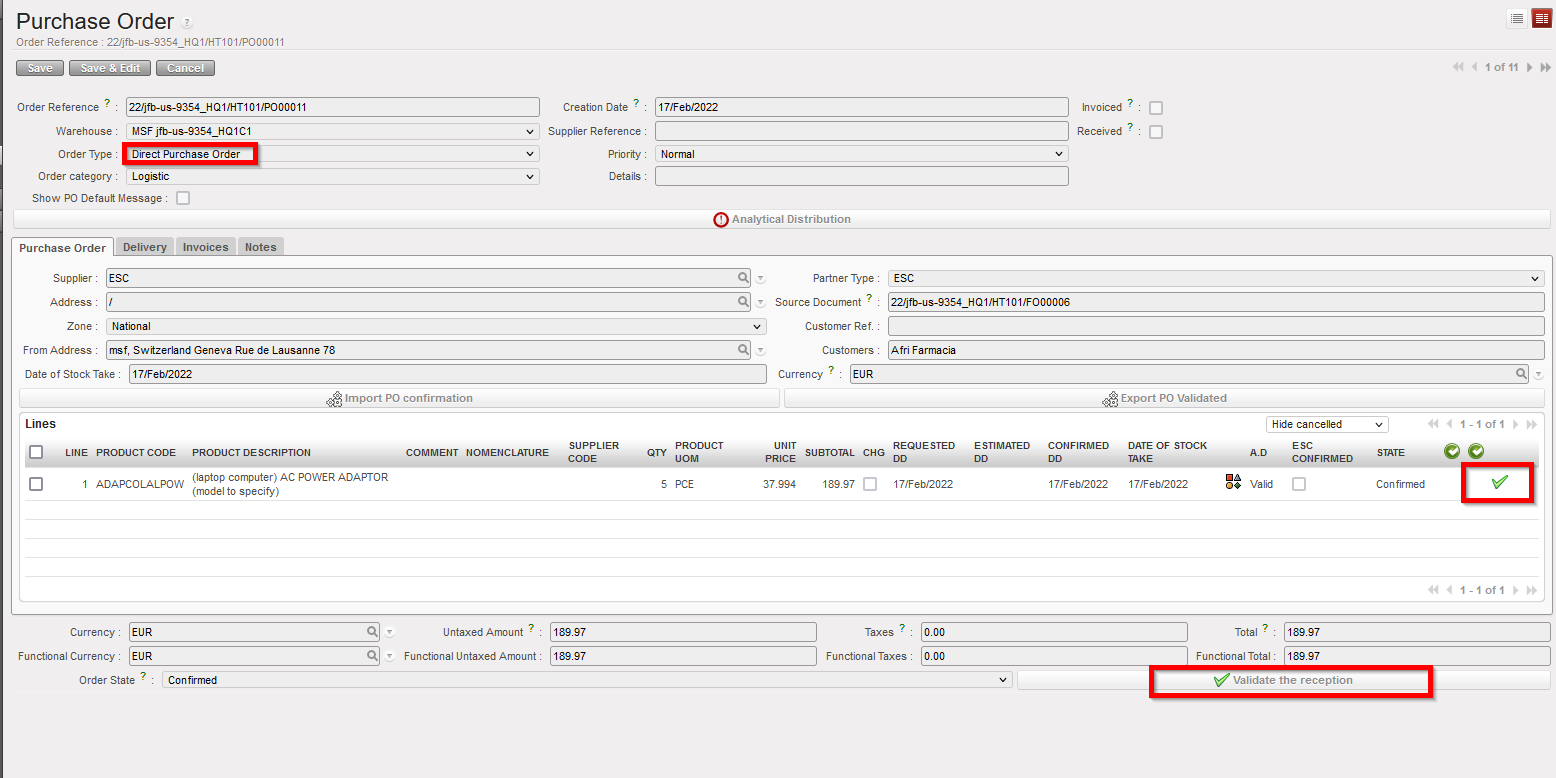
(US- 9354) No validate reception button for DPO to ESC
Improvement for consistency requested by OCP, for the DPO Flow, when DPO (coming from FO sourced to external partner) is done to an ESC, it’s possible now to confirm the reception at line level (and so close the line).
(US-9266) New Reason Type for INTs: Internal Return
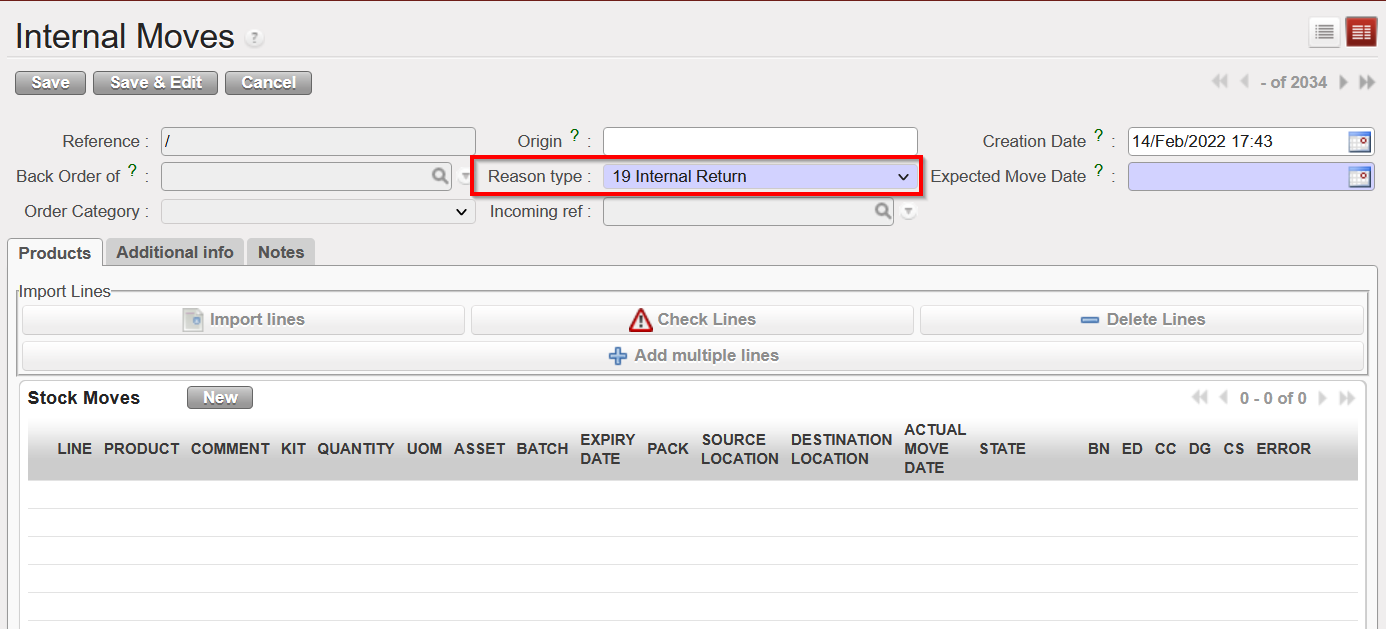
Improvement requested by Pharma and necessary for the RR-AMC report modification described above: a new Reason Type now exists for Internal Movements (INTs). This can be selected manually in the INT, and there is no change to the default RTs proposed by system.The INTs with “Internal Return” will be treated in the same way as INs with RT “Return from Unit” when there is calculation on the RR-AMC of a specific location.
(US-9129) IN: PDF displays cancelled lines
Improvement requested by OCA, a change to the PDF of Incoming Shipments has been implemented: PDF will no longer show any lines which have been cancelled. Closed and Available lines will still be displayed.
(US-8955) BN/ED added to the Receptions & Deliveries Reports
Improvement requested by OCA, to extend the Receptions/Deliveries Reports by the two following columns: Batch Number / Expiry Date
(US-8867) (E-Validation) IR PDF signatory changes
Improvement in preparation for E-Validation development to update the signatories displayed for the IR PDF in Eng and in Fr: They now contain “Technical Responsible” FR: Responsable Technique and “Supply Responsible” FR: Responsable Approvisionnement
iii)Remove “Storekeeper” (the space for the other 2 above can be increased)
(US-8862) Page number and Document references are missing
Improvement requested by OCB, for the PDFs of IR, INT, & OUTs, all pages now contain the page number and the document reference as for the first page of each document.
(US-8843) Claim: Message to clarify that product/batch/ED not on doc
Improvement requested by OCA, in processing the Claims, when batches/Expiry Dates of products being returned are different to those received. Warning message displayed will be more accurate: (Prod/BN/ED not available in the IN/OUT)
(US-8699) Estimated DD on PO, reports to update
Improvement raised to ensure reports aligned with dev already made in US-8076 where an additional date field “Estimated Delivery Date” or EDD was added to the PO.
(US-8660) (Automated) VI: Display freight name in “Ship Reference”
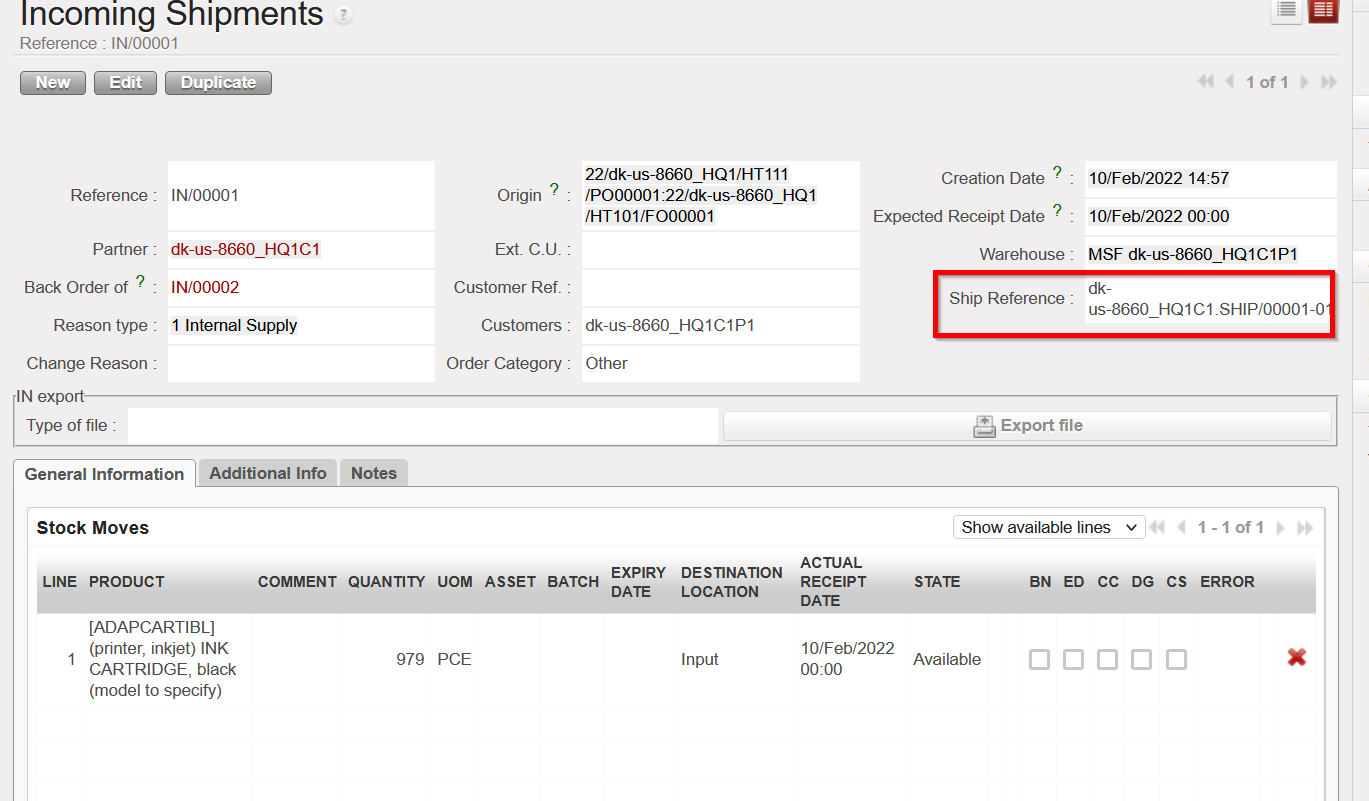
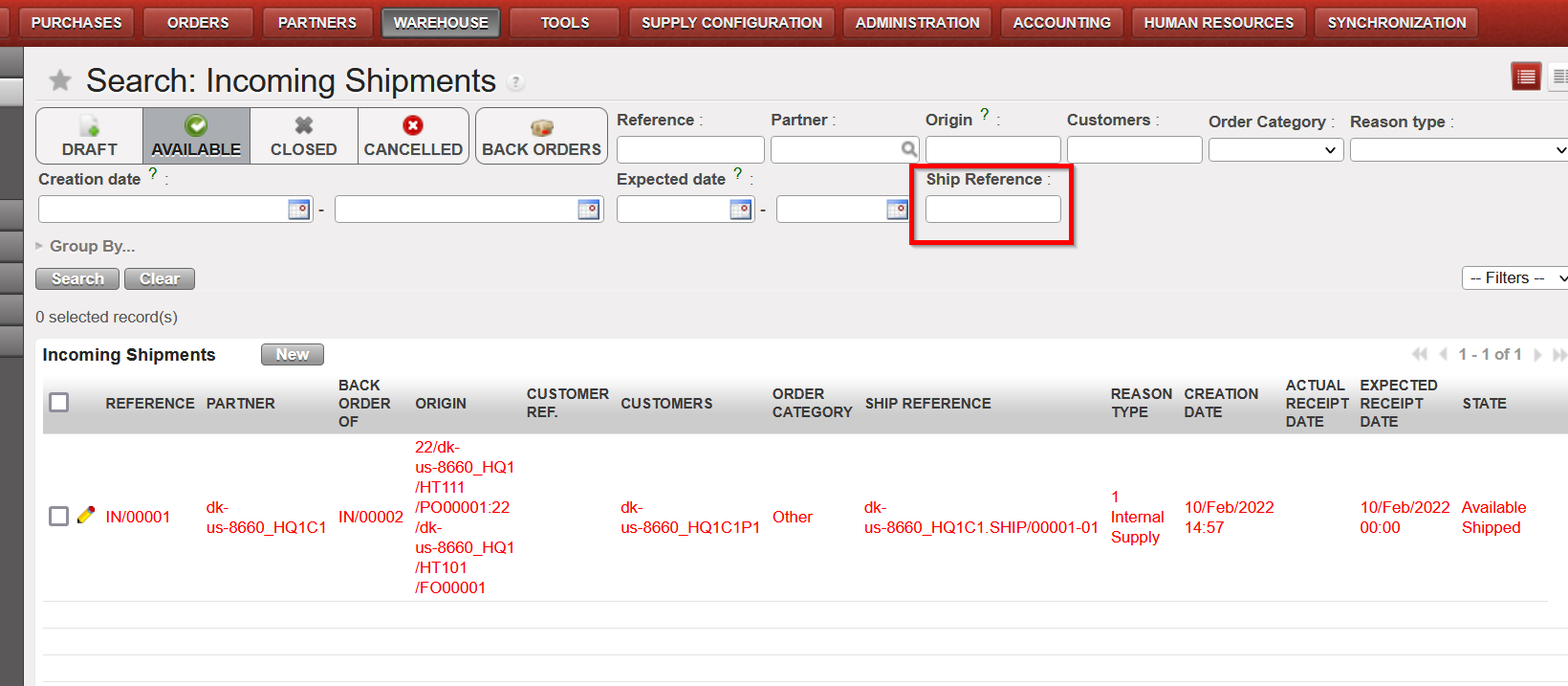
Improvement requested by OCA , affecting Incoming shipments, meaning the “Ship Reference Field” will now be updated when this value is filled in IN/EPacking Vertical Integration (VI) file. This will not impact how this field displays for INs which are updated by synch. An additional filter on “Ship Reference” at header level for the IN list view has been added.
. 
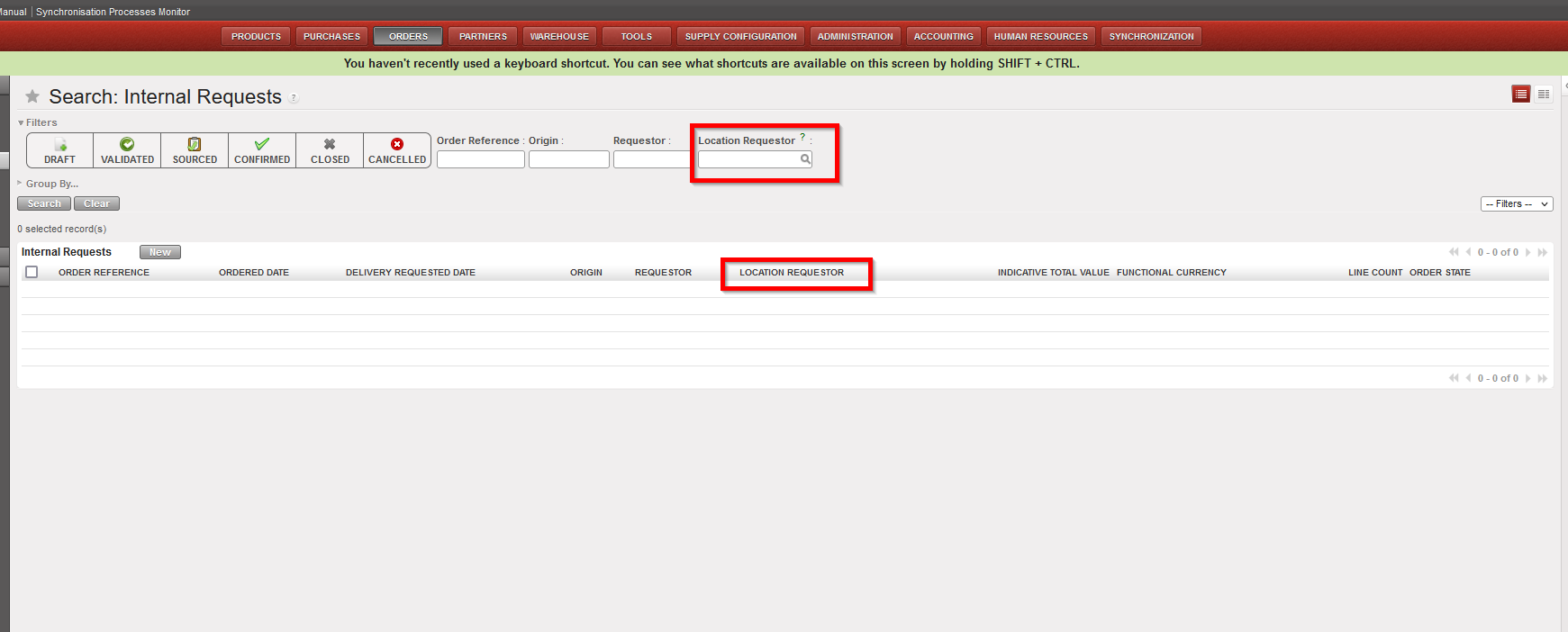
(US-8608) IR additional search/view on Location Requestor
Improvement requested by OCB, search field “Location Requester” has been added to the Internal Requests (IR) List view and is also reflected in same via by additional column there.
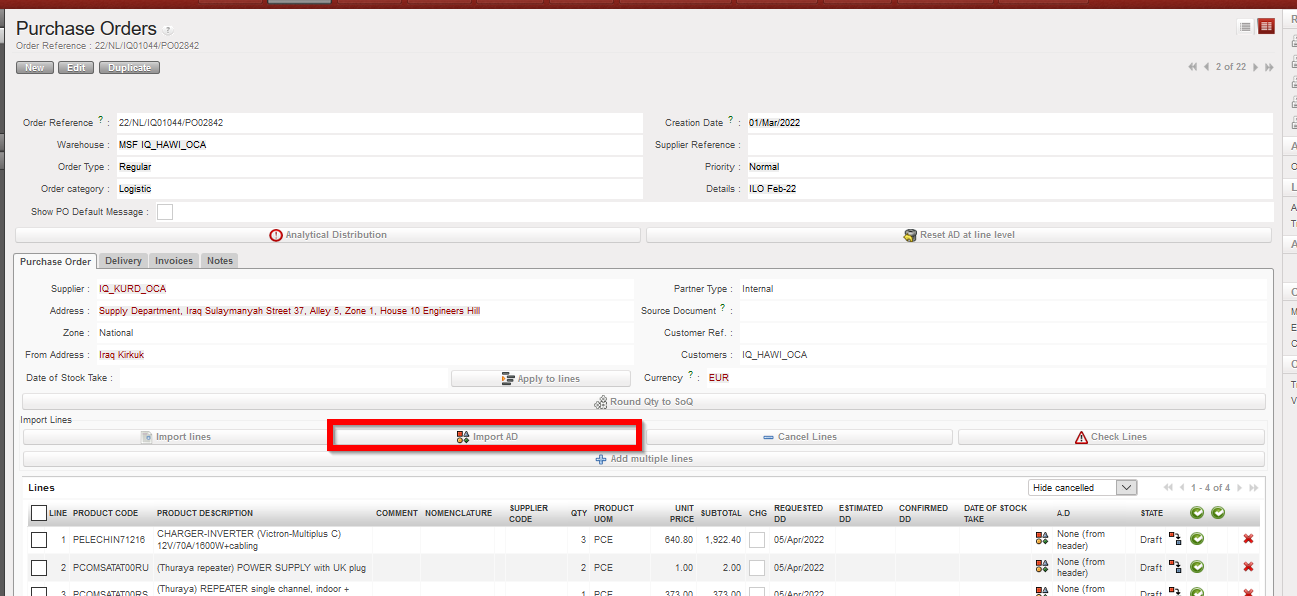
(US- 9603, US-9517) Import of AD into Draft PO/FO
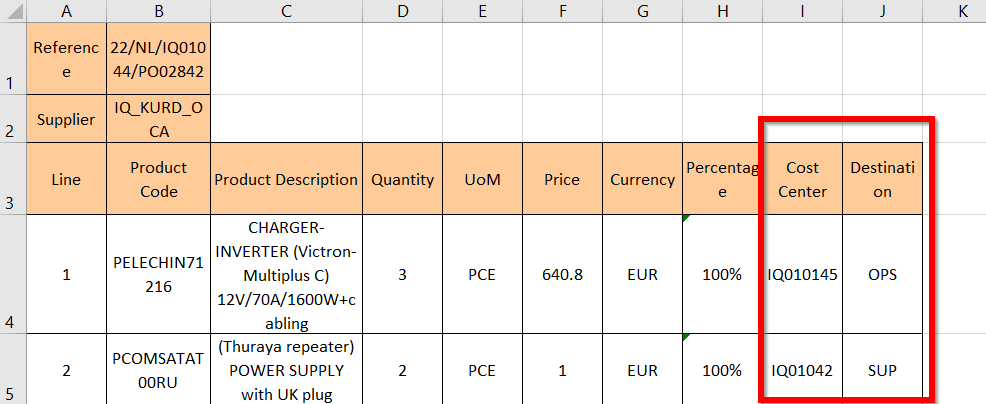
Two requests from OCB, with these it is now possible to import Analytical Distribution directly into a Draft PO/FO at line level. Only 1 AD (1 Cost Centre and 1 Destination) can be added onto each line. The action to export / import templates are both via the “Import AD” button.
In the import file, only the AD values will be imported. No other information can be modified or added via the import file. Percentage must be “100%” and system will check that Line number and Product Code match those of onscreen PO.
If there is already an AD added in onscreen PO, exported template will show this. If at header level there are multiple ADs added, the exported template will show percentage value as “Mix” and ADs will be blank. In the case that there are already ADs in the onscreen PO, it is possible to remove (delete) them by importing the file with blank AD values. However if there are multiple ADs at header level and export and import have “Mix” as percentage value, then the values will remain if AD fields are blank. At import, there is a check that AD values exist, but the main/secondary check will remain after import, when line/PO/FO is validated.
(US-8449) RR: Min/Max and AutoSupply validity dates added
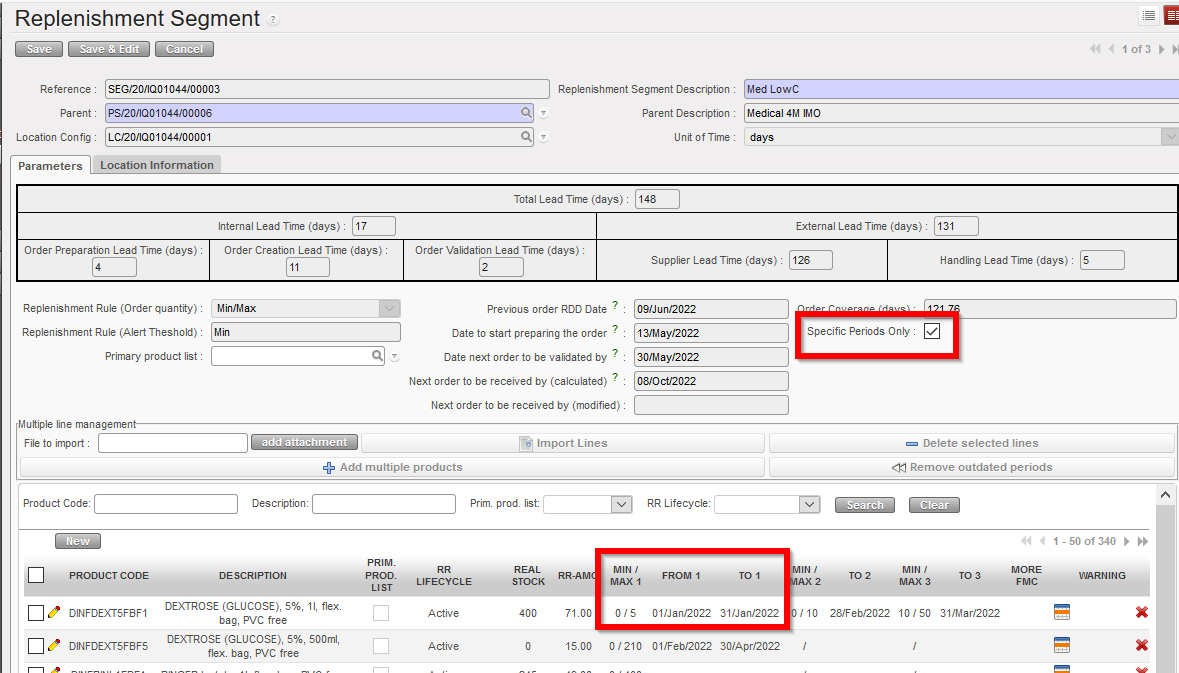
Improvement to Replenishment Rules (RR) functionality requested by OCA, affecting the RR Product Segment and Inventory Review. In this RR product segment:
>The RR types Min / Max & AutoSupply can now be applied with specific validity dates, in the same way as was already the case for RR type Order Cycle.
>The default is that validity periods are not applied for Min/Max & AutoSupply but they can be applied by ticking onscreen checkbox “Specific periods only” or changing value in import/export of Segment. If unselected, values other than 1st column cannot be filled / are not accepted at import.
>Import/export of Segment now has multiple columns to allow for these values: “Min / Max 1” “From” “To”, Min / Max 2″, “To” etc.
For the Inventory Review: 3 columns which display Min / Max and Auto Supply values, are replaced by just one column “RR Type” which will display the RR of that Segment: “”Order Cycle” “Min/Max” “Auto Supply”. The columns at end of the report which previously showed FMC values for each month “RR-FMC M0 Aug” have been renamed to “RR value M0 Aug” to reflect relevant value for any of the 3 RR types.
(US-8122) Consolidated MSR : improvement
Improvement raised by OCP for the Consolidated MSR Dates: Last Update value to be added at header of export. 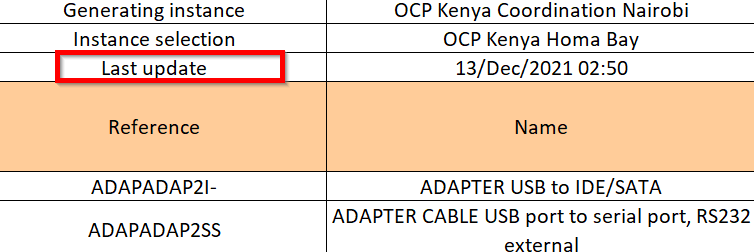
(US-4642) Creation of and conversion to EPREP locations
Improvement requested by OCG and raised and supported also by Pharma for EPREP Locations:
i)All newly-created configurable locations which have “Eprep” type selected will be flagged automatically as of “EPrep” type, a check will be made at creation that the name contains the word “Eprep” in Eng / Fr.
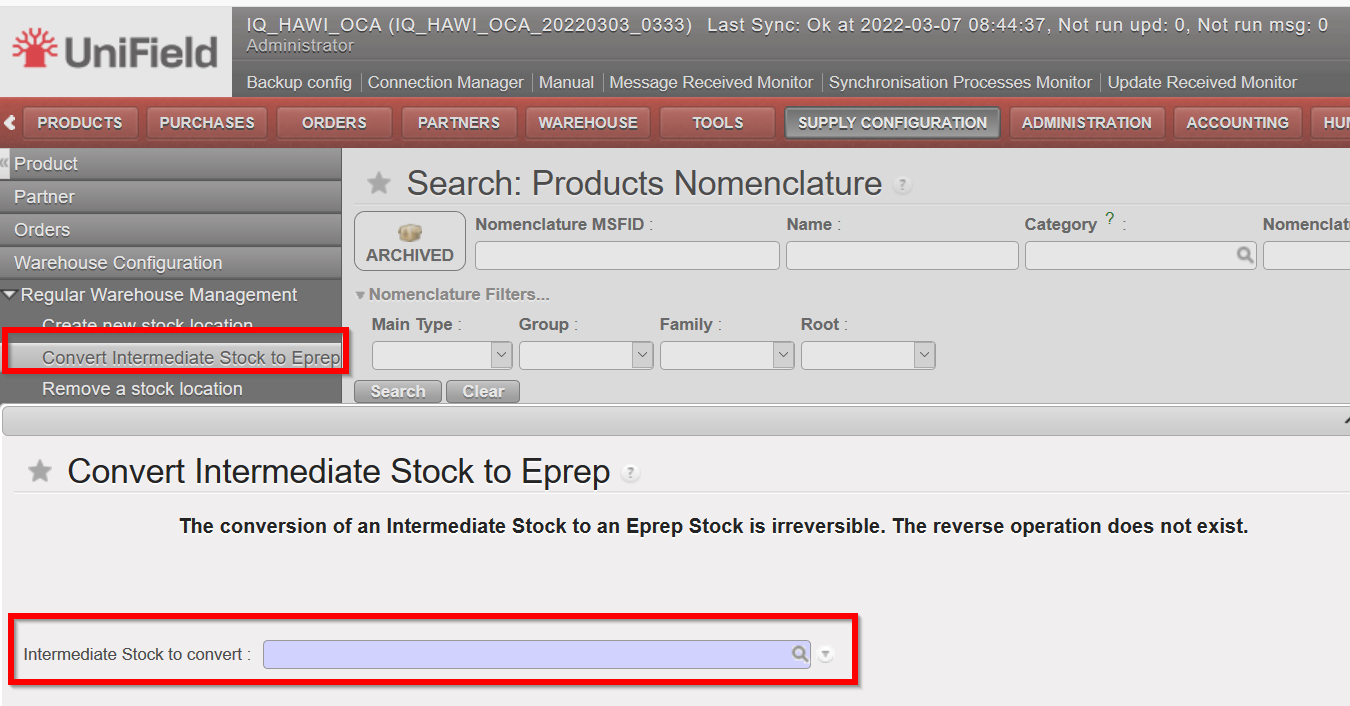
Pre-existing intermediate locations, can be converted into being “Eprep” according to user rights via the menu:
Supply Configuration>Warehouse configuration>Regular Warehouse Management>Convert Intermediate Stock to Eprep
Once a location has been created as Eprep type or converted to it, this cannot be reversed. The EPrep type of location now is reflected as a sub type of location under Configurable Locations in the warehouse structure, and appears in pink as per previous dev (US-9044) to apply colour coding to location types. MSReport has an additional column which shows EPrep stocks qties.
(US-9143) OCA : Patch script to automatically set AD destination to OPS
As per OCA’s request, exceptionally there will be a Patch script included in this release to change AD Destination to OPS for all Validated POs to ESC type suppliers across all OCA instances.
(US-9391) Patch script to rename incorrect references in INs and INT
A second patch script is to be included to rename INT and IN documents which have incorrect prefixes ( ”PICK/XXX”). They will have the correct document prefix added in front of their existing reference (so IN/PICK/XXXXX ) to allow for traceability. The issue causing this problem has been solved via US-9312.
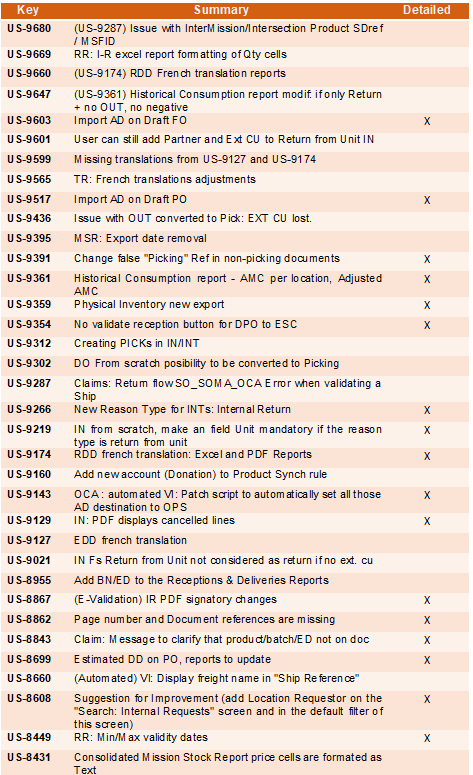
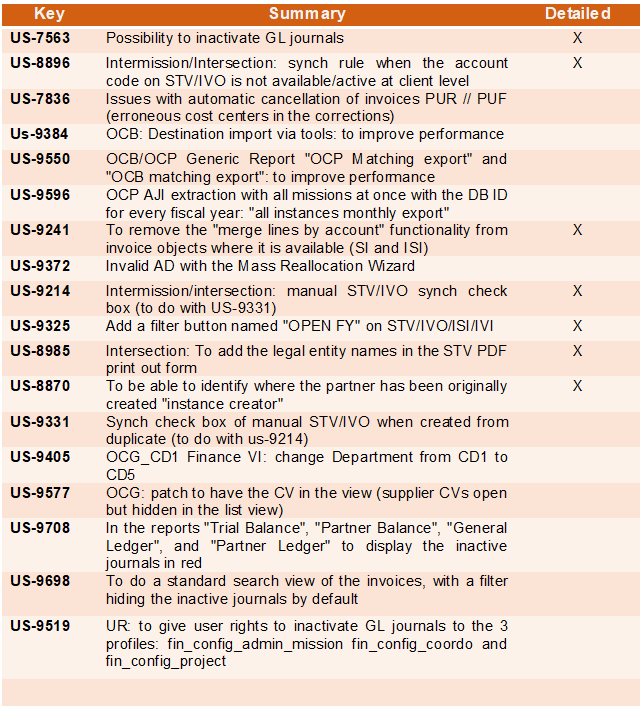
All Supply tickets integrated in UF24.0
Finance
(US-7563) Possibility to inactivate GL journals
In the [Accounting/configuration/financial accounting/journals/journals] screen, we have created a filter with [active] or [inactive] status on the header of the journal list for activation and inactivation of the GL journal.
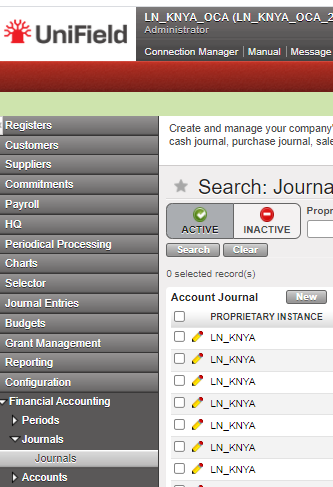
The standard display is [active]: Only active journals are displayed in the standard display screen. Registers related to inactive journals are not listed anymore on the register creation screen on [accounting/registers/register creation].
In the Journals we have the field Active:
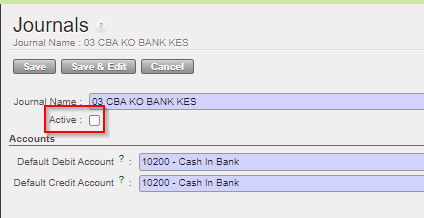
The [inactive] journals cannot be used anymore in the interface:
-
- as third party of an entry
- to book a manual journal entry
- We cannot import a file to the journal from manual journal entry, or into a register for register lines should check the active status of the journal code seen in the import.
The creation of a journal with the same code as an inactive journal it is not allowed.
We have added in the exportable fields the [Active] status in the export of the list of journals.
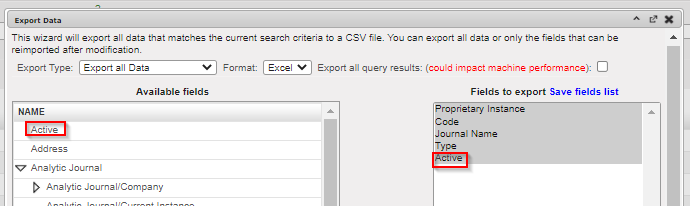
The conditions to allow the inactivation will be:
- For liquidity journals, before allowing the inactivation check:
- all registers have been closed
- all manual journal entries have been posted
- the balance of the last register is zero
We will receive error messages as the following one:

- For non-liquidity journals: all entries have been posted on the journals.
The activation-deactivation will synchronize to the other instances. We will prevent the deactivation if there are draft, or temp posted entries / documents. For the GL journals that have been deactivated, we will show the correction wizard in AJI and JI.
We have added the field “Active” in the Journal Track Changes.
We will not allow:
- The selection of inactive journals in the invoices
- The duplication of JE and invoices on inactive journals
- The re-opening of a register on an inactive journal
- The selection of inactive journals in the Recurring Models
- The inactivation of a journal if a Recurring Plan which isn’t “Done” uses it
- The selection of a Recurring Model on an inactive journal, in the Recurring Plans
- The duplication of a Recurring Model on an inactive journal / of a Recurring Plan using a Recurring Model on an inactive journal
- The selection of an inactive Bank Journal in the Cheque Journal form
- The selection of inactive journals as Refund Journal in the Refund Wizard
- The Refund Type “Modify” for the invoices booked on an inactive journal
Reporting
- We will not show the registers related to inactive liquidity journal in the [liquidity position report]
- We will show the inactive journals in the [liquidity balances] report as far as there have been movements within the period considered in the report. So, the related line won’t be displayed on the condition that the journal is inactive, and the “Starting Balance”, the “Movements”, and the “Closing Balance” are all 0.00.
- We have added a new column in the [liquidity balances] report: [Journal Status].
- (US-9708) In the reports “Trial Balance”, “Partner Balance”, “General Ledger”, and “Partner Ledger” the inactive journals will be displayed in red.
- (US-9698) In the Search views of the invoices, we have done a standard search view, with a filter hiding the inactive journals by default.
(US-8896) Intermission/Intersection: synch rule when the account code on STV/IVO is not available/active at client level
We have changed the synchronisation rule of balance sheets at STV lines between 2 sections using different sets of balance sheets (B/S) accounts. Before this change, UF synchronized the lines booked in B/S, as far as the account codes used were the same. OCA balance sheet numbers are completely different than other OCs.
When an ISI or IVI is created at synch time, the account on each line is taken from (by order of priority) the related CV line if any, else on the product or product category, else directly from the account used on the line in the other instance. In case the account is not found or is inactive, the related line is created without account and is displayed in red (until the account is set). The lines concerned are listed in the related “Synch Message Received” which appears as “Partially Not Run”.
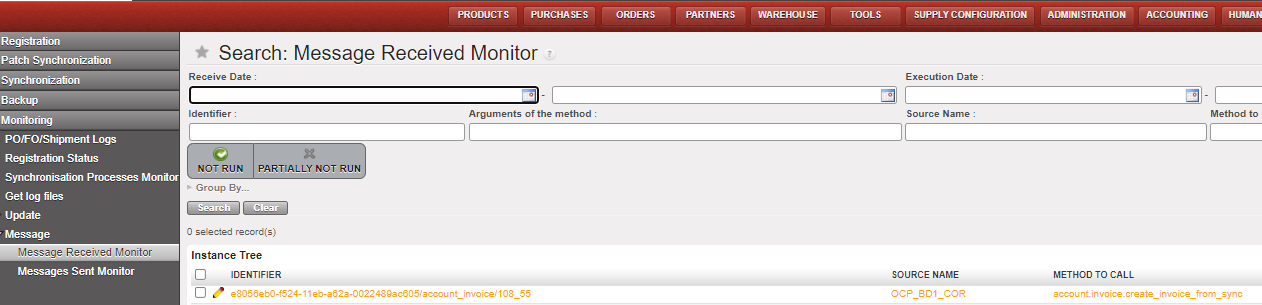
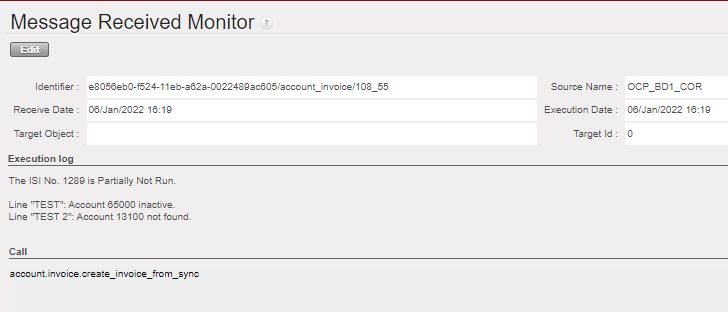
It is not possible to validate the invoice if the accounts are still missing.
This should be the only use case (UC) where invoices can be created with “empty” accounts. Therefore, it is not possible to create an invoice by duplicating another invoice with missing accounts: all the accounts must be filled in first.
(US-9241) To remove the “merge lines by account” functionality from invoice objects where it is available (SI and ISI)
We have removed the “merge lines by account” functionality.
(US-9214) manual STV/IVO synch check box and (US-9331) Synch check box of manual STV/IVO when created from duplicate
US-9214: Intermission/intersection: manual STV/IVO synch check box:
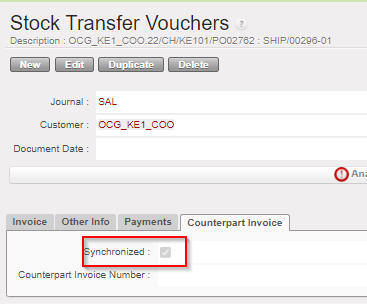
- if the partner chosen is intermission/intersection, the check box is ticked.
- if the partner chosen is not intermission/intersection, the check box is Unticked:
- when the user creates a partner, the user clicks on [validate] button, we will always make a check to ensure the consistency between type of partner at [partner] field and [synch] check box.
- if the partner is not intermission/intersection and the synch check box is active, we will not allow to validate. Error message: ” You are not allowed to synch an invoice to this partner. Please remove the tick from the check box “sychronization” from the tab Counterpart invoice”.
(US-9325) Add a filter button named “OPEN FY” on STV/IVO/ISI/IVI
We have added a filter button named “OPEN FY” on STV/IVO/IVI/ISI screens.

The Fiscal year to consider is the FY of the posting date.
The following statuses are considered as NOT open: draft, mission closed and HQ closed.
This filter button “OPEN FY” is ticked by default.
When the filter button “OPEN FY” is unticked ==> all objects are displayed.
When the filter button “OPEN FY” is activated:
- we can see all draft invoices (whenever their posting date).
- we can see all invoices if their posting date is in the FY Open.
- we can see just the cancelled posting date in the FY Open and the invoices with NO posting date.
(US-8985) Intersection: To add the legal entity names in the STV PDF print out form
In accounting/customers/STV and then in the first tab “invoice”, we are talking about the report pdf named “print invoice” only related to the STV (intersection flow).
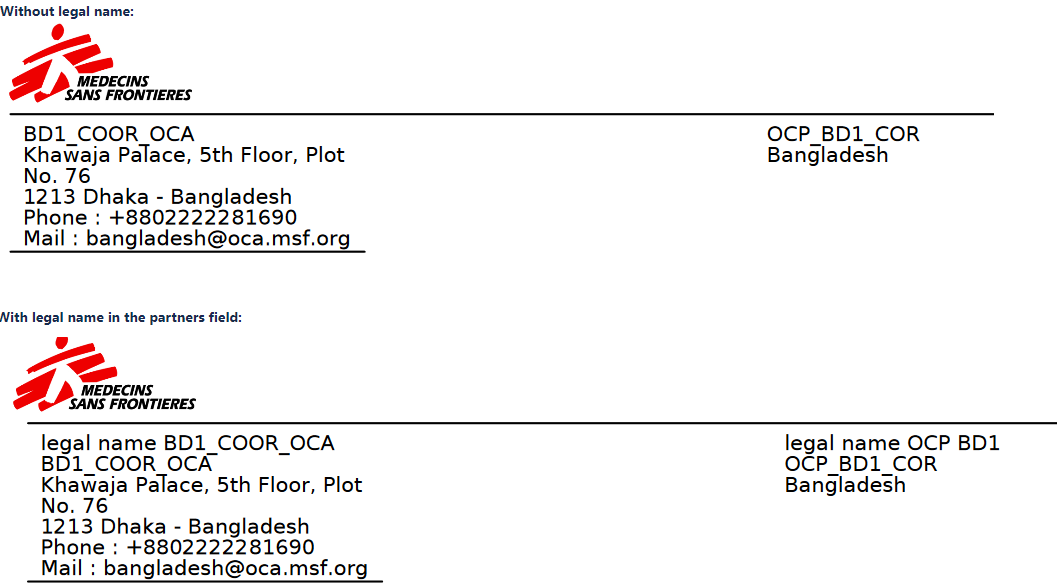
- We have added the legal name of the supplier (in the pdf is in the first line on the left) and of the customer (in the pdf it is in the first line on the right).
- The legal name was not currently in the system, so we have added a field containing this information in the “Partners form”.
The field legal name is placed below the field “Name”:
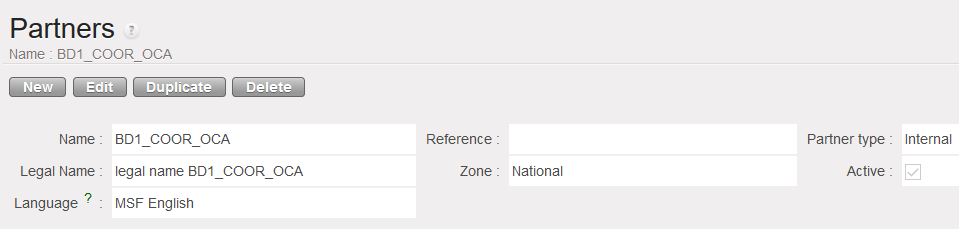
(Note: when we create an instance, the instance must also be created as an internal partner).
It has been decided that the legal name will appear in the pdf document for all partner types (because there are still intersection instances that are not using Unifield)
- If the legal entity name is not available in the system, it will be empty.
- The second line is the Name and this remains the same.
(US-8870) Intersection: To be able to identify where the partner has been originally created “instance creator”
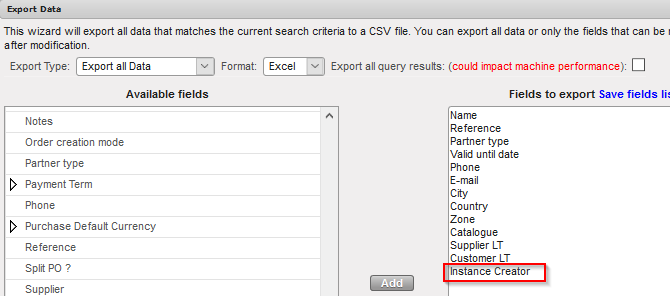
In the Suppliers form we have created a new field “Instance Creator” in the tab “General”.
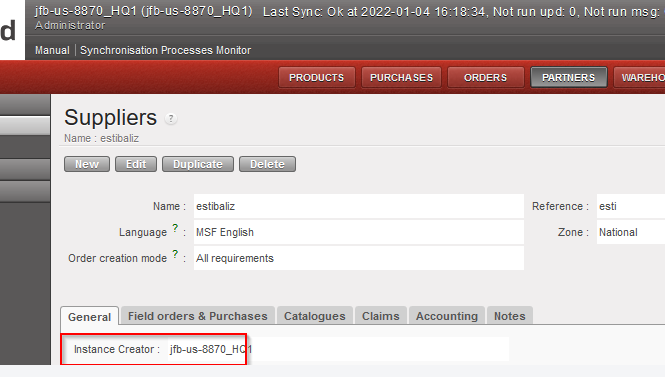
We have added this field in all partners type synchronisation rules.
We have also added this field in the export action menu.
All Finance tickets integrated in UF.24.0
Non- functional
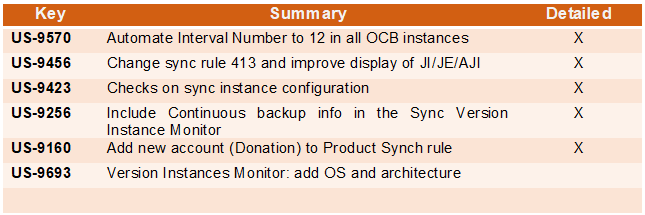
US-9570 Automate Interval Number to 12 in all OCB instances
This change is only for OCB instances as they requested to set the automatic sync to only run 2 times before office hours. As the auto sync interval must always match the auto patch interval, we included a patch script in the UF24.0 release to implement this change for only OCB instances.
US-9456 Change sync rule 413 and improve display of JI/JE/AJI
Failed datapush at OCBHQ, (Data Push create: OperationalError: out of memory). The memory error was raised when the instance tried to compute the sync rule #413 to sync JI (account.move.line).
The rule was created in 2012 for the pilot 0.4 used to flag a JI as corrected but currently only posted JI can be corrected so the domain is not needed anymore. We therefore changed the rule to ensure that with this release:
- Performance during sync is improved
- Display of JI/AJI/JE has been largely improved. This will largely benefit all OCs (HQ) users
US-9423 Checks on sync instance configuration
Checks on sync instance configuration will ensure register actions in the instances leading to wrong sync groups as seen in US-9412 are prevented. The checks in question have been implemented in the sync server at instance validation to ensure:
- A coordination must have exactly 4 groups of each type (Mission, HQ + Mission, Coordinations and OC), all in the same OC,
- A project must have 3 groups: Mission, HQ + Mission, OC. All in the same OC.
- The HQ + Mission group used on an instance must contain the parent instance
- The Mission group used on a project must contain the parent instance
Otherwise, the instance validation is denied.
US-9256 Include Continuous backup info in the Sync Version Instance Monitor
For all versions of UF23.0 and below, the report Administration/HQ Monitor/Version Instance monitor available at HQ only includes info regarding cloud back up. With the UF24.0 release, new columns as below have been added to accommodate continuous backup info too:
- Backup type
- basebackup_date
- rsync_date
US-9160 Add new account (Donation) to Product Synch rule
The Donation account has been added to the product sync rule. Users in the past have not been able to add this account at field level. Even if, they attempted to add it at HQ, it was not synched so there was no way for it to be filled at mission level as seen in US-9106. This release fixes this. Donation expense account once filled at HQ will be synced down.
US-9693 Version Instances Monitor: add OS and Architecture
Following this release, The Windows version information and the architecture (32-bit vs 64-bit) of UniField servers will be added to the Version Instances Monitor.
All Non-functional tickets integrated in UF24.0