Release Details
Release version: UF 26.0
Date of production synchronization server patch: 14th September 2022 / 18:00 Geneva time
Latest user rights files updated: UF26.0 can be found here
Note that no user rights need to be loaded at each HQ. This will be done at the Sync Server by the Core team and will update the user rights via Sync for all HQs and missions.
JIRA filter for all integrated tickets: https://jira.unifield.org/issues/?filter=12435
Supply
(US-10168) Lookups for headers and constants should be case insensitive
This improvement ticket is to ease the importing job in UF, it is now acceptable for all Supply imports in UniField to have inconsistent cases, e.g., UoM “pce” instead of “PCE”, or “Pce” instead of “PCE”, file will be recognised and imported.
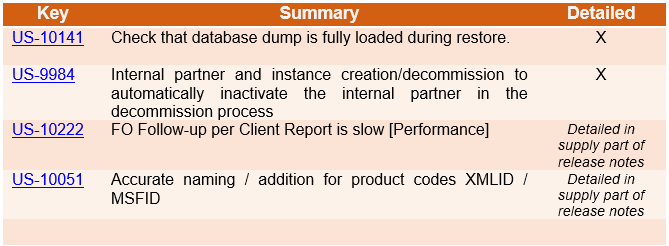
(US-10051) Accurate naming / addition for product codes XMLID / MSFID
This ticket is to improve the accuracy / visibility of background product id codes:
- In Tools>Object Query > Products
Possible search field has been updated so that it is now named “MSFID” (previously it was named “hidden field for UniData). It is also now possible to search for additional field “SDref”.
- In Product PMD>Action menu>View Log:
i) existing label “Internal module data ID” is now renamed to “SDref”
ii) existing label “UniData xmlid_code” is now renamed to “xmlid_code”
- In Product PMD>Action menu> Export
User can search for field MSFID, and MSFID is not possible to be changed by users via import or update products menus (should not be possible to update MSFID of product via import (MSFID should ONLY be added/changed by by UniData)
- Log to show if the MSFID of a Product has been changed has been added to track changes In Product PMD>Action menu> Track Changes
(US-10010) Avoiding Local products import at Project
This improvement ticket is to avoid the issue of users accidentally creating or updating products in project-level instances. In this release below sub-menus are no longer accessible in projects:
- via menu Products > Import products> import products
- via menu Products > Import products> update products
- via menu Tools > import / export > Supply
- via menu Tools > automated imports > Products
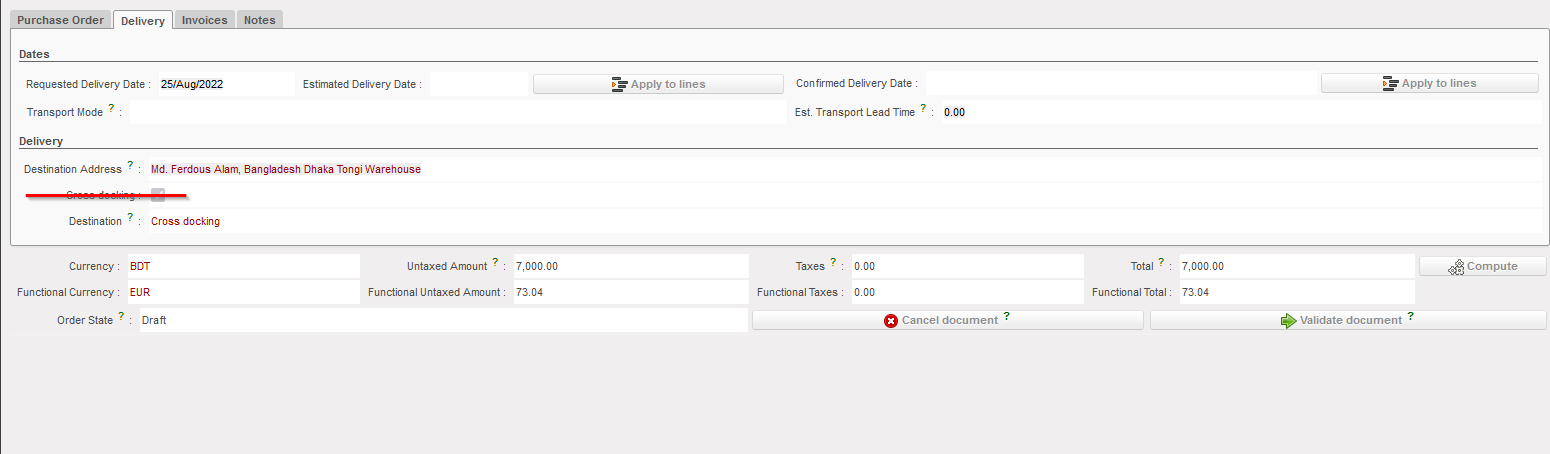
(US-10008) Disable tick box “Cross Docking”
This improvement ticket raised by OCA, to prevent user from changing the destination location on the PO level. Users can still do the change in the IN level. In the PO, the tick box “Cross Docking” in the tab “Delivery” is not visible anymore for users.
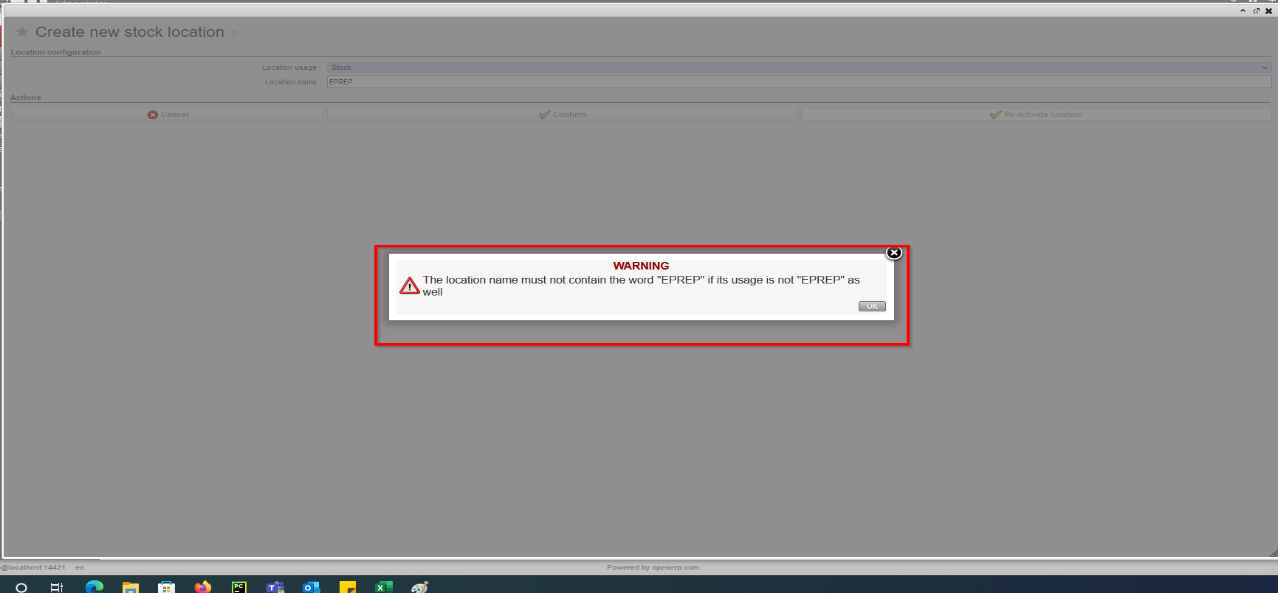
(US-9968) Blocking the creation of EPREP in Intermediate stock location
Improvement ticket raised by OCB, to stop the creation of “EPREP” location under the “Stock” category, system prevents such a location being created if name includes word “eprep” and a message is displayed to stop this action:
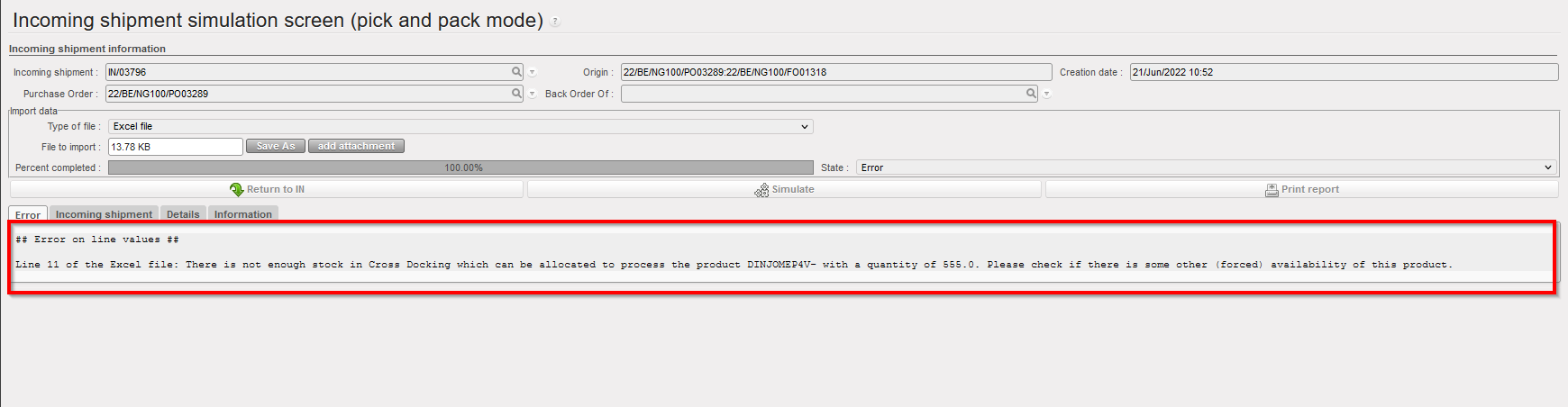
(US-9962) VI: If E-Packing IN > PPS import cannot be done (forced availability/negative stock) clearer message
Improvement ticket raised to avoid previous issues found by OCB. In the flow of ordering, sourcing, and importing E-packing VI import into IN with the option to pick & pack after, if one of the products is already “forced” as “Available” in an unrelated OUT from the same location (Crossdocking), the import could not be processed. With this dev, system will now check at IN import (if IN>P/P/S) that products do not have a negative available stock in CD location, and if so, the import will be blocked and product code / qty displayed in warning message. Same check done for all types of VI IN import.
(US-9744) Remove PI C/S check on line reference.
Improvement ticket raised by OCB, to avoid any duplication in Physical Inventory. At import of Counting Sheet, system will no longer check the line reference in file at import of counting sheet.
System will keep the check of Product / BN / ED, duplicate lines, and match imported Prod/BN/ED, add new lines, etc.
(US-9509) Product UniField Status after re-activation of product.
Improvement ticket raised by OCG, to ensure the consistency for UF Product Statuses when a product is manually re-activated. At manual re-activation, the product’s “UniField Status” should change accordingly. In the case of UniData products, the UF Status should be updated based on its “UniData Status” and “OC Subscription”.
- For HQ, ITC and ESC products at HQ: If product re-activated, then UF Status automatically set to “Valid”
- For Local products at Coordo: If product re-activated, then UF Status automatically set to Valid
- For UniData products at HQ: If product re-activated, then the following is the result:
- If Product is OC Subscribed = FALSE, then UF status > No change (remains Archived or Phase out)
- If Product is OC Subscribed = TRUE, and:
- UD Status = Forbidden then UF status > No change (remains Forbidden)
- UD status = Archived then UF status > No change (remains Archived)
- UD Status = Valid / Outdated/Discontinued then UF status > set to Valid
(US-9229) New Reason Type for OUTs: Deliver Unit
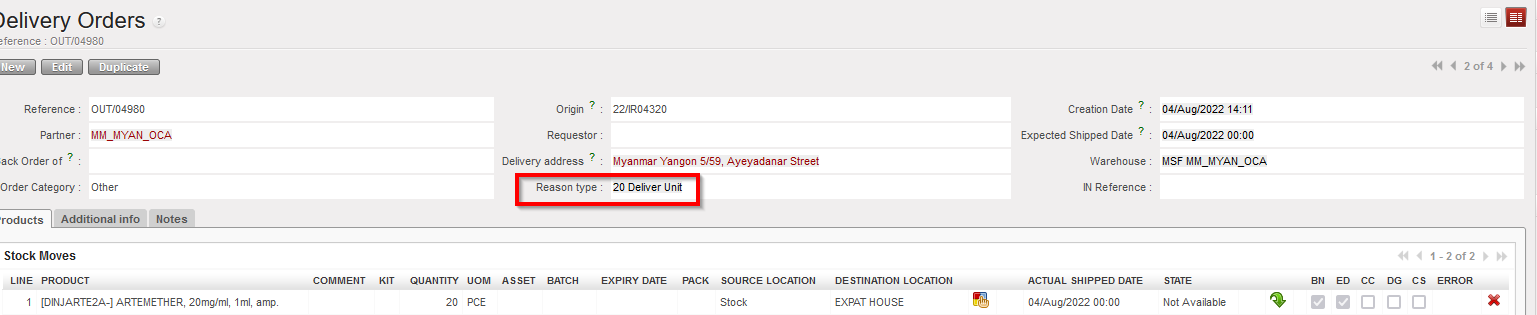
Improvement ticket raised by OCA, to improve the analysis of stock movements and to ensure greater consistency. With this ticket a new Reason Type (RT) is introduced for stock movements towards External Consumption Units. The default RT on any OUT or (converted) Pick to an External CU is now “Deliver Unit”. This new RT can also be selected in an OUT from scratch (although Default RT remains “Deliver Partner” for this). For both Picks and Outs, the RTs at line level will now be consistent with header level RT. The RT “Other” can no longer be selected.
Previous documents (Picks and Outs) have been migrated to conform to the RT logic as follows:
“Deliver Unit” for all OUTs created for IR with Ext CU.
“Deliver Unit” for all Picks created (via converting OUT) for IR with Ext CU.
“Deliver Partner” for all OUTs and Picks created for FO to customer.
“Consumption Report” for all OUTs created via a Consumption Report.
These documents have had their RTs at line level adjusted to be consistent with header level RT
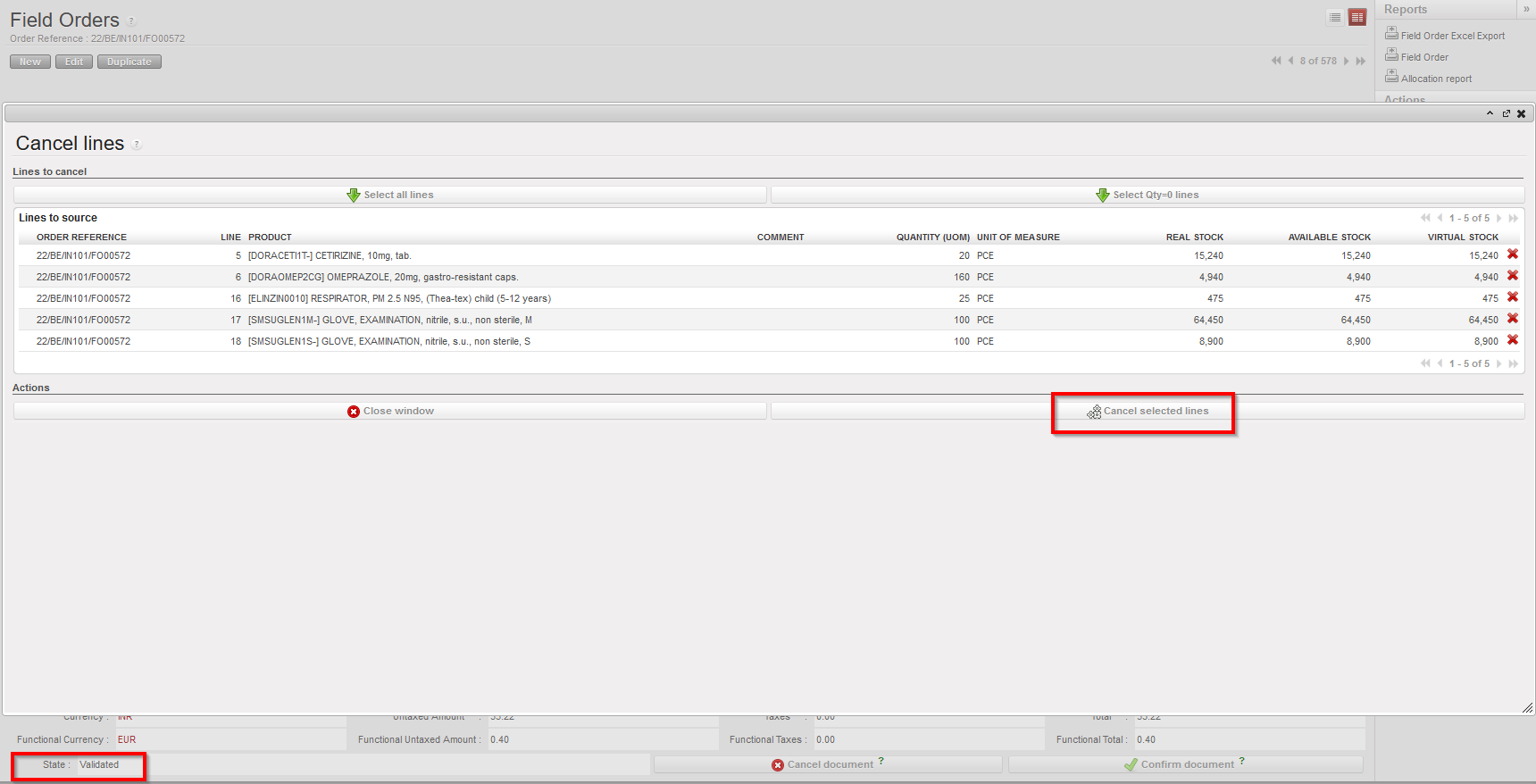
(US-8966) Cancel / C&R multiple lines to be consistent with single lines in IR/FO/PO
This improvement requested by OCB, ensures Cancel and C&R of lines is consistent in IR/FO/POs. It is possible now to cancel / C&R multiple (Draft/validated) lines, in Draft-p / Validated/ Validated-P IR/FO, and also in POs with supplier type ESC or external, (It is not possible to Cancel / C&R validated lines in PO with Internal/Intermission/Intersection type suppliers if they are beyond “Draft” status).
(US-8864) Export Inventory Level lists batches with no movement in the selected period
Improvement ticket raised by OCA, to improve the Export Inventory Level report, in case the checkbox “Include products with stock <= 0 with movements in the last months” is ticked, and X months is selected, report generated will include Products and their EDs/Batches which are in stock or have had movements in the last X months, and exclude the ED/batches which have not moved in the defined value X months and are not in stock.
(US-8428) Physical Inventory – Planned Inventory vs Stock Correction
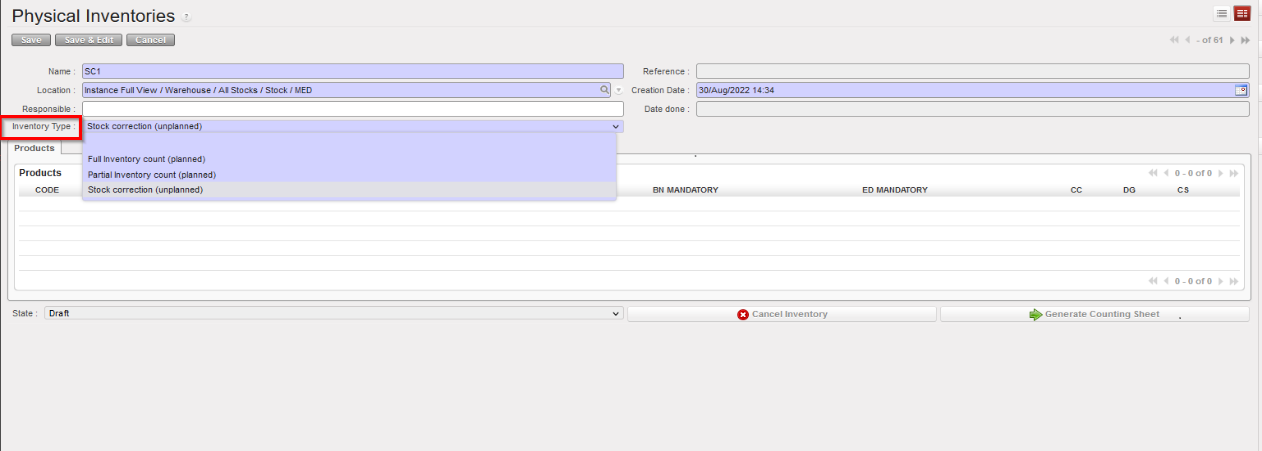
Improvement ticket raised by OCB, to improve options for inventory management, in the Physical Inventory, the checkbox for “Full inventory” is replaced by a mandatory drop-down list with below options:
- Full inventory count (planned),
- Partial inventory count (planned)
- Stock correction (unplanned).
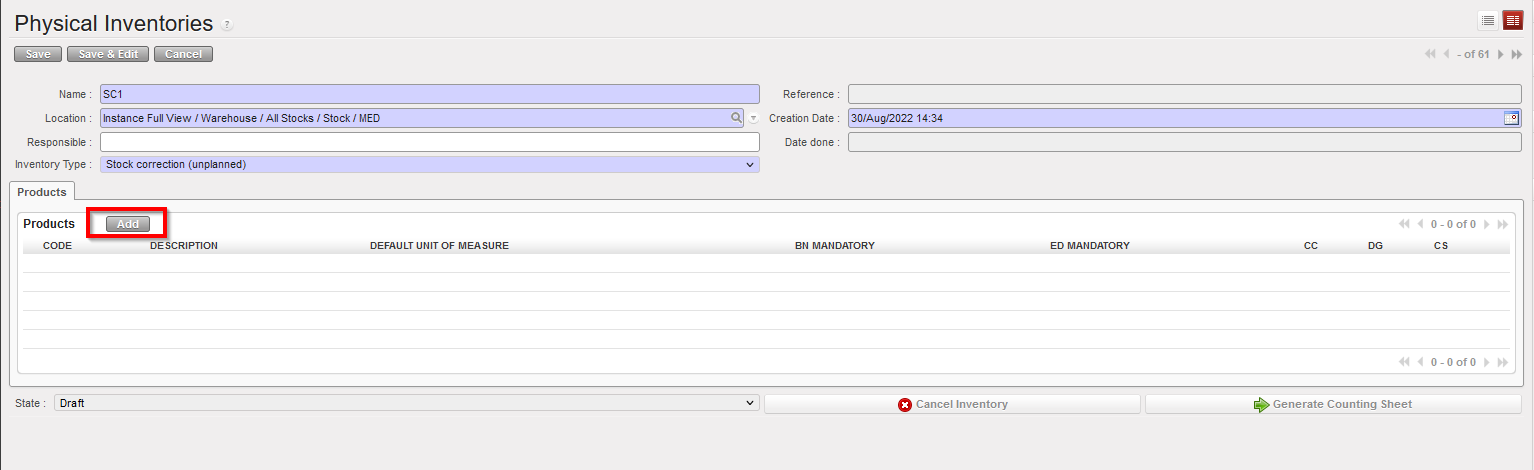
If 3rd option is selected “Stock correction (unplanned)”, only the “Add” button displays to allow products to be added. The button “Products selection” is not displayed.
Drop-down list values of (Inventory Type) options can be changed as long as no products have been added yet.
The rest of the functionality stays as per before.
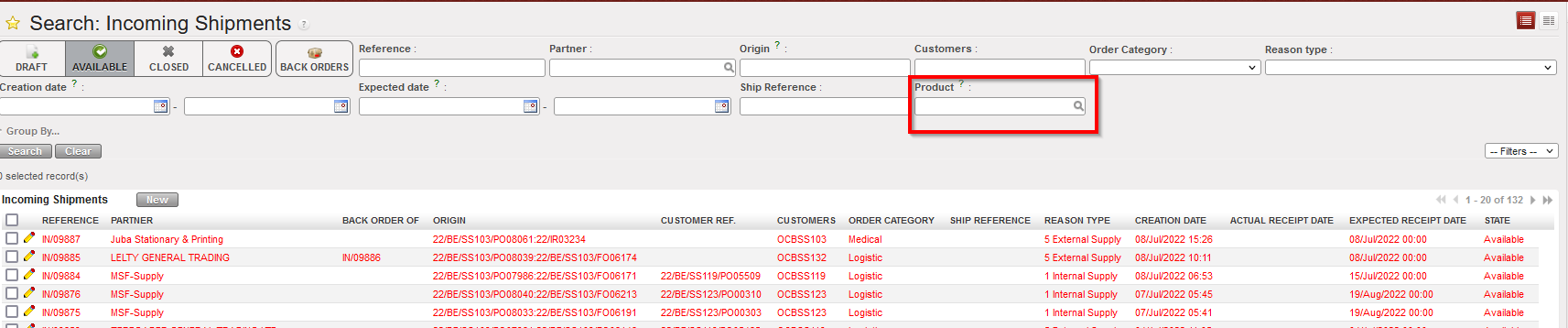
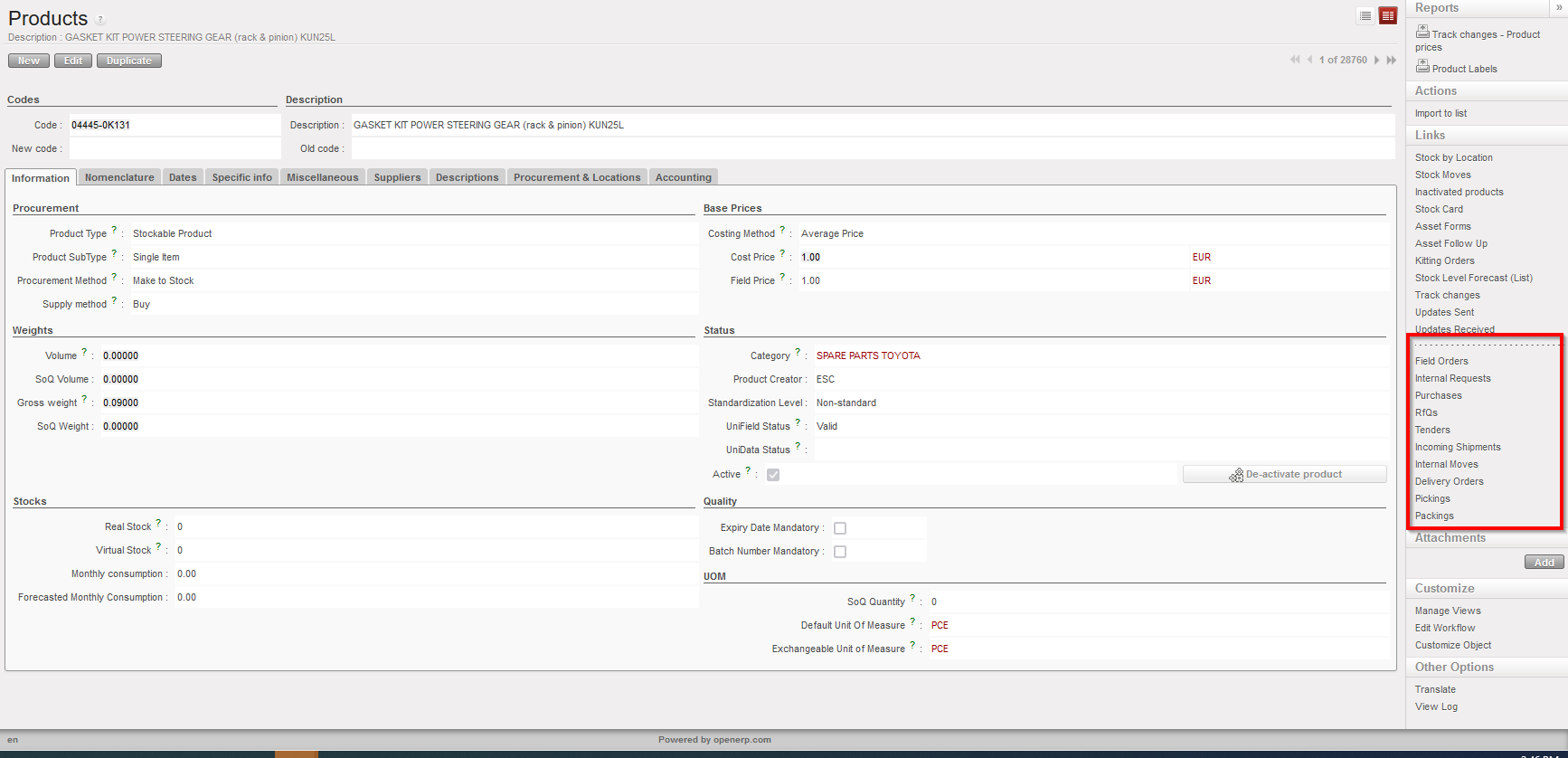
(US-7323) Add Product search field for INs etc and PMD Action menu links
This Improvement ticket was raised by OCG. For more consistency and to extend the searching possibilities, an additional search field for “Products” has been added at header level in the List View for each of these documents: IR, FO, Tender, RFQ, INs, INTs, Outs, Picking, PPL, so as to behave like that existing in POs list view.
Also, in the Products/PMD Action menu, links to see the relevant documents for selected (ticked) product have been added. Links displayed are: Field Orders – Internal Requests – Purchases- RfQ’s – Tenders – Incoming Shipments – Internal Moves – Delivery Orders – Picking – Packing.
(US-5190) Remove possibility to split Draft FO lines
This improvement ticket is to avoid several issues caused in the past leading to NRs and wrong data, and means it is now not possible to split FO lines directly in FO in Draft status. Other functionalities allowing split in FO lines at a later stage (OST, PO, IN etc) remain as before.

(US-3694) Product sheet: Display inventory level from all locations
Improvement ticket raised by OCA, to update the calculation of Real stock and Virtual stock displayed for products so that more locations are taken into account. The calculation of Real/Virtual stock now includes the product Qty in the following locations: LOG/MED in main stock AND all configured Internal locations (Intermediate stock and Internal consumption units). AND E-Prep internal locations. It (still) does not include any transition locations (such as Input, Packing, Cross-Docking etc). The revised stock calculation is displayed in the below menus:
- Product Data sheet – a) list view and b) form view
- Search screen for products – ie pop up when selecting products from other transactions (e.g. IR, PO, FO, Tender, RFQ, OUT) having the calculation of the value for Qty “Real Stock” and “Virtual stock”.
Improvement corrections on reports (US-10296, US-10222 & US-7388)
The last 3 improvement tickets to increase the efficiency of UF reporting and for more consistency,
- Bug solved to correct the CDD/EDD in “IR Follow-up per location” report.
- Performance improved for the times’ needed to export “FO follow-up per client” report, selecting IR in order ref no longer possible in this report to decrease the time since there is another dedicated report for IRs doing the same checks.
- “IR follow-up per location”: For more consistency, in the “IR follow up per location” in case of cancelled lines in Delivery out, report is now more accurate and consistent in display of “Qty to deliver” and in displaying “INT Ref.” where relevant. please refer to ticket “US-7388” for more details.
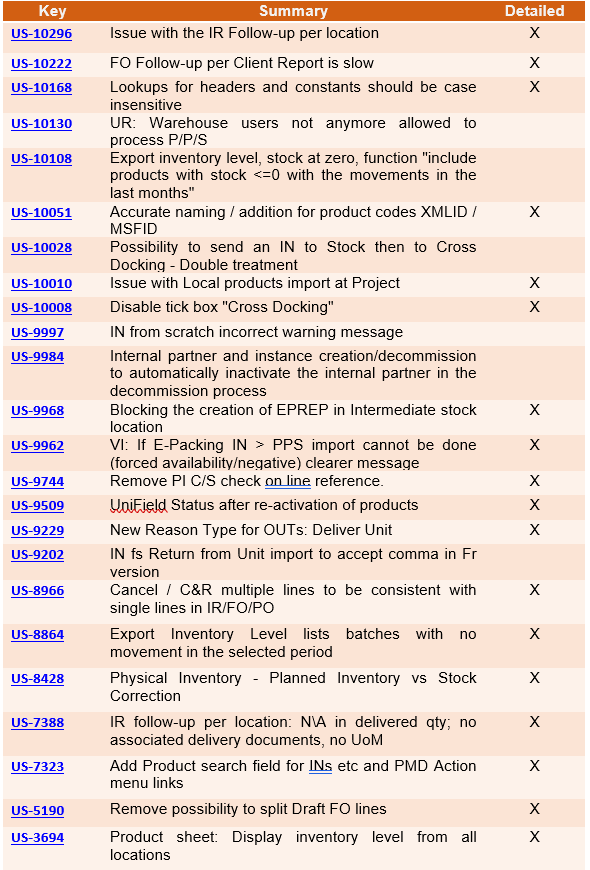
All Supply tickets integrated in UF26.0
Finance
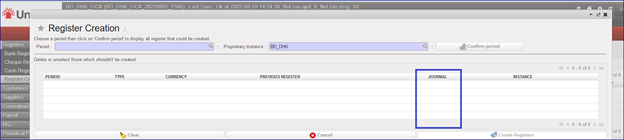
3.1 (US-10241) Get an additional column with the register codes in the list of the Register creation wizard
In the register creation wizard (the path is Registers/Register Creation), we have added a new column named “JOURNAL” that will contain the register code:
3.2 (US-10205) OCA: To sync up the HQ Entry if the CC is not targeted
There is a new behaviour for the cost centers: if the instance at HQ level is targeted with the cost center XX02, but the parent instance is not targeted with the XX02 cost center, now it is possible to synchronize the HQ entry down with the cost center XX02 to the parent instance.
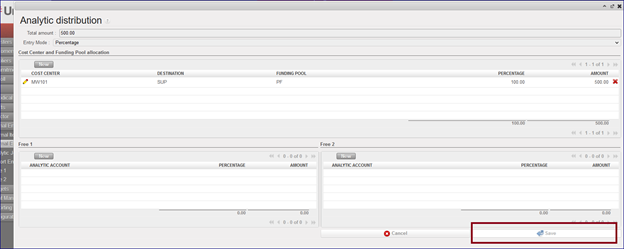
3.3 (US-10115) Code fix for Journal entries: use case with AD KO to avoid: to prevent the edition/change of the AD on a “system” JE
In this dev we have unable the edition/change of an AD on a “system” JE. The “Save” button in the wizard is in grey, so it is not possible to use it. So now it is not possible to update the AD through the “Form” view.
To check this you can:
- Go to Accounting > Registers > Cash register.
- Click in “New” and create a direct entry as expense and temp post.
- Go to “Journal Entries” > “Journal Entries”
- Click on “check box” of the temp posted entry.
- Click on “Form” view:
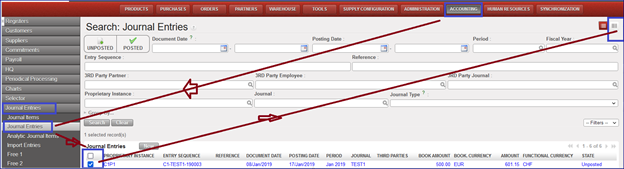
- Click on the “Analytical Distribution” line. It will open a new window named “Analytic distribution”.
- Click on “Save” and you will see that it is in grey so the command is not active.
3.4 (US-10090) OCB proposal: quick update in Recurring Entries module for management of Fixed Assets
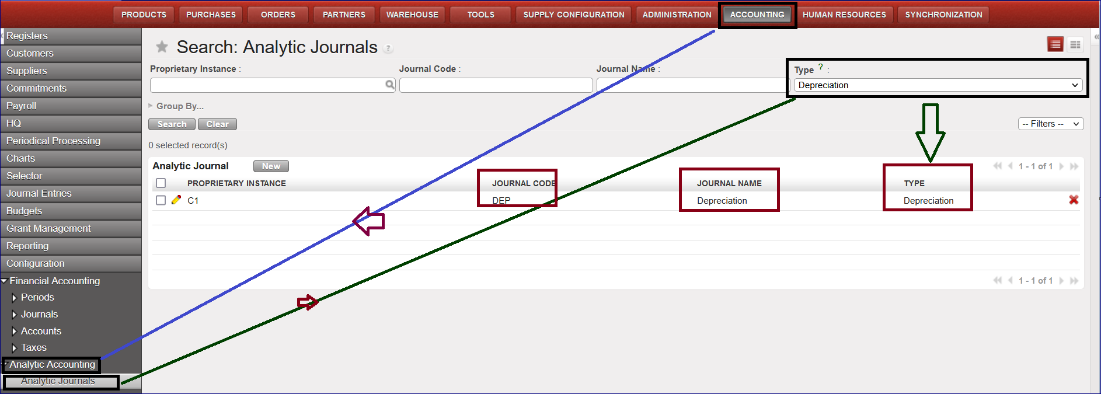
A new Analytic journal DEP has been created in order to use the recurring entries module for the management of the fixed assets.
This is optional per OCs. OCA will not use that for the moment.
- Go to Accounting > Configuration > Analytic Accounting > Analytic Journals
- The Journal code is named DEP, the Journal Name is Depreciation, and the type is also named Depreciation:
The process to create a depreciation entry follows these steps:
- Go to Accounting >Configuration > Financial Accounting > Accounts> Accounts, activate the GL codes for the accumulated depreciation (example code 21200 for the Non-Medical Equipment).
- Go to Accounting > Periodic processing > Recurring entries > Recurring models.
- Click on the button “New” to create a “Recurring Model”
- Go to Recurring Plan and create a “New” Recurring Plan by selecting the Recurring model previously created in the Recurring Model screen.
- Go to “Generate entries” and click on “Generating entries”: it will create entries with the “Journal code” DEP.
3.5 (US-9730) PAYE_UNIFIELD and PAYE_SAGA Import: request to have all the import error messages at once
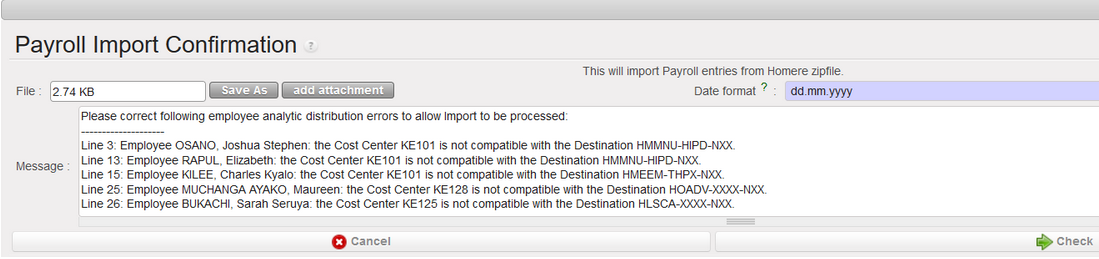
When we import the payroll file in Unifield, the file import can be unsuccessful because of errors in the import file. Before this dev, we had the first error message, then when it was corrected, we had the second message and so on.
In this request we have requested to have all the wrong messages at once. Here is an example:
- go to accounting/Payroll/employee update: import permois file
- go to accounting/payroll/Import payroll: proceed to the import of the Payroll File.
==> the import is not possible because many errors have been detected. As requested in this dev ticket we have all the error messages at once, and not one by one.
3.6 (US-8954) Entries data integrity report – report header to improve: to add additional fields.
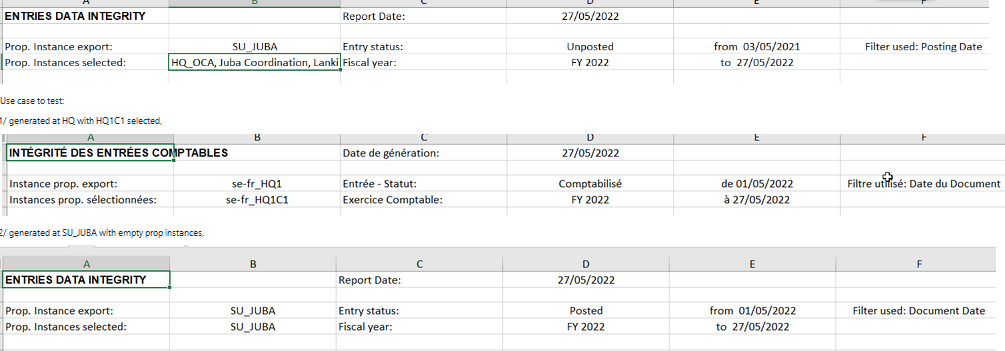
We have improved the Data Integrity report by adding additional fields to the report header in order to have a better visibility of the filter done.
The path to see this report is this: Go to Accounting > Reporting > Generic Reporting > Entries Data Integrity.
Now after improvement the header columns are these:
Name of the field | Content | Example of content |
|---|---|---|
|
Report Date |
Hard coded |
01-09-2022 |
|
Prop. Instance export |
From where the selection is done |
BD-HQ |
|
Prop. Instances selected |
Selected proprietary instances |
BD_KAM, BD_BKL |
|
Entry status |
empty by default, Posted or Unposted |
Posted |
|
Fiscal year |
Selected fiscal year |
FY2022 |
|
from |
Beginning date |
01-09-2022 |
|
to |
End date |
30-09-2022 |
|
Filter used |
Document date, posting date |
Posting date |
Some examples of the new header after dev:
3.7 (US-8169) Partners and selectors: issues with inactive partners
In this development we have fixed these issues:
- In the GL selector => The search filter works now also for partners that are inactive. This is to enable the search at HQs, where all partners are inactive.
- For the Journal Items and for the journal entries => The filter active/inactive have the option active by default but give the possibility to select inactive partners too. This will be useful at HQs, where all partners are inactive.
3.8 (US-8088) The “Funding Pools” finance report from Tools needs to be reviewed following the dev of US-7243.
The release UF19 changed the behaviour in the Funding Pools by adding two new fields in the parameters: “Allow all Cost Centers” and “Select Accounts Only”.
According to this, the new Tools Finance report “Funding Pools” has to take into account these new two fields, so we added the columns J and K in the report corresponding to Allow all Cost Centers and Select Accounts Only.
To see the Funding Pool finance report, please follow this path: go to Tools/Import/Export/Finance and choose Object to import/Export: Funding Pools

3.9 (US-8003) UR: Write access to [Responsible] tab of project register in Coordination.
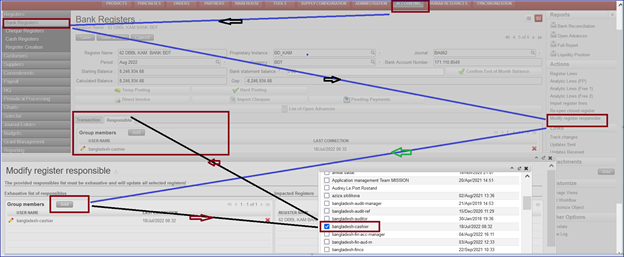
In this dev we have added a window action menu in the right panel of registers called “Modify register responsible”: we have given the rights to this window action only to Fin_coordo group. A wizard is displayed to add or to remove users from the responsible field. The results update the responsible tab in the register.
3.10 (US-7819) Advance return wizard: show the third-party liquidity journal if account code type is “internal transfer”.
We have corrected a behavior in the system and now:
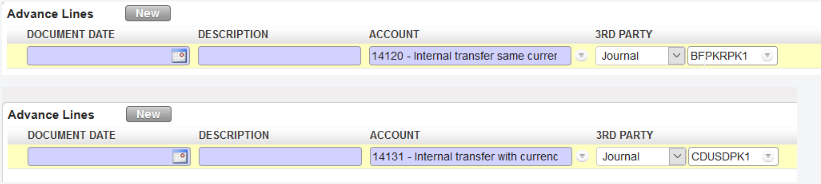
- for “Internal Transfer (same currency)”, we are able to select all the liquidity journals in the same currency except the current journal itself (it is not possible to do a transfer to yourself).
- for “Internal Transfer”, we are able to select all the liquidity journals in another currency.
- Now we have the third party to allow the booking of the entry. It corresponds to the Journal code.
3.11 (US-7790) Data Integrity report VI: add not runs on register lines, account.move,account.move.line, AJI objects
“Not runs” help us to spot problems so we have added the “not runs” on reg.lines, account.move,account.move.line, analytic.account.move objects in the data integrity report as per below:

3.12 (US-7209) Improvement in the “local expenses” report.
This report had performance problems in the past that made it unusable. In order to avoid this, we will not be able to select all the instances at once.
To see this:
- Log into HQ instance
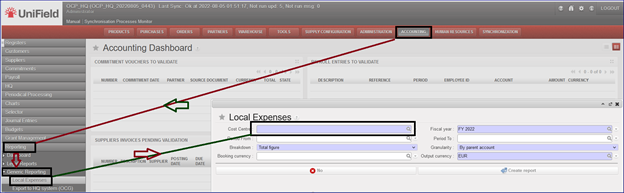
- Go to Accounting > Reports > Generic Reporting > Local Expenses
- It will open a new window “Local Expenses”. Now the default “Cost Centre” is empty. You can not choose the cost center OC (all instances at once).
3.13 (US-6392) OCP Employee Ledger and Employee Balance.
Two new reports have been created for employees following the partner ledger and balance model.
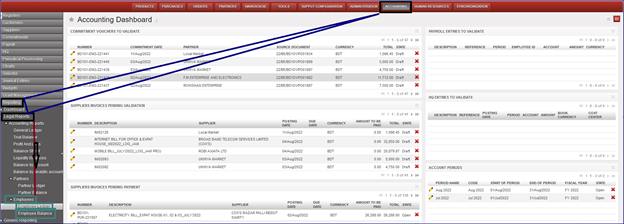
We can see the reports here: go to Accounting > Reporting > Legal Reports > Accounting Reports. We have a new menu called “Employees” with two sub-menus “Employee Ledger” & “Employee Balance”:
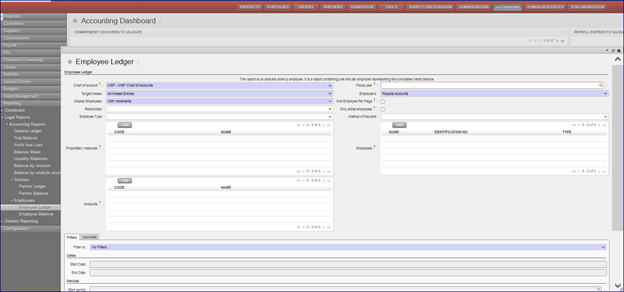
Employee Ledger:
This report is an analysis done by employee. It is a report containing one line per employee representing the cumulative credit balance.
Go to Accounting > Reporting > Legal Reports > Accounting Reports > Employees > Employee Ledger:
We will have several possibilities to do our selections using the filters.
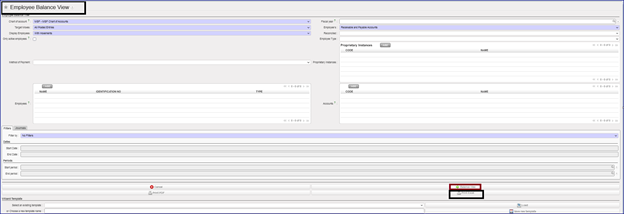
Employee Balance:
To see this new report, we go to Accounting > Reporting > Legal Reports > Accounting Reports > Employees > Employee Balance:
We will have several possibilities to do our selections using the filters.
It’s optional to tick on “Only active employees”.
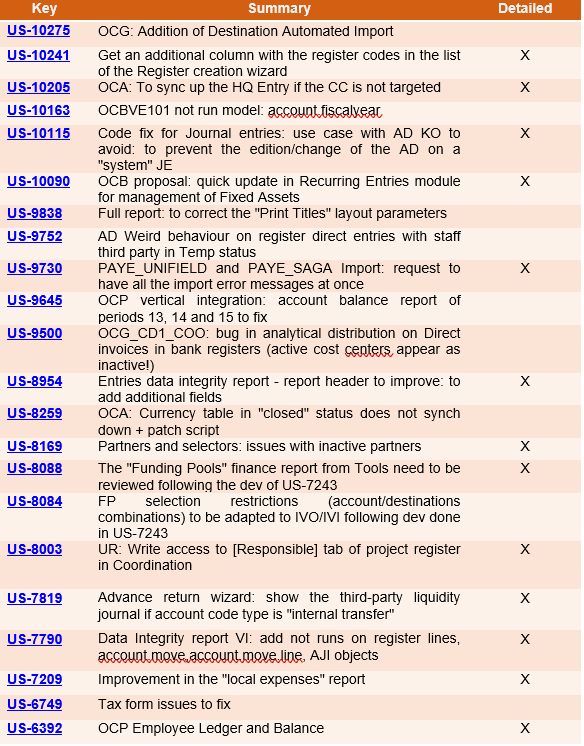
All Finance tickets integrated in UF26.0
Non- functional
(US-10141) Check that database dump is fully loaded during restore.
As seen in US-10140 and US-10117 pg_restore can be stopped before the end of the process. This results in a psql schema with missing data: indexes, foreign keys…. etc which on the web application displays the server as stuck on updating modules with no end.
This release adds a check at login to ensure that indexes and foreign keys are OK, and if not, prevent login and sync. This means that restore will be executed as a single transaction wrapping the emitted commands in BEGIN/COMMIT. This ensures that either all the commands complete successfully or exit-on-error.
Below is the error displayed in the case of a failed db dump restore
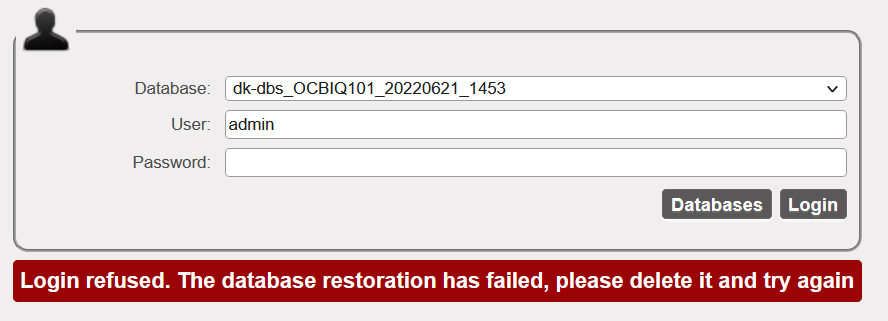
We have also added a warning message on the restore window to inform the IT user to wait to be automatically redirected to the login screen once restore process is completed.

(US-9984) Internal partner and instance creation/decommission to automatically inactivate the internal partner in the decommission process
Prior to this release: When an instance is inactivated, the internal partner stays active in the partner instances. This behaviour is corrected in this release to ensure consistency. The inactivation of a proprietary instance at HQ also triggers the inactivation of the internal partner via sync.
This improvement also ensures that:
- If there are open/ongoing supply documents on the partner (no proper cleaning before inactivation), NotRun message msf.instance is generated when the inactive status from HQ is synced down to the instance. This means the inactive status will not be received by the “decommissioned” instance as well as the linked internal partner.
All open documents linked to the target instance for decommission must be closed and synched to clear the NR message msf.instance. Once NR is cleared, the inactive status of the prop instance and internal partner is received by all the mission instances.
All Non-functional tickets integrated in UF26.0