
Release Details
Release version: UF 27.0
Date of production synchronization server patch: 7th December 2022 / 18:00 Geneva time
Latest user rights files updated: UF27.0 can be found here
Note that no user rights need to be loaded at each HQ. This will be done at the Sync Server by the Core team and will update the user rights via Sync for all HQs and missions.
JIRA filter for all integrated tickets: https://jira.unifield.org/issues/?filter=12448
Cross-functional
(US-9406) Electronic Validation
A new functionality which has been developed in this release is that of Electronic Validation. This has been developed for both Finance and Supply with requirements raised by OCA (Finance) and OCB (Supply), with the aim of providing users with the ability to sign key documents online which will reduce the need for signatures on printouts and give improved traceability of the signature process for each document.
This functionality will only be available if it has been configured to be active at instance level (in the instance which wishes to use E-validation), via the Reconfigure menu.
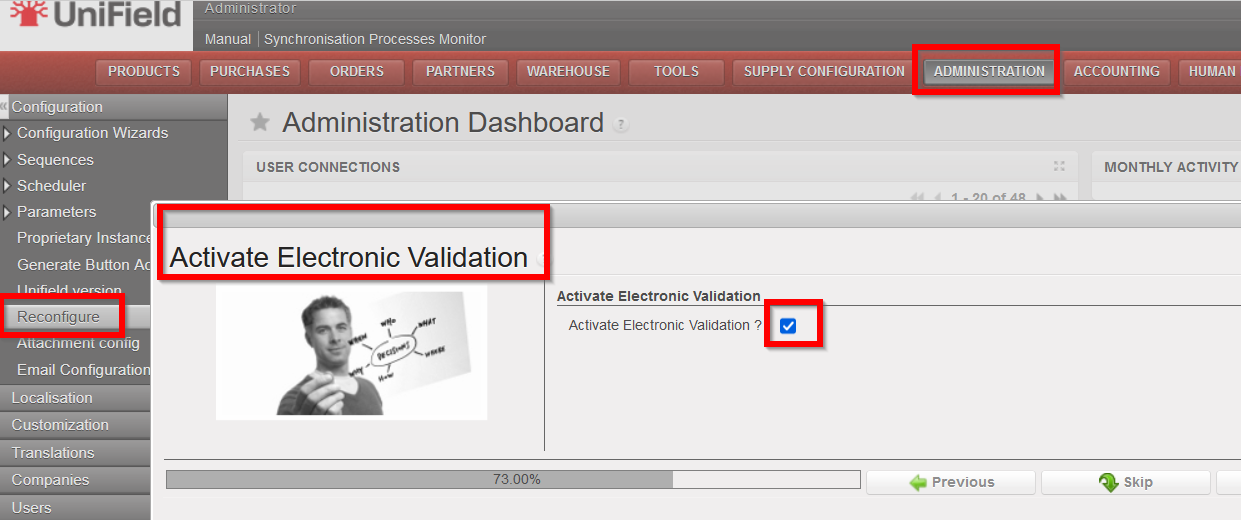
If there is no change to the Reconfigure settings, it will not be possible to access or use the E-validation functionality (users will see no change).
Once E-validation has been activated in the Reconfigure, each user who should have access to the functionality (e.g. because they will need to sign documents or should manage part of the online signature process) will need their User Profile to be configured to allow for this (to be managed in the same way as user rights are currently).
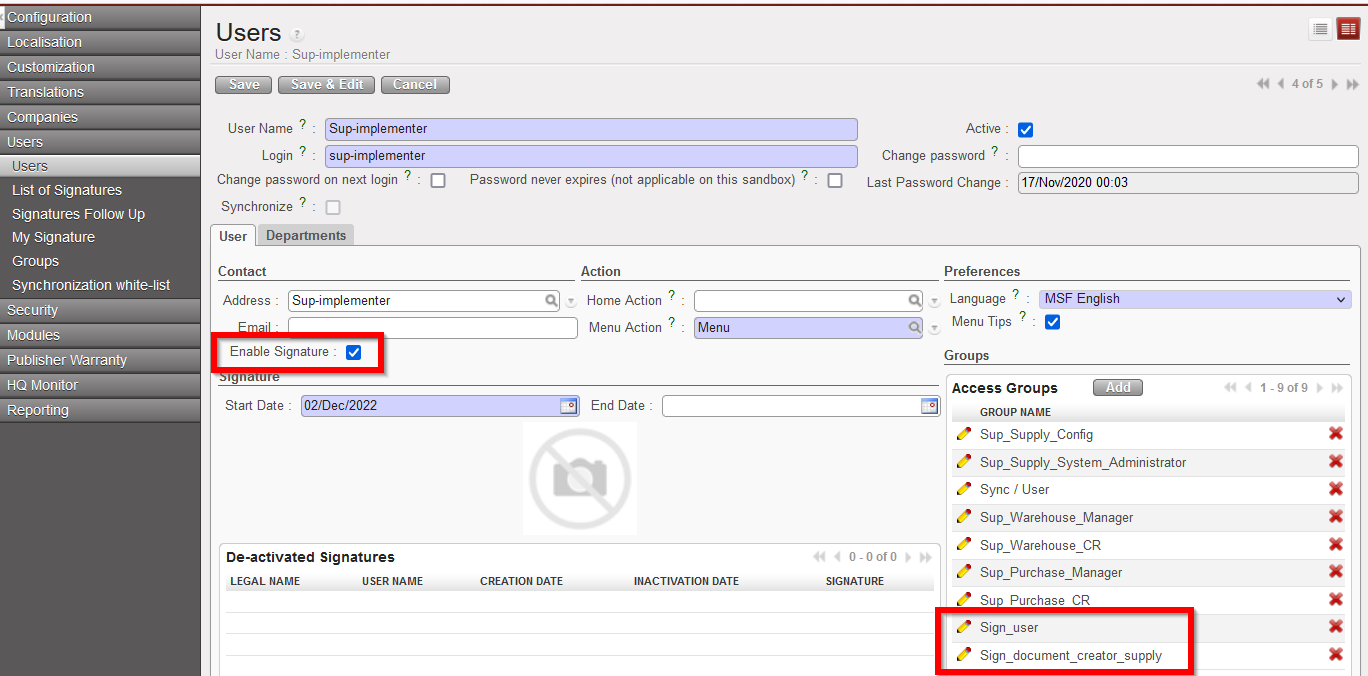
In the User profile, the checkbox “Enable Signature” should be ticked, Start date and End date can be filled (or can be left as default settings as from today without an End Date) and the relevant Signature user groups must be added to the profile:
Sign_user = for user who needs to sign documents (either Finance or Supply)
Sign_document_creator_supply = user who decides who should sign each Supply document, can decide to Close signature part of Supply documents and has visibility of documents for follow up.
Sign_document_creator_finance = user who decides who should sign each Finance document, can decide to Close signature part of Finance documents and has visibility of documents for follow up.
For users who need to manage the signature process and be able to sign they will need more than one of the groups added.
Once a user has had the Signature enabled on their User profile, they need to add their signature. This can be done either by filling in the pop-up which they will see when they next log in to Unifield:
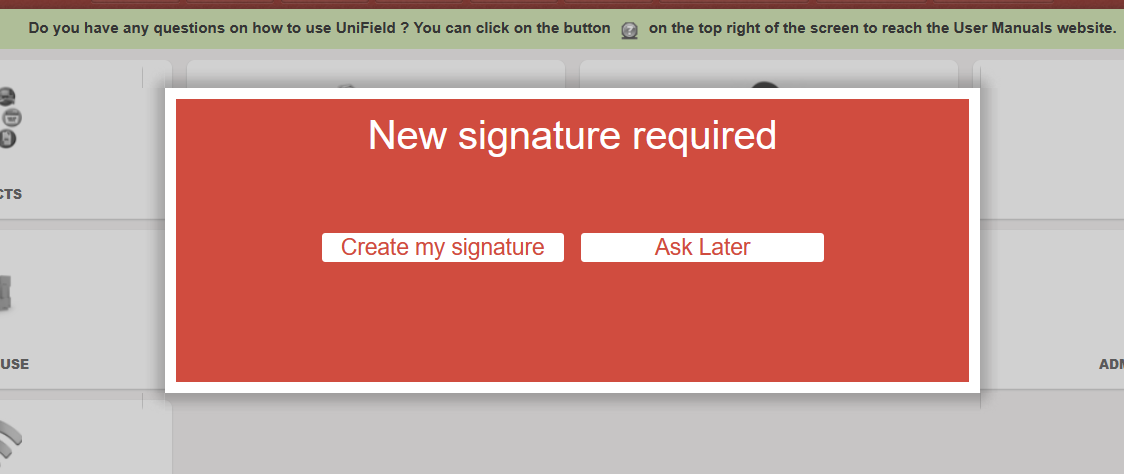
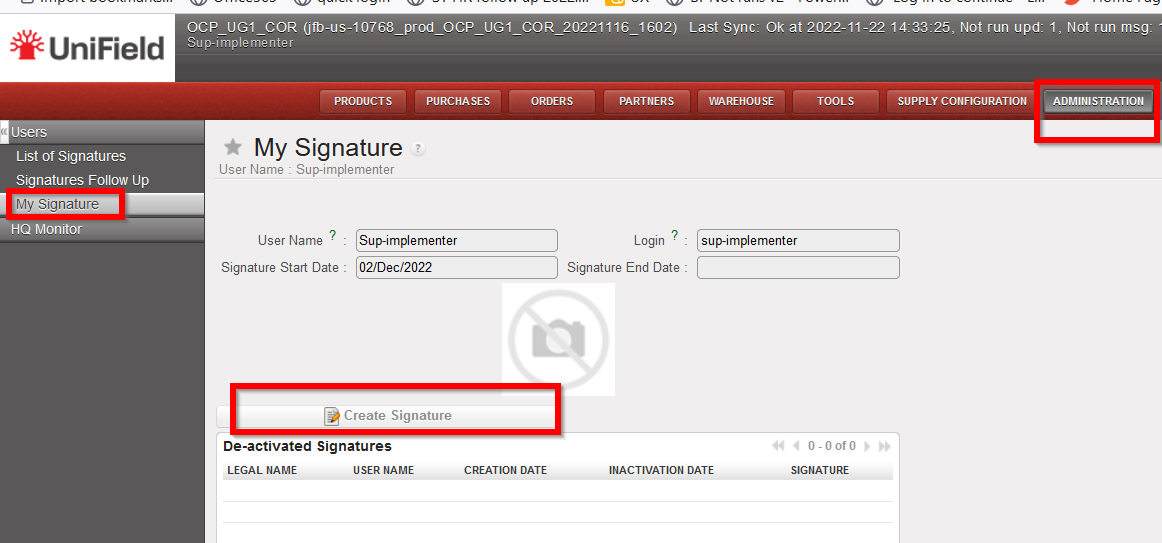
Or by going to the submenu which will now appear to help manage their signature in Administration>Users>My Signature.
(This submenu screen can also be used later for if user wishes to replace or delete their signature)
Once the E-validation functionality has been activated, users will be able to manage signatures and / or sign for the following documents: Supply: Internal Request, Purchase Order, Incoming Shipment, and Finance: Supplier Invoice, Donation Invoice, Bank reconciliation, Cash reconciliation, Full report.
Each of the above documents will now have an additional tab for signatures.
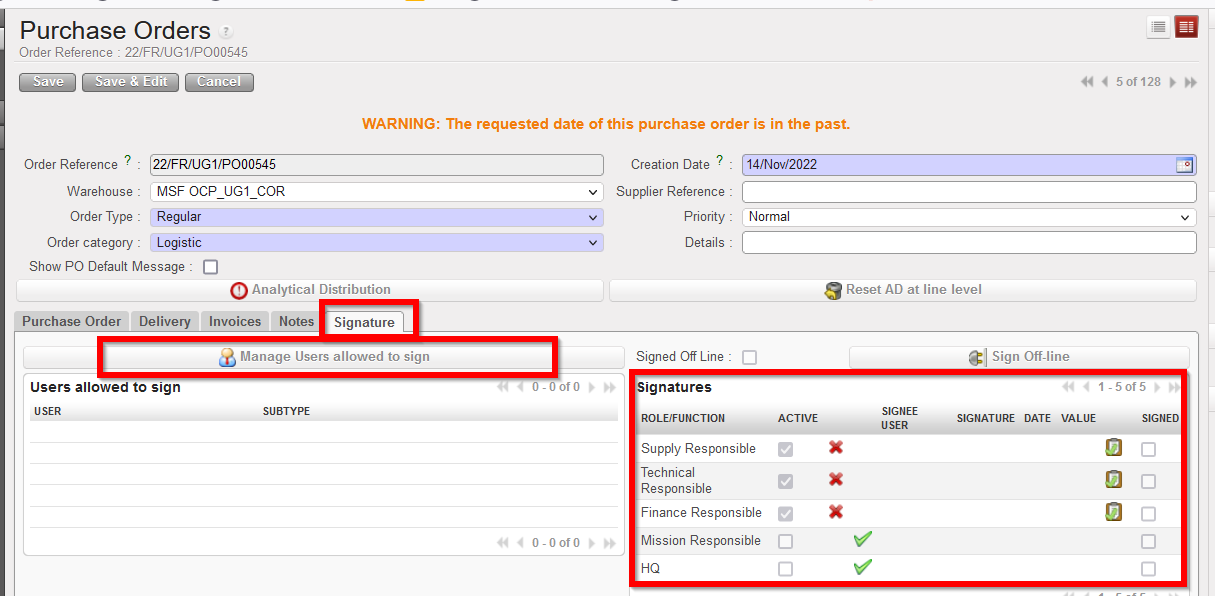
A user can only sign a document on which they have added as “allowed to sign”.
The button “Manage Users allowed to sign” can only be used by a user who has specific document_creator user right.
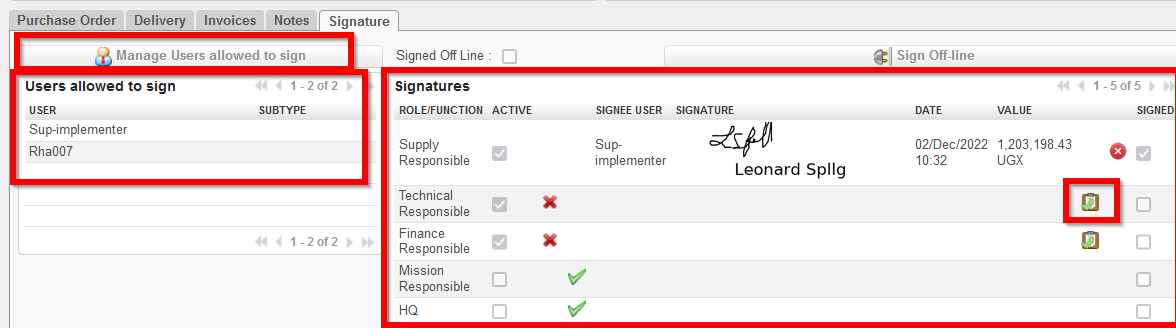
The default and optional Signatures (right panel) are based on the signatures already displayed in the relevant PDF of that object.
When a user that has been added as allowed to sign then signs the document (using the tick box icon  ), their signature will be displayed on the object Signature tab, and also in any relevant PDF of that document. Track changes of document will also record any signatures added, removed or changed.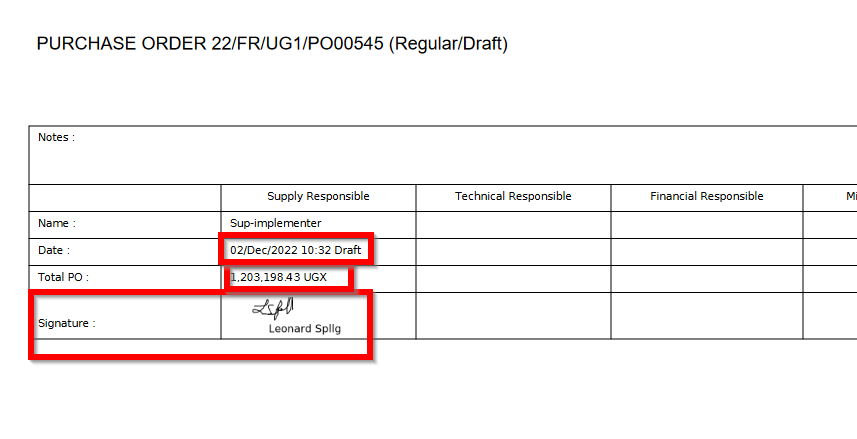
For users who have specific rights, they will be able to see the “List of Signatures” (Administration>Users>List of Signatures) which also has a PDF in the Action menu
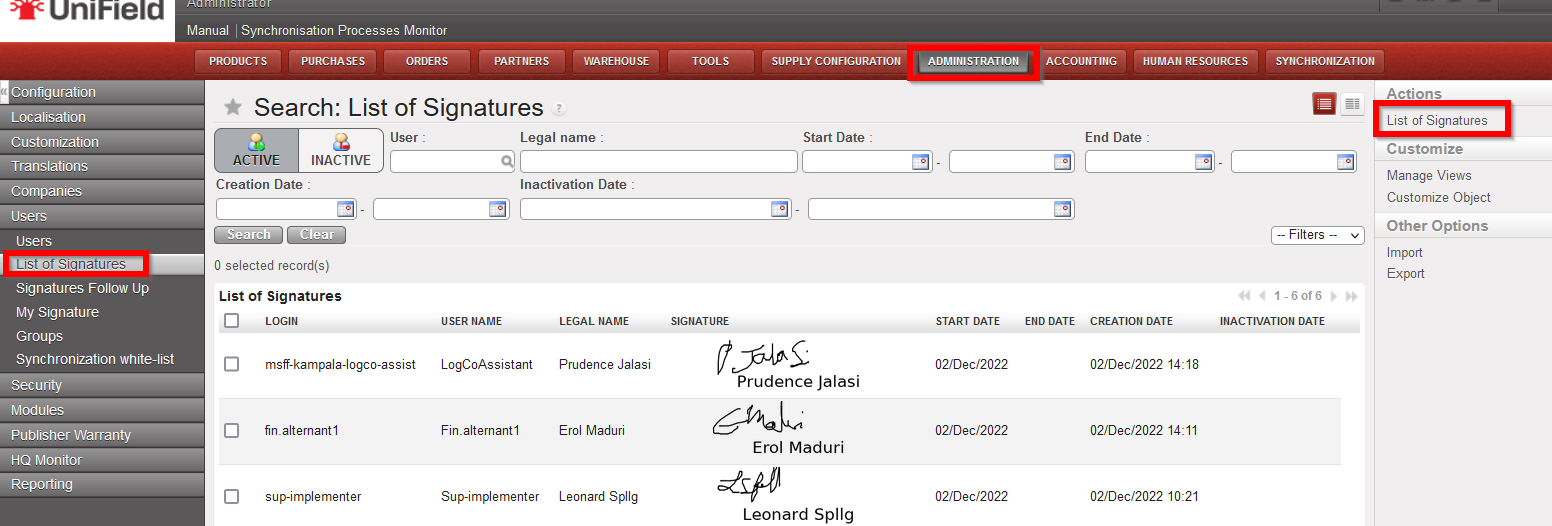
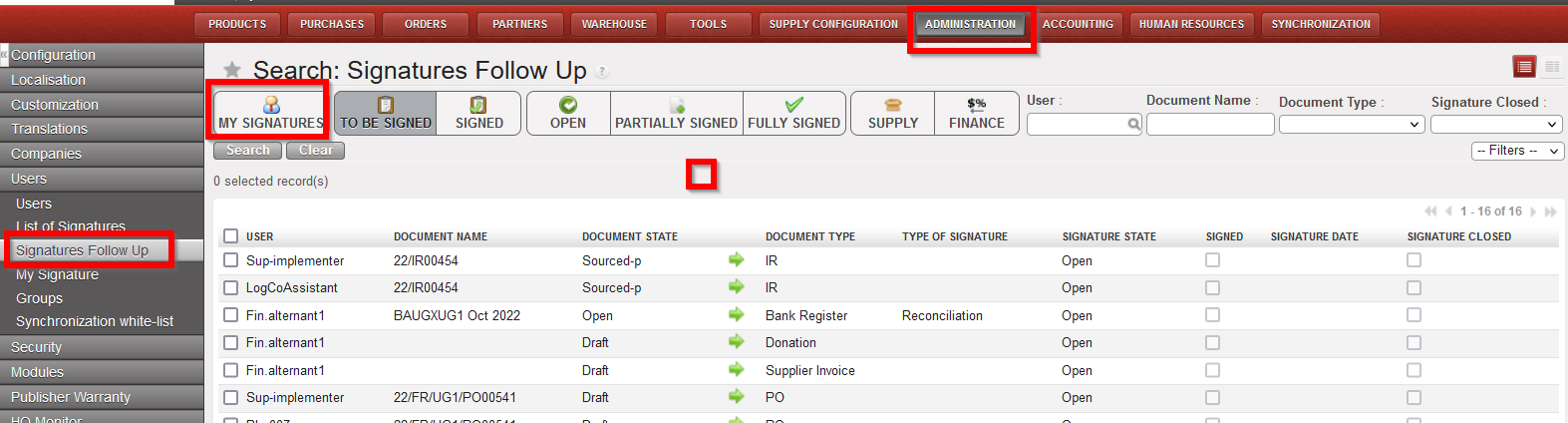
And a “Signatures Follow up” screen (Administration>Users>Signatures Follow up) is available, in a limited capacity, depending on rights, to allow users to follow up which documents are assigned to them for their own signature, or for those with further rights, which documents are assigned to other users for signature.
Supply
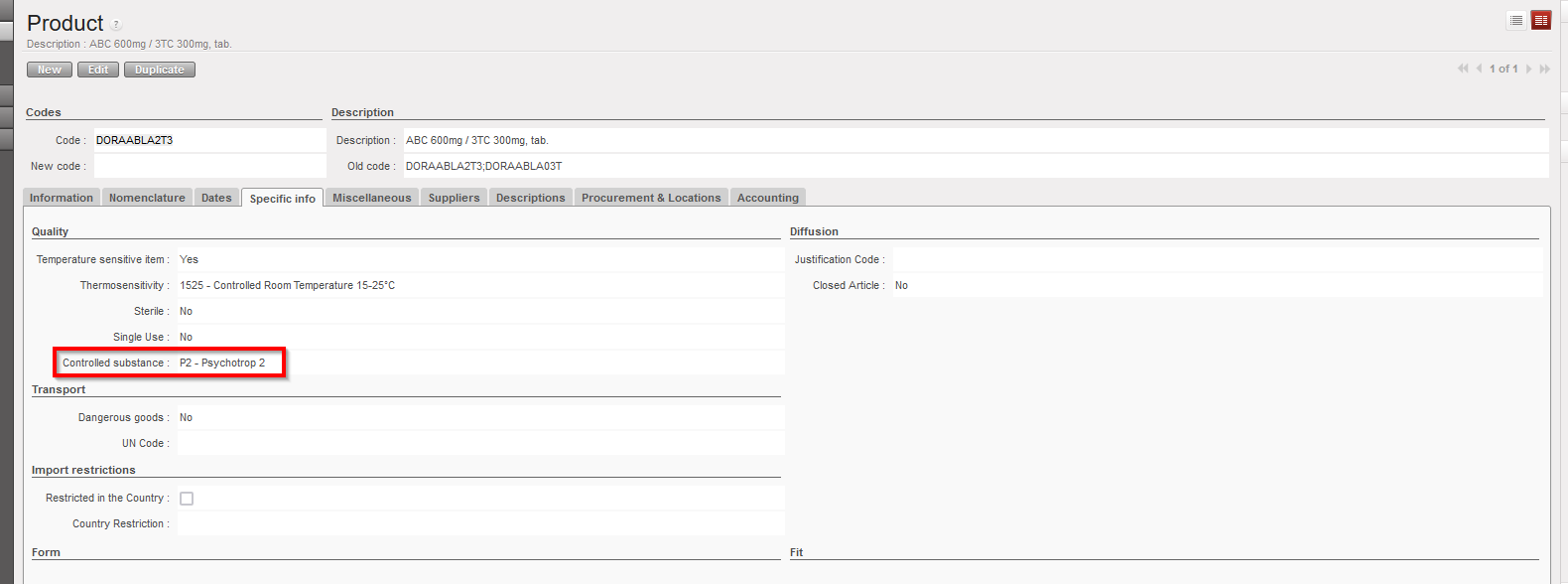
(US-10798) Product field: “Controlled Substance” value: P2 – Psychotrop 2
New request from OCBA-HQ Medical data steward, due to new value which has been created for field “Controlled Substance” attribute in PMD of UniData: P2 – Psychotrop 2. This value should now be available in UniField Products to allow for UD linkage to work. When it is selected for a product, it will behave in same way as for any another value selected in Controlled Substance field – ie in all transport docs (PICK, OUT, IN etc) and reports which have the “CS” checkbox or column.
(US-8749) (US-10777), (US-8749) LOAN report displays new status Cancelled & (US-10403) correction of Loan report for External Partner flow
Improvement requested by OCB for Loans report, to show consistent statuses for PO/FO lines in loans report (column R) with documents, means the following:
- Where original loan has been dispatched but for return of loaned goods, PO/FO documents lines are cancelled (no returns) – line status in report is Cancelled (new status).
- Where PO/FO document lines are closed (complete flows – complete or partial goods quantities returned) – line status in report is Closed.
- PO/FO documents lines are open (pending returns) – line status in report is Open.
- PO/FO documents to external partner, goods received and returned, lines status in report is Closed.
- Where no stock movement (IN / Out) has been done and PO/FO document lines to external/internal partner are cancelled (no ships nor returns) – no line displayed in report.
There has also been a correction to the report for a specific flow to External Partner.
(US-8386), (US-10766), Renaming of reports “PO Follow-up per supplier” and “FO Follow-up per client” & report location changes
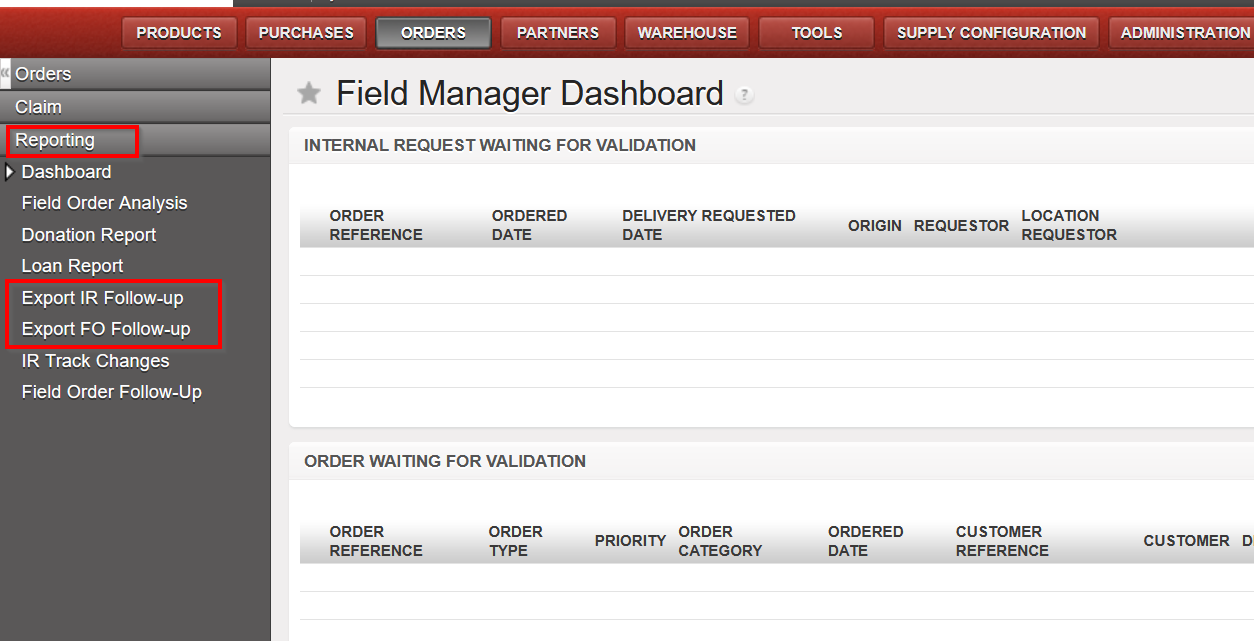
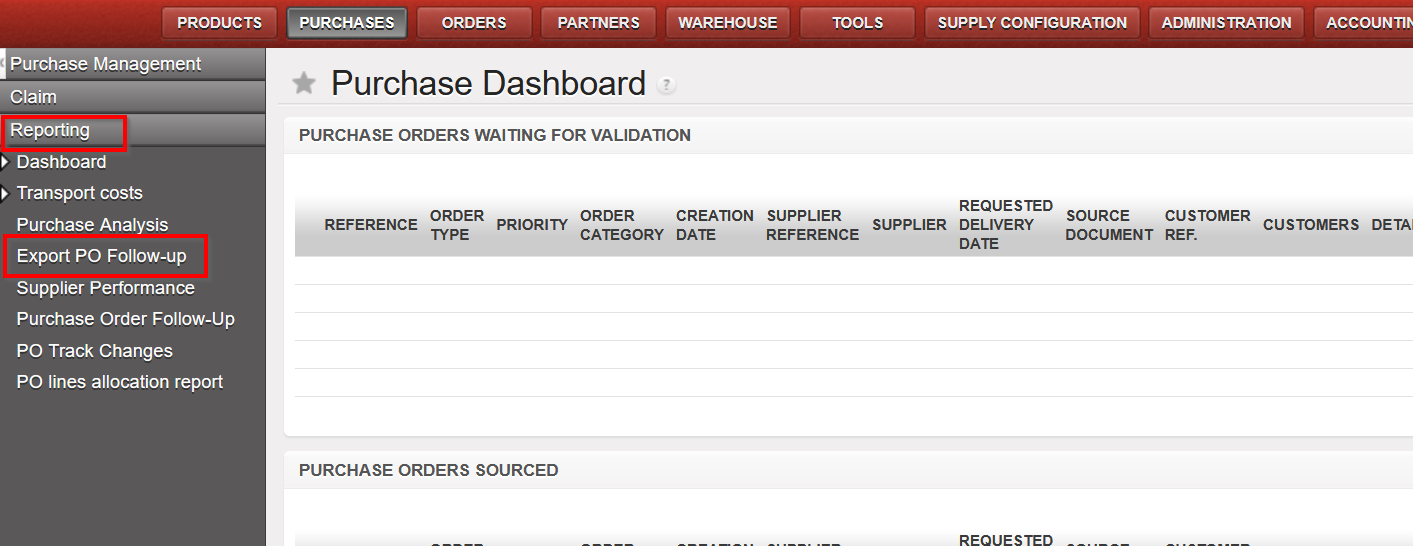
Improvement requested by OCA to rename IR/FO/PO follow-up reports and to change their locations so that they are all under the “Reporting” submenu as per below:
- Original “IR follow up per location” is now named “Export IR Follow-up”
- Original “FO follow up per customer” is now named “Export FO Follow-up”
- Original “PO follow up per supplier” is now named “Export PO Follow-up”
US-9394, US-10721 Modification of Physical Inventory Adjustment Types and new field Sub Reason Type
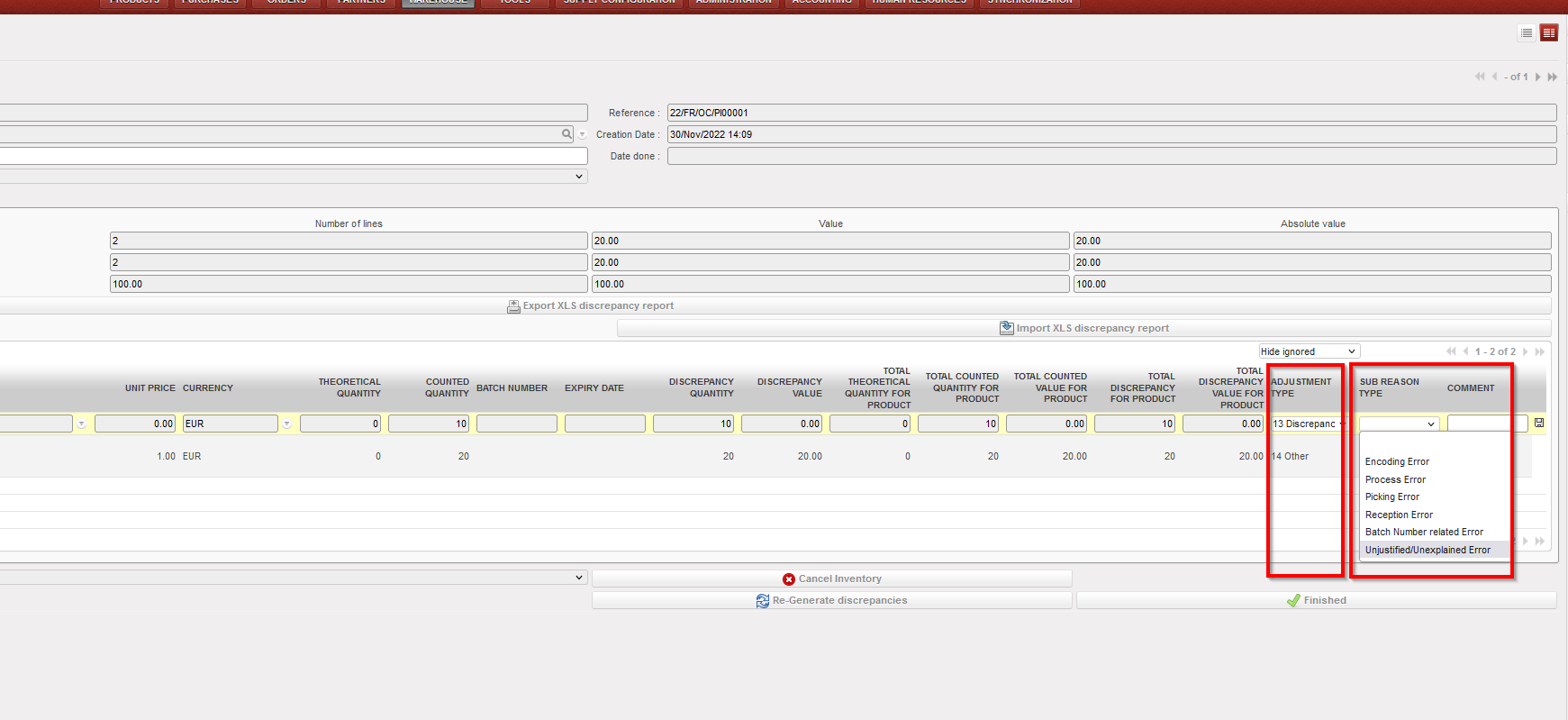
Improvement requested by OCG, in Physical Inventory – Discrepancy report, now for the “Adjustment type”, only 2 options are available, “Discrepancy” and “Other”, it is no longer possible to add or import other options. There is an additional (new) field, also at line level “Sub Reason Type” which is optional to fill in. This field can only be used if “Adjustment Type” is “Discrepancy”. “Sub Reason Type” allows the following options to be selected from the dropdown list or they can be imported. This new field can be changed until the PI is Closed and will appear in all reports:
i)Encoding Error
ii)Process error
iii)Picking error
iv)Reception error
v)Batch Number related error
vi)Unjustified/Unexplained error
(US-10600) RR: Real Stock in Inventory review + Order Calc takes into account all projects & (US-10554) RR: Coordo cannot access project Expiry date info
Corrections raised by OCB for the Replenishment Rules (RR) functionality: When RRs are configured in Coordo and include synced locations in projects, after computing data on all levels , in the Inventory Review report and Order Calculation, the system will now consider the expiry dates of the stocks in Coordo along with those in the configured project locations, and will no longer consider stocks from projects which were not included in the Location Config of that RR.
(US-10598) Addition of Service product to Regular PO from FO no longer possible.
Improvement to avoid having service products in crossdocking location: User will now be blocked from adding a service product to a regular PO created from a synced FO, a blocking message will be displayed in this case. It is still possible for user to add Service type product to a DPO (Direct Purchase Order).
(US-10596) Automated VI E-PL of IN message & check on forced availability in stock correction
Improvement to solve the issue of failed automated import of E-PL in IN due to negative/forced inventory of relevant product in crossdocking location. In the case where there is an import of IN via VI which includes direction to P/P/S goods directly, if those goods are already forced “Available” on an unrelated Out/Pick document (meaning they will be “Unavailable” for the Out/Pick doc linked to E-PL IN) there will be a blocking message “There is not enough stock in Cross Docking which can be allocated to process XXXX with a quantity of XXX” . This message / block of process will only be displayed for the case of POs from FOs for which the IN to PPS option has been selected, and no longer for cases of INs of POs which are from scratch or which come from IRs.
The same checks are done for manual VI IN import.
(US-10587) Reason Types in PPS & OUTs for Loans & Donations correction.
Correction raised by OCB, to fix the reason type in P/P/S & OUTs for Loans & Donations, now all picking documents (Picking, PPL, Packing, SHIP and Out) Reason Types will correspond to RT of preceding order document and adhere to the following rules:
FOs:
– where FO has Order Type “Regular”, Pickings now have RT “Deliver Partner”
– where FO has Order Type “Donation before Expiry”, Picking docs now have RT “Donation before Expiry”
– where FO has Order Type “Standard Donation”, Picking docs now have RT “Standard Donation”
– where FO has Order Type “Loan”, Picking docs now have RT “Loan”
IRs
– for IR to External CU, picking docs now have RT “Deliver Unit”
(US-8684) KIT: Partial qty removal of one component/line & (US-10579) Addition of “Completed” Status Filter in TKC and KCL
Improvement to ease the management of KITs. In the Kit Composition List (KCL), the option to substitute (remove lines and add others in their place), products is now more flexible meaning it is possible to remove a partial quantity of an existing line (previously it could only be the full quantity). This means that in the KCL Substitution pop-up, the field “Qty” will be modifiable for products being removed.
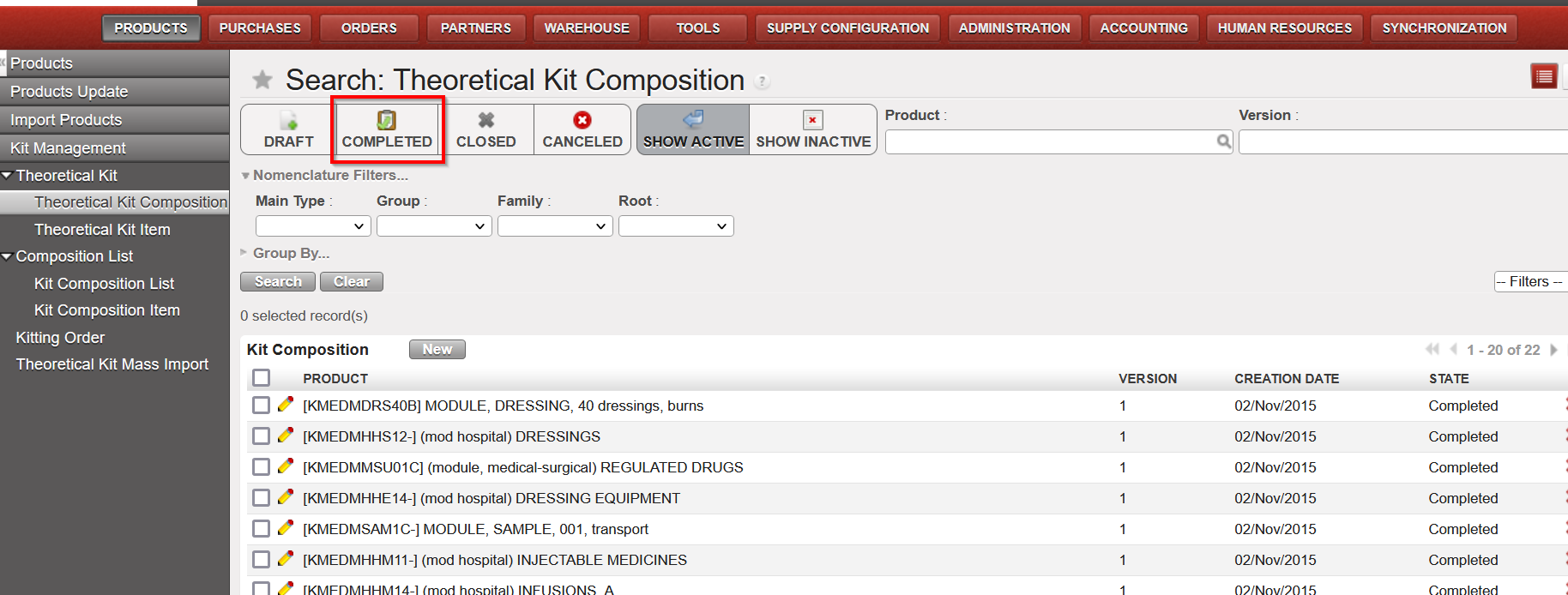
Also another improvement to be more user-friendly, a new filter “Completed” has been added to both Theoretical Kit Composition (TKC) and Kit Composition List (KCL).
(US-10491) Synch Messages: Automatically set to “Run without execution” for Not Runs from INs processed before SHIP sent
As per agreement with OCs, this improvement ticket means specific types of Synch Messages which were “Not Run” will now be Run automatically without execution. The aim of automatically running them is to reduce the amount of Not Runs in the system which need to be manually run (the flows themselves cannot be treated as already closed/processed). The type of Not Runs which will be treated in this way are for the Use Case:
Project (or other requesting instance) process an Incoming Shipment (ignoring warning message) for which the Coordo (sending instance) has not yet processed/sent the SHIP. Then when Coordo do send the SHIP, this creates a Not Run message since it cannot update a Closed / already treated IN.
This type of Synch message (Run without Execution) can be identified by searching for the following in the Synch Messages screen:
Method to Call. “stock.picking.partial_shipped_fo_updates_in_po”
Execution Messages starts with “Exception: Unable to receive Shipment Details into an Incoming Shipment in this instance as IN” .
(US-10369) IR follow up perf improvement
Improvement to decrease the time needed to export IR f/up per location report, time required to export this report has been reduced by around 3 times less than before.
(US-10193) SYS filter in Internal Move label made more accurate
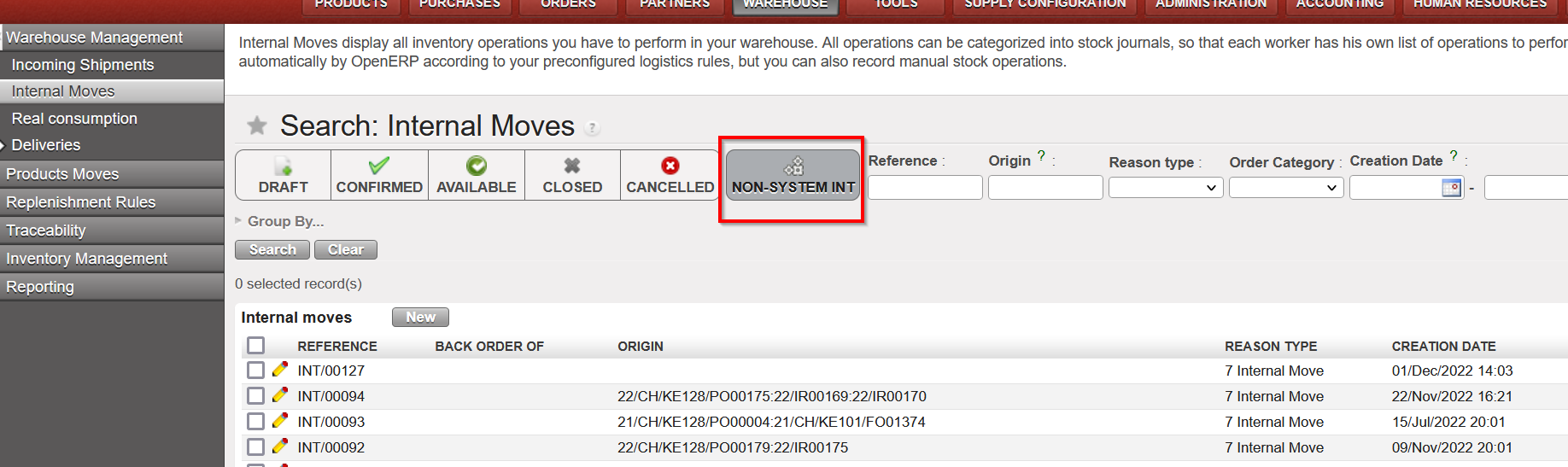
Improvement requested by OCB, to be more logical for users, in list view of Internal Movements “INTs”, the filter button named “SYSTEM INT” has been renamed to “NON-SYSTEM INT”, no other change has been made to this functionality.
(US-10067) (US-10068) Change to how taxes can be added to POs
There has been a change to the way the taxes can be added to POs, please see Finance section for more details
(US-7434) Track changes added to OUT & PICK
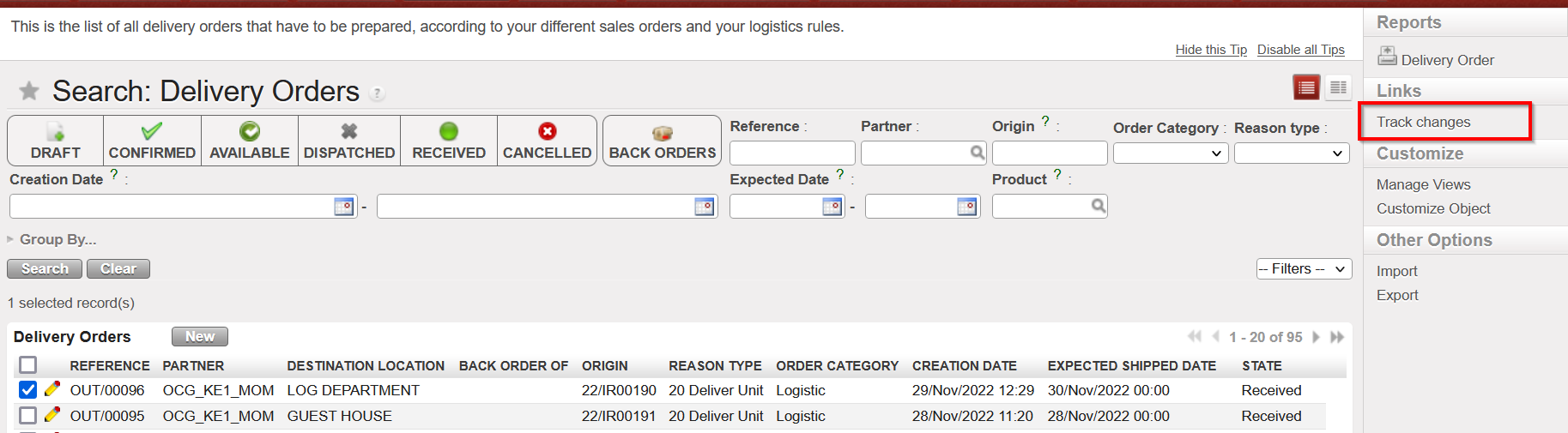
Improvement to add Track changes in the Action Menu > under links, to Delivery Orders (OUTs) and Picking Tickets (Parent & Child pickings) to make more user friendly and to get the information easily for analysis.
The track changes will show same information as was already displayed in Track Changes of INs.
N.B.: See below in IT section for explanation on new Supply User group with possibility to add to white list (for synched users)
All Supply tickets integrated in UF27.00
Key | Summary | Detailed |
|---|---|---|
| US-10812 | [US-10475] Extra space in Sup_Config_HQ group name | |
US-10802 | UR: E-Validation change to User Rights for view of Signatures Follow up screen | |
US-10798 | UD: PMD controlled_substance: extra value: P2 – Psychotrop 2 | X |
US-10787 | E-VALIDATION: “Signatures Follow up” data protection. View screens supply / finance | |
US-10777 | (US-8749) Extra check on Loan report | X |
US-10768 | Electronic Validation corrections / adjustments | |
US-10766 | The files exported from the 2 reports “Export IR Follow-up” excel and pdf export. & “Export FO Follow-up” excel export. do not have the same titles like the name of the reports | X |
US-10721 | Impossible to import a Sub Reason Type on the Physical Inventory’s discrepancy lines | |
US-10600 | RR: Real Stock in Inventory review + Order Calc takes into account all projects | X |
US-10598 | Addition of Service to Regular PO from FO should not be possible. | X |
US-10596 | Automated E-PL of IN was failed with error (There is not enough stock in Cross Docking which can be allocated) | X |
US-10587 | RT in P-P-S & OUTs for Loans & Donations needs correction | X |
US-10579 | Kit Management – Add “COMPLETED” Status Filter in TKC and KCL | X |
US-10567 | OCBCD100: RR-AMC do not show consumption | |
US-10554 | RR: Coordo cannot access project Expiry date info | X |
US-10522 | To improve error message when importing CS which includes not existing products in PI | |
US-10491 | Synch Messages: Set to “Run” without execution for NR IN processed before SHIP sent | X |
US-10480 | UR: Prevent Local finance user to create intermission / intersection partners at mission level | |
US-10475 | Synchronize user from HQ is not possible for supref HQ user |
|
US-10403 | Loans report: remains Open PO to External Partner | X |
US-10369 | IR follow up perf improvement | X |
US-10193 | SYS filter in Internal move works in opposite logic than in other applications | X |
US-10068 | To prevent to add taxes on line nor on header on External PO with Order Type In Kind Donation | |
US-10067 | To avoid the possibility to add taxes at line level in the PO for internal suppliers (internal flows) | |
US-9406 | Electronic Validation | X |
US-9394 | Modification of Physical Inventory Adjustment Types and Comments | X |
US-8749 | LOAN report to show status Cancelled for cancelled lines | X |
US-8684 | KIT: Partial qty removal of one component/line | X |
US-8386 | Rename reports “PO Follow-up per supplier” and “FO Follow-up per client” & report location changes | X |
US-7434 | Add track changes to OUT & PICK | X |
Finance.
3.1 (US-6844) Intermission / intersection flow: Counterpart invoice status filter on IVO/IVI/STV/ISI.
We have added new filters to show the states of the counterparts for the following transactions:
- Stock Transfer Vouchers
- Intermission Voucher OUT
- Intersection Supplier Invoices
- Intermission Voucher IN

3.2 (US-9142) Add in Interface the total of Output Amount/Output Credit and Debit when Output Currency is selected in Selector.
The improvement has been done in both search results: “Analytic Journal Items” & “Journal Items” interfaces that are created from the selector search screen.
Please to see this, go to Accounting / Selector/ G/L / Selector and then select in the Selector the field “Display in output currency “with a currency.
Both “Analytic Journal Items” & “Journal Items” interfaces will appear with two columns and their totals “Output amount” & “Output curr.”:
- Total output amount at the end in the entries interface when using the Analytic selector
- Total Output Credit and Output Debit at the end in the entries interface when using the G/L Selector

3.3 (US-9271) Full report: add the correction lines when using Wizard of correction on return of advance expenses.
The improvement is in the extract of the “Full Report” from the registers. When the correction of the analytic distribution belongs to an advance line (expenses) through the “Analytic Distribution Items” interface, the extract of the “Full Report” will show both lines “Corrected” and “Reversal”:

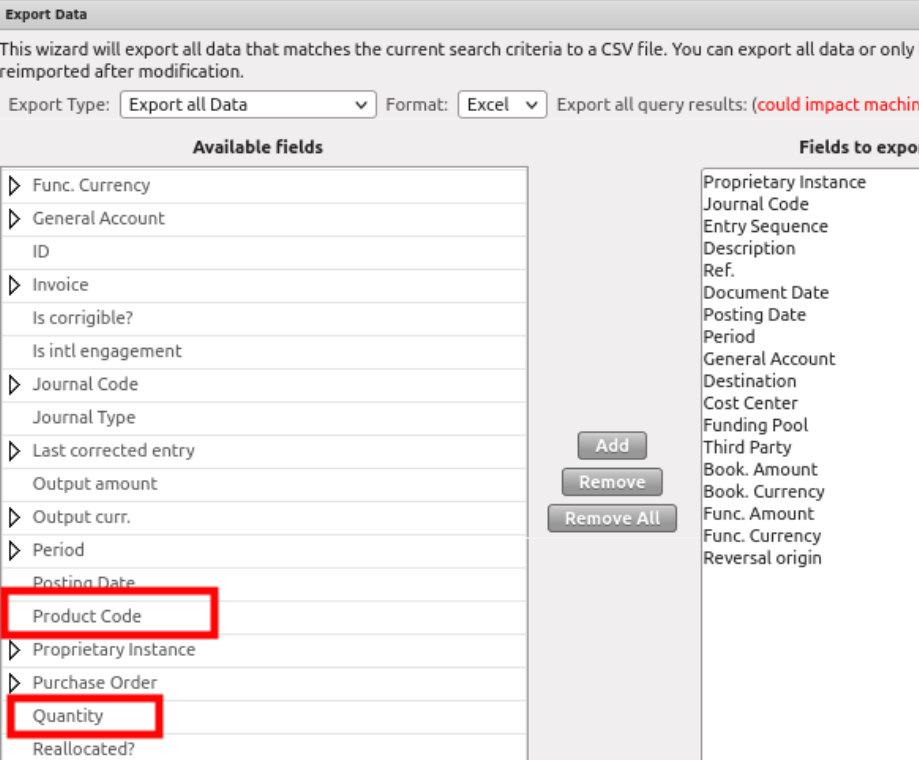
3.4 (US-9301) Possibility to get the product code and quantity of the expense in the JI (Journal Items) and AJI (Analytic Journal Items) export.
The improvement is done in the Export data excel file through both interfaces “Journal Items” and “Analytic Journal Items”.
Now we can get the Product code and the quantity available in the Export of JI and AJI of each entry, line by line.
3.5 (US-9357) Donation’s improvements miscellaneous: filters, journals, fields.
There have been additional improvements for the donation’s functionality:
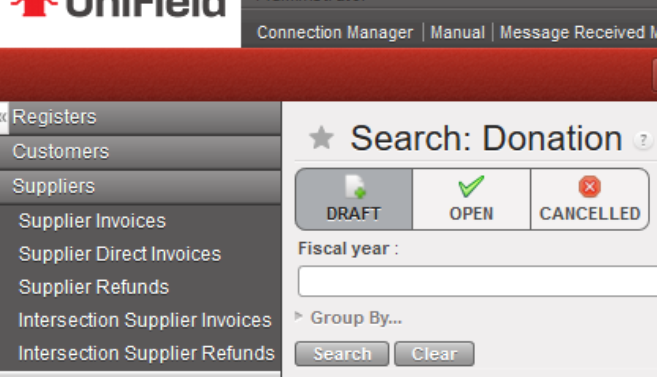
Go to Accounting > Suppliers > Donation:
- The default search of the donations is the “Draft” state:
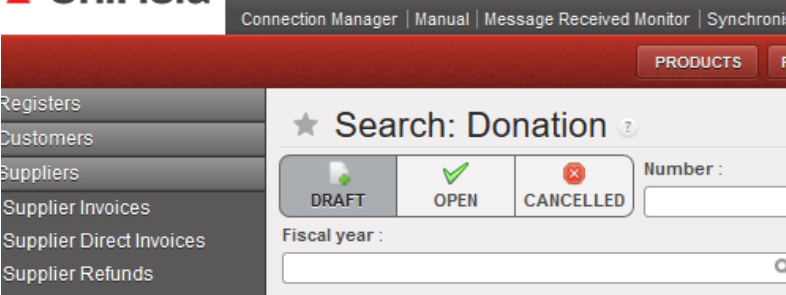
- Below the 3 states of donation filters, we have added a new filter named “Fiscal year”, to allow to filter by year:
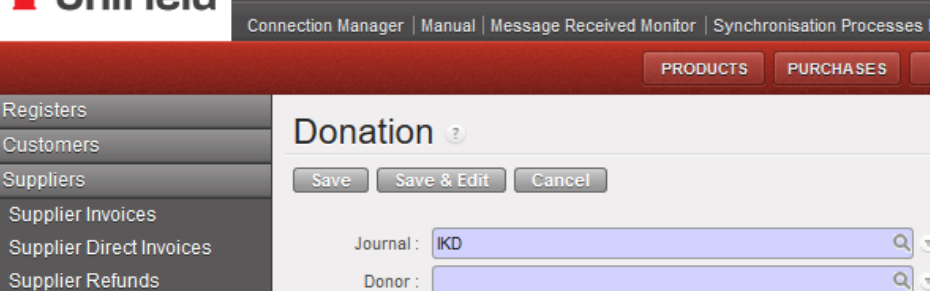
- The only journal available is now the IKD journal -In kind donations- (it is not possible to select the ODX journal in manual. This ODX journal will be used just for automatic entries):
3.6 (US-9389) Commitment Voucher CV: to set up “export CV lines “and “import CV lines” like for the supplier invoices (to do with US-9732).
We have done an “export cv lines” report and an “import cv lines report” (as the ones that we have developed for the supplier invoices in the ticket US-9732).
- We have created two new buttons in the “Commitment voucher lines” tab named: “Import CV Lines” and “Export CV Lines”.
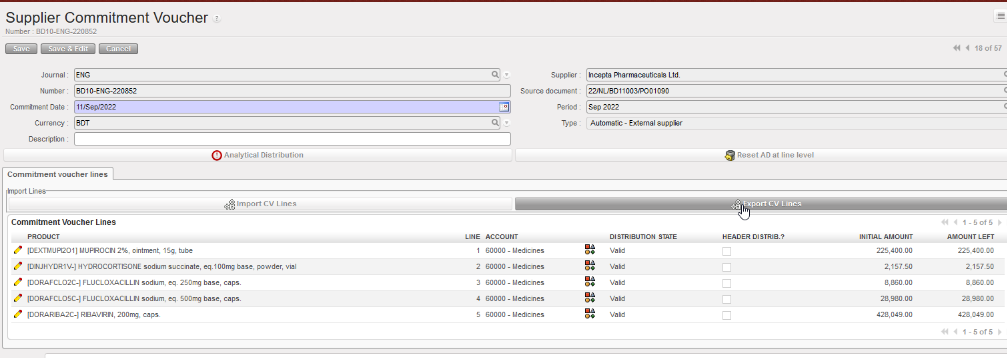
- The “Export CV Lines” includes 10 columns: 4 columns are editable which are “Account” plus the analytic distribution columns.
- Each line has its own ID defined in the column “Internal ID”.
- In the case that a line of the commitment voucher has been split in several lines, the AD will be empty. We will have the word “SPLIT” in the column “Analytic distribution”. The 3 last columns Cost Center, Destination and Funding Pool will be empty.

- We can export the information, change the data and import the file with the data in Unifield. The import fails in case one of the main components do not match: “CV Number, Currency, Supplier, Source Document and CV Type“: an error message will be shown:

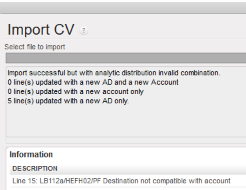
3.7 (US-9588) The filtering for the periods 13, 14, 15 and 16 (extra accounting) is not correct in AJI on ENGI (international commitments).
The display of “ENGI” lines in the “Analytic Journal Items” interface has been corrected.
The ENGI will be seen in the filter of the ordinary periods (Jan-Dec).
3.8 (US-9732) Extend to AD the Export/Import invoice lines (to do with US-9389).
We have improved the excel file by adding the analytic distribution:
- The exported file “Export Invoice line” has been improved by adding 4 additional columns: Analytic Distribution, Cost Center, Destination and Funding Pool).
- If the invoice line has been split, we will have the word SPLIT in the excel file and the analytical distribution will be empty.

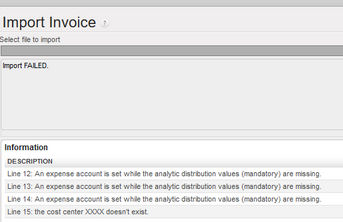
- If we try to import incorrect values (cost center that does not exist, mandatory values not reported…), the import will fail, and we will have error messages that will help us to correct the errors and to import again the file.
3.9 (US-9770() and (US-10780) OCA: Closing of Period 15 and end of year REV: to add checks and warning messages.
UF has the functionality to revaluate a/liquidity every month, b/liquidity end of year (using a currency table) and c/regular balance end of year (using a currency table).
OCA is using this option.
REV is happening at Coordination instance only – it can be applied once and not correctable.
REV is optional. If an account code for REV is set at company configuration, an instance type coordination could not be closed without REV being processed for a defined list of periods: Jan – dec. We did not include extra accounting periods.
This improvement request is to add P15 in the list of months where we do a revaluation and to add warning messages in case of not respect of the procedure.
The current list of periods to be revaluated is January to December. Those periods have only a/ liquidity every month revaluation.
In Period 15 we have to do the revaluation in 2 steps:
B/ liquidity end of year and c/ regular balance end of year (in both cases it is compulsory to use a currency table).
This improvement has added to P15 2 revaluation checks and additional warning messages:
(EoY: End of Year revaluation)
1. No EoY revaluation run = no warning message.
2. Liquidity EoY has been done => “EoY Revaluation of liquidity has been done”.
3. B/S EoY has been done => “EoY Revaluation of B/S has been done”.
4. Both has been done ==> “Both EoY Revaluation have been done”.
3.10 (US-9869) To be able to identify where the LOCAL staff has been originally created “instance creator”.
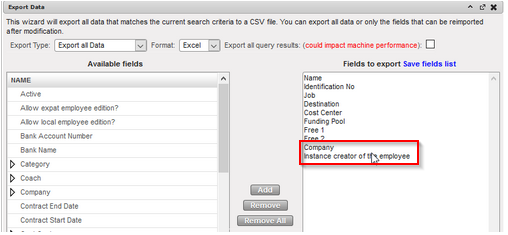
We have added a new field in the Employees tab indicating the instance where the employee has been created. The field is named “instance creator of the employee”.
We have added in the export report (in the right action menu), the field “Instance creator of the employee” and the field “Company”.

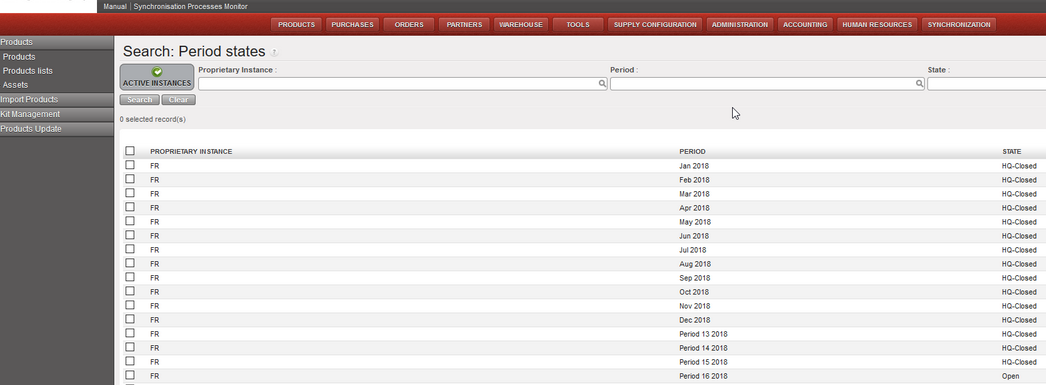
3.11 (US-9941) To add a filter button named “ACTIVE INSTANCES” in the “Search: Period States” interface
Go to accounting / configuration / financial accounting / periods / periods
1. We have added a new button called “Active Instances” to filter only the Active Instances.
2. This button “Active Instances” will be selected by default.
3.12 (US-10067) To avoid the possibility to add taxes at line level in the PO for internal suppliers (internal flows).
We have disabled the possibility to add taxes at line level in the PO for internal suppliers (internal flows).
3.13 (US-10068) To prevent to add taxes online nor on header on External PO with Order Type In Kind Donation.
We have disabled the possibility to add taxes at line level nor on header on External PO with Order Type In Kind Donation.
3.14 (US-10073) How to inactivate liquidity journals from decommissioned instances in an easy way.
At coordination level, it is now possible to inactivate the journals of a decommissioned/deactivated project.
3.15 (US-10124) To allow the import PAYE_UNIFIELD even if Destination and Cost centers in the file are not compatible.
UniField will allow the import of the Paye Unifield file even if the combination of cost center and destination is not active. But in this case, a warning message will appear:
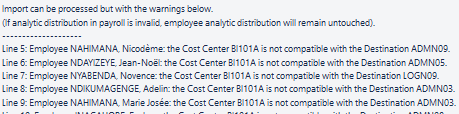
The incorrect payroll lines will be reported as invalid and there will be no update of the analytics on staff with error.
The correct payroll lines will be reported as valid and there will be the update of the analytics on staff without error.
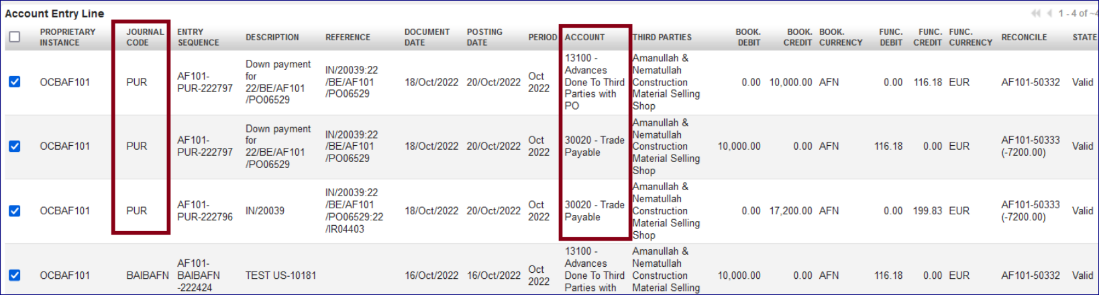
3.16 (US-10181) Improve the booking of Entries linked to down payments function: use the PUR journal.
The improvement in the column “Journal Code” in the “Journal Items” interface.
When an account code is configured “type for specific treatment = down payment”, the down payment entry in the register needs to be linked to a confirmed PO. The entries related will appear in “Journal Items” interface as below (example):
- “13100 – Advances Done To Third Parties with PO” recorded in the liquidity journal will appear under the journal code of the liquidity journal.
- All other lines related created automatically from the reconciliation will be booked in the “PUR” journal.
- Below you have an example:
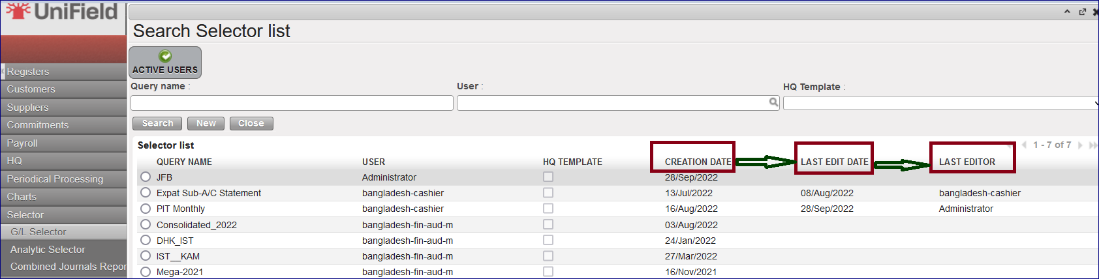
3.17 (US-10237) Selector saved query list view: add creation and last edit date/editor fields.
This is an improvement in the “Selector” at saved queries for “GL Selector”, “Analytic Selector” and “Combined Journals Report “.
We have created three additional columns:
- CREATION DATE
- LAST EDIT DATE
- LAST EDITOR
3.18 (US-10262) To block the possibility to create a Journal if the currency parametrized is not active.
The improvement blocked the possibility to select an inactive currency during the creation of a new journal.
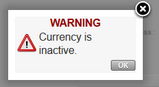
Now with the creation of a new journal, if an inactive currency is selected, you will receive a popup message with “WARNING Currency is inactive” and you will not be able to save.
3.19 (US-10480) UR: Prevent Local finance user to create intermission / intersection partners at mission level.
The possibility to create intermission / intersection partners at mission level has been blocked for the groups of users below:
- Sup_Demand_Manager
- Sup_Purchase_Manager
- Sup_Purchase_Officer
- Sup_Store_Keeper
- Sup_Supply_Config
- Sup_Supply_System_Administrator
- Sup_Warehouse_Manager
- Fin_Config_Coordo
- Fin_Config_Project
- Fin_Config_Full
3.20 All Finance tickets integrated in UF27.0
Key | Summary | Detailed |
|---|---|---|
Change of Color codes for HQ entries: validated (to black) and split lines (to green) | ||
Intermission / intersection flow: Counterpart invoice status filter on IVO/IVI/STV/ISI. | X | |
Remove the space at beginning and at the end of the “journal code” and “journal name” object when saving. | ||
Report the third party “code” and not the third party “description” in the Analytic Journal Items interface. |
| |
Default [destination] could not be displayed in the AD wizard of the Direct Invoice. | ||
In the register import file, technically allow this special character “…” | ||
Add in Interface the total of Output Amount/Output Credit and Debit when Output Currency is selected in Selector | X | |
Impossible to validate a direct invoice (DI) after having deactivated the original destination. | ||
Full report: add the correction lines when using Wizard of correction on return of advance expenses | X | |
Advance settlement wizard: to make AD screen a pop up on top of the advance settlement wizard. |
| |
Possibility to get the product code and quantity of the expense in the JI and AJI export. | X | |
Donations improvements miscellaneous: filters, journals, fields. | X | |
Commitment Voucher CV: to set up “export CV lines “and “import CV lines” like for the supplier invoices (to do with US-9732). | X | |
The filtering for the periods 13, 14, 15 and 16 (extra accounting) is not correct in AJI on ENGI (international commitments) | X | |
Extend to AD the Export/Import invoice lines (to do with US-9389). | X | |
OCA: Closing of Period 15 and end of year REV: to add checks and warning messages. | X | |
AD check on HQ entries not correctly applied: check on both parametrized account code and Cost centres of the Destination. |
| |
To remove the white space in the beginning and end of the identification number of the international employees. | ||
To be able to identify where the LOCAL staff has been originally created “instance creator”. | X | |
To add a filter button named “Active Instance” in the “Search: Period States” interface. | X | |
Accruals: to change the default display ACC in the list view. | ||
To avoid the possibility to add taxes at line level in the PO for internal suppliers (internal flows). | X | |
To prevent to add taxes online nor on header on External PO with Order Type In Kind Donation. | X | |
How to inactivate liquidity journals from decommissioned instances in an easy way. | X | |
Invoice object default display + Commitment vouchers (CV) in list view: draft State on the top |
| |
To allow the import PAYE_UNIFIELD even if Destination and Cost centers in the file are not compatible. | X | |
Improve the booking of Entries linked to down payments function: use the PUR journal. | X | |
Pending Invoice Report to fix: not to add the temp posted register entries for direct invoices (draft DI). | ||
Payroll entries shown as Valid without AD (analytic distribution): behaviour to be changed! they must be Invalid. | ||
Selector saved query list view: add creation and last edit date/editor fields. | X | |
To block the possibility to create a Journal if the currency parametrized is not active. |
X | |
OCG_LB1_COO: Cheque paid in May appears as unpaid in July : code fix to exclude FXA entries from later period check. | ||
UR: Prevent Local finance user to create intermission / intersection partners at mission level. | X | |
Patch script: to turn all one-time accruals manually reconciled in status Running to status DONE in OCA and OCB prod instances. | ||
End of year REV on P15: change warning messages. | X | |
E-VALIDATION: “Signatures Follow up” data protection. View screens supply / finance. | X | |
US-10819 | To add product_id and quanity in account_move_line sync rule 412 |
Non- functional
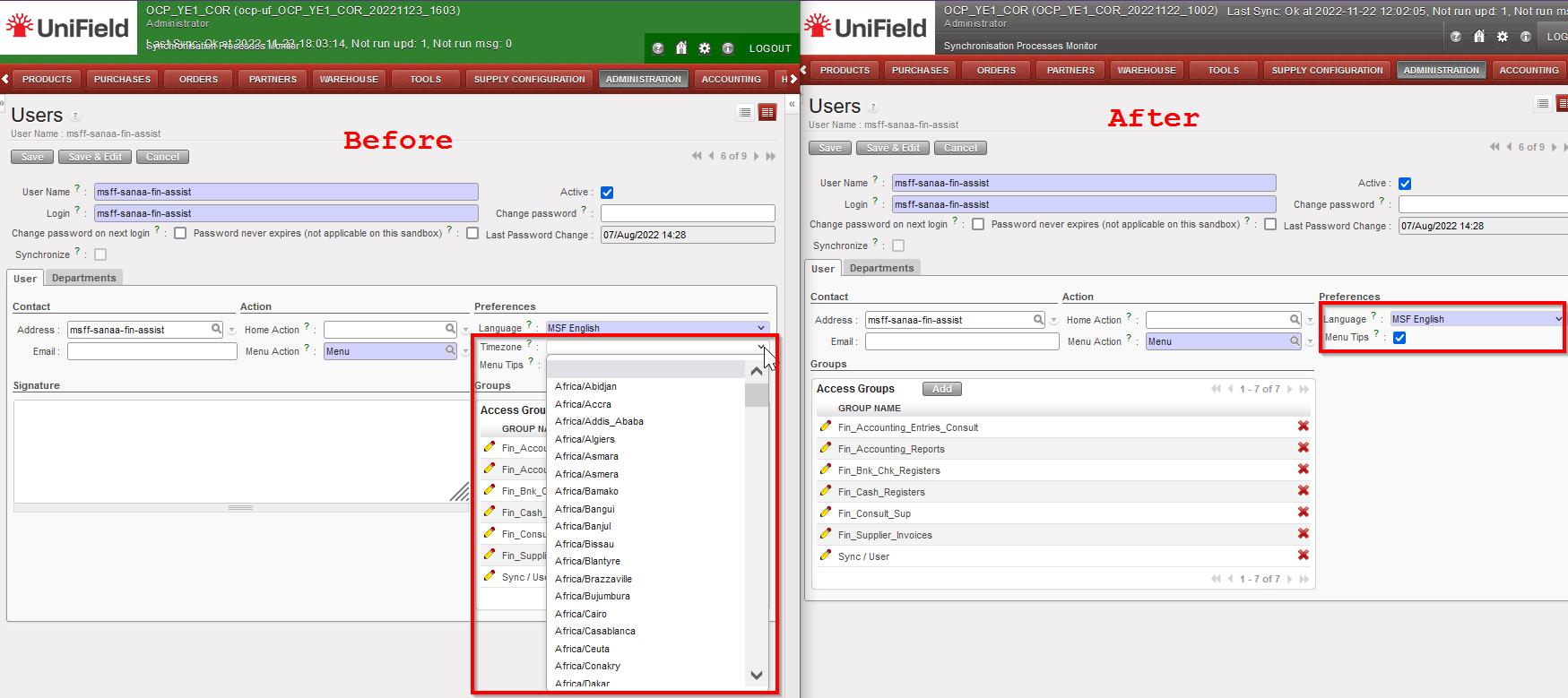
(US-10662) Error: No valid Time zone detected: Disable time zone field on user preference and user form.
The timezone field on user preference and user form has been removed for all users. This fixes the bug that was causing application error when timezone is set on a user profile. The standard openERP behaviour when timezone is set on a user profile is to:
- Detect the system Timezone
- Change time displayed on the User Interface to apply the rule: database time – system timezone + user timezone
Most of the time OpenERP is unable to detect the system timezone on Windows so the default UTC timezone is set.
This release removes the timezone drop down menu from Users and Settings to prevent this behaviour. Only the database time and system timezone will be taken into account.

(US-10475) Synchronize user from HQ is not possible for supply referent HQ users
Prior to this release, only the group Fin_Config_Full had access to the synchronization whitelist. We have created a new group Sup_Config_HQ only at HQ level for supply to independently manage the Supply synchronized users.
(US-10604) To improve the performance of the HQ entries import
The performance of the HQ entries import has been improved. A progress bar and state of the import has been added. The state will show status: In progress, Done or Error if import fails with the reason for the failure displayed. See finance part of the release notes for the functional details
All Non-functional tickets integrated in UF27.0
