
Release Details
Release version: UF 28.0
Date of production synchronization server patch: 15th March 2023 / 18:00 Geneva time
Latest user rights files updated: UF28.0 can be found here
Note that no user rights need to be loaded at each HQ. This will be done at the Sync Server by the Core team and will update the user rights via Sync for all HQs and missions.
JIRA filter for all integrated tickets: https://jira.unifield.org/issues/?filter=12462
Supply
(US-7598, US-7603, US-10562) Changes to Kit Composition Lists
With this release there are several changes to Kit Component Lists (KCL) and how their components and expiry dates are tracked and managed.
A ‘Kit’ column has been added when processing KCL, Kitting Orders, PICK, Pack, Ship, Delivery Orders and Real Consumption to make it possible to identify which kit is being processed. It is not mandatory to identify a KCL in the ‘Kit’ column, but when one is chosen, the kit being processed will be linked to the document that’s being processed. This information will be shown on the related documents.

When a Kit is processed in an OUT, the KCL will be automatically set to Status “Closed” when it is sent out of the instance. If a KCL has kit as a component, the component KCLs will also automatically be set to Closed status when the top KCL is closed.
If the kit has components that need to be managed by Batch Number/Expiry Date, these fields will be mandatory in the KCL for the kit and its components.
(US-7957) Improved usability in the OST
Several changes have been made to make the Order Sourcing Tool more user friendly. It is now possible to click on column header to sort by Requested Delivery Date.
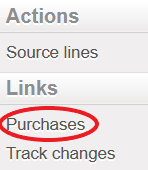
A new link has been added to the Action Menu when a line is selected in OST which displays all POs that contain this Product.
Last, in the Supplier pop-up that opens after clicking the magnifying glass, suppliers that have an active catalog which contain selected item are displayed in green at the top of the list.
(US-8454) Upgrade of FO, RFQ, Tender for consistency
In this release, the functionality of Field Orders, Requests for Quotation and Tenders has been updated to make them more easily editable and to make line level information more easily viewable.
Previously, Field Orders and RFQs could only be modified in the pop up screen. In the current release, there will be 2 icons to the left of each line to allow the 2 different modes of edit: a “Pencil” icon to edit directly in the line, and a “doc” icon to open line in pop-up. Clicking anywhere on the line will allow the line to be edited in line-mode. In addition to being editable at line level, it will now be possible to add lines by Nomenclature in FOs and RFQs. The process for adding products by nomenclature in these documents will follow the same steps as the current functionality for POs.
Header information for FOs, RFQs and Tenders have been updated to make the naming more consistent, and to ensure that pertinent information is shown in each document.
(US-9495) Re-sync between internal partners
The Re-sync functionality that allows orders to be synchronized to a third (external) UniField instance has been expanded to allow synchronization to a third internal instance. This means an order can be created at a project, synched to Coordination and the Coordination could then send the order (by sourcing the FO to a PO) to another project in the same Mission. Transport documents will work in the same way as previously: each order document will have a corresponding transport document for the goods flow. The “Re-synch” mechanism is limited to 3 UniField instance partners and not more.
The functionality for DPOs remains the same; this Order Type can only be issued to External suppliers. This means that DPOs can only be created in the final instance with the second instance as the Consignee/Delivery partner. This is where the IN for these goods must be received. For the original requestor to receive the goods, the second instance must use the Pick/Pack/Ship mechanism to send goods.
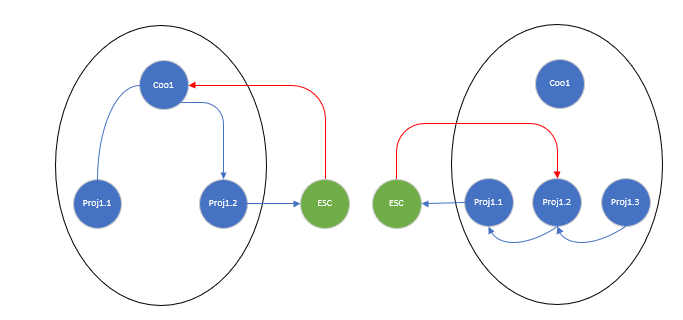
Diagram 1: 2 possible DPO flows
- The order is initiated at project1.1, and order sent to Coordo1, who sources to project1.2 in the same Mission. Project1.2 can source the order onto a DPO to an external/ESC partner. The delivery flow (red arrow) starts with External/ESC partner and goes directly to the middle internal partner Coordo1.
- The order is initiated at project1.3, and order sent to project1.2, who then source to their project1.1 in the same Mission. Project1.1 can source the order onto a DPO to an external/ESC partner. The delivery flow (red arrow) starts with External/ESC partner and goes directly to the middle internal partner proj1.2
*Only some possible flows are displayed, however bother internal and DPO flows are equally valid for any combination of flows between 3 internal partners of same mission.
(US-9874) Improvement on the LOAN flow documents’ naming
An additional Order Type has been created for processing Loans. When processing INs, POs and FOs for loans, “Loan Return” has been added as a reason type. When the “reminder” document is automatically generated by the system, the system will automatically add the reason type “Loan Return” to this document and all transport documents which follow.
(US-10180) Adding new lines in synced FO – Order in Sync Instance
Each FO line created by synchronization is linked to the original request in the field “Order in synced instance”. If a line is added to a synchronized Field Order, the line will be red and it will not be possible to validate the FO until the line is linked to an original request from the requesting instance.
It is now possible to link an added line to the original request by opening the FO pop up and selecting the order in the mandatory Order in Sync instance field:
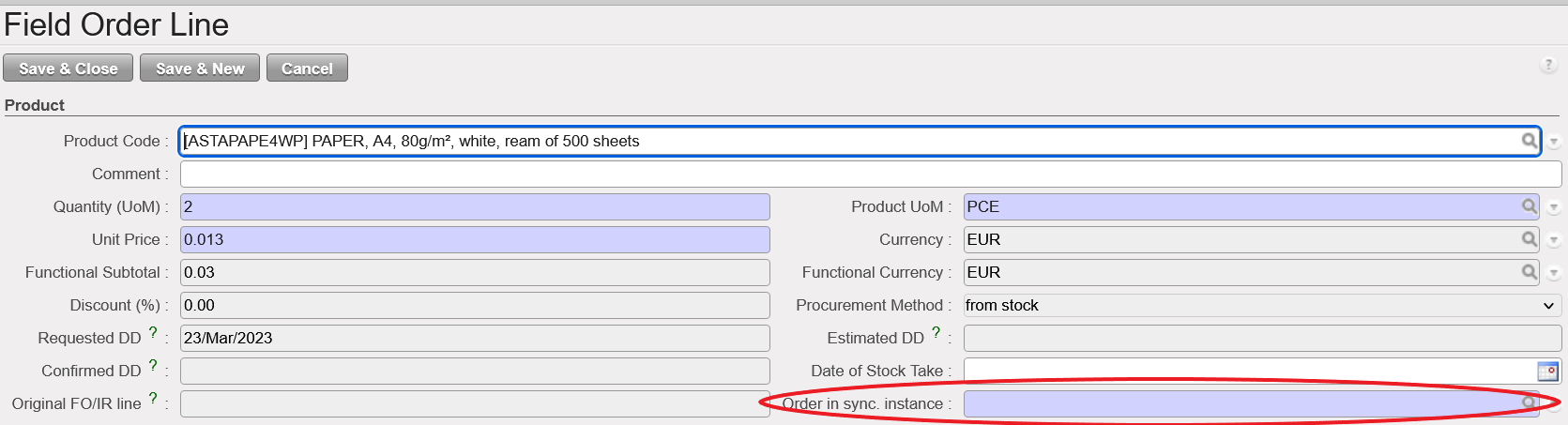
With this change, the added lines will be able to enter the stock or be included in the OUT for delivery following the reception the goods.
(US-10585) Merge 2 UniData products functionality
In previous versions of UniField, if two products that are active in the HQ instance are merged in UniData, the items had to be manually deactivated and merged. This could only be done when there were zero stocks in all instances and no open transactions for this product.
With this release, two UniData products can be merged at HQ, even if they are in stock or have open transactions. Once the merge action has been performed for the 2 UniData products, the selected product will be de-activated in HQ. After synch, this product will be de-activated in all Coordination and Project instances, and any quantities in stock or open or closed transactions will be updated so that the active “kept” product will appear in its place.
There are 2 new reports which display products which have been merged; one accessible at HQ and one at instance level (Coordination and Project) displaying Products which have been merged.
User rights for merging products at HQ have been added to the group Sup_Config_HQ.
All Supply tickets integrated in UF28.0
| Key | Summary | Detailed |
|---|---|---|
US-7598 | KIT: If KCL contains KCL as component, automatic closure of component KCL(s) if delivered out | x |
US-7603 | x | |
US-7957 | x | |
US-8417 | Report and on-screen reason type mismatched for orders with Service Products | |
US-8454 | Upgrade of FO, RFQ, Tender for consistency | x |
| US-9495 |
Re-sync between internal partners | x |
US-9874 | Improvement on the LOAN flow documents’ naming | x |
US-10180 | Adding new lines in synced FO – Order in Sync Instance | x |
US-10185 | FO Follow per Client: Qty to deliver > 0 despite PICK was cancelled | |
US-10562 | Kitting: KCL component products which are BN/ED : info (BN/ED) to be mandatory in KCL | x |
US-10566 | Customer get changed after merging two PO’s | |
US-10585 | x | |
US-10591 | EPREP as External Consumption Unit | |
US-10706 | Physical Inventory: Minor user friendly changes | |
US-10913 | Synch Messages: Set to “Run” without execution for NR IN processed before C&R and SHIP sent | |
US-10918 | FOs in Draft status unable to edit | |
US-11062 | Prevent changing of partner when PO Type is DPO | |
US-11139 | Issues with KCL References in PICK-OUT conversion (US-7603) | |
US-11143 | [US-9495] Re-sync: starting from ext FO1, line added to last PO do not sync to FO1 |
Finance
(US-6710) New Cost center (CC) import behaviour in Tools/Import-Export/Finance:
We have done an improvement in the export/import file be able to import the cost centers for their creation. This is import is just for the creation and not to update the cost centers that exist already un the system. If we import a cost center already in the system, the hole file will be rejected and we will get an error message:
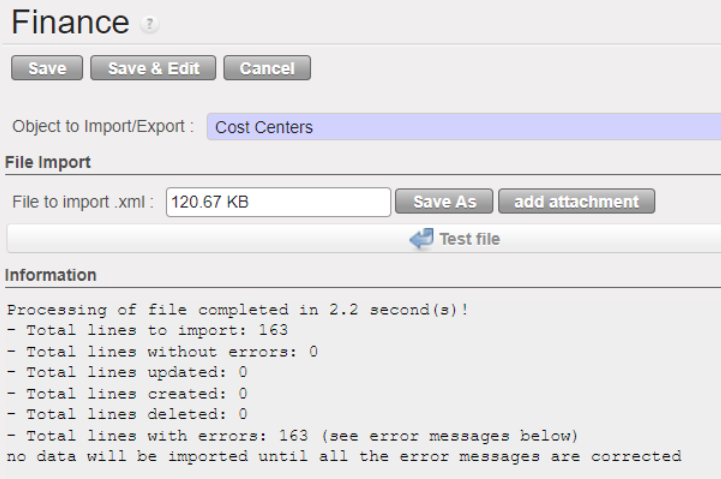
CCs with a “Top prop instance” to be tied with but with no target instance will reject the whole file as target is mandatory for each CC.
All file is accepted or nothing.
The new import file will have 4 new fields :
Top Proprietary Instance | Only one Top prop instance can be filled in. It has to be a coordo level instance type as if added to the coordo, it will be added to all children instances. Top prop instance shall exist and match. |
Instance having the CC as Target CC | Top Prop instance: only one Top prop instance can be filled in. It has to be a coordo level instance type as if added to the coordo, it will be added to all children instance. Top prop instance shall exist and match. |
Instance having the CC as Top CC | Top cost centre for budget consolidation: either empty or shall be the prop instance code |
Instance having the CC as CC picked for PO/FO ref | Cost centre picked for PO/FO reference: either empty or shall be the prop instance code |
How to do the extract of the new improved file:
Go to Tools > Tools > Import/Export > Finance.
Filter “Object to Import/Export” by “Cost Center”.
Under “File export” click on “Export empty template”, you will get extract with the following headers:
| Code |
| Name |
| Parent Analytic Account / Code |
| Type |
| Active from |
| Inactive from |
| Top Proprietary Instance |
| Instance having the CC as Target CC |
| Instance having the CC as Top CC |
| Instance having the CC as CC picked for PO/FO ref |
Example:
| Code | Name | Parent Analytic Account / Code | Type | Active from | Inactive from | Top Proprietary Instance | Instance having the CC as Target CC | Instance having the CC as Top CC | Instance having the CC as CC picked for PO/FO ref |
CD511-SUPZZZ | Prise en Charge de Blesses Buna Support Cost | CD51 | Normal | 2022-04-01 | CD1_COO | CD1_COO |
| ||
CD510 | RDCongo Urgence Rougeole | CD5 |
Normal | 2022-04-01 | CD1_COO | CD1_EM1 | CD1_EM1 | CD1_EM1 |
(US-7624) Remove the possibility of partial import for automatic import of international staff (employees) (let possible ONLY the TOTAL import)
In the menu Human Resources, Import Expats: We have removed the possibility of partial import for automatic import of international staff (employees).
The import must be total or rejected if the file contains errors.
CASE 1: If there is no error at all:
- If the file is “processed” ==> it will have all the employees displayed.
- If the file is “rejected” ==> nothing will be displayed.
CASE 2: If there is one or several errors:
- the file is “rejected” ==> it will have all the employees displayed – because all of them has been rejected!).
There will be an ERROR column. If the column is not empty, it means that the employee contains an error to correct.
The error message that will be on the rejected file: “THE EMPLOYEE DOES NOT HAVE AN ID NUMBER AT LINE X”.

CASE 1: If there is no error at all:
- If the file is “processed” ==> it will have all the employees displayed.
- If the file is “rejected” ==> nothing will be displayed.
CASE 2: If there is one or several errors:
- the file is “rejected” ==> it will have all the employees displayed – because all of them has been rejected!).
There will be an ERROR column. If the column is not empty it means that the employee contains an error to correct.
The error message that will be on the rejected file: “THE EMPLOYEE DOES NOT HAVE AN ID NUMBER AT LINE X”.

(US-9215) Intermission/intersection: IVO/IVI Change the fields name from “reference” to “description”
IVO (Intermission voucher out):
Go to Accounting > Customers > Intermission Voucher OUT> Invoice
No more “Reference” field, now renamed as “Description”
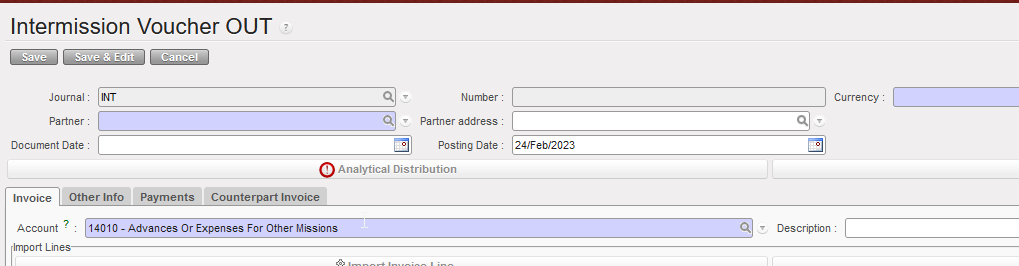
IVI (intermission voucher in):
Go to Accounting > Customers > Intermission Voucher IN > Invoice
No more “Reference” field, now renamed as “Description”
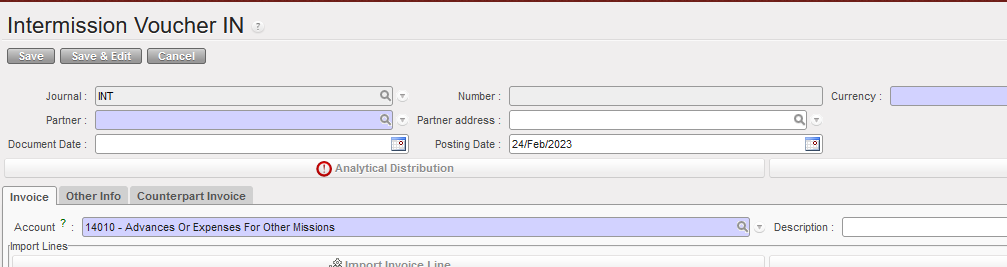
(US-10279) Open advances: When clicking on “Open advance” button from a given register: filter of the list of open advance per journal code of the register where we are
Go to: Accounting/Registers/Bank registers
Select a bank register.
Go to “List of Open Advances” in this bank register.
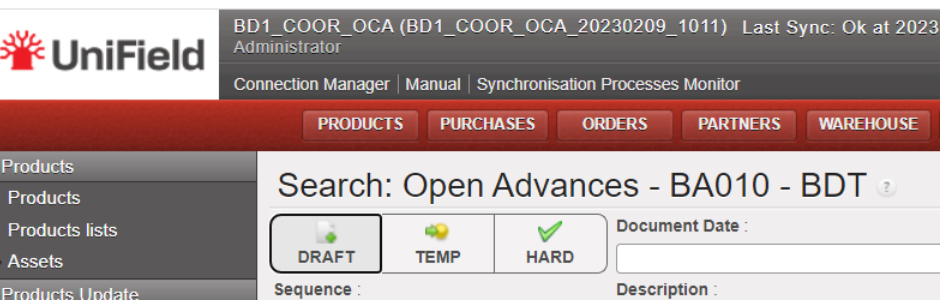
You arrive to this screen: Search: Open Advances – BA010 – BDT
(before this development, we had not the journal name)
When clicking on [open advance] button from a given register – filter the list of open advances per the journal code of the register where we were:
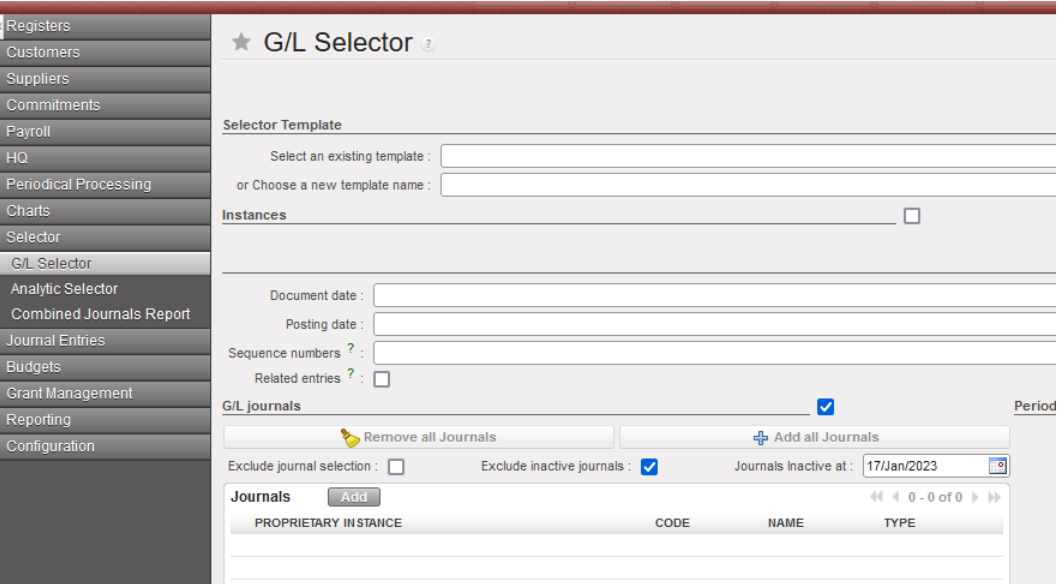
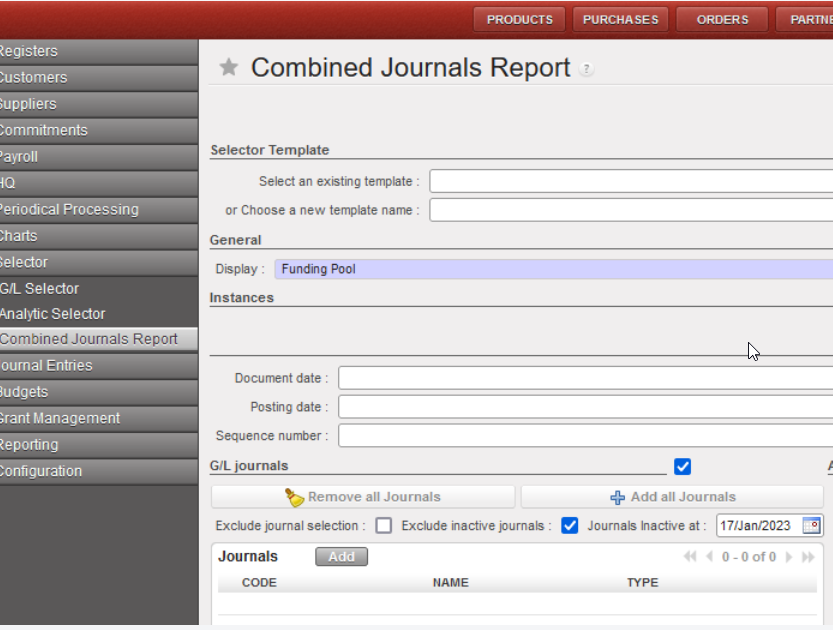
(US-10353) Selector (GL and combined): to add a new checkbox “Exclude inactive journals” with also the filter journal inactive date.
We have created a new checkbox “Excluded inactive journals” and also a date on the G/L Selector and Combined Selector:
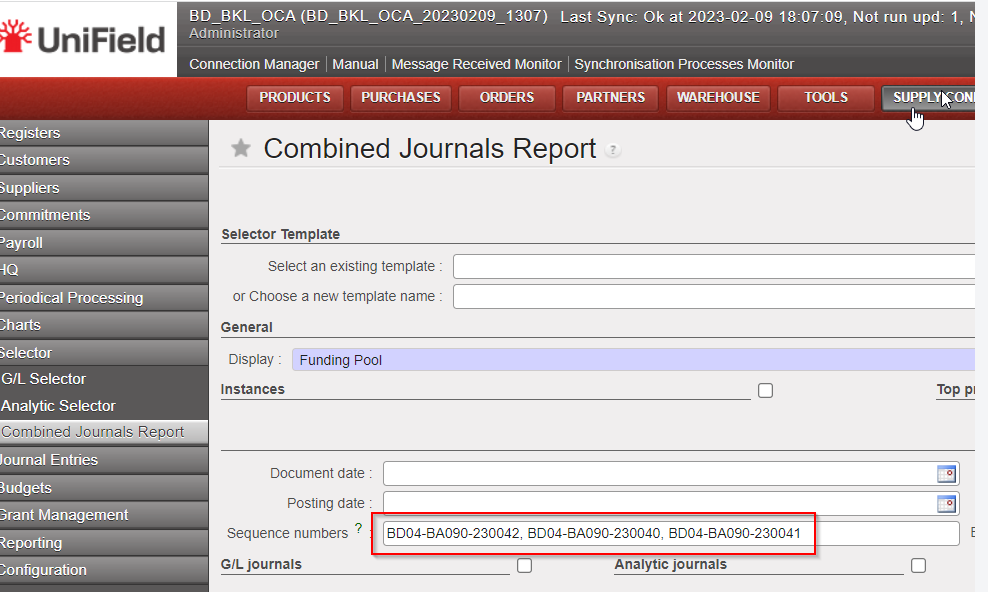
(US-10410) Combined journals reports: allow multiple sequence numbers on the selection
In the Accounting/Selector/Combined Journal Report we are now allowed to add multiple sequence numbers to search “Combined journal reports”:
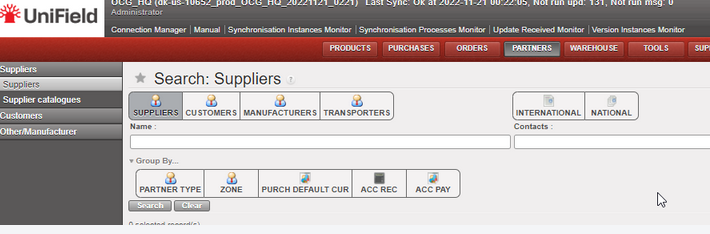
(US-10652) Improvement of the Supplier list (Search: Suppliers): to add 3 additional filters
Go to partners, Suppliers/Suppliers and add after Partner type and zone 3 additional filters:
- purch default cur: purchase default currency
- cur acc rec: currency accounts receivable
- and acc pay currency accounts payable
(US-10653) To improve the Liquidity Balances report: to be able to select from the HQ all the liquidity balances (Coordo and project)
At HQ level, go to Accounting/reporting/legal reports/liquidity balances:
==> Now we have the possibility to select all missions at once in the liquidity balance report: coordinations and projects.
==> The result is sorted by instance code and journal code.
(before this development we could select all coordinations -so we had the liquidity balances of the coordinations at once – but we could not select the projects, so we didn’t have the liquidity balances of the projects).

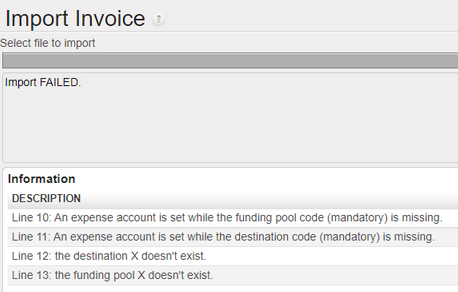
(US-10838) To add additional error messages in the Export/Import invoices in case of import of wrong or empty destination or funding pool
In the Export/import invoices, we have added additional error messages in case that we import a wrong or an empty destination or funding pool:
Example:
(US-10850) OCG Vertical integration: modification of the formatted data file: department column (exception to the CD1 mission)
We have done a change in the formatted data file exported from UF (to be imported in D365) as follows:
- for any accounting line that does have a cost center, the department field should be the first three characters of the cost center (ie: in the instance MX1, if cost center is MX101, department is MX1, if cost center is MX301, dpt is MX3).

- for any accounting line that does not have a cost center (ie: balance sheet accounts), department should be the name of the instance (in the instance MX1, dpt is MX1.
This change has been applied to all OCG missions, with the exception of CD1 where a specific development was made and should not be updated.
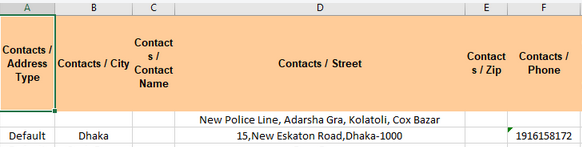
(US-10897) In Tools: To add the field “Phone” in the excel file of “Suppliers”
In Tools (XML File)
Go to Tools > Tools > Import/Export > Supply
From “Object to Import/Export” select the object “Suppliers”
==> we have added an additional column with the field “Phone”:
All Finance tickets integrated in UF28.0
| Key | Summary | Detailed |
|---|---|---|
US-6710 | New CC import behavior in Tools/Import-Export/Finance: | X |
US-7624 | Remove the possibility of partial import for automatic import of international staff (employees) (let possible ONLY the TOTAL import) | X |
US-7955 | Remove spaces in the description of the invoice lines | |
US-8557 | To prevent the duplication of AJI – users in the same instance – by creating an sql log in the journal entries | |
US-9215 | Intermission/intersection: IVO/IVI Change the fields name from “reference” to “description” | X |
US-9281 | Change the data type of field “piece” in account_cashbox_line: to maximum 10 digits | |
US-9724 | To improve the error message when the reconciliation should be done and the cost center for FXA is inactive | |
US-9995 | Bug in the default free analytic account in Intermission Vouchers In IVI an Out IVO | |
US-9996 | Total Amount computation in AD wizards: mix balance sheet accounts and profit and loss accounts | |
US-10279 | Open Advances: When clicking on [open advance] button from a given register – filter the list of open advances per the journal code of the register where we were | X |
US-10290 | JOB name imported from PER_MOIS file not always correct: to import the job name from the last contract | |
US-10353 | Selector (GL and combined): to add a new checkbox “Exclude inactive journals” with also the filter journal inactive date | X |
US-10363 | Default display: Commitment lines: to add ENGI | |
US-10409 | Not runs with model res_partners_address and reason: /XX partner not found | |
US-10410 | Combined journal reports: allow multiple sequence numbers on the selection | X |
US-10637 | To avoid that the description of the register line ends with a non-breaking space | |
US-10652 | Improvement of the Supplier list (Search: Suppliers): to add 3 additional filters | X |
US-10653 | To improve the Liquidity Balances report: to be able to select from the HQ all the liquidity balances (Coordo and project) | X |
US-10725 | Advance return wizard: third party must be required for “internal transfer” or “internal trasnfer same currency” | |
US-10736 | CD_GOMA OCA Solution to inactive (local) product used in IVO/IVI/STV/ISI with HQ settlement account | |
US-10784 | Electronic Validation: Ability to de-activate E-validation in Reconfigure | |
US-10838 | To add additional error messages in the Export/Import invoices in case of import of wrong or empty destination or funding pool | X |
US-10850 | OCG Vertical integration: modification of the formatted data file: department column (exception to the CD1 mission) | X |
US-10894 | Donations: to translate the field “Fiscal Year” in the French version to “Exercice Comptable” | |
US-10897 | In Tools: To add the field “Phone” in the excel file of “Suppliers” | X |
US-10933 | To improve the Import of suppliers: partners CSV file. |
