
Release Details
Release version: UF 29.0
Date of production synchronization server patch: 14TH June 2023 / 18:00 Geneva time
Latest user rights files updated: UF29.0 can be found here
Note that no user rights need to be loaded at each HQ. This will be done at the Sync Server by the Core team and will update the user rights via Sync for all HQs and missions.
JIRA filter for all integrated tickets: https://jira.unifield.org/issues/?filter=12472
Supply
(US-8455) Request to introduce a “Loan Certificate” in PPS and OUT
With this release, a Loan Certificate will be available in the Action Menu for all INs and OUTs (Pick/Pack/Ship and Delivery Orders). The certificate will only show the lines in the document that pertain to the Loan or Loan return.
If there is a Loan and a Loan Return in the same SHIP, it will be possible to select the document you want to view. When selecting the document that you wish to view, it is possible to choose to see the Total Value of the Loan. By default, no value will be shown.
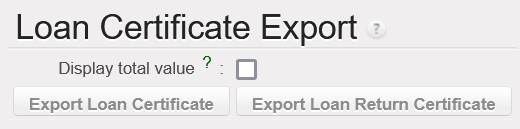
The project’s name in the documents will be based on the name submitted by HQ. Any changes required to the name shown cannot be modified at project or coordination level.
(US-8361) Free gift certificate text alignment with donation certificate
A Certificate of Donation has always been available in UniField, but it has been added to the action menu for all SHIP and OUT for better accessibility. This certificate will be available for all Reason Types, not just ‘Donation.’
Previously it was possible to view Gift Certificates and Free Gift Certificates. This change harmonizes the names and shows the Free Gift Certificate in any place where the Gift Certificate was shown in the past. This document is now also available in the action menu for all SHIPs and OUTs.
(US-11141, 11462) Prevent new lines from being added on Validated POs that sync to a supplier
Lines from Cusomer Purchase Orders that have been validated have never synchronized to the Supplier instance, since the second instance may have already started to process the order. Despite this limitation, it was possible for the requesting instance to add lines to the PO even though the added lines would never be visible in the FO in the supplying instance.
In this release, it is no longer possible to add lines in the requesting instance once a synchronized PO is validated. The add line button is no longer visible once the PO is validated if the PO is sent to the supplier by synchronization (Internal, Intersection, or Intermission orders). All new lines must be added in the Field Order or Purchase Order of the Supplying instance and will synchronize to the Requesting Instance.
(US-10580) Alignment of IN pdf “Line Number” and “Qty Confirmed” to the PO
In past versions of UniField, the line numbers shown in the PDF version of an Incoming Shipment always started from 1, where the line numbers in the form view were linked to the PO’s line numbers. With this release, the line number shown in the Reception PDF will match what is shown when processing the IN.
The quantities shown in Incoming Shipments are also being updated to provide more insight on backorders and quantities in the original orders.
The Qty Confirmed column in the IN will now show the quantity that was confirmed in the PO, even if some of the original quantity has already been processed, same for qty in the IN from scratch, confirmed qty will show the quantity that was confirmed in the IN from scratch.
The Qty backorder column will now reflect the open backorder (the qty confirmed minus qty received from all IN lines linked to that line of the PO/IN from scratch).

(US-10563) Add fields in PO lines allocation report
The “Allocation Report” has been updated to show two new pieces of information:
- Requestor: The allocation report will now show who requested the line, whether the request came from an FO or an IR. Previously this column was called ‘Partner’ and only showed the requestor when the request was an FO.
- Comments: Any comments included in the Purchase Order for the line will now be shown on the PO allocation report.

(US-11218) VI PO import job stops due to checksum
During Automated Vertical Integration, UniField checks to make sure that a file isn’t a duplicate. If it is, the import is stopped, even if there are new non-duplicate import files to process. With this release, UniField will continue to process remaining VI files, even if another file processed was a duplicate file.
(US-10126) Split IN lines VIA manual VI, Duplicate ordered QTY and update QTY to process
When processing an IN via manual vertical integration, the quantities to process are taken from the import file. To prevent replacing the correct import data with order information from the PO, the top 3 buttons (Copy All, Clear All, Import IN) in the IN process screen have been removed.
(US-8968) To introduce a “Returned” status for completely returned SHIPs
Until this release, the statuses available for processed Shipments were ‘Dispatched’ and ‘Received,’ even if all lines in the order were returned. With this release, a new status ‘Returned’ will be available for shipments Replaced “Cancelled” State:

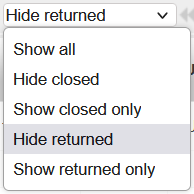
If all lines in a SHIP have been returned, the document status will be Returned. The status of shipments where all lines were returned before this release have been changed from Dispatched to Returned.
The status of all lines that have been returned in a SHIP will be changed from Closed to Returned.
A dropdown menu has been added to SHIPs to make it easier to only view relevant line statuses:
(US-9022) Allow modification of Estimated and Actual Ship Dates on Ships
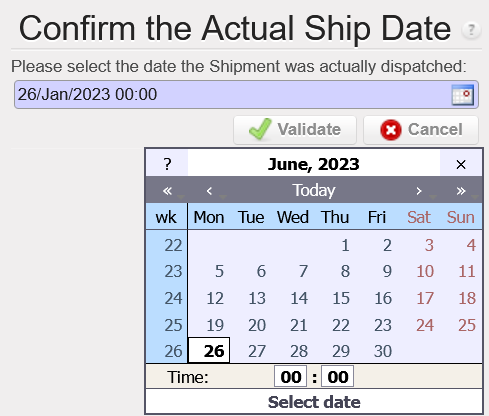
Previously the Actual Ship Date in a SHIP could not be manually modified and the shipment’s Expected Ship Date could only be modified when the state is Draft.
With this release, it will be possible to modify the Expected and Actual Ship Date fields until the shipment is dispatched (Validated). Sometimes shipments are sent before or after they are validated, so now there will be a pop up allowing the shipper to select the date the shipment was actually dispatched. Once a shipment is dispatched, the Ship Date fields cannot be modified.
(US-10752) Products: Prevent change of Product Type (Stockable > Service etc)
Users at HQ can change the Product Type for UniData products and these changes will synchronize down to all coordination and project instances. At coordination level, changes in Product Type will synchronize down to projects for local codes. If an item is in stock and then the Product Type is changed to Non-Stockable, the product could be stuck in stock without being able to be delivered.
Now, a check will be done using data from latest MSR. If an item is in stock/Pipelines in any linked instance, the Product Type cannot be changed.
(US-10923) Prevent resubscription of NSL that have been unsubscribed in Unidata
OCs can choose to unsubscribe to Non Standard Local (NSL) codes in UniData and this change in subscription will be reflected in UniField. Previously, it was possible to reactivate these NSL codes in coordination, even if it was unsubscribed by HQ.
Now, when an NSL product has been unsubscribed by the OC, it cannot be activated at mission level unless the product code is resubscribed.
(US-11000) Magnifying glass to search for orders in the OST does not show lines from IRs
In the Order Sourcing Tool, the magnifying glass in the Order field previously only showed references from Field Orders. With this change, it will also be possible to search for sIR references using the magnifying glass.
(US-11177) Add ability to search for batch numbers with magnifying glass for KCL
Previously batch numbers for kit components managed by batch number/expiry dates had to be entered manually when creating a Kit Composition List (KCL).
Now, the magnifying glass functionality has been added when selecting batches for Kits so that users can view all available batches for a given kit’s Component .
(US-9157) RR: Better differentiate OC exports
The names for the Replenishment Rules export files have been updated to be more clear. The new document names are:
| Previous Name | New Name |
|---|---|
Order Calc | Order Calc Excel Export |
Order Calc (only lines with warning) | Order Calc Excel Export (only lines with warning) |
Export Draft Consolidated OC Lines | Draft Consolidated OC Lines |
Export Consolidated OC all status | Consolidated OC Lines – All Statuses |
A warning Message will be displayed in case of trying to import an incorrect file type:
“Error: Wrong format: Order Calc Excel Export template must be used”.
All Supply tickets integrated in UF29.0
| Key | Summary | Detailed |
|---|---|---|
US-8455 | Request to introduce a “Loan Certificate” in PPS and OUT | x |
US-8361 | Free gift certificate text alignment with donation certificate | x |
US-11141 | Prevent new lines from being added on Validated POs that sync to a supplier | x |
US-11462 | (US-11141) Prevent new lines from being added on Validated POs to Internal Intermission Intersection Partners | x |
| US-10580 | Alignment of IN pdf “Line Number” and “Qty Confirmed” to the PO | x |
| US-10563 | Add fields in PO lines allocation report | x |
| US-11218 | VI PO import job stops due to checksum | x |
| US-10126 | Split IN lines VIA manual VI, Duplicate ordered QTY and update QTY to process | x |
| US-8968 | To introduce a “Returned” status for completely returned SHIPs | x |
| US-9022 | Allow modification of Estimated and Actual Ship Dates on Ships | x |
| US-10752 | Products: Prevent change of Product Type (Stockable > Service etc) | x |
| US-10923 | Prevent resubscription of NSL that have been unsubscribed in Unidata | x |
| US-11000 | Magnifying glass to search for orders in the OST does not show lines from IRs | x |
| US-11177 | Add ability to search for batch numbers with magnifying glass for KCL | x |
| US-9157 | RR: Better differentiate OC exports | x |
| US-11340 | [Physical Inventory] Include accurate decimal values instead of rounding down in discrepancy reports | |
| US-11015 | No statuses for some items lines in Export IR/FO Follow-up | |
| US-11140 | Add Link to RfQ Reference when Sourcing to RfQ | |
| US-11184 | French translation improvement for IN print out – « contrôlé par » | |
| US-10880 | Claims: Claim from scratch from IR ext CU strange behaviour | |
| US-11268 | [RFQ] Update RFQ button once RFQ is sent | |
| US-11450 | Product track changes attached to the wrong product | |
| US-11465 | (US-8968) Main Shipment becoming Returned when it should not | |
| US-11471 | To fix the QTY confirmed and backordered qty calculation in the IN from scratch | |
| US-8371 | PO: UF refuses to change unit price | |
| US-11524 | [9022] Actual Ship Date should be Today’s Date in Pop Up, but it defaults to previous Actual Ship Date | |
| US-11528 | To fix the qty confirmed in the IN from scratch |
Finance
(US-10858) Electronic Validation: Inactivate signature when user is inactivated
After this improvement, we will get automatically the signature inactivated, when the user will be inactivated.
The aim is to prevent that old signatures could be used when the profile is reactivated later.
(US-10991) Electronic Validation: Improve the error message when the user has a signature, but he is not allowed to sign a document
We have improved the error messages for this use case: the user has the signature, but the user is not allowed to sign the document. In this case, the user tries to apply his/her signature on the object and the old error message was “Operation denied”. We have adapted the message to put it clearer.
The error message has been changed as follows:
“You are not in the list of users allowed to sign this document – please contact the document creator”.
“Vous n’êtes pas dans la liste autorisée à signer ce document – merci de contacter le createur de document”.
(US-11199) Electronic Validation: signature follow screen up for “document creator”: to remove the default filters [my signature] and [to be signed]
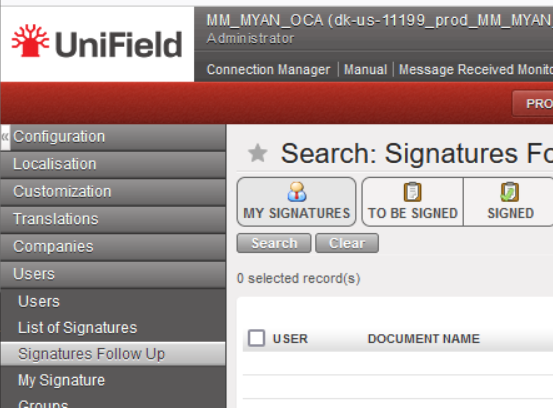
In Unifield, go to: Administration/Users/Signature/Signature follow-up: we have removed the default filters [my signature] and [to be signed]. After user’s experience we have considered that it was not pertinent.
(US-11349) Electronic Validation: “signature follow up” exporting option (excel and pdf)
We have created two “Export” action menus from the Signature follow up screen:
- Export to Excel
- Export to PDF
Go to Administration, Users/ Signatures Follow up, go to the right menu Actions and select “export search results”.
The idea is to apply some filters using the existing filtering method above the screen and to be able to export the list in Excel/PDF.
The content will be the information of all the columns that we have on the current “signature follow-up” screen.
The use of this: when we need to quick check which documents/objects have been signed in UF, we can export the report and provide to auditors/control etc.
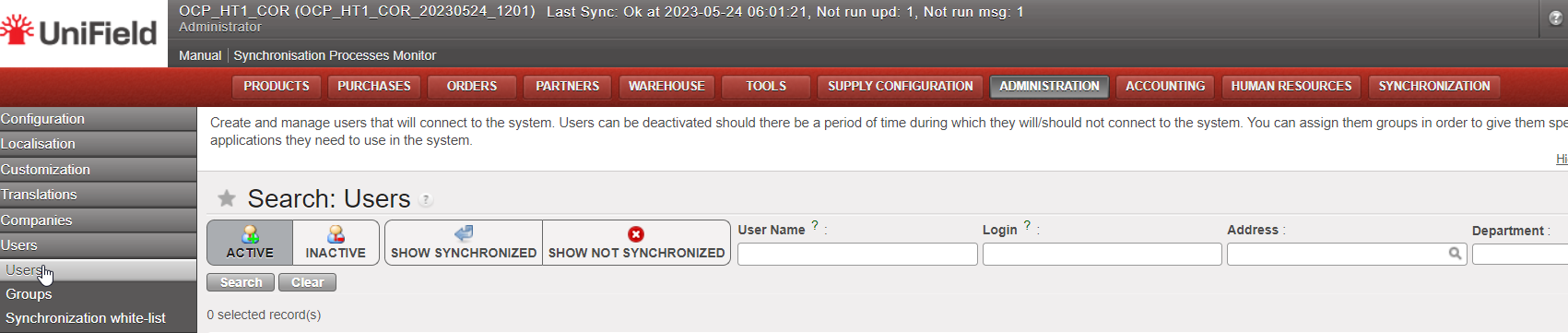
(US-10807) Users: filter based on the “department code”- drop down list
In Administration, Users: “Search: Users” there was an inactive filter named “Company“. It has been now renamed as “Department” and it will be used to have the Department information.
Remember that to populate the department field, you need to go to the menu Human Resources => Configuration => Human Resources => Departments.
(US-10820) OCB: Sub-cost center validity date greater than parent cost center validity date, no import in CODA: to add an error message
We have added an additional check for cost centers parametrization:
In the case that the Sub cost center validity date is greater than the parent cost center validity date ==> we have added a warning error message.
“the sub-costcenter validity date is greater than the parent cost center validity date”.
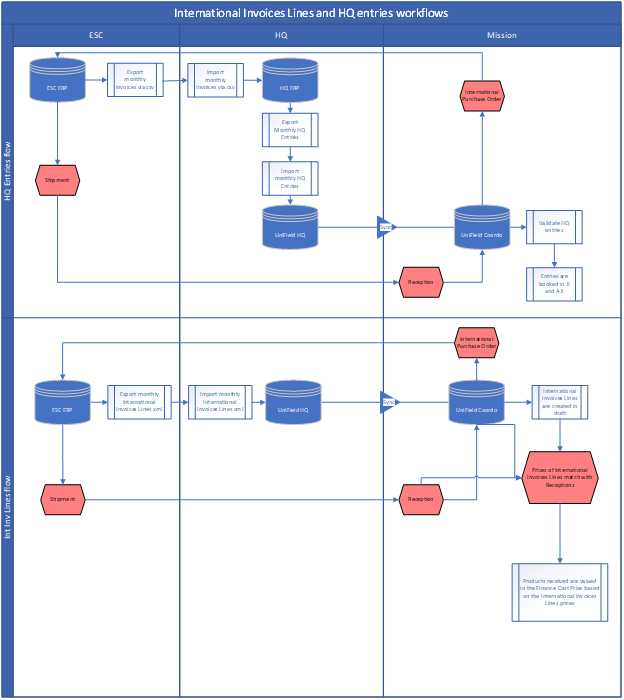
(US-10835) International Invoice Lines – ESC ERP (European Supply Center ERP)
To develop the Finance Cost price *, we have created the International Invoice Lines module to synchronize down the International Invoices Lines extracted from ESC ERP to the requestor instances. This is to get the real paid prices from the ESCs for International orders.
* Finance Cost price: the product finance cost price will be calculated based on invoices and no more on POs.
This module intends to:
- Allow a downstream flow from UniField HQ instance to missions’ instances, called International Invoices Lines.
- With information extracted from the ESCs’ ERPs and imported in UniField HQ instance.
- International Invoices Lines are a more detailed information of HQ Entries/Invoices placed by ESCs to OCs related to International orders placed by missions to ESCs, where information of a product line level / Purchase Order Line level are available, especially invoiced prices.
- Match International Invoices Lines with reception of International Orders in UniField so prices of International Invoices Lines can be used to value the average Finance Cost price of a product.
Principles :
The Module is not compulsory to use and will be in the reconfigure (Manage International Invoices Lines) and access managed via user rights.
IIL imported at HQ will sync to the instance where the CC is ticked as PO/FO Reference to ensure IIL are available either at Coordo or project that placed the International Orders.
In case of DPO to ESCs, the CC of the receiving instances will have to be entered in the IIL instead of the CC of the instance that placed the order.
If ESC entries are not found at time of reception triggering the creation/validation of the ESC invoices, invoices prices will be populated by the Purchase Order prices.
ESC entries can be monitored at HQ regarding their status (status will sync up from mission to HQ).
(US-10904) Final status of in kind donation: from OPEN status to new status DONE/TERMINE (it is not a renaming)
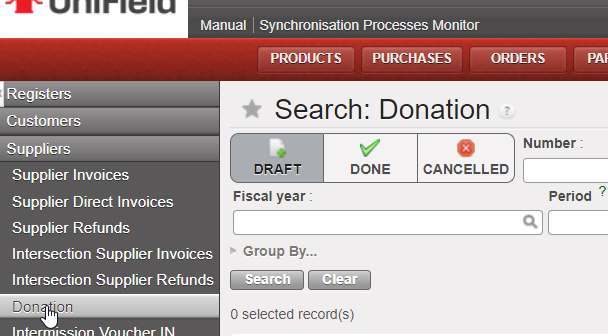
We have done some improvements on the in kind donation functionality:
– We have created the button called: “Set as done” (“Terminer” in French version).
– we have also created the Status Done (Terminé in French). The status OPEN will not exist anymore.
(US-10921) IVI / IVO / STV / ISI: to add the Counterpart Invoice Number search field
We have added the “Counterpart Invoice Number” field on the IVI / IVO / STV / ISI search views and to display it in the list views.
(US-11005) To prevent FO / PO creation if “Cost center picked for PO/FO reference” is empty
We have prevented the FO / PO creation if the “Cost center picked for PO/FO reference” is empty:
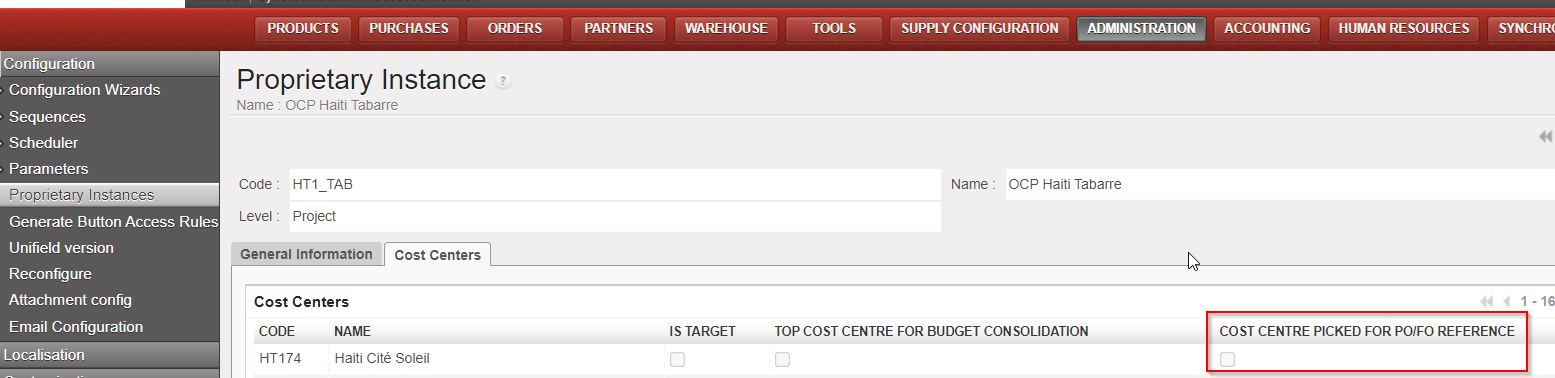
We have also put an error message:
English message: “add the cost center picked for PO/FO reference”
French message : “rajouter le centre de coût utilisé pour la reference PO/FO”
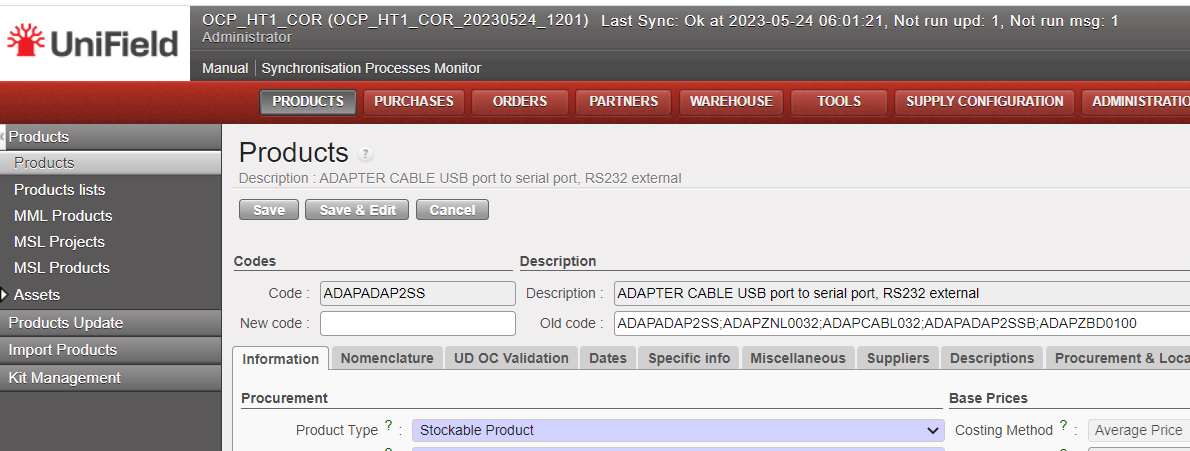
(US-11046) Costing methods: standard price to remove + Patch script to correct products with the wrong costing method
We have removed the option Standard price, as MSF used just the option Average price.
We have done a patch script to correct the products with the standard price.
(US-11103) Manual journal entry: available journals: to remove the not used journal with code REV
The REV journal is no more available for manual journal entries.
All Finance tickets integrated in UF28.1
| Key | Summary | Detailed |
|---|---|---|
US-10799 | ELECTRONIC VALIDATION: To create a submenu in the Users with the Signatures (List, Follow-up and My Signature) | |
| US-10858 | Electronic Validation: Inactivate signature when user is inactivated | x |
| US-10991 | E-validation: Improve the error message when the user has a signature, but he is not allowed to sign a document | x |
| US-11199 | E-validation: signature follow screen up for “document creator”: to remove the default filters [my signature] and [to be signed] | x |
| US-11349 | E-validation: “signature follow up” exporting option (excel and pdf) | x |
| US-6976 | Remove the translation option from the analytic accounts | |
| US-8443 | OCA_VE_COOR Unbalanced entry after synch – causing failure of test auto Finance VI in from HQ. | |
| US-9702 | Code fix for Journal entries: use case with AD KO to avoid | |
| US-10629 | Partners form: purchase default currency and field order default currency | |
| US-10755 | Selector saved queries/templates: to be able to delete them at once (to do with the user right ticket US-11328) | |
| US-10807 | Users: filter based on the “department code”- drop down list | x |
| US-10820 | OCB: Sub-cost center validity date greater than parent cost center validity date, no import in CODA: to add an error message | x |
| US-10835 | International Invoice Lines – IIL module – ESC ERP | x |
| US-10904 | Final status of in kind donation: from OPEN status to new status DONE/TERMINE (it is not a renaming) | x |
| US-10915 | OCB VI – vertical integration – Changes to the interface file (to add additional columns) to adapt to the new HQ system | |
| US-10921 | IVI / IVO / STV / ISI: to add the Counterpart Invoice Number search field | x |
| US-10996 | Entries Data Integrity at project: remove coordo Unbalanced reconciliations | |
| US-11005 | To prevent FO / PO creation if “Cost center picked for PO/FO reference” is empty | x |
| US-11022 | Accrual – Edition of the third party on draft ACC to empty is not reflected in the list view + patch script | |
US-11046 | Costing methods: standard price to remove + Patch script to correct products with the wrong costing method | x |
| US-11103 | Manual journal entry: available journals: to remove the not used journal with code REV | x |
| US-11348 | Allow editing entry line with if the line contains character (° ) | |
| US-11399 | OCA_MM_MYAM: DF: Target instance of CC did not synched to the field | |
US-11410 | OCB VI vertical integration: to add the db-id for journals (account_journal.id) | |
US-11444 | French Translation: Cash request into Demande de fonds |
Non- functional
(US-11254) Python3: patch file too large to store in database
This improvement is in preparation for the python3 migration. In the UF28.1 and all earlier versions of UF, the patch file retrieved from the sync server by the instances is stored in the database. However, when we tested this procedure to migrate from python2 to python3, it returned an error when allocating memory to output buffer. To fix this, we changed the patch file to be stored in the filesystem under a new folder: “C:\Program Files (x86)\msf\Unifield\Patches”
Please note that the new patches folder will not be visible with this 29.0 release. It will be created with the next patch/release when the new patch is applied. The patch file to migrate py2 to py3 will be approximately 100MB and should not heavily impact the disk space on the C drive.
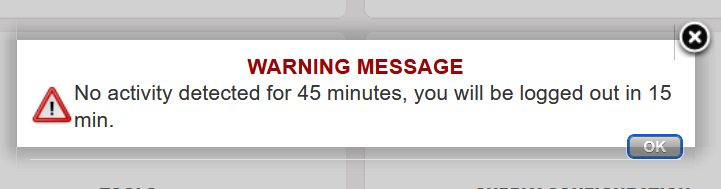
(US-9958) Time out for inactivity
Currently, there is no automatic log out when users are not using UniField. This poses some IT security risks. This release implements a 1hour timeout activity which was agreed upon by both Supply and Finance as acceptable for the business. The user will be notified 15mins before automatic logout.
(US-11232) Unidata API: Display Mission/Project Restriction and OC validation
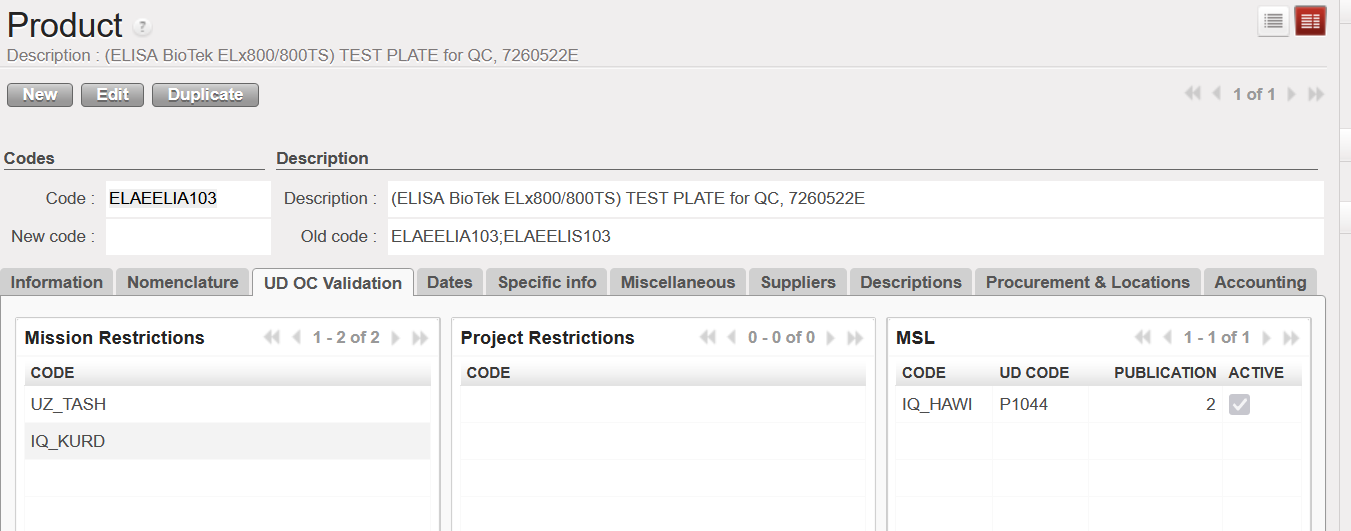
We have extended the integration with UniData and UniField. As a result, some of the fields from UniData are now visible in UniField as well.
On the Product level, in the ”Information” = > “Status” section, the following fields are newly visible:
- “OC Validation” checkbox
- “Devalidation Date” or “Validation Date“ (depending in whether the product is OC validated or not)
A new tab on the ”UD OC Validation” has been created. You will find there all ”Mission Restrictions”, ”Project Restrictions” and ”MSL” in which the specific product is listed. The ”Code” field is the instance code that has been mapped to the specific mission/project/MSL restrictions. Please note that if the Mission/Project restriction has not been mapped yet, the field will remain empty.
(US-10885) MSL: prepare prototype call to MSL API
We have integrated the MSL data into UniField. This enabled us to show all the published MSL projects in UniField as well as all the products listed in these projects which are also present and active in UniField.
You will find new submenus in the ”Products” menu:
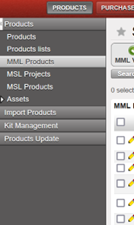
- MML Products – The submenu lists all the products, that are active in UniField and are also OC Validated for the given OC in UniData. You can also see, whether the product is MML or MSL Valid. MML Valid means that for the given product, there are either no restrictions for the products in UniData or these restrictions apply to the proprietary instance, or coordination instance. MSL Valid means that MSL project applies to the proprietary instance. The ”MML Valid” filter serves as a quick filter to see only MML Valid products. Please note that on the HQL level, ”MML Valid”/”MSL Valid” fields are always empty as MML restrictions and MSL projects only apply to Coordination/Project level instances.
- MSL Projects – The submenu lists only relevant MSL Projects for the proprietary instance. Which project is relevant depends on the instance level. For the HQ instances, all published projects within OC are displayed. On the coordination level, only published projects mapped to the proprietary instance or its children are displayed. On the project level, published projects mapped to the proprietary instance + projects of its coordination + all children of its coordination are displayed.
You can click on each project to see the specific products that are listed under this project.
To see the specific products in the ”MSL Products”, you need to activate the specific project first. You can do so by clicking on the green button positioned on the right side. The project can also be deactivated at any time. By default, all projects are deactivated.
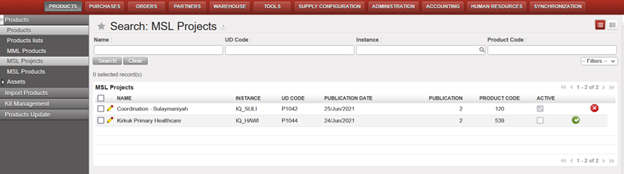
- MSL products – all products listed in the relevant MSL projects are listed in this submenu. Each MSL project must be activated first in the “MSL Projects“ object. By default, only products listed in the MSL Project mapped to the proprietary instance are displayed. If you wish to see the products listed under another MSL project, you need to choose them in the “MSL Valid for instance” filter. Again, you can only choose from projects, which are already activated in UniField.
In the ”Tools” -> ”Unidata” => ”MSL Projects with no link to UF” you will find all unmapped MSL projects. Also, these unmapped projects will appear in red font in the “MSL Projects” submenu.
All Non-functional tickets integrated in UF29.0
| Key | Summary | Detailed |
|---|---|---|
| US-11254 | Python3: patch file too large to store in database | x |
| US-9958 | Time out for inactivity | x |
| US-11232 | Unidata API: Display Mission/Project Restriction and OC validation | x |
| US-10885 | MSL: prepare prototype call to MSL API | x |
