
Release Details
Release version: UF 30.0
Date of production synchronization server patch: 13th September 2023 / 18:00 Geneva time
Latest user rights files updated: UF30.0 can be found here
Note that no user rights need to be loaded at each HQ. This will be done at the Sync Server by the Core team and will update the user rights via Sync for all HQs and missions.
JIRA filter for all integrated tickets:
Supply
(US-10748) MSL & MML in UniField
Medical Standard Lists (MSL) and Medical Master List (MML) are now integrated into UniField. The data from the lists are managed in a UniData Medical Standard List tool at HQ level outside of UniField. Data added to this tool will automatically synchronize into UniField. Although there are some cases of LOG products in MSL/MML, these lists are intended for Medical products.
An MML submenu was added to the Products tab in UniField version 29.0 to synchronize data from UniData to UniField. This submenu is now visible in
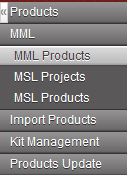 MML Products: The Medical Master List (MML) is a list of products which are OC Validated. Some MML Products are restricted to a specific mission or project. These products are included in the MML but Restrictions and Use Comments are noted.
MSL Projects: This list will show a list of MSL projects linked to that mission. It is possible to activate and deactivate MSLs on this page. Once activated, the MSL is automatically updated by any change made to it in the MSL tool.
MSL Products: All products in any active MSL Project are listed in this submenu.
The product details for individual products have also been updated. OC Validation has been added to the “Information” tab to show that the product is Validated on OC level. There is also a new “UD OC Validation” tab in each product datasheet.

Use Comments are shown in this tab along with information about Mission or Project Restrictions. Additional information about whether the item is included in the MML or MSL is also shown in this new tab.
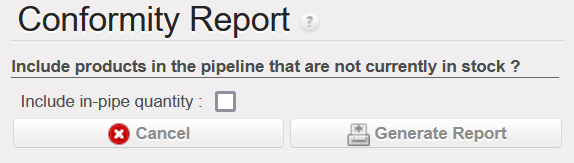 An MSL Non Conform report has been added to the Action Menu of MML Products to show the medical products in stock that are not included on the MML/MSL. Sometimes a project or coordination will order on behalf of another instance, even if the products don’t exist on the shipping instance’s MSL. These items which will be shipped to another partner are only shown on the report if the “Include in-pipe quantity” box is ticked.
A column showing whether items are included on the MML/MSL list has been added to supply documents (IR, FO, PO, IN, OUT, etc). The lines with products that are not included in the MML/MSL will be red. There will also be a notification at the header of the document. Last, a pop up warning will appear when validating or confirming a purchase for any items that are not included in the MML or MSL. None of these types of alert levels is blocking: it is possible to continue to process document/line, even if the product isn’t on the MML.
(US-11369) Import AD Multiple Lines on draft PO and FO
It is now possible to import multiple Analytical Distributions on the same PO or FO line. The process to import multiple ADs is the same as the process to import one AD (by exporting, modifying then importing the template found on the  page).
 If only one Cost Center and Destination are used on a PO or FO line, the format of the template looks the same as it has in past versions of UniField. In this release, multiple Cost Centers, Destinations and Percentages can be added to the template by separating the values with a semicolon (;).
To be able to import the document, the numbers in the Percentage column must add up to 100 and the total number of semicolons in the Percentage, Cost Center and Destination columns must be the same.
(US-11534) Auto save line quantities when adding multiple lines
Previously, if a user entered a quantity in the Add Multiple Products popup, the quantity would only save if the user clicked on  . If they clicked on the next line without saving, the quantity entered changed back to zero.
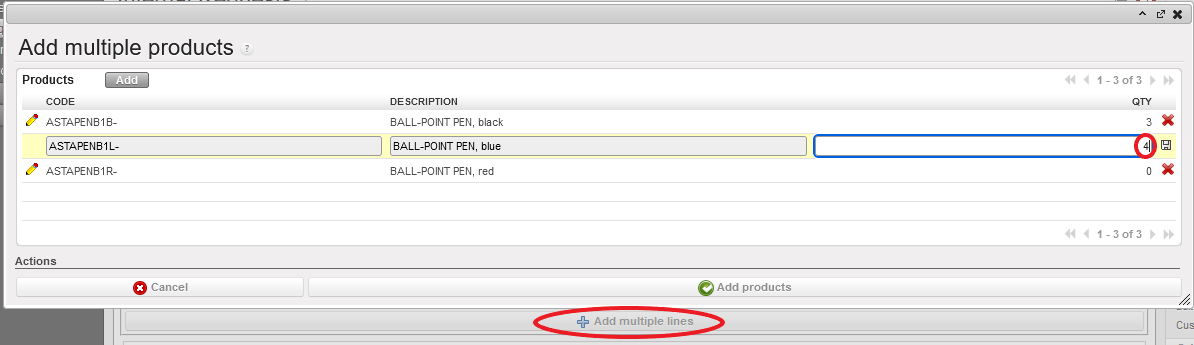 Now, quantities entered in any ‘Add Multiple Lines’ screen (FOs, IRs, POs, RfQs, Tenders, Catalogues, INs, INTs, OUTs, Real Consumption, TKC, KCL, and Initial stock inventories), will be automatically saved when clicking on another line.
(US-11563 & US-10783) Allow PO to have Multiple Destination Locations
Destinations in a Purchase Order indicate where the products should be received (Input for items to be stocked, Cross Docking for items to be delivered out and Service/Not Stockable for specific products).
It is now possible to have multiple destination locations in the same PO. Previously, the Destination Location was managed at header level so it had to be the same for all lines in a PO. This could cause problems when a merged PO had IRs/FOs with different destinations. A new “Destination Location” field has been added at line level so that items can be received in the correct Destination Location in the IN, even if some items will be delivered (Destination = Cross Docking) and others will be stocked (Destination = Input). This field can be viewed in the Purchase Order Line’s pop up view. It is only possible to have one Destination per line.
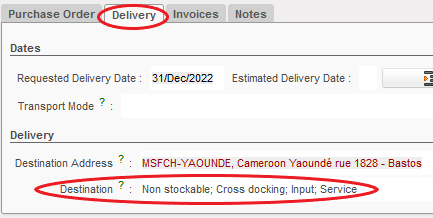
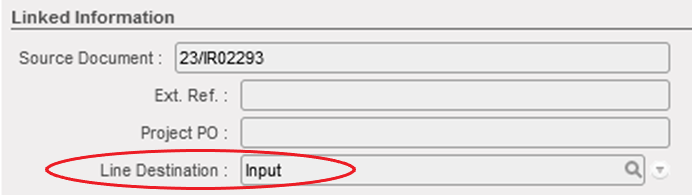 The same PO can have different Line Destinations on different lines. The Destination field in the PO’s Delivery tab will show all of the destination locations included in the PO, based on the different Line Destinations.
(US-2411) Add status column to OUT document
 In this release, a “State” column has been added to the PDF of the Delivery Order to make it easier to distinguish between Available and Not Available lines in an OUT.
(US-11181 & US-11787) E-VALIDATION for FO/OUT/Pick
It is now possible to electronically validate/sign three new supply documents: Field Orders, Delivery Orders and Picks. If E-validation is activated, these modules will each have an additional Signature tab where users can manage signatures and / or sign documents. The process to sign electronically is the same as the signature process for other supply documents (Internal Requests, Purchase Order, Reception,…)

The total quantities at the time of signing are shown in the e-validation line. To make it easier to compare the quantities when validated to the printed document, Total Quantities have been added to the OUT, IN and Pick PDF documents.
To allow e-validation of Picks, there is now a signature box at the bottom of the Pre-Packing List. The quantities shown in this document will be the Total Quantity if nothing has been picked or the Picked Quantities for closed Pre-Packing Lists.
Signatures can be added at any time. In case a signature was added to a document that was only partially processed (creating a new document), a warning message will appear, indicating that the signature needs to be added to the new document. The signature will remain in the original document.
(US-11636 & US-11433) Added filters/ fields in Export PO Follow-Up
Several improvements have been made to the PO Follow Up Report. New columns have been added to the Excel document to show the Order Category, Priority and “Source Creation Date” (the creation date of the IR or FO that is linked to that PO line). It is now possible to filter the report based on these new columns.
Additional filters have been added to the Report configuration page making it possible to view only certain Order Types or Categories. If no box is ticked, all lines will be shown.

All Supply tickets integrated in UF30.0
|
Key |
Summary |
Detailed |
|
US-11369 |
Import AD Multiple Lines on draft PO and FO |
X |
|
US-11534 |
Auto save line quantities when adding multiple lines |
X |
|
US-11563 |
PO Destination field’s value to be changed when it includes product lines with different requester destinations |
X |
|
US-10783 |
IN Dest Location incoherent with goods actual destination |
X |
|
US-10748 |
MSL & MML in UniField |
X |
|
US-2411 |
Add status column to OUT document |
X |
|
US-11181 |
E-VALIDATION for additional Supply Documents (FO/OUT/Pick) |
X |
|
US-11787 |
[EValidation] Add a warning message when partial quantities are processed in IN, OUT, PICK |
X |
|
US-11636 |
Export PO Follow-up – Add Priority and order creation date |
X |
|
US-11433 |
Add filters + change extract for PO FOLLOW-UP report |
X |
|
US-11607 |
Add “Reference” search box for the Destruction Report | |
|
US-11749 |
Use Prop Instance Name instead of Code in Loan Certificate | |
|
US-11650 |
Take supplier code from the same supplier catalog from which price is taken | |
|
US-10329 |
Avoid creation of “Pick” in PPL Menu | |
|
US-11670 |
UF total cargo weight | |
|
US-11590 |
Require Update of Actual Ship Date when Validating SHIP from Dashboard | |
|
US-11543 |
To fix the issue of having empty shipment in draft state | |
|
US-11448 |
[RfQ] Improve Viewing of Lines to Align with Other Purchase Documents | |
|
US-11466 |
CDD in RFQ and Tender cannot be edited | |
|
US-11566 |
Allow de-activation of cancelled products in Tender before Tender is closed | |
|
US-11519 |
OCBML101: Consolidated mission stock has a mixed fr/eng description for products in FR version of UF | |
|
US-11459 |
Improve French Translation of Demand and Request | |
|
US-11473 |
[RR] Update names in Order Calc Export Files |
Finance
(US-10874) Improvement Internal transfer: auto booking of counterpart (in the same instance)
We have improved the internal transfers within the same instance.
1 – A counterpart is created at temp/or direct hard posting of the initial entry. The creation is at first posting of initial entry only. We have an icon for visual purposes, to advise about the link between the initial entry and the counterpart.
2 – When we edit/delete the initial entry (in temp status) and the counterpart entry (in draft or in temp status) : there will not be updates:
- Initial entry in temp status: allow edit/delete. No update to counterpart entry.
- Counterpart entry in draft or temp status: allow edit/delete. No update to initial entry.
3 – It is not allowed to manually reconcile entries if there is a counterpart at project level or coordination. There will be an error message.
4 – When the counterpart or initial is deleted, the link will be break. At that time, manual reconciliation is possible.
5 – When the reconciliation is undone, the link is broken and it is allowed to manual reconcile back with various lines without link.
6 – To keep a coherence, automatic reconciliation will be for both same or different currency.
7 – Only do Full reconciliation. Don’t proceed to partial reconciliation when amounts don’t match:
- Reconciliation same currency: Full reconcile when amounts debit/credit match.
- Reconciliation same currency: When amounts debit and credit do not match, do not allow reconciliation and as consequence, break the link. Allow lines to be reconciled with entries without link. This covers also the use case when there is no debit or no credit (both lines in the same sides of the booking).
- Reconciliation different currency: always reconcile as the amounts will never match due to UF rate vs local rate difference. Any difference will be FXA as per current behaviour.
8 – Reconciliations are manually un-reconcilable = that means they are tagged as “manual” even if system does it automatically
BEHAVIOUR TABLE BETWEEN INITIAL AND COUNTERPART BOOKING
|
FIELDS |
INITIAL BOOKING |
COUNTERPART BOOKING |
|
Create the initial booking |
Draft status |
Not existing yet |
|
Doc date |
Allow edit |
N/A |
|
Posting date |
Allow edit |
N/A |
|
Description, reference |
Allow edit |
N/A |
|
TP, account code |
Allow edit |
N/A |
|
Amount |
Allow edit |
N/A |
|
Entry line |
Allow delete the line. |
N/A |
|
After temp post initial booking |
Temp posted |
Created in draft or temp posted |
|
Doc date |
Allow edit. Do not send update. |
Allow edit. Do not send update. |
|
Posting date |
Allow edit. Do not send update. |
Allow edit. Do not send update. |
|
Description, reference |
Allow edit. Do not send update. |
Allow edit. Do not send update. |
|
TP, account code |
Allow edit. Do not send update. |
Allow edit. Do not send update. |
|
Amount |
Allow edit. Do not send update. |
Allow edit. Do not send update. |
|
Entry line |
Allow delete the line. Break the link (counterpart could be manually reconciled) |
Allow delete the line. Break the link (initial could be manually reconciled) |
(US-11130) OCBHQ to have in the Combined report and JI and AJI exports the accounts mapped: “HQ system accounts” at project level
For the instances that will import accountancy entries from UF in their local accountancy application, OCB has a mapping of the accounts.
They requested to have the option to select accounts mapped in the reports Selector, Combined Journals Report, and in JI and JE.
In the Selector and in the Combined Journal Reports we have now the possibility to add accounts that are mapped in: Accounting>Config>Accounts>Account mapping:
- Accounts mapping is now synchronized down.
- There is new tick box “Display HQ system accounts mapping” in the company for, “Configuration” tab, when ticked.
- HQ mapping is displayed on JI, AJI list views.
- HQ mapping is exported in Selectors and “Export Search result”.
- HQ mapping is displayed on Selectors in accounts field.
- New extended filter “HQ System Account” on JI and AJI.


(US-11289) Search: Supplier and customers screens: to remove the field “Journal” and to replace it with “booking currency” field filter
In the menus Customers and Suppliers we have added the Booking Currency field.
Some examples here for suppliers:

(US-11303) Accruals: to add a filter by number in the “Search: Accruals Management” screen
In the accruals search view, we have added a filter by number.

(US-11311) Bank and Cash registers created in a special period: to prevent!
We have done several changes in order to ensure that:
- Only regular periods are shown in the [period] field of the registers. This is the case if we navigate this field.
- When changing the date of opening to a December date, in case December period is not open => an error message is shown like when the period is not open:

- When changing date of opening to December date, the extra accounting periods are not displayed as option, even one of them is in open status.
(US-11548) For IVO and for IVI: to put in the list all accounts with type regular, expenses, payables and receivables (as in the Supplier Invoices)
For IVO and IVI, we have allowed the accounts that are now in the SI header and we have removed the regular equity accounts and the accounts with the type for specific treatment “Down Payment” /”Operational Advance” (in OCA account number 13610 and in OCB, OCP, OCG account number 13100).
(US-11601) IIL auto import configuration in UF HQ_OCA
OCA have requested support for the configuration of automatic import of IIL (International invoice lines) from SharePoint to UF HQ_OCA.
(US-11715) OCG: Automated import setup and testing for destination (daily import) 2
OCG has requested support to setup the automated import for destination in our HQ OCG sandbox.
All Finance tickets integrated in UF30.0
|
Key |
Summary |
Detailed |
|
US-10874 |
Improvement Internal transfer: auto booking of counterpart (in the same instance) |
X |
|
Us-11007 |
To add a line with the “Total” when selecting invoice object/CV from list (same as in the Journal Entries) | |
|
US-11090 |
YE_COOR_OCA Fin VI vertical integration: Remove special character | |
|
US-11118 |
Proprietary instance, filter active CC on the list + red color lines with inactive cost centers | |
|
US-11130 |
OCBHQ to have in the Combined report and JI and AJI exports the accounts mapped: “HQ system accounts” at project level |
X |
|
US-11142 |
Remove empty space beginning and end of analytic account code | |
|
US-11212 |
“Balance by account” report: field periods selection to fix | |
|
US-11289 |
Search: Supplier and customers screens: to remove the field “Journal” and to replace it with “booking currency” field filter |
X |
|
US-11303 |
Accruals: to add a filter by number in the “Search: Accruals Management” screen |
X |
|
US-11311 |
Bank and Cash registers created in a special period: to prevent! |
X |
|
US-11451 |
Currency tables duplication is not working | |
|
US-11512 |
To prevent duplications when importing the HQ entries: double click in import button | |
|
US-11548 |
For IVO and for IVI: to put in the list all accounts with type regular, expenses, payables and receivables (as in the SI) |
X |
|
US-11565 | Export to HQ system (OCBA) to remove from the menu Accountancy/Reporting/Generic Reporting | |
|
US-11601 |
IIL auto import configuration in UF HQ_OCA |
X |
|
US-11644 |
HQ_OCA prod does not import IIL international invoice lines (Traceback (- most recent call last -) CODE FIX | |
|
US-11655 | French Translation: to translate Finance queries to Requêtes finances in the Rapports menu | |
|
US-11679 | Patch script: set all OCA instances with IIL functionality | |
|
US-11680 | French Translation: Is reconciled? into C’est lettré? and others | |
|
US-11715 | OCG: Automated import setup and testing for destination (daily import) 2 |
X |
|
US-11763 |
To add a configuration checkbox field on the “Automated imports” form view, to disable the checksum check for a specific import |
Non- functional
(US-11484) Prevent Modifying Proprietary Instance Fields as Soon as It Is Used
Proprietary instances have always been created with all fields editable but once the instance is used in journal entries the code, level and Parent should not be changed. This release disables the ability to edit these 3 fields completely. As seen in the screenshot below, these fields will be read only for all users including administrator.

(US-11602) To Have a Pop-Up Asking for The E-Mail Address.
The UF30.0 release will include a pop-up prompting users to input their email address. This will not be a mandatory field so users can proceed to login without inputting their email address. However, the pop-up will continue to be displayed up to a maximum of 3times until 4th December 2023. After this, the user can still provide the email address in the following ways:
- In the preferences menu at the top right corner of the UniField application window as seen below.

- Upon password expiry, the change password dialog box will have the email address field displayed. The email field will not be mandatory so one can proceed to change password without it.
- With user_manager rights directly in the user objects
Please note: For synchronized users, the email field can only be filled in at HQ using admin user or other user with access to managing synchronization whitelist.
(US-11616) Remove Block on Patch Application If CC For FO/PO Ref Is Not Set.
Instances with no cost centre for FO/PO reference set could not upgrade to new version of UF as seen with the release of UF29.0 in US-11613, US-11627 and US-11635. Instances were stuck at upgrading modules until the FO/PO cc was data fixed. The UF30.0 release removes the block on patch application for such instances. Instances without the cost centre for FO/PO reference set can now upgrade to newer versions of UniField.
(US-11668) Prevent Deletion of Synchronized Users and Allow Recreation by Sync If Deleted.
All users with user_manager access group were able to delete synchronized users on the coordination and project levels. This improvement now ensures that a deleted synchronized user is recreated by sync after deletion. In addition to this, in the linked user rights ticket US-11691 we have removed deletion rights from user_manager access group. Only activation and deactivation will be possible. Any attempt to delete a synchronized user will return error message: Cannot remove a synchronized user.

(US-11734) To Auto Activate International Invoice Lines (IIL) On New Instances For OCA
The current process of activating IIL for existing instances is manual through the Reconfigure menu in Administration tab. This improvement ticket ensures that IIL is automatically activated for all new instances in OCs that desire it. In this specific case for OCA, their auto install config file template is now set to:
Activate International Invoices Lines = Yes
If another OC desires to have IIL already activated for new instances, we shall update their auto install template after formal request via Jira.
All Non-functional tickets integrated in UF30.0
|
Key |
Summary |
Detailed |
|
US-11484 |
Prevent Modifying Prop Instance Fields as Soon as It Is Used |
X |
|
US-11602 |
To have a pop-up asking for the e-mail address |
X |
|
US-11616 |
Remove block on patch application if CC for FO/PO ref is not set. |
X |
|
US-11668 |
Prevent Deletion of Synchronized Users and Allow recreation by sync if deleted |
X |
|
US-11734 |
To Auto Activate International Invoice Lines (IIL) On New Instances For OCA |
X |
