
Finance User Manual ENG -> General Finance_en -> 1.2 LU-GE 0102: Information Flows(Finance)
LU-GE 0102 Information Flows
How to Explain UniField Information Flow?
Link between Finance and Supply
The following chart is the global business model, presenting an overview of the main functions and represents the different flows of the functional coverage of the project.
Not all of the variations of flows are represented here, in order for the standard flows to remain readable.
Not all of the functions displayed in this chart will be accessible to all users; this will be according to the user rights management.
Global functional project coverage
Relationship between Different Operational Levels
Some MSF field processes crosscut over several operational levels. The following charts will show the main functional links between Projects, Coordination, Regional supply centres, European Supply Centres and HQs.
The data flows accompanying these processes will be handled by the synchronization module of UniField. They will also rely on the successive statuses of the transactions, each status corresponding to a specific step in a process to be performed by the defined user at the appropriate operational level.
These flows are of an accounting and supply nature, and include master data. Validation workflows across sites, including HQ are also considered as part of these inter-site operations.
- Integration with External Systems
The UniField solution will provide a full integration with existing systems:
- Vertical integration: The first version of the UniField tool will provide each HQ/European supply center (ESC) system with the same degree and format of integration as what is used in the former systems. Future versions of UniField will move towards an automated integration with all HQs/ ESCs, potentially through a unique common integration platform and web service.
- Horizontal integration: The UniField tool will integrate with field applications (Homere, EasyMED…) in a similar format as they did with past MSF accounting and supply software. In cases where tools have not yet been standardized and are still based on spreadsheets (e.g. drug forecasting tools based on epidemiological data or medical protocol, activity monitoring tools) the information will not be synchronized with UniField
2. Inter-Instance Accounting Flows
As described in the following chart, accounting flows correspond to two distinct needs:
- Accounting consolidation, aiming at having closed accounting records at HQ on a monthly basis within a reasonable timeframe.
- Financial information flows, aiming to make financial data available at any operational level for budget follow-up and financial management purposes. This flow will include records made at HQ level for a mission (called HQ Entries).
Data exchanged includes both general accounting and analytical information.
In the Registers there are three distinct statuses to manage entries:
- Draft: created locally and are not synchronized
- Temp-posted: synchronized up to coordination – can be edited at creation instance (but not necessarily by all users)
- Hard-posted: cannot be edited or deleted any more
In the Journals, entries can be:
- Unposted: the corresponding entries are not final in the accounting; they can still be modified without generating an accounting correction. For entries created from registers this status is corresponding to {Temp-posted}.
- Posted: the corresponding entries are final in the accounting; they cannot be modified anymore. If they need to be corrected, an accounting correction will be generated. For entries created from registers this status is corresponding to {Hard-posted}.
There are four period statuses to manage the closing process:
- Open
- Field-closed
- Mission-closed
- HQ-closed
In addition to the first synchronization of a created entry, any correction or posting of accounting entries is synchronized as well.
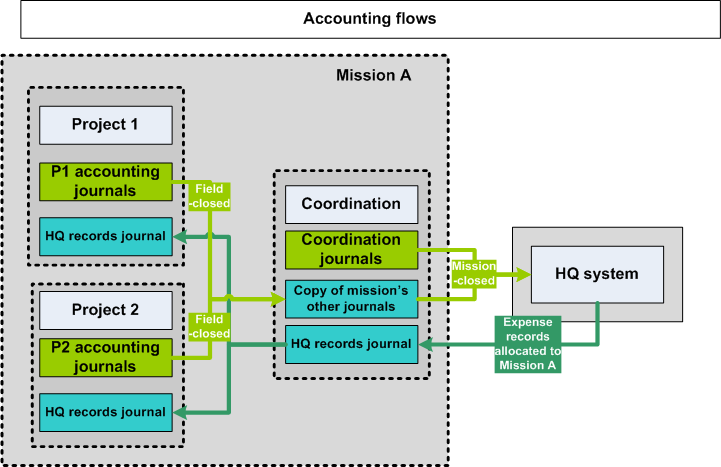
Inter-site accounting flows
3. Supply Order Flows
The documents in UniField are linked: whenever a document is confirmed, validated or closed, the following one, corresponding to the expected next step of the supply chain, is automatically generated in {Draft} (snowball effect).
These flows can be grouped in 3 major groups: Internal Flows; Inter-Instance Flows and External Flows.
- Internal Flows
The Internal flow regroups all the flows that are specific to an instance (Coordination; Project) and that are occurring WITHIN the instance.
The starting point of the supply chain process is the requirement which is expressed in UniField by the creation of an Internal Request (IR). Consequently the IR is the starting point of UniField Internal Flows.
Once the IR is validated, the IR will need to be sourced either from “stock” if the goods are in the “Warehouse” or to a “Purchase Order (PO)”. The sourcing will confirm the IR.
Afterwards, the requirement will follow a step by step process where all the documents will be generated automatically in Draft in a logical stream until the delivery of the goods.
- Inter-Instance Flows
As opposed to the Internal Flows, the Inter-Instance flows are between two MSF instances (Coordination and Project). That is to say that there will be a requiring instance which will require goods from another instance (“supplying” instance). The requiring instance will address a PO to a “supplying” instance which will act as an Internal Supplier.
The synchronization engine processing the Validated PO from the “requiring” instance will be sent automatically to the “supplying” instance. The details of this PO will be received in a Draft Field Order (FO) at the “supplying” instance.
The “Supplying” instance will then process the requirement via the sourcing of the FO. Once the FO is confirmed, a new synchronization will happen and the initial PO at the requiring instance will be automatically updated and confirmed.
- External Flows
The External Flows are the ones that happen between an MSF instance and an external Supplier; That is to say when a PO is addressed to a supplier that is not an Internal Partner (not Coo, not Project, not ESC). Confirmed POs will be printed from UniField and sent to the external supplier.
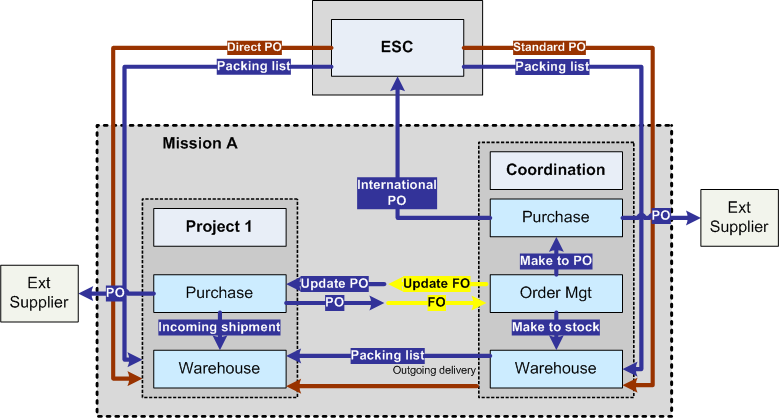
Inter-instance standard order flows
