Finance User Manual ENG -> 2. Finance Configurations -> 2.11 Company Set Up.
COMPANY SET UP
LUFI-21101 Company Set Up
LU Introduction
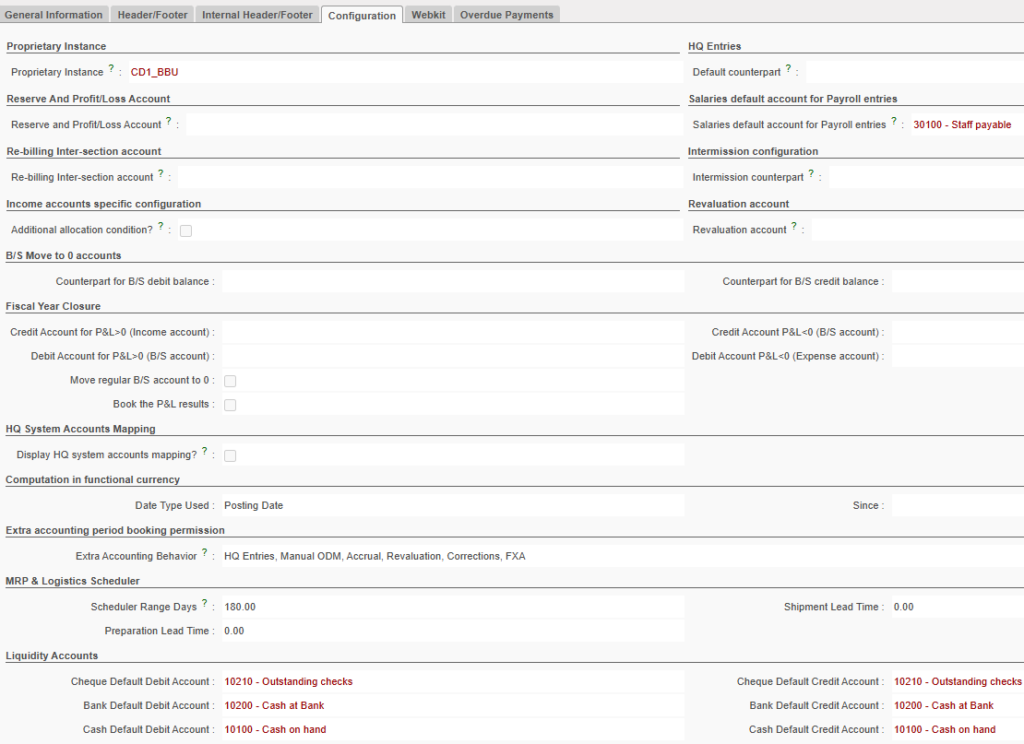
At the time of creating each instance, the company needs to be set up for each instance level. It is about defining the counterpart accounts for specific functions and transactions. You will need therefore to complete the below boxes:
- Reserve and Profit/Loss Account: used to book profit, loss and reserve account in a P&L.
- Intermission counterpart: overrides the accounting configuration of an intermission partner. Choose account 14010- Advances or expenses for other missions. The expense, at the delivery instance will be booked on the credit side and the advance account 14010 on the debit side. The opposite will be booked at the ordering instance. The account 14010 will be reconciled at HQ.
- Revaluation account: to record revaluation of assets and liabilities. The balance of this account should be later input to profit or loss accounts or transferred to a reserve account.
- Salaries default account for Payroll entries: 30100 Remuneration (net salary) payable; this account will by-pass the reconciliation rules and can be reconcile regardless the third party. This can be used for payroll entries.
- Re-billing Inter-section account: use account 12011 Expense re-invoiced to other sections. This will restrict the import into a register of any entries set to this accounting code. The objective is to use the {Debit note} function so all entries will be imported into a Debit note for global rebilling on a periodical basis.
- Income accounts specific configuration*: to restrict the mandatory allocation to income accounts of type 7.
- HQ entries Default counterpart: 33010 Expense paid by HQ, payable account type used to balance HQ entries expense accounts booked in the field.
- Revaluation account: cost account used to book month and year end balance sheet revaluation entries (optional, check own OC procedures)
- B/S Move to 0 accounts: accounts (5xxxx/69xxx/79xxx) to offset year-end closing entries for accounts that are not reconcilable at mission level (optional, check own OC procedures)
- P&L result accounts: Income/Expense and Balance sheet accounts for year-end closing entries (optional, check own OC procedures) in order to book the P&L result of the year in the fiscal year to close and to book the Initial Balance of the P&L result in the next fiscal year.
-
A field named “Extra Accounting Behavior” has been added. This field becomes read-only once the instance is created, in order to prevent discrepancies and ensure consistency across instances.
The dropdown includes three predefined options, each corresponding to specific booking permissions for periods P13, P14, and P15:
- OCB and OCG: No bookings allowed in P13–P15.
- OCP and WACA: allow booking of HQ entries MJE for corrections in ODM Accruals + Revaluation + ACW (accounting correction wizard) +FXA + analytic mass reallocation in P13, P14 and P15.
- OCA: allow booking of +HQ entries + MJE (manual journal entries) + Accruals + Revaluation + IVO+IVI, + ACW (accounting correction wizard) + analytic mass reallocation in P13, P14 and P15 + FXA
As this field is read-only after instance creation, any future changes (e.g., switching from OCB to OCA behavior) will require a patch script to ensure uniform updates across all relevant instances.
- The MRP & Logistics scheduler is defined by Supply. Please check your own OCs procedures.
Depending on your section policy, you will define which accounting code to use.
How to Set Up Companies in UniField
Go to: Administration/Companies/Companies
- Select the tab Configuration
- Complete the counterpart fields by using the counterpart account codes required by your respective OC’s procedures. The fields to fill in are highlighted in red as showed below.
Setting the default counterpart in Companies