
Finance User Manual ENG -> 2. Finance Configurations -> 2.12 Finance Configurations’ Synchronization.
LUFI-21201 Manual Synchronization
LUFI-21202 Synchronization Monitoring
FINANCE CONFIGURATIONS’ SYNCHRONIZATION
Synchronization is the tool that allows data exchange in UniField. An instance is a UniField installation. It could be a Project, Coordination or an HQ database. In simplified terms, one instance reflects one MSF office and is materialized by a local server that will most often be a dedicated device (laptop or server). The instances exchange data through the synchronization server. Within one instance users can work offline via a local area network, i.e. not connected to the internet or synchronization server. When data is sent from one instance location to another instance location UniField requires the user to log into the synchronization server via an online connection. Synchronization is performed regularly, either on an automatic or manual basis.
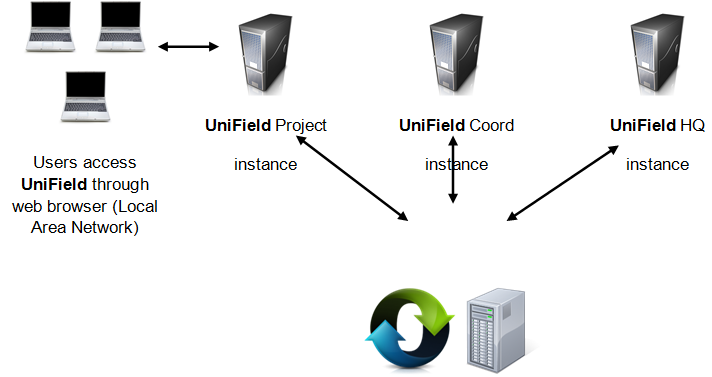
User-Instance-Synchronization Server relationship
Some data can synchronize only downwards (e.g.: from HQ to Coordination to Projects), only upwards (e.g. from project to Coordination to HQ) or bi-directionally (from HQ to Coordination to Project or from Project to Coordination to HQ).
Each sub chapter in this manual will provide further information on synchronization rules for specific configuration.
The below table summarises how financial data is synchronized:
Name | Synchronization Group (level) | Direction |
|---|---|---|
Account Move | OC | Bidirectional-Private |
Account Move Line | OC | Bidirectional-Private |
Account Move Line Correction | OC | Bidirectional-Private |
Account Move Line / Register Line | MISSION | Bidirectional-Private |
Account Move Reconcile | OC | Bidirectional |
Account Move State | OC | Bidirectional |
Analytic Accounts (free 1, Free 2, Destination) | OC | Down |
Analytic Line | OC | Bidirectional-Private |
Analytic Line (Free 1 + Free 2) | MISSION | Up |
Analytical Journal | OC | Bidirectional-Private |
Analytical Journal (Coordination) | MISSION | Down |
Analytical Journal (HQ) | OC | Down |
Analytical Journal (Project) | MISSION | Bidirectional |
Budget | OC | Up |
Cost Center | OC | Bidirectional-Private |
Currency | OC | Down |
|
Currency Rate |
OC |
Down |
Currency table rate | OC | Down |
Donors | HQ + MISSION | Bidirectional |
ESC Partner | COORDINATIONS | Down |
Expat Employee | HQ + MISSION | Down |
External Partner | HQ + MISSION | Bidirectional |
Financing Contract | HQ + MISSION | Bidirectional-Private |
Fiscal Year | OC | Down |
Funding Pool (linked to a specific coordo) | HQ + MISSION | Bidirectional-Private |
GL Accounts | OC | Down |
GL Journals – Registers (Coordination) | MISSION | Down |
GL Journals – Registers (HQ) | OC | Down |
GL Journals – Registers | HQ + MISSION | Bidirectional |
GL Journals (Non Register) | OC | Up |
HQ Entries | OC | Bidirectional-Private |
Intermission Partner | OC | Down |
Internal Partner | MISSION | Bidirectional |
Intersection Partner | OC | Down |
Link Accounts/Destination | OC | Down |
Local Employee | HQ + MISSION | Bidirectional |
Periods | OC | Down |
Product Category | OC | Down |
Proprietary Instance | OC | Bidirectional |
Register | MISSION | Bidirectional-Private |
Tax Code | OC | Down |
Synchronization Rules
OC = All instances belonging to one OC
MISSION= Project(s) + Coordination belonging to one mission
COORDINATIONS = all Coordinations + HQ belonging to one OC
HQ+MISSION = HQ + Coordination + Project(s) belonging to one mission
Up = lines synched upwards
Down = lines synched downwards
Bidirectional = Up + Down
Bidirectional-Private = To cost center tied up to the proprietary instance
