
Finance User Manual ENG -> 2. Finance Configurations -> 2.8 Suppliers and Customers.
LUFI-20801 Partner Creation
LUFI-20802 Partner Deletion
LUFI-20803 Inactivating a Partner
2.8 SUPPLIERS AND CUSTOMERS
Partners are third parties which MSF is doing business with. UniField transactions with third parties must be recorded as Payables or Receivables which recognizes a debt or a receivable.
UniField introduces different partnership types. They are:
- Internal: entities belonging to the same mission. They could be suppliers, customers or both (e.g. a coordination purchasing for a project, they both belong to the same mission).
- Inter-mission: entities belonging to the same section but different missions. They could be suppliers, customers or both (e.g. a coordination in Bunia purchasing for a coordination in Nairobi They both belong to Operational Center Geneva OCG).
- Inter-section: entities belonging to different sections. They could be suppliers, customers or both, (e.g. OCA coordination in Chad providing tents to OCG coordination in Chad).
- External: entities not related to MSF. They could be suppliers, customers or both (e.g. a landlord providing office space to MSF, or an office supply company providing pens to a project, or OCA receiving mosquito nets from UNICEF).
- ESC: European Supply Centers such as MSF Logistic and MSF Supply which are used by various sections to purchase goods internationally.
Which users (supply, finance or both) create suppliers will vary per section. Please seek guidance from your mission’s financial procedures.
Suppliers and Customers can be set-up in the {Partners} supply business application or in the {Accounting} business application. This depends on the level of access rights the user has. As supply and finance share the same database, a supplier created through the {Accounting} business application will be visible in the {Partners} business application and vice versa.
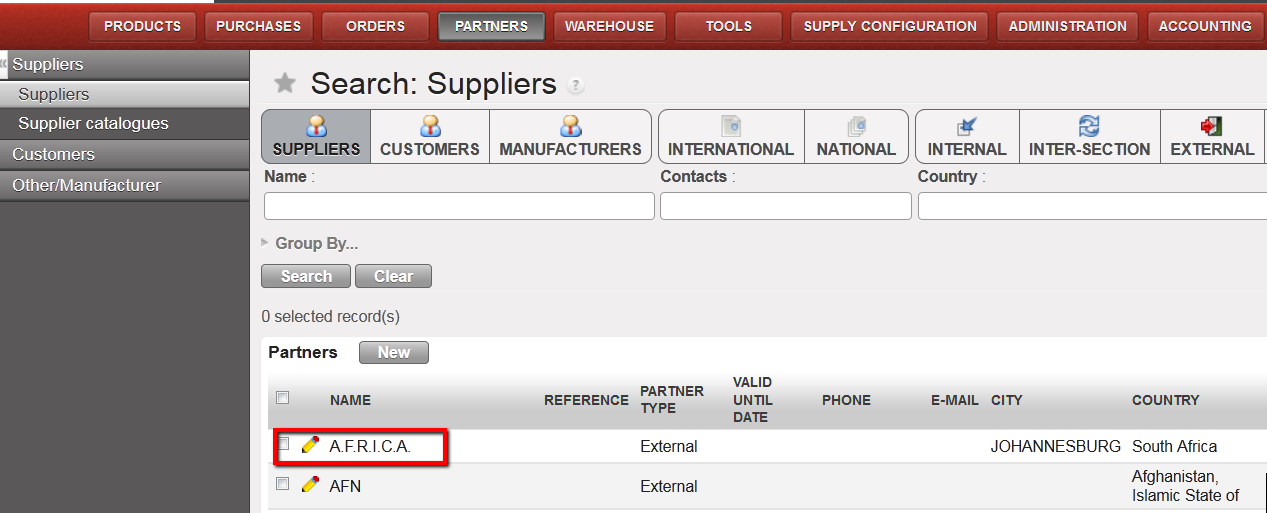 Supplier A.F.R.I.C.A. visible in the PARTNERS business application
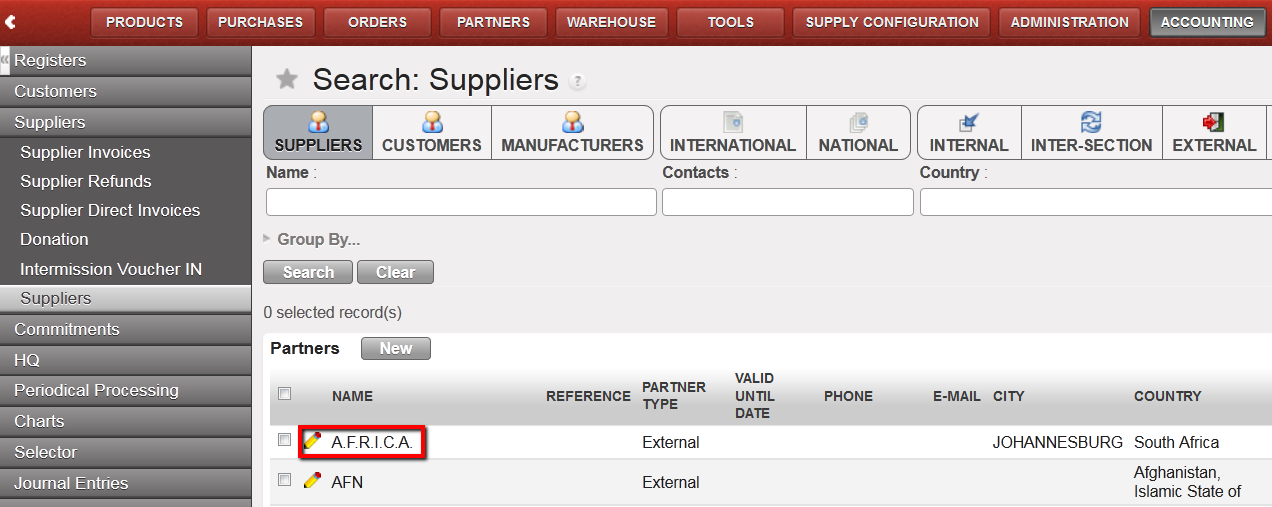 Supplier A.F.R.I.C.A. visible in the ACCOUNTING business application
- If you create a supplier (or customer) which already exists in the database with the same name and city, you will get a warning message and be blocked in the process. This is to avoid duplicated (external) partner.
- If you are creating a partner for the same company but for a different location with separate billing, then add the location to the partner name (e.g., Local market Addis Abeba vs. Local market Abdurafi).
- Please note that all external partners created in one instance will synch bi-directionally as inactive within the mission. If one partner is used by several instances within a mission, it will have to be created only once in one instance and then synchronized as active to the other instances so the partner will be the same in all the instances.
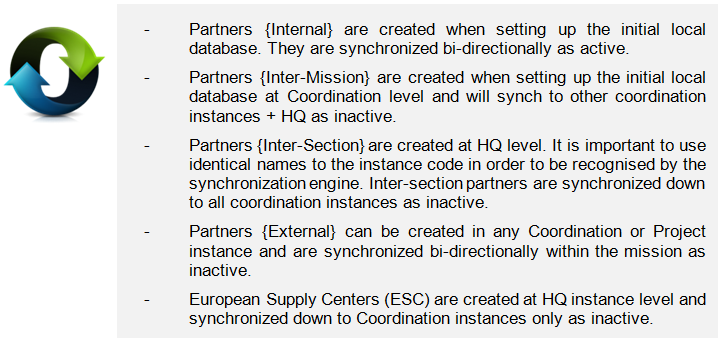
Please keep in mind that the type of partners (and orders) impacts the generation of specific financial documents. Therefore the right partner type must be chosen when a partner form is created.
Accounting on suppliers (Accounts Payables or A/P) reflects what an instance owes to suppliers for products and services purchased, while accounting for customers (Accounts Receivables or A/R) is the money to be received for products and services provided by an instance.
In UniField, each partner need to be linked to financial accounts in the {Accounting} tab of the Supplier/Customer form, one for the account receivable and one for the account payable. Therefore, the documents generated linked with the supplier will use one of these accounting codes, depending if this is an amount to pay (accounts payable, i.e. supplier invoice) or an amount to collect (accounts receivable, i.e. supplier refund).
OCs should define procedures to decide whether finance will need to provide this information to the supply team or if it is up to the finance to enter the accounts into supplier forms.
Some examples:
An {External} supplier of goods or service should be linked to account 30020 {Trade payables} and 12050 {Other receivables}.
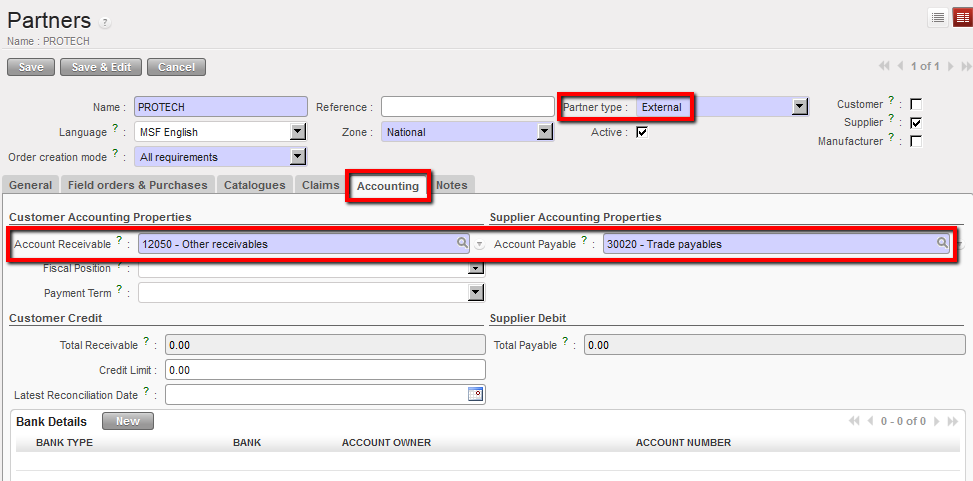 A supplier {External} of goods and services and associated accounting codes
The social security is an {External} partner and should be linked to the account 30200 {Social security} and 12040 {Social security receivable}.
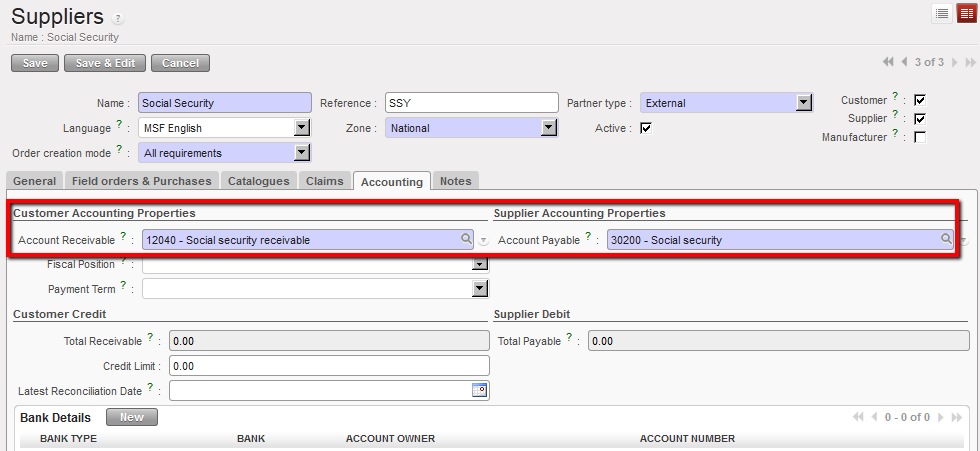 Social security partner (external supplier) and associated accounting codes
The tax office (to record income taxes liabilities) should be linked to the account 30310 {Payroll taxes} and 12030 {Tax receivables}.
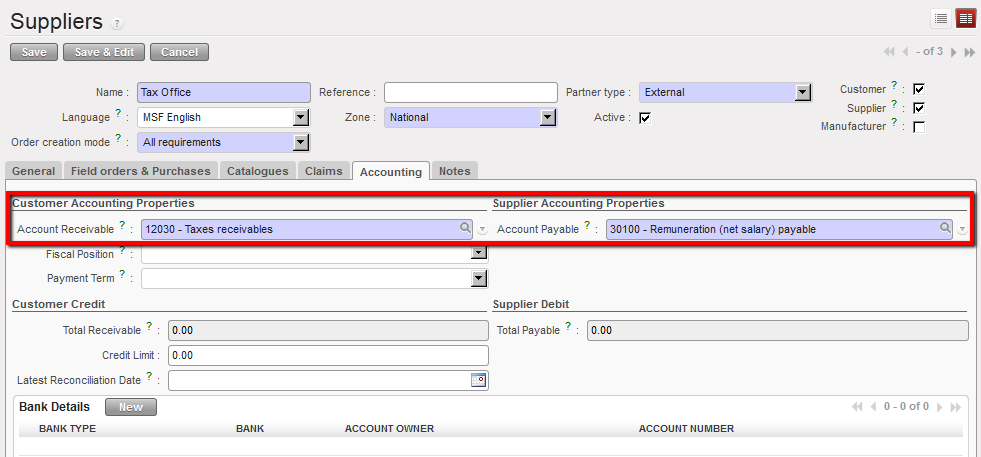 Tax office partner (external supplier) and associated accounting codes
An {internal} supplier (coordination) should be linked to the account 30020 {Trade payables} and 12050 {Other receivables}.
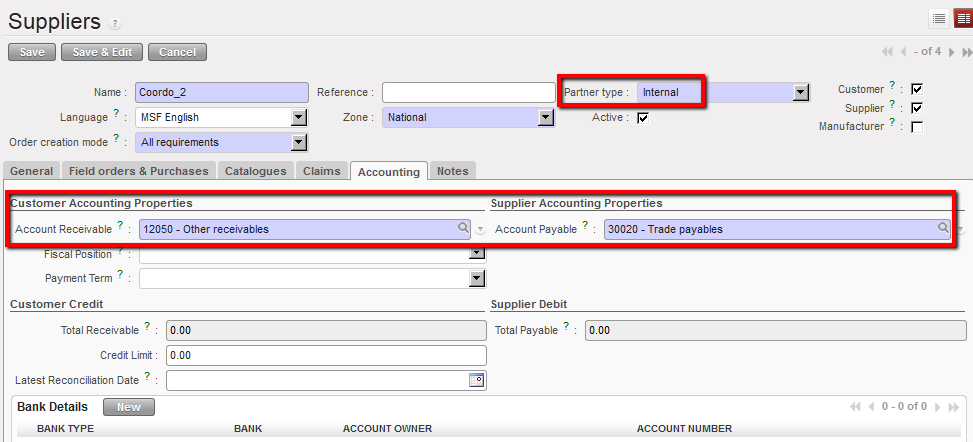 Coordo_2 is both a supplier and customer type of internal partner
A/P and A/R accounts need to be assigned to partners of type {inter-section} and {inter-mission}:
Inter-section partners are associated to the accounts 12010 {Receivables from other sections} and 30010 {Payable to other sections}.
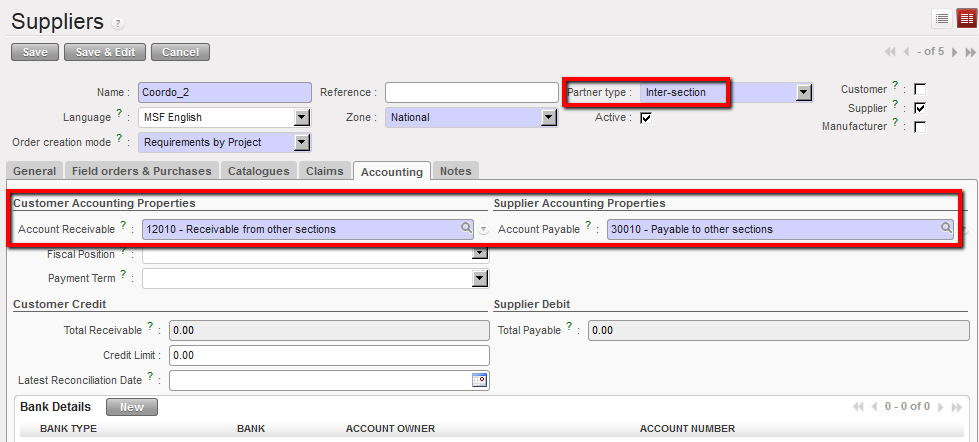 Coordination-002 is a supplier type of inter-section partner
You can also decide to associate a partner of type {inter-section} to the A/R account 12011 {Expense re-invoiced to other sections} and periodically create debit notes.
Inter-mission partners are associated by default to the accounts 14010 {Advances or expenses for other missions} and 30000 {Payable to other missions}.
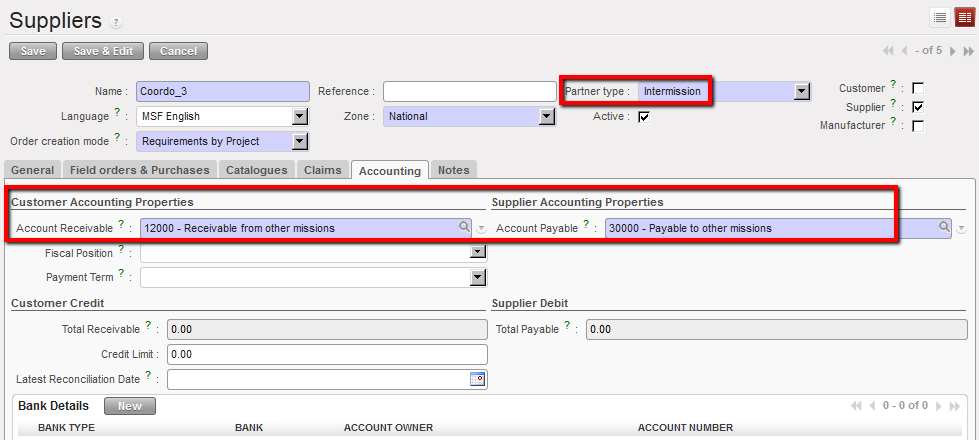 Coordination-3 is a supplier type of intermission partner

When activating a partner type intermission, the system will check if the same name exists in the internal partners; if yes, the system will not allow to activate the partner (regardless of the status of the internal partner and whatever the letter case) and we will have an error message as follows:
“There is already an Internal Partner with the name ‘XE_ZZZZ_XYZ’. The Intermission Partner could not be created and activated”
In the Suppliers/Customers form we have created a new field “Instance Creator” in the tab “General”.
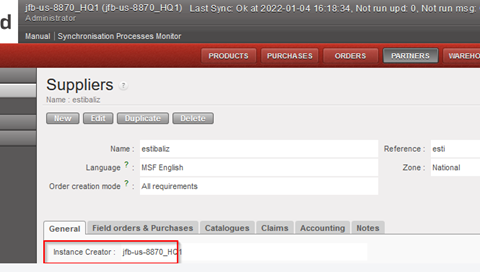
We have added this field in all partners type synchronization rules.
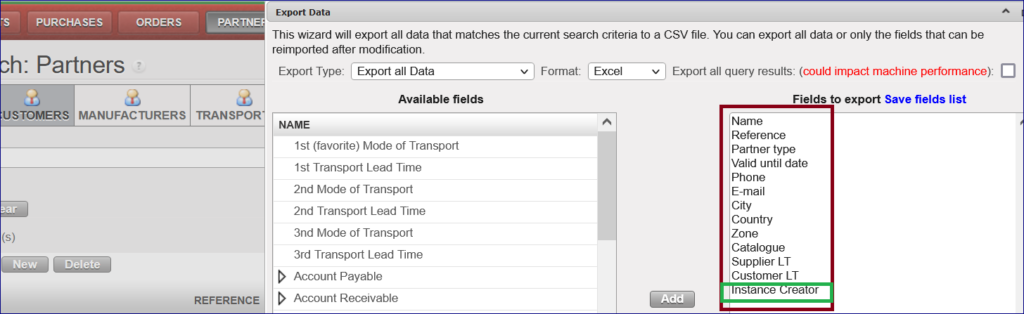
We have also added this field in the export action menu as a default field
Filter parameters through “Group By…”:
You can filter suppliers by different parameters.
Go to Partners > Click on “Group By…” > It will display below by toggling in each one of them:

There are four roles for a partner: Supplier, Customer , Manufacturer and Transporter .
When creating/editing a partner, it is mandatory to tick one of the roles, otherwise a warning message will pop up below:

It is possible to have two external partners with the same name but different cities within the same instance, but it is not possible to edit the external partner to have the same city for both external partners with the same name, otherwise you will get a warning popup as below:

