
Finance User Manual ENG -> 2. Finance Configurations -> 2.9 Products and Product Categories.
LUFI-20901 Local Product Configuration
PRODUCTS AND PRODUCT CATEGORIES
The ITC Product Master data (Unidata) is loaded as part of the installation and is shared by all OCs. All single products are linked to a product category, which is linked to an Accounting code. It means that each individual product doesn’t necessarily have an individual accounting code, the one by default taken into account being the one of the product category.
If the account code to be associated to a product differs from the account set on the product category, you will then link a specific account code directly to the product itself. In this case UniField will by default use the account defined on the product instead of the one defined on the product category.
In each mission, it is possible to create local product that is not in the master data file, for instance a product of type service like “house rental”.
There are different product types:
- Stockable product: for products which are usually in stock and can be stored
- Non-stockable: for products which will not be managed in the warehouse storage. For example: Expat food, some stationeries, etc.
- Service with reception; services that are formally received in the system to confirm they have been consumed. For example: Electricity bills, construction contracts, or transport contracts.
A product, e.g. cable, is assigned to a Category field on the Information tab.
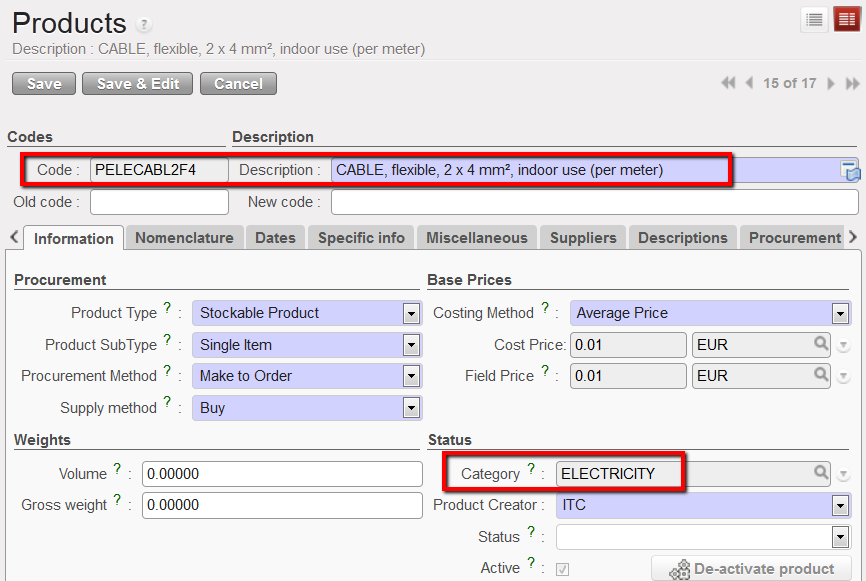 Product category displayed on the information tab of a product form view
Each product category is linked to an expense and an income account (booked on the purchase journal) and a donation account (booked on the extra-accounting journal). Therefore, every time a product is selected UniField will automatically link this product to an expense account and a donation account.
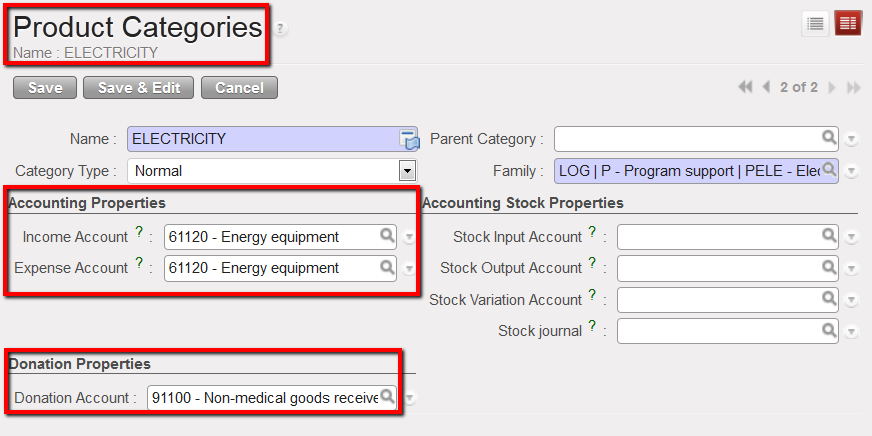
Product category {ELECTRICITY} and associated accounting properties
The mapping (and updating) of the product category / expense account / income account / donation account link should be done by the person in charge of the data base set up at HQ level (import file) in the sub-module {Products Categories} in Accounting/Configuration/Miscellaneous.
