
Finance User Manual ENG -> 5. Searching, Correcting and Closing -> 5.2 Corrections.
LUFI-50207 Import and export of invoice lines
CORRECTIONS
Depending on the nature of the entry and data to be corrected, the correction process will be different. This section will address the use of correction wizard as well as corrections of supplier invoices, direct invoices and imported cheques.
The basic rule is that if you need to correct an accounting code or the analytical allocation of a journal item (destination, cost center or funding pools), you will use a dedicated wizard called {Accounting Corrections wizard}. The wizard can be accessed directly on the journal item or the analytic journal item that you will need to correct. The use of the wizard is detailed in following LUFIs.
The corrections can be performed through the wizard provided the below requirements are fulfilled:
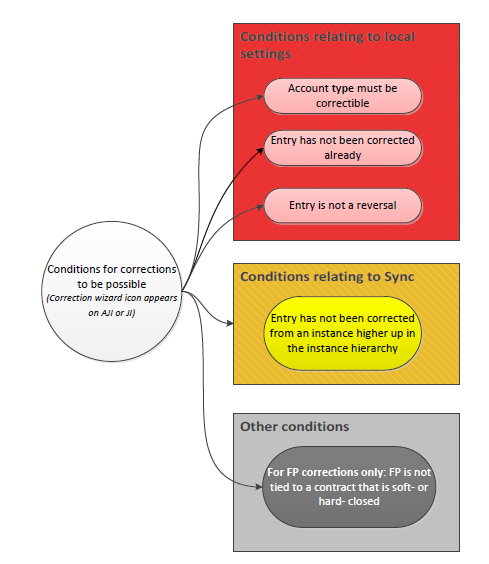
Basic requirements to perform a correction using the correction wizard
- In the account configuration, the account must have not been set to uncorrectable (see LUFI-20301)
- The entry was not corrected by an upper instance (i.e., Project cannot correct a project entry that has already been corrected in Coordination)
- The entry is not a reversal nor an original entry already corrected
- Only funding pools associated to draft or open financing contract can be corrected
Entry description, booking amount, third party and document date can be corrected in the register for direct entries that are not hard-posted yet; otherwise they can be corrected with a manual correction entry.
When using the correction wizard (either in JI or AJI) or the mass-reallocation, there is always a check on document date. The correction entry takes by default the same document date as the original entry, and therefore, if the document date belongs to an earlier fiscal year, a correction entry will not be created.
Below are examples of the accounting treatment for correcting an entry created with a Document Date and Posting Date of 15.12.2016 (Dec 2016 period):
- If period Dec 2016 is open: You can correct Destination and Cost Center no matter which date is selected in the wizard, because the original AJI will just be updated no correction entry created
- If period Dec 2016 is open: You can correct Funding Pool no matter which date is selected in the wizard, because the original AJI will just be updated no correction entry created
- If period Dec 2016 is open: You can correct Account with a Posting Date of 31/Dec/2016 or earlier a correction entry is created with a Document Date of 15.12.2016 and selected Posting Date for Dec 2016
- If period Dec 2016 is open: You cannot correct Account with a Posting Date of 01/Jan/2017 or later no correction entry created because Document Date 15.12.2016 is on an earlier Fiscal Year than Posting Date
- If period Dec 2016 is mission-closed: You cannot correct Destination or Cost Center with a Posting Date of 31/Dec/2016 or earlier no correction entry created and no AJI updated because Dec 2016 is closed
- If period Dec 2016 is mission-closed: You cannot correct Destination or Cost Center with a Posting Date of 01/Jan/2017 or later no correction entry created because Document Date 15.12.2016 is on an earlier Fiscal Year than Posting Date
- If period Dec 2016 is mission-closed: You cannot correct Account with a Posting Date of 31/Dec/2016 or earlier no correction entry created because Dec 2016 is closed
- If period Dec 2016 is mission-closed: You cannot correct Account with a Posting Date of 01/Jan/2017 or later no correction entry created because Document Date 15.12.2016 is on an earlier Fiscal Year than Posting Date
- If period Dec 2016 is mission-closed: You can correct Funding Pool no matter which date is selected in the wizard, because the original AJI will just be updated no correction entry created, original AJI updated.
This means that entries belonging to FY2016 have to be corrected when Dec 2016 period is still open, they cannot be corrected in Jan 2017 or later except by passing a manual journal entry.
For entries belonging to extra-accounting periods 13, 14 and 15 no correction wizards are available. This means that if you create manual entries in these extra accounting periods, they can only be corrected with another manual entry. Also, these periods are not selectable in correction wizards for entries from earlier periods, e.g. you can’t use the correction wizard to create a correction entry for an entry from Dec 2016 for Period 13.
The correction wizard also provides an option to set any journal item as manually corrected. This option shall be used if a correction is made to an entry outside of the normal correction process (e.g. a manual correction entry was created) in which case there is no link to the original entry which could still be corrected. If the original entry is set as manually corrected, the correction wizard is no longer available to be used in that entry.
