
Finance User Manual ENG -> 6. Donor Management -> Chapter overview: Donor Management.
6.1 CHAPTER OVERVIEW: Donor Management
Donor reporting is a custom-made module in UniField that enables users to handle both simple and complex reporting requirements, enabling the production of reports once the funding period is over.
When MSF starts negotiating a grant with a Donor, a project proposal is submitted together with a budget; until this proposal is accepted (or well under way) this information will not translate into UniField. Once the proposal is accepted, users will start encoding the related information in the software, from specific analytic accounts and Donor templates to financing contracts object.
Once analytical accounts are set and linked to a specific financing contract, the system recognizes how costs should be distributed when the allocation (in mass or individually) is performed. (See section Analytical accounts, Analytic Allocation execution, Chapter 1 Configurations). In Chapter 1 Configurations, we have extensively explained the purpose and setting of cost centers, destinations and Free Axis 1 and 2. This chapter addresses specifically the principles and configuration of funding pools.
{Funding pools} are specific types of analytic accounts that will allow the system to build direct links between expenses and reports issued from the Grant management module; they are accessed from the {Configuration} module.
Specific reporting requirements are first managed through the {Donors} sub-module which enables the creation of templates that could be used in different grants.
{Funding Pools} and {Donors} are linked together within a central object in terms of grant management: the {Financing contract}. It is the foundation on which all Donor reports are built in UniField.
More specifically, the Funding Pool is a specific type of analytic account to which users allocate expense entries with a specific funding source. The funding pool is defined by cost centers and expense account/ destination couples. When allocating a given expense, a user can pick a determined funding pool if and only if the expense account, destination and cost centers selected have been linked to this funding pool and if the expense document date belongs to the funding pool eligibility date range.
In the financing contract sub-module, funding pools are linked to one or more financing contracts. This allows expenses to be co-funded by several Donors. There are three types of Funding Pools: “Private funds (PF)” for expense paid only by MSF, “Co-funded (CoFI)” for groups of expenses included in several Donor reports and “Grant” for earmarked expenses.
The Donor sub-module allows users to set the parameters of reporting according to the Donor’s requirements. In the Donor form, a user defines which MSF expense accounts and destinations shall be selected and grouped to create reporting lines according matching the template imposed by the Donor.
It translates the type of expenses funded (Donor policy) into the system. End users may choose from three reporting formats: total project only, earmarked only, or earmarked and total project; they determine the reporting format to be used for a particular Donor.
Overhead costs can also be defined on the Donor form.
A Donor form can be used for several financing contracts in case an institutional Donors funds different projects in distinct missions.
A Financing Contract is created for each individual grant or global contribution agreed with an institutional Donor. By setting up a financing contract the user identifies which cost centers (projects / activities) and which funding pools (groups of expenses) are included in the funding perimeter, as well as the funding periods through eligibility dates.
By linking the financing contracts to a Donor, the system will by default retrieve the reporting lines set in the Donor template and import them in the financing contract, where the user will be able to customise it. Here the user will enter the agreed budget per reporting line.
Financing contracts are linked to at least one funding pool in order for the system to compute actual amounts included in Donor reporting in the appropriate reporting lines.
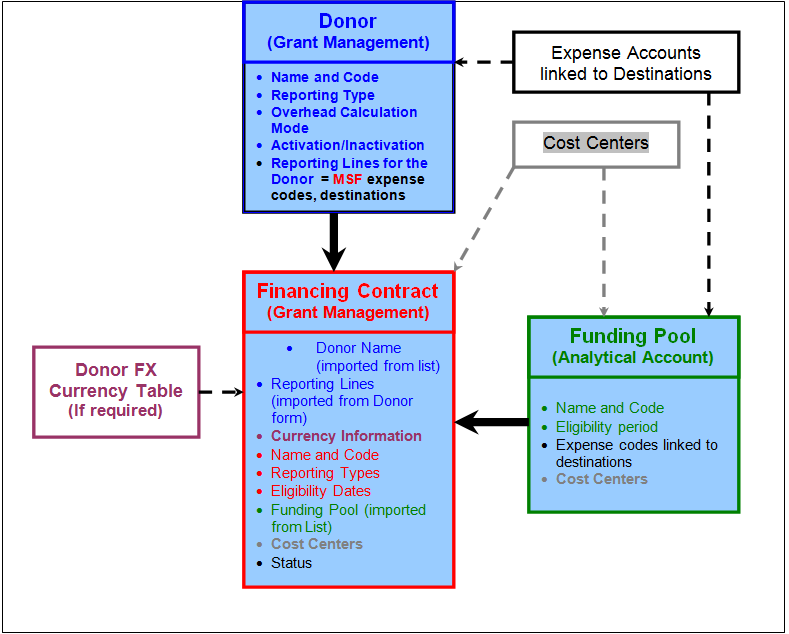
Donor, financing contract and funding pool
After completing the reading of this chapter you will be able to:
- Create a Donor form
- Understand the concept of funding pools
- Create a funding pool
- Understand the composition of a financing contract
- Create a financing contract
- Produce reports requested by institutional Donors.
