Finance User Manual ENG -> 4. Imports -> 4.1 CHAPTER OVERVIEW: Imports
4.0 CHAPTER OVERVIEW
The first part of this chapter concentrates on HR and payroll related transactions. For most missions’ national staff management, the national staff database and payroll calculations are managed in an application called Homere. In order to have a full overview of a mission expenses, you need to import the data from Homere into UniField.
This chapter explains how to import the Homere files into UniField. The Homere import contains one file related to the national staff database and another one to the monthly payroll.
In order to track costs properly, the payroll booked on expense accounts has to be allocated to an analytical dimension. To avoid recurrent allocation task at every payroll import, the national staff employee can by default be assigned to an analytical dimension (destination, cost center and funding pool). It helps following up on national staff costs per cost center and to create financial reports accordingly. The same applies for the expatriate staff; you will learn how to import Expat employee at Coordination or HQ level and assign them an analytical distribution.
In case your section does not use Homere, this chapter will present the various options of registering the HR and payroll information in UniField.
In the second part of this chapter we explain how to book HQ entries in UniField. HQ Entries are accounting entries representing field expenses recorded and paid at HQ level. They encompass for example international orders (and associated commitment vouchers) as well as expatriate salary expenses.
There is a specific section for OCA and OCB which addresses the automatic import of international commitment vouchers. The section is identified with a *.
The last aspect covered in this chapter is the Budgets. Budgets are created outside UniField and imported into UniField in order to properly track expected expenses against actual expenses. You will learn how to import a budget into UniField and produce the different kinds of budget reports available in the system.
After reading this chapter you will be able to:
- Set the national staff database and allocate an analytical dimension to it
- Manage the national staff payroll booking and the salary payment
- Manage entries from international orders and expat salaries
- Follow-up actual expenses vs. budgeted expenses if your section decides to import the budget files into UniField.
PAYE_UNIFIELD and PAYE_SAGA Import: request to have all the import error messages at once
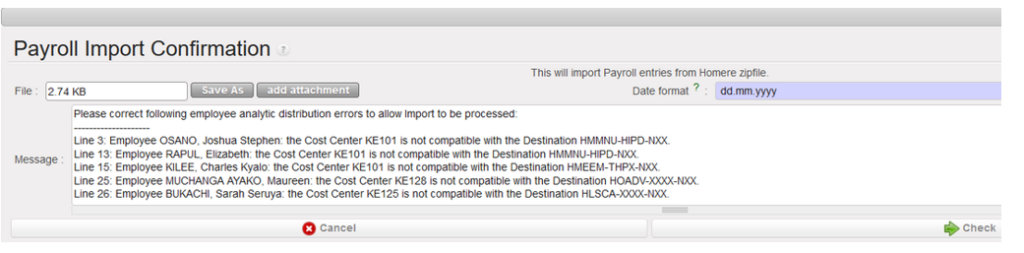
When we import the payroll file in Unifield, the file import can be unsuccessful because of errors in Budget lines in the import file and Unifield was reporting the error messages one by one bringing confusion for the users
In this request we have requested to have all the wrong messages at once when the import fails:
This will help to spot the errors to correct in HOMERE.