Finance User Manual ENG -> 5. Searching, Correcting and Closing -> 5.5 Reports.
LUFI-50501 Registers / Bank Registers
The Liquidity Position report (PDF or XLS) This report is showing the capability of the project/coordo to pay its short-term due debts using all its liquid assets, cash, bank, cheque.
Shows us an overview of the liquidity position of the project/Coordination at a specific point in time (given period).
We can see the state of the registers, Starting Balance, Calculated Balance and Bank Statement
Balance Additional note: Please note that when you export the Liquidity Position, UniField will display the entire status of Bank, Cash, and Pending Cheque..
The Bank reconciliation report (PDF) PDF report; displays starting balance, calculated balance and bank register balance w/gap. Note that the Comments field displays in the report; it can be used to explain any cash discrepancy. Separate field for the Bank Account Number. Additional note: Paper evidence to be signed-off and acknowledge bank reconciliation was properly done..
The Open Advances report (XLS) Excel output of all the internal open advances, including 13000; 13010, not yet settled
The Full report report (XLS) Excel output showing all entries in a register, including breakdown of invoice lines for imported invoices and analytical allocation. This report provides full detail to cross reference paper receipts and invoices. Additional note: It includes also record of deleted entries and all manual journal entries on corresponding liquidity journal..
The Full report PDF report (PDF) PDF output showing all entries in a register, including breakdown of invoice lines for imported invoices and analytical allocation. This report provides full detail to cross reference paper receipts and invoices. The full report in PDF format can be considered an accounting or financial document because it has validation fields. Additional note: It includes also record of deleted entries and all manual journal entries on corresponding liquidity journal..
LUFI-50502 Registers / Cheque Registers
The Cheque Inventory report (XLS) Excel output displaying all outstanding cheques of the current period:
The Pending Cheque report (XLS) Excel output showing outstanding cheques without any period limitation:
The Full report report (XLS) Excel output showing all entries in a register, including breakdown of invoice lines for imported invoices and analytical allocation. This report provides full detail to cross reference paper receipts and invoices. Additional note: It includes also record of deleted entries and all manual journal entries on corresponding liquidity journal..
The Full report PDF report (PDF) PDF output showing all entries in a register, including breakdown of invoice lines for imported invoices and analytical allocation. This report provides full detail to cross reference paper receipts and invoices. The full report in PDF format can be considered an accounting or financial document because it has validation fields. Additional note: It includes also record of deleted entries and all manual journal entries on corresponding liquidity journal..
LUFI-50503 Registers / Cash Registers
The Cash Reconciliation report (PDF) PDF cash count report; displays opening balance, calculated balance and cash count balance w/gap Additional note: Paper evidence to be signed-off and aknowledge cash reconciliation was properly done, with potential gaps explained.
The Liquidity Position report (PDF or XLS) Shows us an overview of the liquidity position of the project/Coordination at a specific point in time (given perid).
We can see the state of the registers, Starting Balance, Calculated Balance and Bank Cash Box Balance Additional note: Please note that when you export the Liquidity Position, UniField will display the entire status of Bank, Cash, and Pending Cheque..
The Open Advances report (XLS) Excel output of all the internal open advances, including 13000; 13010, not yet settled
The Full report report (XLS) Excel output showing all entries in a register, including breakdown of invoice lines for imported invoices and analytical allocation. This report provides full detail to cross reference paper receipts and invoices. Additional note: It includes also record of deleted entries and all manual journal entries on corresponding liquidity journal..
The Full report PDF report (PDF) PDF output showing all entries in a register, including breakdown of invoice lines for imported invoices and analytical allocation. This report provides full detail to cross reference paper receipts and invoices. The full report in PDF format can be considered an accounting or financial document because it has validation fields. Additional note: It includes also record of deleted entries and all manual journal entries on corresponding liquidity journal..
LUFI-50504 Suppliers reports
The Pending invoices report (XLS) A list of open supplier invoices, supplier refunds, customer refunds and stock transfer vouchers in open state, showing outstanding amounts. If the invoice has been imported or partially imported you can also see the related register sequence numbers. Additional note: Reports shows invoices in open status: imported, not imported and partially imported..
The Paid Invoices report (XLS) A list of paid supplier invoices, supplier refunds, customer refunds and stock transfer vouchers in paid state, for the dates selected. Shows the sequence number of the invoice as well as the register sequence number where the invoice was imported.
The Allocation Synthesis report (XLS) Shows split of the invoice amount per accounting code and cost centre.
The Invoice Allocations report (PDF) Shows invoice lines allocation: analytical distribution (Destination, Cost centre, Funding Pool), Accounting code, quantity, unit price etc per invoice line. Additional note: To avoid certain corrections after validation of a Supplier Invoice, it is best to check the analytical allocations using this report, which gives a brief overview of all the important fields in the Supplier Invoice..
The Print report report (PDF) Invoice hard-copy, available for all kinds of invoices / refunds, donations and inter-mission vouchers. It can be used for filing or internal communication purposes.
LUFI-50505 Selector reports and journals view
The G/L Selector report (List view in the system or PDF) List of journal items that is produced after user entered a series of criteria Additional note: The G/L Selector is a tool to search Journal items when you need to use multiple or complex criteria that cannot be easily done in Journal Items..
The Analytic Selector report (List view in the system or PDF) List of journal items that is produced after user entered a series of criteria Additional note: The Analytic Selector is a tool to search Journal items and their corresponding analytic allocation when you need to use multiple or complex criteria that cannot be easily done in Analytic Journal Items..
The Combined Journals Report report (PDF or XLS) List of journal items that is produced after user entered a series of criteria Additional note: Combined Journals Report is a tool to search Journal items when you need to use multiple or complex criteria that cannot be easily done in Journal Items and Analytic Journal Items..
LUFI-50506 Journal Entries Reports
The Journal Items report (List view in the system) Raw list of journal items that can be refined thanks to a series of filters Additional note: All accounting lines of the journal accounting,.
The Journal Entries report (List view in the system) Raw list of journal entries (consisting of 2 to n journal items) that can be refined thanks to a series of filters Additional note: All journal accounting entries (debits and credits)..
The Analytic Journal Items report (List view in the system) Raw list of analytic journal items that can be refined thanks to a series of filters Additional note: All analytical lines of journal accounting entries.
LUFI-50507 Reporting / Legal reports / Accounting Reports
The General Ledger report (PDF or XLS) PDF or Excel report, a complete record of financial transactions on all G/L accounts. The ledger holds accounting information that is needed to prepare financial statements. This report can be used e.g. to verify the amounts on reconciled and unreconciled balance accounts. Additional note: The General Ledger report is a complete record of all financial transactions on G/L accounts. The ledger holds account information that is needed to prepare financial statements, and it includes accounts for assets, liabilities, equity, revenues and expenses..
The Trial Balance report (PDF or XLS) PDF or Excel report, lists the balance on all accounts. Additional note: The Trial Balance shows the balance on all accounts at a selected point of time..
The Profit & Loss report (PDF or XLS) PDF or Excel report, lists expense and income account balances. Additional note: The Profit & Loss reports expense and income per accounting code and potential under spending (net profit) or overspending (net loss)..
The Balance Sheet report (PDF or XLS) PDF or Excel report, lists Balance Sheet account balances, reflects the assets and liabilities. Additional note: The Balance Sheet is a reflection of your assets and liabilities at any given point of time..
The Liquidity Balances report (PDF or XLS) PDF or Excel report of the Liquidity Position – starting and closing balances of all the register – for the selected period.
The Balance by account report (XLS or list view) Excel report or viewed in UniField, lists the balance on all accounts. This report can be used e.g. to verify the amounts on reconciled and unreconciled balance accounts. Additional note: The Balance by account is a reflection of the G/L accounts balance per account.
The Balance by analytic account report (XLS or list view) Excel report or viewed in UniField, lists the balance on all analytic accounts (Cost center, Destination, Funding Pool, Free 1 and Free 2). Additional note: The Balance by analytical account is a reflection of the analytical accounts balance per account.
LUFI-50508 Reporting / Generic reporting
The Local Expenses report (XLS) Excel report of all expenses purchased or settled locally, in order to get a better overview of cash flow needs or to meet specific requirements from local auditors asking MSF to report on local expenses.
The Export to HQ system (OCB) report (ZIP) Used in UniField HQ instance to export field data into HQ system (OCB compatibility)
The OCB matching export report (ZIP) To check if all entries reconciled in UniField are reconciled in CODA
LUFI-50509 Configuration / Currency Management
The Currency Tables report (XLS) Shows the FX rate per month, per currency (all currencies)
The Currencies report (XLS) Shows the FX rate per currency (all currencies)
The FX rates by currency report (XLS) In some cases, you might want to use the same FX rate for a defined currency over several periods. The “FX rate by currency” function will produce a report in xls showing the rates used for given periods. Additional note: Go to chapter 02 Configuration / LUFU – 20204 Applied FX Rate over multiple periods for more details.
LUFI-50510 Reporting / Legal reports / Employees
The Employee Ledger report (PDF or XLS) PDF or Excel report, a complete record of all financial transactions on all employees. It is important to note that an individual employee cannot be selected for the report; all employees will be listed.
The Employee Balance report (PDF or XLS) PDF or Excel report, a complete record of all financial transactions on all employees. It is important to note that an individual employee cannot be selected for the report; all partners will be listed.
Two new reports have been created for employees following the partner ledger and balance model.
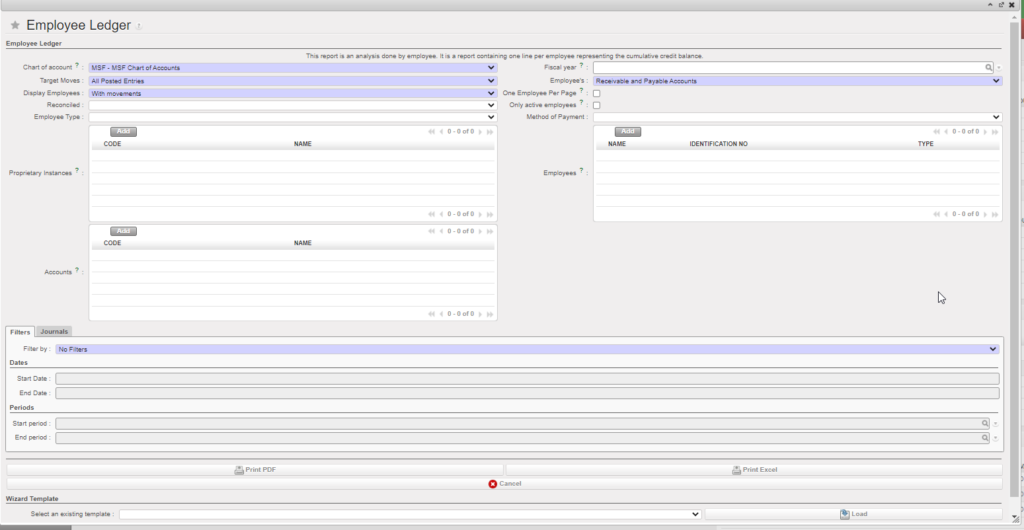
Employee Ledger:
This report is an analysis done by employee. It is a report showing all B/S entries linked to a staff depending on your selection (periods, reconciled or not, etc..).
Go to Accounting > Reporting > Legal Reports > Accounting Reports > Employees > Employee Ledger:
You will have several possibilities to do our selections using the filters.
Employee Balance:
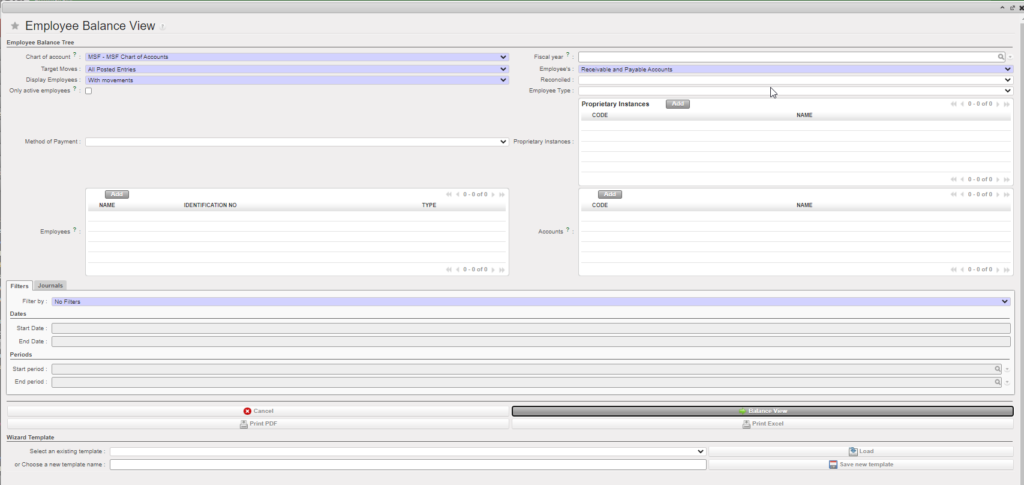
This report will give you for each staff the balance by B/S account code + currency. This one can be reported either in the interface or exported in excel file.
Go to Accounting > Reporting > Legal Reports > Accounting Reports > Employees > Employee Balance:
You will have several possibilities to do our selections using the filters and the option to tick on “Only active employees”.
LUFI-50511 Reporting / Legal reports / Field Balance Specification Report
The Field Balance Specification Report report (XLS) Excel, provides a detailed overview of all transactions or operations carried out during a given period.
Field Balance specification report is to track liquidity balances and B/S line’s history.
Main features of the report:
- It shows the booking rate for the line to compare with the rates of the extracted report.
- It displays currency amount to compare functional amount with current period rate
- It displays “Reconcile No” for line reconciled later to compare with month of the report.
How to extract the report:
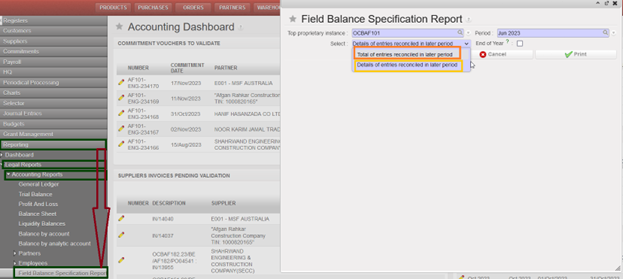
- Go to Accounting > Reporting > Legal reports > Accounting Reports
- Click on ” Field Balance Specification Report ” it will open popup with “Field Balance Specification Report ” .
- The filters as below:
- “Top proprietary instance” it shows only instance code where you are if from project instance, and all mission’s instances if from coordo.
- “Period” >> in project shows only regular periods (closed + open only), in coordo display more extra accounting periods
- “Select” with 2 options either “Total of entries reconciled in later period” or “Details of entries reconciled in later period”.
- “End of Year” box, this box can be ticked if we have an active currency table.