Finance User Manual ENG -> 4. Imports -> 4.2 Headquarter (HQ) Expenses.
LUFI-40201 HQ Expense Commitment Vouchers
LUFI-40201 B: How to Edit a Headquarter Expense Commitment Voucher
LUFI-40201 C-F: Commitment Vouchers.
LUFI-40202 Headquarter (HQ) Expenses
LUFI-40202 C: How to Review HQ Entries Individually
LUFI-40202 D: How to Review Multiple HQ entries
LUFI-40202 F: How to Validate HQ Entries
LUFI-40201 HQ Expense Commitment Vouchers
LU Introduction
Headquarter (HQ) entries consist of accounting entries recorded at HQ level on behalf of the mission offices. They encompass for example international orders and expatriate salary expenses. The mission sends international orders for medical and logistic supplies to supply centers which will then source, pay for and ship these items to the mission. The supply centers periodically charge OCs (at HQ level) for the goods shipped to the field.
International orders are initiated in the field but settled at HQ level. To remain consistent with the current expense recognition scheme, goods are expensed:
- At time of shipment for the OCA
- When the European Supply Center (ESC) invoice is validated in the HQ accounting system for all other OCs.
As invoices are already settled at HQ level, the reception of an international order by a field office instance does not trigger the creation of an invoice at field level e.g. a PO addressed to a partner with type ESC does not trigger the creation of a supplier invoice and therefore the entries must be imported into the system.
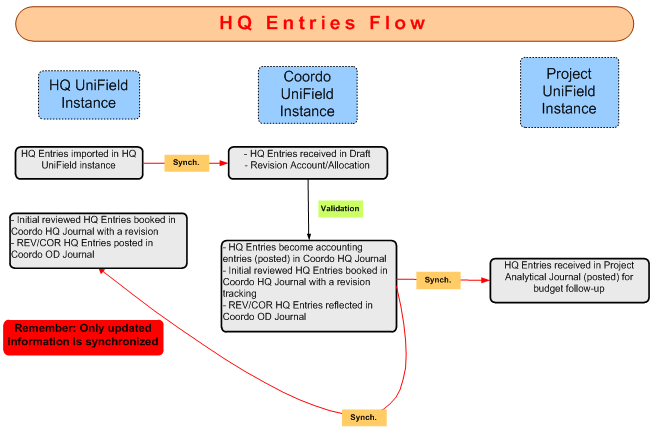
From a system perspective the process of HQ entries is as follows:
- Expenses settled at HQ (HQ entries) on behalf of the field missions are entered into the HQ ERP system.
- Expenses are exported to a csv file.
- The file is then imported into the UniField HQ instance.
- The imported entries are synchronized to the UniField coordination instance in {Draft}.
- At coordination level, the entries are reviewed in the {HQ Entries} sub-module. By default the funding pool picked is {Private Funds}. Field users must update the funding pool as well as verify the amounts, account codes, and analytical information.
- Once the entries were reviewed, the authorized user validates them. At this point, they become accounting entries in the coordination’s {HQ} journal.
- The corresponding analytic entries allocated to projects are then synchronized down to the project(s). Both coordination and project(s) take the HQ entries into account in the follow-up of their budget.
Goods from an international order are often received in partial deliveries. The associated commitment voucher generated when the PO to the supplier ESC was validated, must be updated:
- Either manually by the coordination instance when entries are received from HQ and validated by the coordination. If not, costs reflected in your budget will be incorrect if you choose to include pending commitments. Once expenses have been fully recognized and entries received from HQ and validated at coordination, you must manually close the commitment voucher. The commitment voucher state will change from {Validated} to {Done}. If not, cost will be reflected in your budget as committed (or simulated) expenses AND as actual expenses.
- Or automatically by importing an external file (OCA, OCB) representing outstanding international commitments. Once imported this data is recorded in the “international engagements” analytic journal and is not synced. Next time a file is imported, previous entries on this journal will be deleted. See next chapter for more explanation.
.